What is HL7? The messaging standard that connects radiology to the rest of the hospital

HL7 (Health Level Seven) is the ANSI-accredited messaging standard that defines how clinical systems exchange patient data, orders, and results. In radiology, HL7 V2 messages are the connective layer between the EHR, RIS, PACS, and modality — every imaging order, worklist entry, and report delivery depends on HL7 messages arriving with the correct segments, fields, and patient identifiers.
HL7 V2 depends on 3 conditions to function in the imaging workflow: the sending and receiving systems must agree on the same message version and segment structure, patient identity (MRN, accession number) must match exactly across ADT, ORM, and DICOM tags, and interface engines must be configured to handle not just new orders but cancellations, modifications, and status updates. When any of these conditions break, the result is lost orders, split patient records, or reports that never reach the referring physician.
Medicai processes HL7 V2 messages alongside FHIR resources in its cloud-native imaging platform, converting inbound ORM orders into Scheduled Procedure Steps and FHIR ServiceRequest resources simultaneously. This article explains how HL7 V2 messages are structured, which 6 message types appear in the radiology workflow, what breaks when HL7 integration fails, and how V2 and FHIR coexist in modern imaging architectures.
What HL7 is — and what the name actually means
HL7 stands for Health Level Seven International. It is an ANSI-accredited standards development organization founded in 1987, and the organization that produces the messaging and interoperability standards most hospital IT infrastructure runs on.
The “Level Seven” in the name refers to the seventh layer of the OSI network model — the application layer. HL7 operates at that layer. It does not specify how data moves between systems (that is, TCP/IP and the layers below it); it specifies what the data means and how it must be structured when it arrives. Two systems can understand each other’s HL7 messages because they have both agreed on what the segments, fields, and values in those messages represent.
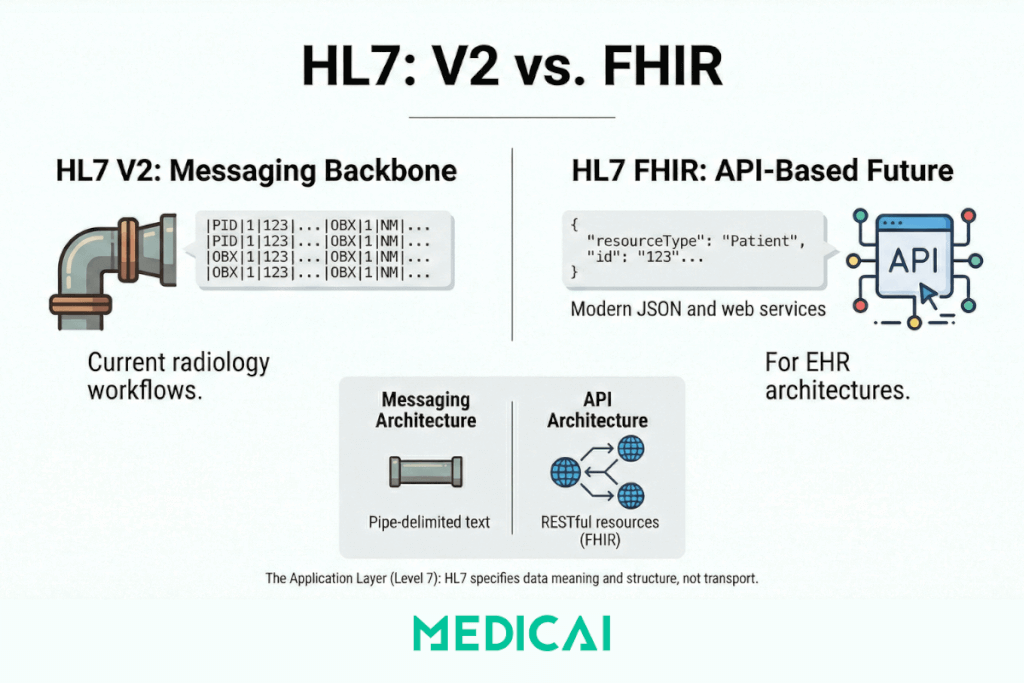
The organization produces several distinct standard families. In radiology and medical imaging, two matters:
- HL7 Version 2 (V2) — the operational backbone of hospital IT since the late 1980s. Pipe-delimited text messages are sent between systems to communicate orders, results, patient registrations, and status updates. Still the dominant messaging standard in radiology workflows worldwide.
- HL7 FHIR (Fast Healthcare Interoperability Resources) — the modern, API-based standard introduced in 2014. Uses REST, JSON, and web service patterns rather than pipe-delimited text. The direction modern EHR and PACS architectures are moving.
These two families are not the same thing, with a version number change between them. They are architecturally different approaches to interoperability — V2 is a messaging standard, FHIR is an API standard. Both are actively used. The HL7 FHIR vs. V2 guide covers the architectural differences in detail. This post covers V2 mechanics, because V2 is what the radiology workflow runs on today.
How HL7 V2 messages work
HL7 V2 uses an event-driven messaging model. When something happens in a clinical system — a patient is registered, an order is placed, a result is ready — the system generates an HL7 message describing that event and sends it to the systems that need to know.
Every V2 message has the same structural logic: it is composed of segments, each on its own line, each identified by a three-letter code. Fields within a segment are separated by pipe characters. Subfields are separated by carets. Repeating values are separated by tildes.
An imaging order message — the ORM^O01 — looks like this in practice:
MSH|^~&|EPIC|HOSPITAL|RIS|RADIOLOGY|20250210143022||ORM^O01|987654|P|2.5
PID|1||MRN123456^^^HOSPITAL||SMITH^JOHN^A||19720315|M
ORC|NW|ORD-2025-4421||||||20250210143000
OBR|1|ORD-2025-4421||71046^CHEST XRAY 2 VIEWS^CPT|||20250210150000|||||||||DR JONES^REFERRING
ZDS|2.25.123456789|RIS|SCHEDULED
Breaking this down by segment:
MSH (Message Header) identifies the sending and receiving systems, the timestamp, the message type (ORM^O01 = Order Entry, New Order event), and the HL7 version.
PID (Patient Identification) carries the patient’s MRN, name, date of birth, and sex — the demographic data that must match exactly across RIS, PACS, and modality for images to auto-reconcile.
ORC (Common Order) carries the order control code (NW = New Order) and the order number.
OBR (Observation Request) includes the procedure code, accession number, requested exam time, and referring physician.
ZDS is a Z-segment — a custom segment defined locally by the vendor — used here to pass the DICOM Study Instance UID.
The caret notation in the message type field — ORM^O01 — means: message type ORM (Order Entry), event O01 (New Order). This notation is how HL7 message types are expressed throughout the radiology IT stack. When an interface engine log shows ADT^A08, it means: message type ADT (Admit/Discharge/Transfer), event A08 (Patient Update).
Understanding this structure matters for troubleshooting. A broken link between an image and its order is almost always a data mismatch between what the ORM message carried and what arrived at the PACS. The mismatch is in a specific field — usually PID-3 (Patient ID / MRN) or OBR-18 (Accession Number). Knowing the segment and field structure makes that diagnostic search tractable.
The HL7 message types that appear in the radiology workflow
Six message types recur throughout the imaging workflow. Each maps to a specific event in the ordering-to-report cycle.
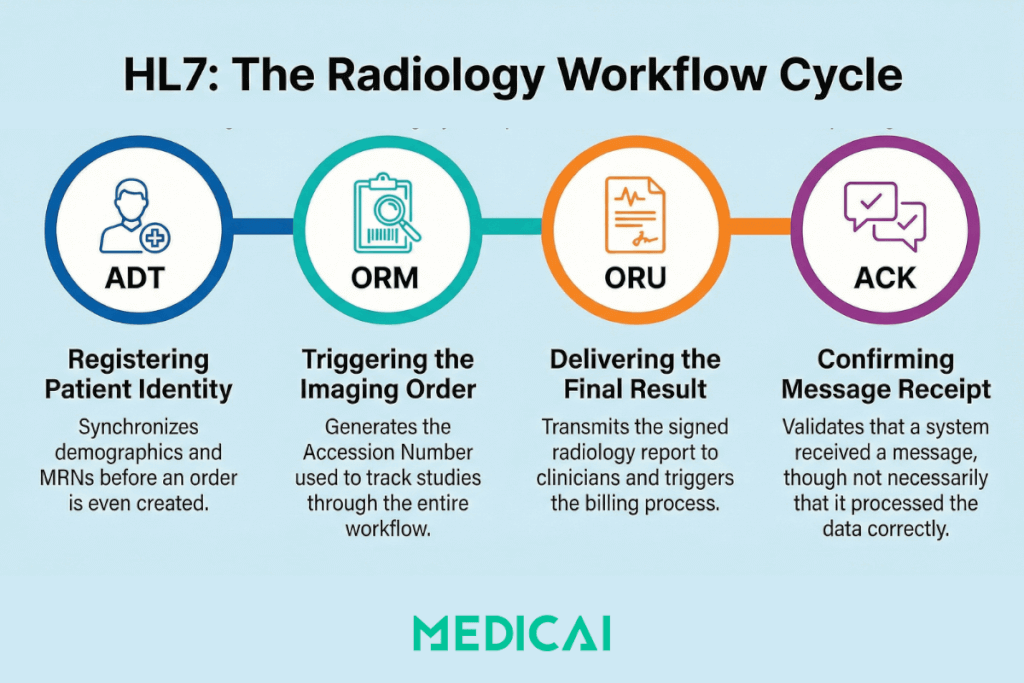
ADT — Admit, Discharge, Transfer
ADT messages carry patient identity and registration data. They fire before orders are placed, when a patient is first registered in the HIS or EHR. The RIS receives ADT messages to identify a patient — their MRN, full name, date of birth, insurance, and encounter information — before any imaging order is created.
The two ADT events that matter most in imaging are ADT^A01 (Patient Admission — a new patient encounter is opened) and ADT^A08 (Patient Information Update — demographics are corrected). ADT^A08 is the update message that HL7 V2 architectures frequently fail to propagate correctly: a name correction in the EHR fires an A08, the RIS receives it and updates its record, but the PACS — if it has no bidirectional ADT feed — retains the original registration. The split record is born.
ORM — Order Entry
ORM O01 is the message that initiates the radiology workflow. When a physician places an imaging order in the EHR or CPOE, the ordering system generates an ORM^O01 and sends it to the RIS. This is Step 1 of the IHE Scheduled Workflow (SWF) transaction sequence.
The ORM carries everything the RIS needs to create a Scheduled Procedure Step and make it available on the Modality Worklist: patient demographics, accession number, procedure code, ordered exam time, ordering physician, and priority. The accession number generated at this point serves as the linking key that will follow the study through the entire workflow — from MWL response to DICOM image tags to MPPS completion signal to the final report.
ORM also carries order status updates beyond new orders. ORM^O01 with ORC order control code CA (Cancel Order) cancels a scheduled exam. XO (Change Order) modifies it. These update messages are where many legacy integrations break: the original order arrives fine, but cancellation or modification messages use different ORC control codes that the receiving system was never configured to handle.
ORU — Observation Result
ORU R01 carries the imaging result — the radiology report — back to the ordering system. When the radiologist signs the final report in the RIS or reporting system, an ORU^R01 fires to the referring physician’s EHR, the patient’s primary HIS, and any other registered result recipients.
The ORU message either carries the report text directly (in OBX segments, one per observation) or carries a reference to the report document stored elsewhere. In modern deployments, the report itself may be a DICOM Structured Report or a PDF attached to the FHIR DiagnosticReport resource — but the notification that a result exists and where to find it still often travels as ORU^R01 in V2 environments.
ORU failure is the most visible integration failure in the workflow from the clinician’s perspective: the radiologist signed the report, the study was completed in PACS, but the referring physician never received the result. The study is also not billed because the billing trigger depends on the ORU reaching the billing system and on the order status being set to Finalized.
ACK — Acknowledgement
ACK messages are the receiving system’s response to any inbound HL7 message. An AA acknowledgement code (Application Accept) indicates that the receiving system has successfully processed the message. An AE (Application Error) or AR (Application Reject) means it did not.
The ACK is also where V2’s fundamental limitation becomes visible. An AA acknowledgement confirms that the receiving system’s message parser accepted the message, not that the system acted on it correctly. The interface engine can log a clean ACK while the RIS silently discards the order because the procedure code was unrecognized. This is why HL7 interface monitoring requires watching application logs, not just ACK codes.
| Message | Direction | What it carries | Where it appears in the imaging workflow |
|---|---|---|---|
| ADT A01 | HIS → RIS | New patient registration / encounter open | Establishes patient identity in RIS before any order is placed |
| ADT A08 | HIS → RIS / PACS | Patient information update | Propagates name corrections; often not received by PACS, causing split records |
| ORM O01 | EHR → RIS | New imaging order with accession number | Step 1 of IHE SWF sequence; triggers Scheduled Procedure Step creation and Modality Worklist entry |
| ORM O01 (CA/XO) | EHR → RIS | Order cancellation or modification | Common failure point: legacy RIS/PACS often configured to receive O01 new orders but not cancel or modify events |
| ORU R01 | RIS → EHR / HIS | Finalized radiology report | Closes the clinical loop; triggers referring physician notification and billing status update |
| ACK | Receiver → Sender | Message receipt acknowledgement | AA = accepted; AE = error; AR = rejected. Confirms parse success, not application action |
What breaks when HL7 messages fail
HL7 V2 failures in radiology produce a recognizable set of downstream symptoms. Understanding the failure pattern makes diagnosis faster.
The lost order
An imaging order is placed in the EHR. The ORM O01 fires. The interface engine logs an AA acknowledgement. The modality queries the MWL and finds nothing. The technologist manually enters the patient data.
The ORM arrived at the interface engine and was acknowledged, but the RIS never processed it because the procedure code in OBR-4 was not in the RIS procedure dictionary. Some interface engine configurations return AA on receipt rather than waiting for the downstream system to confirm processing. The result is a clean HL7 log and a missing worklist entry.
Fixing this requires monitoring application-level processing logs in the RIS, not just the interface engine’s ACK log. It also requires a defined exception workflow: what happens when the interface engine accepts a message that the RIS silently discards.
The split record
Images arrive in PACS from a CT scanner. The PACS cannot auto-reconcile them to the correct patient — they land in an unassigned folder. The images carry the correct DICOM tags (pulled from MWL). The MWL was populated correctly from the ORM. But the patient in the PACS was registered from an ADT A01 that spelled the patient’s name differently than the ORM.
The accession number matches. The name does not. The PACS reconciliation logic requires both to match, but it fails. A technologist manually moves the study. The manual action creates a second event in the audit log, a billing delay, and a risk that the study is attached to the wrong patient record if the name difference was a different patient, not a typo.
This is the most common identity integrity failure in radiology IT. The RIS-PACS Integration guide covers the mechanism in detail. The root cause at the HL7 level is that ADT and ORM messages for the same patient were generated from different source records across different systems, with no MPI (Master Patient Index) to enforce consistent identity.
The frozen status
The radiologist signs the report. The PACS shows the study as reported. The referring physician’s EHR never receives the result. The RIS shows the order as pending. Billing shows no claim.
The ORU^R01 fired but never arrived at the receiving system. In a push-only V2 architecture, the sender has no mechanism to detect this beyond a failed ACK, and ACK failures require the sender to retry and ultimately alert. If the retry logic is misconfigured, or if the failure was silent (the message arrived at the interface engine but the EHR discarded it), the ORU is lost, and no automatic recovery occurs.
Monitoring for ORU delivery failures requires tracking not just that the message was sent but that the downstream system’s order status changed to reflect receipt. In many legacy environments, this monitoring does not exist.
The uncancelled order
A patient cancels their appointment. The receptionist marks the order as cancelled in the RIS. The cancellation ORM (ORC control code CA) fires to the PACS. The PACS was not configured to handle CA events — it was set up years ago to receive only new orders. The order remains active in PACS. When the patient reschedules and the study is acquired, two Scheduled Procedure Step records exist for the same accession number.
This is a configuration failure, not a protocol failure — HL7 defines the cancel message correctly. But it is representative of how legacy integrations accumulate technical debt: each order event type (new, cancel, modify, reschedule) requires explicit configuration in both the sending and receiving systems, and departments often configure only the happy path.
HL7 V2 and FHIR: the transition, not the replacement
Most radiology environments in 2025 run HL7 V2 for operational messaging and are adding FHIR at the edges — for EHR integration APIs, patient portal access to imaging results, and cross-enterprise data sharing. It is not an either/or transition in practice. It is a layered architecture where V2 handles the real-time ordering and results workflow, and FHIR handles the broader interoperability use cases that V2 was never designed for.
The architectural reason for this split is fundamental. V2 is a push model: systems send messages to other systems that are waiting for them. FHIR is a pull model: systems expose resources via RESTful APIs that other systems can query on demand. Push models are simpler to implement in tightly coupled point-to-point workflows like ordering and results. Pull models are better for use cases where the querying system does not know in advance when data will be available, or needs to query across multiple sources.
In a Medicai cloud-native environment, FHIR resources coexist with V2 message processing. An ORM^O01 from a legacy EHR enters the platform, is processed to create the Scheduled Procedure Step and MWL entry, and also creates or updates a FHIR ServiceRequest resource. The FHIR resource can then be queried by any system with API access — a referring physician’s portal, a cross-enterprise imaging exchange, a population health analytics platform — without requiring those systems to receive V2 push messages. The imaging workflow itself still runs on V2; the interoperability layer runs on FHIR.
The HL7 FHIR vs. V2 guide covers the architectural comparison in full, including the specific FHIR resources that correspond to each V2 message type and the practical migration path for departments moving from pure V2 to a hybrid or FHIR-first architecture.
Connections to the rest of the imaging standards cluster
HL7 is not a standalone topic in the imaging workflow — it is the connective tissue between PACS, RIS, EHR, and modality. Every post in the imaging interoperability cluster touches HL7 at some point. This post is the vocabulary anchor for those references.
- Modality Worklist (MWL): The MWL transaction is Step 4 in the IHE SWF sequence. Step 1 — the ORM O01 — is an HL7 message. Understanding what the ORM carries and how it populates the Scheduled Procedure Step explains why MWL query results look the way they do and why the accession number in the DICOM tag must match the ORM exactly.
- RIS-PACS Integration: The RIS-PACS integration guide covers ORM and ORU message flow in the context of data integrity. This post provides the structural foundation — segment definitions, field semantics — that make the integration guide’s failure analysis actionable.
- IHE Integration Profiles: The IHE Scheduled Workflow profile defines how HL7 ORM and ORU messages fit into the full eight-step transaction sequence. The IHE section of the PACS Interoperability post describes that sequence at the profile level. This post explains the messages themselves.
- PACS Migration: Identity mismatches that accumulate during a PACS migration are almost always rooted in HL7 data inconsistency — ADT records that differ between source and destination, ORM messages that used non-standard field population, and historical data loaded without corresponding HL7 context. The PACS Migration guide covers the operational consequences; this post explains the source.
- HL7 FHIR vs. V2: That post assumes the reader already understands V2 mechanics. This post is the prerequisite. Readers new to HL7 should read this post first, then move to the FHIR comparison.


Related Articles



Lets get in touch!
Learn more about how Medicai can help you strengthen your practice and improve your patients’ experience. Ready to start your Journey?
Book A Free Demo