Cloud PACS for Specialty Clinics: What Orthopedic, Neurology, and Oncology Practices Need on a Budget

A small specialty clinic and a hospital radiology department have one thing in common: both produce medical images that must be stored, retrieved, and shared. Everything else about their requirements is different, except for the cloud PACS for specialty clinics setup.
The hospital has a radiology IT team, a multi-year enterprise PACS contract, an on-premise server room, and a procurement process that takes the better part of a year. The three-physician orthopedic group, the four-neurologist clinic, and the community oncology center have none of these things. What they have is a set of imaging modalities producing DICOM studies every day, a regulatory obligation to store those studies for 5–10 years depending on jurisdiction, and a budget that cannot absorb a six-figure infrastructure investment.
The numbers confirm the mismatch. According to KLAS Research, 67% of ambulatory and specialty practices cite total cost of ownership as the primary barrier to PACS adoption — ahead of interoperability concerns (54%) and implementation complexity (48%). A HIMSS 2023 Clinical Informatics Survey found that 43% of practices under 10 physicians reported their existing PACS required IT support beyond what their in-house staff could provide. And a 2022 report from the American College of Radiology found that community and specialty practices handle an average of 300–600 imaging studies per month — a volume profile that falls below the minimum commitment thresholds of most enterprise PACS contracts.
Hospital-grade PACS platforms were not designed for this buyer. Their pricing structures assume multi-site enterprise contracts. Their implementation timelines assume dedicated IT resources. Their feature sets include capabilities that a small specialty clinic neither needs nor can justify paying for.
This guide covers what small orthopedic, neurology, and oncology clinics specifically need from a PACS — the imaging requirements unique to each specialty, the deployment and budget constraints that define what is practical, and the cloud-native features that separate a PACS built for small practices from one that merely tolerates them.
For a complete technical overview of how PACS works, its architecture, and the full evaluation framework, see the PACS comprehensive guide.
Why Small Specialty Clinics Have Different PACS Requirements
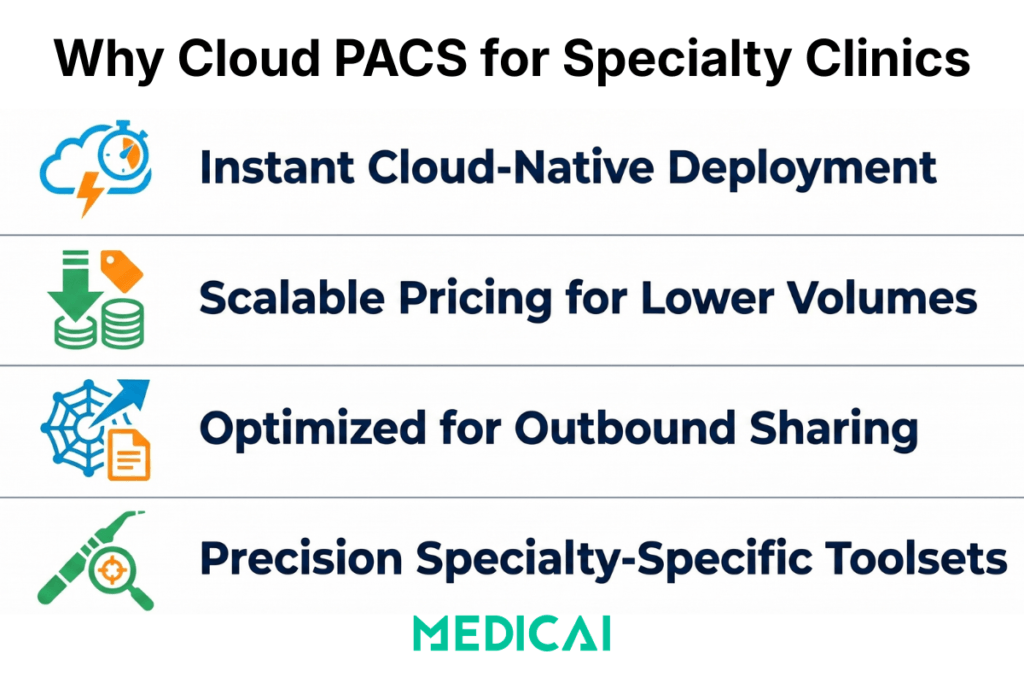
The PACS requirements of a small specialty clinic differ from those of hospital radiology in four structural ways that no amount of enterprise feature bundling resolves.
The IT capacity gap is real and persistent. Enterprise PACS implementations typically require 3–6 months of on-site professional services — DICOM networking configuration, HL7 interface setup, worklist integration, and staff training. A 2023 survey by Healthcare IT News found that small practices (under 15 physicians) spend an average of 14 hours per month on imaging system maintenance — time drawn from clinical or administrative staff who were not hired for IT work. Cloud-native PACS platforms designed for small practices deploy in hours via a DICOM Gateway and require no on-site configuration, no dedicated IT staff, and no recurring maintenance beyond vendor-managed software updates.
The volume profile does not justify enterprise pricing. Enterprise PACS contracts from established vendors — Philips IntelliSpace, Sectra PACS, Agfa Enterprise Imaging — are structured around high-volume radiology departments handling 5,000–20,000 studies per month. Per-study pricing at enterprise scale is economically rational for those volumes. For a 300-study-per-month orthopedic clinic, the same per-study rate produces a monthly cost that is disproportionate to the value delivered. Subscription-based cloud PACS at a flat monthly fee or low per-study rate is the only pricing model that aligns with small clinic economics.
The primary use case is outbound sharing, not inbound reading. In a hospital radiology department, PACS is optimized for the inbound clinical workflow: modalities send studies to PACS, radiologists read from PACS, and reports return to EHR. In a small specialty clinic, the primary imaging workflow is outbound: the orthopedic surgeon shares a pre-operative X-ray with the device representative, the neurologist sends an MRI to the neurosurgical center for consultation, and the oncologist shares serial CT studies with a tumor board panel including remote participants. A PACS built for the inbound hospital workflow does not prioritize secure external sharing. A PACS built for small specialty clinics does.
The specialties have genuinely different clinical imaging requirements. An orthopedic PACS needs calibrated digital templating. A neurology PACS needs multi-planar reconstruction in the browser viewer. An oncology PACS needs RECIST measurement persistence across serial studies and lossless CT storage for radiation planning. These are not edge cases — they are the core clinical functions of each specialty’s imaging workflow. A general-purpose cloud PACS that lacks them is not usable for these specialties at any price point.
Cloud PACS for Orthopedic Clinics: Beyond Standard X-Ray Storage
Orthopedics is the most imaging-intensive of the three specialties in this guide. A single-site orthopedic practice performing joint replacement surgery, fracture fixation, and sports medicine procedures images every patient at multiple points — initial assessment, pre-operative planning, post-operative verification, and follow-up. According to American Academy of Orthopedic Surgeons (AAOS) data, the average orthopedic surgeon orders 4.2 imaging studies per patient encounter, higher than any other surgical specialty. In a busy practice seeing 30–50 patients per day, imaging volume compounds quickly, and the clinical use of those images extends far beyond storage and retrieval.
Digital templating and calibration: the non-negotiable requirement. As reviewed extensively in our orthopedic PACS and templating guide, the defining clinical capability that separates an orthopedic PACS from a general radiology PACS is calibrated image scaling with digital prosthesis template overlay. Digital X-rays have no inherent physical scale — the apparent size of a bone on screen varies depending on the patient’s distance from the detector during acquisition. Without calibration, a prosthesis template overlaid on a hip X-ray is meaningless for sizing. An orthopedic PACS detects the calibration marker — a 25mm metal ball placed in the field of view during acquisition — and automatically scales the image so that 1mm on screen equals 1mm in the patient’s anatomy. The surgeon can then overlay digital templates from manufacturer libraries (Stryker, DePuy, Zimmer Biomet) and confirm the correct implant size before the patient enters the operating room.
Dr. Dan Anghelescu, orthopedic surgeon at Medsport Romania, describes the clinical impact directly: “Pre-operative templating with calibrated images reduces intraoperative sizing uncertainty — we open fewer trial implant trays, OR time is shorter, and the patient benefits from a more predictable procedure. When you are working from an uncalibrated image, you are guessing. The calibration marker removes the guessing.”
A KLAS Research survey of orthopedic practices found that 78% rated digital templating as “essential” or “very important” in PACS selection — yet only 34% of general cloud PACS platforms listed digital templating with manufacturer library integration as a standard feature. The gap is in the market. Practices that need templating but cannot afford a dedicated orthopedic PACS platform have historically been underserved.
Weight-bearing X-ray identification and load-bearing protocol management. Weight-bearing studies — obtained with the patient standing under full load rather than supine — are clinically critical for planning knee and hip replacements. The joint space under load differs from that at rest, and implant sizing based on non-weight-bearing imaging can result in a component that fits incorrectly once the patient is ambulatory. An orthopedic PACS tags weight-bearing studies separately in the worklist, so the surgeon can immediately identify which images were acquired under load without having to read the acquisition notes. A general PACS archives weight-bearing studies as standard X-rays. The distinction matters for every joint replacement case.
External sharing for device representatives and referring surgeons. Before total joint replacement, the device representative from the implant manufacturer needs to confirm that the correct kit — the right femoral and tibial component sizes, the right instrument tray — will be in the operating room on surgery day. The workflow is: the surgeon templates the X-ray, identifies the required component sizes, and shares the templated image with the device rep for kit confirmation. In a legacy environment, this happens via email attachment, a printed image, or a CD — all of which create HIPAA risks and workflow delays. In a cloud PACS with secure link-based sharing, the surgeon generates a time-limited encrypted link, sends it to the device rep, and the rep opens the full study in a browser viewer with no account creation required. The confirmation happens in minutes, not days.
Competitor context: what small orthopedic clinics are currently using. The established orthopedic PACS market is served by Medstrat’s Joints PACS (focused on the US market), ScImage’s clinical PACS, and legacy platforms from Merge Healthcare and Viztek, now in maintenance mode following acquisitions. Carestream’s OrthView digital templating solution is the most capable dedicated orthopedic templating platform, but it requires integration with a separate PACS for archive and workflow. None of these options offers a unified cloud PACS with built-in templating, cloud archive, zero-footprint browser viewer, and subscription pricing in a single platform. That gap is where Medicai operates for orthopedic clinics.
Cloud PACS for Neurology Clinics: Handling Complex Studies at Scale
Neurology practices are among the heaviest consumers of MRI imaging across all specialties. Brain and spine MRI studies — multi-sequence, high-resolution acquisitions — produce DICOM datasets that are an order of magnitude larger than standard radiographs. A brain MRI with T1, T2, FLAIR, diffusion-weighted imaging (DWI), and post-contrast T1 sequences typically generates 1,500–4,000 DICOM instances per study. A neuroradiology reading session involving five complex studies can require the retrieval and display of 15,000–20,000 DICOM instances — a volume that exposes the performance limitations of cloud PACS platforms not designed for large neurological datasets. A Neurology PACS is the solution here.
According to the American Academy of Neurology, neurologists order imaging in approximately 34% of patient encounters — primarily MRI for brain, spine, and peripheral nerve assessment. For a small neurology practice seeing 20–30 patients per day, that translates to 7–10 MRI studies per day, or 150–200 per month. The annual storage volume for a small neurology clinic, assuming an average study size of 600MB, exceeds 1TB per year — a storage requirement that a local workstation archive cannot sustain and that requires cloud object storage with tiered lifecycle management.
Multi-planar reconstruction in the browser viewer. Neurologists routinely reformat coronal and sagittal reconstructions from axial acquisitions to characterize lesion location, measure lesion dimensions, and assess white-matter tract involvement. MPR — multiplanar reconstruction — is a core clinical viewing tool, not a premium feature. A PACS that requires the neurologist to install thick-client workstation software to access MPR is not a practical solution for a clinic where the neurologist alternates between reading workstations, a dictation station, and a clinical examination room. The MPR tool must be available in the zero-footprint browser viewer, accessible from any device without software installation.
Dr. Dan Mitrea, neurologist and neuro-oncology specialist, describes the clinical stakes: “For a patient with multiple sclerosis, the quality of longitudinal imaging comparison determines whether we are seeing true disease activity or artifact. When the PACS automatically loads the prior study alongside the current one — same patient, same sequence, same slice position — the comparison is reliable. When I have to locate the prior study manually, load it separately, and align the views by eye, I introduce variability into an assessment where variability costs the patient. The automatic prior loading is not a convenience feature. It is a clinical accuracy feature.”
Serial study comparison for longitudinal neurological conditions. Multiple sclerosis lesion monitoring, tumor growth tracking, and post-stroke follow-up imaging are all fundamentally longitudinal — the clinical question is not “what is in this image” but “what has changed since the last image.” A PACS that automatically retrieves prior studies and presents them in linked side-by-side panels when a new study is opened — with synchronized slice scrolling so the neurologist sees the same anatomical location in both studies simultaneously — serves the neurology use case correctly. A PACS that requires manual prior study loading and manual viewport alignment does not.
Neurosurgical and specialist collaboration without PACS access grants. Neurology clinics refer complex cases to neurosurgical centers, epilepsy programs, and neuro-oncology multidisciplinary teams. These referral recipients need to see the imaging — the full MRI study, not a compressed JPEG — before or during the consultation. The correct mechanism is a cloud-based secure link that opens the full study in a browser DICOM viewer with MPR, measurement tools, and series navigation. The neurosurgeon clicks the link from any device and immediately has the full study available. No CD, no file transfer, no PACS login, no compatibility problem between different institutional PACS systems.
Competitor context for small neurology clinics. General-purpose cloud PACS platforms — Ambra Health (now Intelerad Cloud), PostDICOM, PaxeraHealth — provide cloud archive and basic DICOM viewing for neurology practices. The differentiating question is whether MPR is available in the zero-footprint browser viewer rather than requiring a plugin or thick-client installation. PostDICOM and Ambra/Intelerad offer browser-based viewing, but their MPR capabilities in the zero-footprint viewer vary depending on the deployment configuration. For a small neurology clinic where the primary viewer is a laptop browser, MPR availability in the zero-footprint context is the decisive evaluation criterion.
Cloud PACS for Oncology Clinics: Serial Imaging, Measurement Consistency, and Treatment Planning
Oncology imaging is characterized by three requirements that make it more demanding than general diagnostic radiology: high frequency of serial studies for the same patient over months to years, the clinical necessity of consistent tumor measurement methodology across every study in the treatment timeline, and the presence of radiation therapy planning CT studies that carry strict data integrity requirements.
The American Cancer Society reports that approximately 1.9 million new cancer cases are diagnosed annually in the United States. Community oncology centers — the practices that provide the majority of oncology care outside academic medical centers — treat patients across solid tumor types where CT, MRI, and PET-CT are the primary monitoring modalities. A community oncology practice managing 80–100 active chemotherapy patients, images each patient every 2–3 treatment cycles — generating 3–5 studies per patient per year, or 300–500 studies per year across the active patient population. The cumulative archive of serial studies per patient over a 3–5 year treatment course creates a dense longitudinal record that the PACS must manage efficiently.
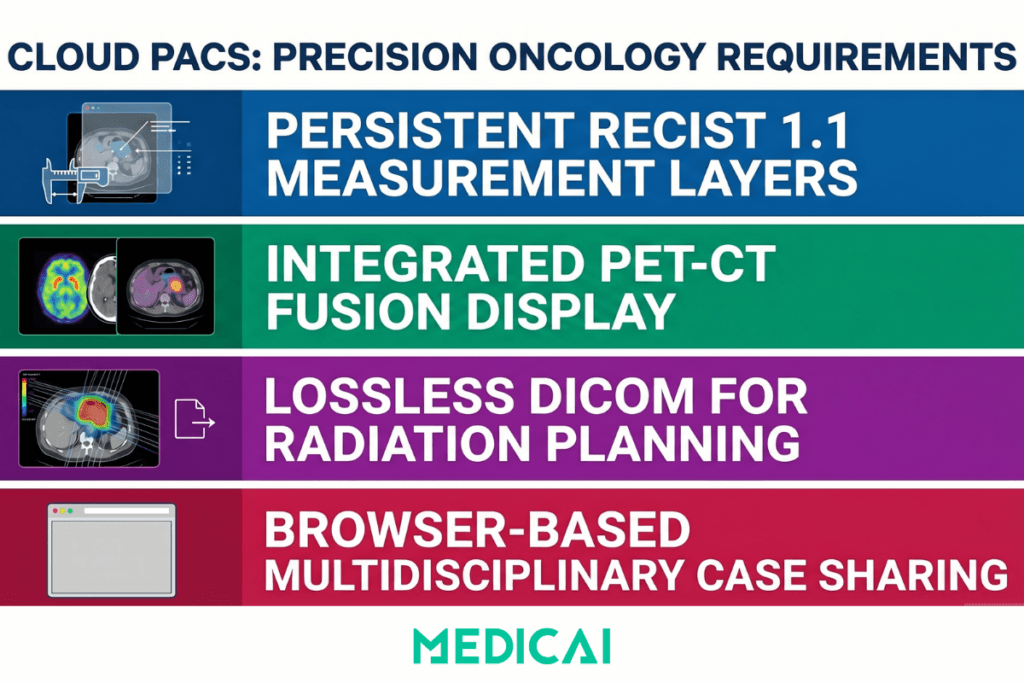
RECIST measurement persistence: the measurement standard that defines treatment response. Response Evaluation Criteria in Solid Tumors (RECIST) 1.1 — the international standard for assessing treatment response in solid tumor oncology, published by the European Organization for Research and Treatment of Cancer (EORTC) — requires precise measurement of up to five target lesions across serial studies, using the same lesion selection and the same measurement approach at every time point. The sum of the longest diameters of target lesions determines whether the patient has responded to treatment (≥30% decrease), progressed (≥20% increase), or maintained stable disease. An error of a few millimeters in measurement or an inconsistency in lesion selection between studies can change the classification of treatment response and affect clinical decisions.
A PACS that persists RECIST measurements as a planning layer on the archived study — so the oncologist can see exactly where the prior measurement was placed when opening the next study — supports measurement consistency. A PACS that clears annotations when the study is closed requires the oncologist to re-identify target lesions from the prior study by memory or by printing the prior measurements and referring to them during the current read. The latter approach introduces exactly the variability that RECIST methodology is designed to eliminate.
Dr. Andra Catalina Zincenco, oncologist at Neolife Oncology Department, describes the practical challenge: “When we are following a patient through multiple lines of chemotherapy, the imaging record over two or three years can contain twenty or thirty studies. The oncologist reading the current CT should not have to reconstruct the measurement history by reviewing previous reports. The measurements should be in the viewer, on the image, in the same location they were placed at the last assessment. If they are not, we are accepting unnecessary variability into a decision that affects whether the patient continues on the current regimen or moves to a different protocol.”
PET-CT fusion display: the primary oncological imaging tool. PET-CT studies produce paired positron emission tomography (PET) and computed tomography (CT) series that are acquired simultaneously and must be displayed as fused overlays for metabolic activity assessment. The PET component identifies areas of elevated glucose uptake associated with tumor activity; the CT component provides anatomical localization. Reading the two series separately is inadequate for clinical staging, treatment response assessment, and radiation planning — the fused overlay is the clinical image.
A PACS that archives the paired PET and CT series correctly but cannot display them as a fused overlay in the viewer requires the oncologist to use a separate fusion workstation. For a community oncology center without dedicated nuclear medicine infrastructure, this means either investing in a standalone PET-CT workstation (capital cost of $30,000–$80,000) or referring all PET-CT interpretation to an external radiology facility and losing the immediate clinical context that on-site PET-CT assessment provides.
Lossless CT storage for radiation therapy simulation. Radiation therapy planning requires CT simulation studies — high-dose, full-field CT acquisitions used to define the treatment volume, plan beam angles, and calculate dose distributions. The CT simulation study is imported into the radiation planning workstation (Eclipse, RayStation, or equivalent), where it is used to generate the treatment plan. This import process reads DICOM header data — patient positioning, isocenter coordinates, couch position, slice thickness — that must be preserved exactly as acquired. A PACS that applies any lossy compression to CT studies during ingestion corrupts the spatial precision on which radiation planning calculations depend.
Lossless DICOM storage — specifically DICOM transfer syntaxes that apply only lossless compression (JPEG-LS lossless, JPEG 2000 lossless) or no compression — is a non-negotiable requirement for any PACS used in a radiation oncology environment. It is also a feature that small clinic PACS evaluations frequently overlook because the default storage settings of cloud PACS platforms are not always transparent about compression applied during ingestion.
Tumor board sharing for multidisciplinary case review. Community oncology centers participate in multidisciplinary tumor boards — structured case-review meetings in which complex cases are presented to a panel of medical oncologists, surgeons, radiation oncologists, pathologists, and radiologists. These meetings have increasingly shifted to hybrid formats, with remote participants following the adoption of video conferencing in clinical settings. A cloud PACS that generates a session link to open the imaging study in a browser viewer with annotation tools, series navigation, and measurement tools — accessible to all participants via the same link without individual PACS logins — enables full tumor board participation regardless of whether attendees are in the room or remote.
What are the top Cloud PACS solutions for small Radiology Practices?
OnePACS
Still one of the strongest pure small-practice fits because it is explicitly positioned around lower IT burden, integrated workflow/reporting/storage, imaging-center use cases, and fast deployment.
Medicai
A very credible option for small and growing practices, especially if you care about cloud-native deployment, zero-footprint browser access, multi-site connectivity, and easy image sharing with outside partners. Medicai says its Cloud PACS runs without an on-prem server, supports CT/MRI/X-ray/ultrasound, and connects locations and imaging partners in days without VPNs via its DICOM Gateway and Image Uploader.
RamSoft OmegaAI
A strong choice when a smaller practice wants a more complete RIS/PACS/VNA environment from the start, not just image archiving and viewing. RamSoft positions OmegaAI as cloud-native and zero-footprint, with interoperability and scalability as core strengths.
Intelerad IntelePACS
A solid option if your priority is a more mature hosted platform with centralized imaging infrastructure and strong cloud accessibility. It looks especially attractive for practices that expect to scale or need more robust enterprise-style image management.
PaxeraHealth
It’s worth shortlisting if you want web-based workflow flexibility and teleradiology-oriented functionality. Paxera highlights real-time cloud access for reads across facilities and browser-based PACS workflow through PaxeraUltima.
UltraLinq
A good lightweight option for practices that want fast setup, browser-based access, and straightforward commercial positioning. UltraLinq says it is 100% web-based, can go live in as little as two weeks, and offers transparent pricing.
What to Look for in a Cloud PACS for Specialty Clinics
The evaluation criteria for a small specialty clinic buying a cloud PACS differ from the criteria a hospital radiology IT director uses. The questions are not about integration with existing enterprise infrastructure — they are about deployment speed, specialty-specific clinical tools, and cost transparency.
| Criterion | Enterprise PACS (hospital-grade) | Cloud PACS for small specialty clinics |
|---|---|---|
| Implementation timeline | 3–6 months — on-site professional services for DICOM networking configuration, HL7 interface setup, and staff training; practice disruption during go-live period | Hours to days — DICOM Gateway connects existing modalities to cloud archive; setup completable by a practice administrator following documented steps without on-site vendor engineering |
| Ongoing IT requirements | Dedicated radiology IT staff required for interface engine maintenance, PACS server management, and regression testing after every software upgrade on any connected system | No dedicated IT staff required — vendor manages infrastructure, backups, security patching, and software updates; practice staff focus on clinical work, not system maintenance |
| Year-one cost | $50,000–$200,000 for a single-site deployment — per-site licensing, per-modality connection fees, professional services, and server hardware; minimum contract volumes above most small practice study counts | $200–$800 per month on a flat subscription or $0.10–$0.50 per study — no hardware investment, no per-site or per-modality fees, no professional services charges for standard configuration |
| Orthopedic tools | Calibrated digital templating and manufacturer prosthesis libraries require a separate module — OrthoView or Medstrat Joints PACS — at additional licensing cost and a separate integration project | Calibration marker detection and digital implant template overlay from Stryker, DePuy, and Zimmer Biomet libraries available in the standard zero-footprint browser viewer — no separate module or additional cost |
| Neurology tools | Multiplanar reconstruction (MPR) available only on dedicated thick-client diagnostic workstations — not accessible from the browser-based viewer; neurologists require a specific workstation for routine reformatting tasks | Full MPR available in the zero-footprint browser viewer — coronal, sagittal, and axial reformats on any device without plugin installation, accessible from laptop, tablet, or mobile |
| Oncology tools | RECIST measurement persistence and PET-CT fusion display typically require a separate oncology workstation — measurements are not automatically carried forward between serial studies; CT simulation studies may be subject to compression during ingestion | RECIST measurement persistence across serial studies, PET-CT fusion display in the browser viewer, and lossless CT storage for radiation planning — all available in the standard platform without a separate workstation |
| External sharing | Sharing via CD, email attachment, or a separate image exchange portal — recipient typically needs PACS credentials or a portal account; CD workflow creates HIPAA exposure and logistics delays | Time-limited encrypted sharing links — device representatives, surgeons, tumour board participants, and patients open the full DICOM study in a browser with no account creation, no software installation, and a HIPAA-compliant access audit trail |
| HIPAA and security | HIPAA compliance standard — BAA provided; the practice’s own IT team is responsible for maintaining server security, managing access controls, and responding to security incidents on on-premise infrastructure | HIPAA BAA, AES-256 encryption at rest, TLS 1.2+ in transit, role-based access controls, and full audit logging — vendor manages security infrastructure; practice verifies these are contractual commitments, not aspirational targets |
| EHR integration | HL7 integration with major EHR systems as standard; SMART on FHIR contextual image launch available in modern platforms but requires EHR version certification and ongoing maintenance coordination after EHR upgrades | HL7 ORU report delivery and FHIR-based image access integration; verify which specific EHR versions the vendor has certified and who is responsible for maintaining the integration after EHR upgrades before contracting |
How Medicai Works for Small Specialty Clinics
Medicai is a cloud-native PACS and VNA built on Microsoft Azure, designed for multi-specialty imaging environments rather than for single-department hospital radiology. For small specialty clinics, this architecture has specific operational implications that differ from both enterprise PACS platforms and general-purpose cloud storage tools.
Deployment uses a lightweight DICOM Gateway that connects any DICOM-capable modality — digital X-ray, MRI, CT, ultrasound — to the Medicai cloud archive. The Gateway is installed on a standard Windows or Linux machine at the clinic and configured to automatically forward DICOM studies from the modality to the cloud archive. Setup takes hours. No PACS server, no on-premise storage hardware, no DICOM networking engineer. The practice administrator follows a documented setup guide and verifies connectivity by sending a test study. If the study appears in the cloud archive, the PACS is operational.
The zero-footprint browser viewer runs in Chrome, Firefox, Safari, and Edge on Windows, macOS, iOS, and Android — any device with a modern browser. For orthopedic clinics, the viewer includes calibration marker detection and digital implant template overlay from cloud-connected manufacturer libraries. For neurology clinics, full multiplanar reconstruction is available in the browser viewer without thick-client installation. For oncology clinics, linked series synchronization for PET-CT fusion display and measurement persistence across serial studies are available from the same zero-footprint interface.
“Definitely, this application provides us with fast, remote imaging acquisitions,” said Armand Frăsineanu, MD, neurologist at Neuroaxis. “In addition, we can always make comparisons between different cases, we can make databases, we can make collections on different pathologies. It is a mini real-time library, extremely useful for neurologists, neurosurgeons, surgeons, oncologists, and hematologists.”
External sharing uses time-limited encrypted links. The orthopedic surgeon shares a templated X-ray of the device with the device representative before surgery. The neurologist sends an MRI study to the neurosurgical center for pre-operative consultation. The oncologist shares the active case imaging with remote tumor board participants. Each recipient opens the full DICOM study in a browser viewer with clinical tools — no account, no software, no HIPAA risk from email attachments.
Storage uses Azure Blob Storage with Information Lifecycle Management tiering — recent studies use the hot tier for fast retrieval, while older studies automatically move to cool and archive tiers based on configurable age thresholds. All data is encrypted at rest with AES-256 and in transit with TLS 1.2+. A HIPAA Business Associate Agreement is provided to every clinical customer as a standard contract term. Medicai holds ISO 27001 certification for information security management and ISO 9001 certification for quality management.
Pricing is subscription-based. A free 14-day trial includes full platform access — connect existing modalities, run studies through the complete workflow, and verify that the specialty-specific tools meet clinical requirements before the first invoice.
FAQ: Cloud PACS for Specialty Clinics
What is the best PACS for a small orthopedic clinic?
A small orthopedic clinic needs a cloud PACS that includes three capabilities beyond standard DICOM storage: calibrated image scaling using a detectable calibration marker so measurements reflect true anatomical dimensions, digital implant template overlay from major manufacturer libraries (Stryker, DePuy, Zimmer Biomet) for pre-operative planning, and secure external sharing for device representative communication before surgery. Enterprise orthopedic PACS platforms — Medstrat Joints PACS, ScImage, and legacy Merge/Stryker systems — provide these capabilities but at pricing and implementation complexities that do not fit single-site practices. Cloud-native platforms that integrate digital templating into a zero-footprint browser viewer with subscription pricing are the practical solution for small orthopedic clinics.
Can a small specialty clinic use cloud PACS instead of an on-premise system?
Yes — for small specialty clinics, cloud PACS is typically the better option. On-premise PACS requires local server hardware, ongoing maintenance, and IT support beyond what most small practices have available. A 2023 HIMSS survey found that 43% of practices with under 10 physicians reported that their PACS required IT support beyond their staff’s capacity. Cloud PACS eliminates the need for server hardware, shifts maintenance responsibility to the vendor, and enables access from any device, anywhere. The prerequisites are: sufficient network bandwidth at the clinic for DICOM study transmission (a standard business internet connection handles most specialty clinic volumes), a HIPAA-compliant vendor who provides a signed BAA, and a vendor whose platform supports the specialty-specific clinical tools the practice requires.
What does a neurology PACS need that a general PACS does not?
Three capabilities differentiate a PACS for neurology practice from a general-purpose cloud PACS. First, multi-planar reconstruction (MPR) in the zero-footprint browser viewer — neurologists routinely reformat axial MRI acquisitions into coronal and sagittal views for lesion characterization, and this tool must be accessible without thick-client installation. Second, automatic prior study loading with synchronized linked panels — the clinical question in longitudinal neurological conditions (MS, brain tumors, post-stroke follow-up) is always about change over time, and the PACS must automatically present current and prior studies in aligned side-by-side panels. Third, high-performance retrieval for large multi-sequence MRI datasets — brain MRI studies can exceed 4,000 DICOM instances — must be supported without performance degradation.
How much does a cloud PACS cost for a small specialty clinic?
Cloud PACS pricing for small specialty clinics falls into three models. Per-study pricing typically ranges from $0.10 to $0.50, depending on the platform and storage tier. At 300 studies per month, this translates to $30–$150 per month for storage alone, with viewer and sharing features priced separately or included. Flat subscription pricing typically ranges from $200–$800 per month for small clinics (under 500 studies per month) with all features included. Per-user pricing is less common but ranges from $100 to $300 per named user per month. The total cost must include storage, viewer, sharing capabilities, and integration features — not just the archive layer. Enterprise PACS first-year costs for a single-site deployment typically run $50,000–$200,000, including professional services — a comparison that makes cloud PACS subscription pricing compelling for volume profiles under 1,000 studies per month.
Does a small oncology clinic need a different PACS from a general radiology practice?
Yes, for three specific reasons. First, RECIST measurement persistence — the clinical standard for solid tumor response assessment requires consistent measurement of the same target lesions at every imaging time point, and a PACS that does not persist prior measurements as a reference overlay forces the oncologist to re-identify lesions from memory, introducing measurement variability into treatment decisions. Second, PET-CT fusion display — oncology practices that image patients with PET-CT need a viewer that displays PET and CT series as a fused overlay, not as separate series; a general radiology viewer that cannot display the fusion overlay requires a separate workstation for PET-CT interpretation. Third, lossless CT storage for radiation therapy planning — CT simulation studies used for radiation dose calculation must be stored without lossy compression; any compression applied during ingestion corrupts the spatial precision that radiation planning software requires.
Take Away
Small specialty clinics are not small hospitals. A three-physician orthopedic group, a four-neurologist practice, and a community oncology center all have clinically sophisticated imaging requirements — calibrated templating for joint replacement planning, MPR for longitudinal neurological assessment, and RECIST measurement persistence for treatment response monitoring. These requirements are not simplified versions of what hospital radiology departments need. They are distinct clinical imaging workflows that happen to require less IT infrastructure and carry tighter budget constraints than hospital deployments.
The cloud PACS model — zero local server, browser-based viewer, subscription pricing, DICOM Gateway connectivity, and HIPAA-compliant link-based sharing — is architecturally well-matched to the small specialty clinic operating environment. The differentiating evaluation criterion is not cloud vs on-premise. It is whether the cloud PACS platform has built the specialty-specific clinical tools that make it usable for the specialty it claims to serve, at a price and deployment complexity that a small practice can actually absorb.
The KLAS Research finding that 67% of specialty practices cite total cost of ownership as their primary PACS barrier reflects a market that has historically been asked to choose between enterprise platforms they cannot afford and general-purpose tools that lack the clinical features they require. Cloud-native platforms purpose-built for specialty clinic workflows are closing that gap.


Related Articles


Lets get in touch!
Learn more about how Medicai can help you strengthen your practice and improve your patients’ experience. Ready to start your Journey?
Book A Free Demo