Orthopedic PACS: Digital Templating, Pre-Operative Planning, and Why Generic Viewers Fall Short

In general radiology, the goal of a PACS is Diagnosis: “Is the bone broken?” In orthopedics, the goal of orthopedic PACS is Reconstruction: “How do I fix it, and what size implant do I need?”
This fundamental difference is why generic PACS viewers often frustrate orthopedic surgeons. A standard viewer allows you to see the fracture, but it lacks the engineering tools required to plan the repair.
For high-volume orthopedic practices, Digital Templating and Pre-Operative Planning capabilities are not “nice-to-haves”—they are operational necessities. This guide explores why moving to a specialized Ortho-ready PACS architecture is critical for reducing OR time and improving surgical outcomes.

Orthopedic PACS vs Radiology PACS
Orthopedic PACS differs from general radiology PACS not in image storage mechanics but in the engineering tools layered on top — calibration, templating, and pre-operative measurement capabilities that a diagnosis-focused viewer does not need and therefore does not provide.
| Capability | General radiology PACS | Orthopedic PACS |
|---|---|---|
| Primary goal | Diagnosis — identify pathology and report findings to the referring clinician | Reconstruction — plan the surgical repair, size the implant, and carry the plan into the OR |
| Image scaling and calibration | Pixel-level viewing only — no inherent physical scale; measurements are relative, not absolute | Calibrated scaling via calibration marker (typically a 25mm metal ball) — 1mm on screen equals 1mm in the patient’s body |
| Measurement tools | Basic linear distance and angle measurements | Cobb Angle (scoliosis), Leg Length Discrepancy (pelvic balance), Acetabular Inclination (hip stability), TT-TG Distance (patellar instability) |
| Implant templating | Not available — no overlay or sizing tools | Digital overlay of prosthesis templates — surgeons drop implant silhouettes directly onto the calibrated X-ray to confirm fit before the OR |
| Prosthesis libraries | Not available | Cloud-connected manufacturer libraries — Stryker, DePuy, Zimmer Biomet — updated automatically without manual imports |
| Planning persistence | Diagnostic report only — no planning layer saved to the image | Planning layer saved on the DICOM image — surgeon creates the plan in clinic, pulls it up on a wall monitor or iPad in the OR on surgery day |
| Robotic surgery integration | Not applicable | DICOMweb API integration with robotic surgery platforms (Mako, Rosa) — PACS delivers calibrated, high-quality imaging data to the robotic system before and during procedure |
| Device rep sharing | Not applicable | Secure time-limited sharing — surgeon sends device representative a HIPAA-compliant link to confirm correct implant kit is ready for surgery day |
From Acetate to Digital: The Evolution of Templating
Years ago, surgeons planned total joint replacements using physical acetate overlays on printed X-ray films. Today, film is gone, but the need for precise measurement remains.
Digital Templating is the software attribute that replaces those acetate sheets. It allows surgeons to overlay digital representations of prosthetics (hips, knees, shoulders) directly onto the digital X-ray image.
The “Calibration” Factor
The single most critical technical vector in Ortho PACS is Calibration.
- The Problem: Digital X-rays have no inherent scale. Depending on the patient’s distance from the detector, the bone might appear 10% larger or smaller than it actually is.
- The Solution: A specialized Ortho PACS detects the Calibration Marker (usually a 25mm metal ball placed in the field of view). It automatically scales the image so that 1mm on the screen equals 1mm in the patient’s body.
- The Result: When you drop a size 5 femoral stem template onto the image, you know it will fit the actual patient.
The Workflow: Pre-Operative Planning Software
Modern Orthopedic PACS integrates planning directly into the image lifecycle. This moves the workflow from “guessing” to “engineering.”
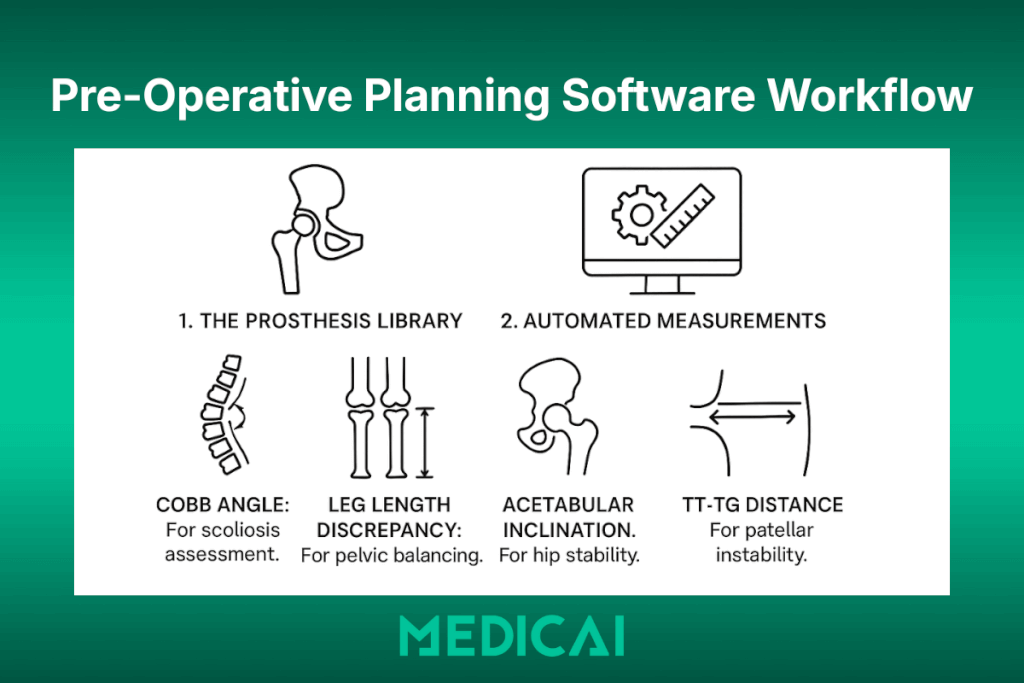
1. The Prosthesis Library
A robust planning suite connects to a cloud-based library of implant manufacturers (Stryker, DePuy, Zimmer Biomet, etc.). This ensures that the surgeon has access to the latest templates without manual updates.
2. Automated Measurements
Beyond implants, orthopedic surgeons need specific geometric measurements that generic viewers make difficult:
- Cobb Angle: For scoliosis assessment.
- Leg Length Discrepancy: For pelvic balancing.
- Acetabular Inclination: For hip stability.
- TT-TG Distance: For patellar instability.
An Ortho-ready viewer allows these measurements to be saved as a “Planning Layer” on top of the DICOM image, separate from the diagnostic report.
Orthopedic Imaging Modalities: What an Ortho PACS Must Handle
General radiology PACS is designed around standard modality output — a CT series, an MRI sequence, an X-ray series — all encoded in standard DICOM with consistent file structures. Orthopedic imaging introduces four modality types that sit outside this standard workflow, each with specific acquisition characteristics, file structures, and viewing requirements that a general radiology viewer handles poorly or not at all. An orthopedic PACS must accommodate all four without special configuration or manual workarounds.
Weight-Bearing X-Ray
A weight-bearing X-ray is acquired with the patient standing under full load rather than lying on a table. For knee and hip replacement planning, this distinction is clinically essential — the joint space under load looks different from that at rest, and implant sizing based on a non-weight-bearing image can result in a component that fits incorrectly once the patient stands.
The problem in a general PACS workflow is that weight-bearing status is not automatically flagged in the worklist or in the DICOM header as a separate priority attribute. The image looks identical to a standard X-ray until the radiologist reads the report. An orthopedic PACS handles this by tagging weight-bearing studies separately in the worklist — surgeons see immediately which images were acquired under load and which were not, without needing to read the acquisition notes.
For total knee arthroplasty (TKA) and total hip arthroplasty (THA) planning, weight-bearing AP views of the knee and hip serve as the baseline images for digital templating calibration and implant overlay. Without a correctly tagged, correctly calibrated weight-bearing view, the templating measurement is unreliable.
Long-Leg AP (Full-Limb) View
A long-leg AP — also called a full-limb or standing long-leg radiograph — is a panoramic X-ray that captures the entire lower limb in a single frame, from the femoral head to the ankle. It is the gold standard for measuring mechanical axis deviation, leg length discrepancy, and tibial and femoral alignment prior to total knee or total hip replacement.
The challenge for general PACS systems is the image format. A long-leg AP is typically acquired as a stitched composite of two or three overlapping X-ray exposures that the acquisition system assembles into a single wide-frame image. The stitching process creates a composite DICOM object that some general PACS systems archive as separate series rather than as a single stitched image — breaking the full-limb view into segments that cannot be measured continuously.
An orthopedic PACS handles stitched long-leg images as a single calibrated object. The calibration marker (typically included in the lower field of the stitched image) is detected across the full composite, allowing the Leg Length Discrepancy measurement to be made from femoral head to ankle in a single drag — a measurement that is the literal basis for deciding whether to lengthen or shorten the limb during surgery.
EOS Low-Dose Biplanar Imaging
EOS is a low-dose biplanar X-ray system that acquires simultaneous AP (front) and lateral (side) images of the full skeleton in a single scan, with the patient standing. From these two simultaneous acquisitions, specialized software reconstructs a 3D skeletal model that preserves the natural load-bearing posture of the patient’s spine, pelvis, and lower limbs — something no supine MRI or CT can replicate.
EOS generates DICOM objects that differ structurally from standard X-ray DICOM — the biplanar acquisition produces paired series with spatial relationship metadata that a general radiology viewer ignores, displaying the AP and lateral views as two unrelated series rather than as a linked stereoscopic pair. The 3D reconstruction data is exported as a separate DICOM Structured Report or as a secondary capture object that general PACS systems often strip or fail to display.
An orthopedic PACS that supports EOS preserves the paired series relationship, displays AP and lateral views in synchronized linked panels, and stores the 3D reconstruction data alongside the native images. For spinal deformity surgery planning — where EOS-derived 3D models are used to simulate corrective osteotomies — this is not a convenience feature. It is the difference between planning with a 3D model and planning from two disconnected 2D images.
Fluoroscopy Sequences
Fluoroscopy is real-time X-ray imaging used intraoperatively to guide implant placement, verify alignment, and confirm fracture reduction while the patient is in surgery. The output is not a static image but a sequence of frames — a DICOM multi-frame object, sometimes hundreds of frames captured at 7.5 to 30 frames per second.
General PACS systems archive fluoroscopy sequences but typically display them as a static thumbnail or as a single representative frame — the cine playback functionality needed to review the sequence frame-by-frame is either absent or requires a separate workstation tool. For post-operative review of an intra-operative fluoroscopy sequence, a surgeon needs to step through frames to verify the trajectory of a screw or the seating of a femoral component.
An orthopedic PACS provides cine playback natively within the viewer — surgeons step forward and backward through the fluoroscopy sequence, adjust playback speed, and mark specific frames for the operative report. For fracture fixation cases in particular, the intra-operative fluoroscopy sequence is often the most important imaging record of the case — it documents what was done and how, not just what the anatomy looked like before surgery.
Robotic Surgery Integration: How Orthopedic PACS Connects to the OR
The final frontier in orthopedic imaging is not storage or viewing — it is the seamless transfer of pre-operative planning data from the imaging environment into the operating room’s robotic and navigation systems. This integration represents the highest-value connection an orthopedic PACS can make: the plan created from the calibrated X-ray in the surgeon’s office becomes the data that guides the robotic arm during the procedure.
How Robotic Surgery Systems Use Imaging Data
Robotic-assisted orthopedic surgery platforms — most prominently Stryker Mako for total hip, total knee, and partial knee arthroplasty, and Zimmer Biomet Rosa for total knee and spine procedures — operate on pre-operative CT or X-ray data that has been processed into a patient-specific 3D bone model. The robotic system uses this model to define the safe cutting zone for the surgeon and to provide haptic feedback that prevents the robotic arm from moving outside planned boundaries during implant preparation.
The imaging pipeline for a Mako-assisted total knee arthroplasty works as follows: the patient undergoes a pre-operative CT scan, the scan is segmented into a 3D bone model by the Mako planning software (Stryker’s Triathlon application), the surgeon defines the component position and alignment targets in the planning software, and those targets — expressed as geometric coordinates relative to the patient’s bone landmarks — are loaded into the Mako system in the OR on surgery day. The robotic arm then enforces the planned cutting boundaries in real time during preparation of the tibial plateau and femoral condyles.
The PACS role in this workflow is twofold: it must receive and archive the pre-operative CT in a format compatible with Mako’s DICOM import, and it must provide a high-quality, calibrated DICOM dataset that the Mako planning software can reliably segment. A PACS that strips metadata, applies lossy compression to CT series, or fails to preserve the full DICOM object hierarchy produces a dataset that the Mako planning software either rejects or segments inaccurately — leading to a planning session that does not reflect the patient’s actual anatomy.
The DICOMweb Integration Layer
Legacy orthopedic PACS systems connected to robotic surgery planning software through direct DICOM C-MOVE queries — the planning workstation queried the PACS archive for the relevant CT study and retrieved it via the traditional DICOM retrieve mechanism. This works but requires a configured DICOM Application Entity (AE) for every planning workstation on every robotic system, and each AE must be manually registered in the PACS routing table.
Modern orthopedic PACS platforms that support DICOMweb (specifically WADO-RS for image retrieval) allow the robotic surgery planning software to query the PACS archive through a standard HTTPS endpoint — no pre-configured AE, no DICOM networking configuration, and no dependency on the specific IP address or port of the PACS server. This matters operationally because robotic surgery planning workstations are not fixed installations — they may be updated by the vendor, replaced after hardware failures, or moved between sites — and each change in a legacy DICOM environment requires manual PACS reconfiguration.
Medicai’s DICOMweb-native architecture means that any robotic surgery planning application that supports WADO-RS can retrieve a study from the Medicai archive through a standard web endpoint, without requiring a PACS administrator to register a new DICOM AE or modify routing rules. The integration is configured once at the API level and works regardless of changes to the planning workstation’s network configuration.
Intra-Operative Navigation: A Different Data Requirement
Beyond robotic surgery, computer-assisted orthopedic navigation systems — used in spine surgery, fracture fixation, and complex joint reconstruction — use intra-operative imaging rather than pre-operative CT data. These systems typically work with a C-arm fluoroscope that acquires real-time X-ray images during surgery, with the navigation system overlaying anatomical landmarks and instrument trajectories on the live fluoroscopy feed.
The PACS requirement here is different: rather than providing pre-operative data, the PACS must receive and archive the intra-operative fluoroscopy sequences that the navigation system generates. These sequences are DICOM multi-frame objects — sometimes hundreds of frames captured at 7.5 to 30 frames per second — that document the implant trajectory, screw placement angles, and reduction quality at each stage of the procedure.
An orthopedic PACS that handles intra-operative fluoroscopy correctly archives these sequences in full fidelity, links them to the correct patient record and accession number, and makes them available for post-operative review through a cine-capable viewer. This creates a permanent, retrievable intra-operative imaging record that serves three functions: quality review by the operating surgeon, training material for residents and fellows, and legal documentation in the event of a post-operative complication claim.
What to Ask a PACS Vendor About Robotic Surgery Integration
For orthopedic practices evaluating PACS vendors, robotic surgery integration is not a yes-or-no question. The relevant questions are specific:
Does the PACS preserve full DICOM object hierarchy in CT series — specifically the Frame of Reference UID and the Image Position Patient tag — without modification? These tags are used by robotic surgery planning software to establish spatial relationships between image slices. If the PACS modifies or strips them during ingestion or compression, the 3D segmentation fails or produces inaccurate bone models.
Does the PACS support WADO-RS retrieval via a standard HTTPS endpoint, or does it require a preconfigured DICOM AE for each connected planning workstation? The answer determines whether integration is a one-time API configuration or an ongoing network administration task.
Does the PACS archive intra-operative fluoroscopy multi-frame objects at full frame count and full resolution, or does it downsample or truncate long fluoroscopy sequences during storage? Downsampling destroys the clinical utility of the intra-operative record.
Medicai’s architecture answers all three questions in the way a robotic surgery environment requires: full preservation of DICOM metadata through ingestion, DICOMweb WADO-RS retrieval without AE pre-registration, and lossless storage of multi-frame fluoroscopy objects at full resolution.
The Operational ROI: Why It Matters to the Administrator
For the Practice Manager or CIO, investing in Orthopedic digital planning delivers measurable ROI:
- Reduced Inventory Waste: By knowing the exact implant size beforehand, the hospital doesn’t need to open (and potentially waste) multiple trial sizes in the OR.
- Shorter Surgery Times: A surgeon with a solid pre-operative plan spends less time sizing and measuring while the patient is under anesthesia.
- Surgeon Satisfaction: Providing tools that mirror the surgeon’s mental workflow acts as a powerful retention tool.
The Medicai Advantage: Bringing the Plan to the O.R.
The biggest limitation of legacy on-premise Ortho PACS is access. Planning often takes place in the clinic office, but the surgery is performed in the hospital OR.
Medicai bridges this gap through its Cloud-Native VNA Architecture.
1. Plan Anywhere, View Anywhere
With Medicai’s Zero-Footprint Viewer, a surgeon can perform their digital templating on a desktop in their private clinic, save the plan, and then instantly pull up the same plan on an iPad or a wall monitor in the hospital Operating Room. No VPNs, no thumb drives.

2. Interoperability with Specialized Suites
Medicai acts as the central Image Backbone. Because we use open standards (DICOMweb), we integrate seamlessly with advanced third-party AI planning suites and robotic surgery platforms. We handle storage, calibration, and delivery of the image, ensuring your specialized tools receive high-quality data.
3. Sharing with Reps
Device representatives often need to review X-rays to ensure the correct kit is delivered to the OR. Medicai’s secure Sharing Portal allows surgeons to send a secure, time-limited link to the device rep, ensuring everyone is prepared for surgery day without violating HIPAA.
Conclusion
Orthopedics is a discipline of precision. Your imaging software should match that standard. If your surgeons are still holding plastic rulers up to computer screens, it is time to upgrade.
Equip your surgeons with the right tools. Move to a PACS that understands the difference between Diagnosis and Reconstruction. Contact Medicai today to see how our cloud platform supports the modern orthopedic workflow.


Related Articles
Lets get in touch!
Learn more about how Medicai can help you strengthen your practice and improve your patients’ experience. Ready to start your Journey?
Book A Free Demo