Password Security in Radiology: Protecting Access to PACS, DICOM Viewers, and Patient Imaging Data

Healthcare now depends heavily on digital tools. These tools speed up work and support better patient care, but they also create new security risks.
One of the biggest questions is how to protect access to PACS, DICOM viewers, and private patient imaging data with strong password security. Medical images often play a central role in diagnosis and treatment, so this data is very valuable. It is also very attractive to hackers because it is large, detailed, and private.
Keeping it safe matters, and strong passwords plus solid access controls are a key part of that protection. Without them, systems meant to help care can turn into weak points.
To secure these systems, healthcare organizations need clear password rules and staff who know how to create hard-to-guess logins, including using a trusted password generator.
Patient imaging data can show a lot about a person’s medical history, current health, and possible future risks. That level of detail calls for a proactive, layered security plan, and password protection is one of the basic building blocks.
Key Systems Requiring Password Protection: PACS, DICOM Viewers, and Imaging Archives
Modern radiology depends on connected systems that manage huge volumes of imaging data. These systems improve speed and collaboration, but they also become entry points for cyberattacks if they are not secured. Knowing what these systems do and where they can fail helps organizations set up better defenses.
What Is PACS and Why Is It a Target for Attacks?
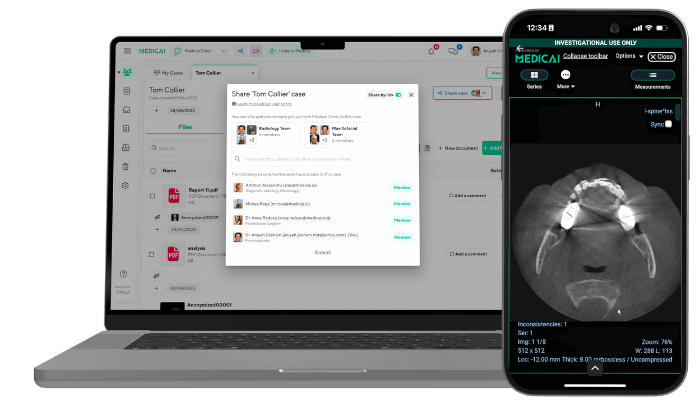
Picture Archiving and Communication Systems (PACS) are central to digital imaging. PACS stores, retrieves, manages, and shares images like X-rays, CT scans, and MRIs. It replaces film and reduces manual handling, which improves workflow and supports faster decisions in care.
Even with these benefits, PACS can be a major target. PACS connects to many devices and networks inside a facility, and that connectivity can expose it to network attacks. If it is not locked down, attackers may access private patient images and related data. PACS software can also contain bugs or security gaps, especially when updates and security patches are delayed. Because PACS often contains large amounts of sensitive data, criminals may try to steal it for fraud or to sell it.
Digital Imaging Data in DICOM Viewers: Vulnerabilities and Entry Points
PACS is closely linked with the DICOM standard (Digital Imaging and Communications in Medicine). DICOM sets the file format and communication rules for medical images and related details, such as patient info and scan settings. A DICOM file can include the image itself plus information about the equipment and how the scan was done. DICOM is widely used because it helps systems from different vendors share and read images correctly.
DICOM viewers are programs that display and edit DICOM images, and they can also be weak points. As of April 2025, many PACS servers and DICOM nodes were found online and reachable, making them easier targets. If these systems are exposed to the internet, attackers may gain access to patient records and medical images, harming privacy and trust in care.
Security issues have also been found in well-known PACS servers and DICOM viewers. MedDream PACS servers, which support web viewing across platforms, have serious vulnerabilities that can allow attackers to run code and possibly take control. Sante PACS servers have weaknesses that may allow arbitrary file writes and denial-of-service attacks. Osirix PACS servers for macOS have also had reported issues that can disrupt operation and lead to data exposure. These examples show why strong password protection and other security controls are needed across the full DICOM environment.
Storage, Transfer, and Sharing of Patient Imaging Data
Patient imaging data has a full lifecycle: capture, storage, transfer, and sharing. Each step has security risks. Images are usually stored in PACS, which often connects to internal clinical systems and medical devices. That connection supports smooth workflows, but it can also give attackers a path into PACS and put confidentiality at risk.
Sharing images is also a common need. DICOM makes it easier for clinicians to store and share images across locations and devices. Still, convenience must be balanced with strong protection. Many organizations still rely on weak or outdated encryption, which can expose data during transfer.
Cloud storage can add flexibility and scale, but it also adds risk if access controls and encryption are weak. Secure transfer methods like TLS (Transport Layer Security) help protect data while it moves, and strong encryption for stored data is also needed. Keeping imaging data safe requires protecting every step of its digital path.
Core Strategies to Strengthen Password Security
With so many threats, waiting for a problem is not enough. Radiology needs proactive, layered steps to improve password security. That includes policy, technical controls, and ongoing attention.
Creating and Enforcing Strong Password Policies
Strong password security starts with clear password rules. Policies should set a minimum length (often at least eight characters, but longer is better) and require a mix of uppercase and lowercase letters, numbers, and special characters. Passwords should not include dictionary words or personal information, including details that could be found on social media. Strong passwords do not stop attacks completely, but they make brute force attacks much harder.
Enforcement matters as much as the rules. Regular password changes can help, but the bigger focus should be on strong, unique passwords rather than frequent changes that lead people to use small variations (like adding “1” at the end). Policies should also ban writing passwords down or sharing them.
Multi-Factor Authentication for PACS and DICOM Viewers
Multi-Factor Authentication (MFA) is now a basic requirement for critical systems like PACS and DICOM viewers. MFA requires two or more proofs of identity, which lowers the chance of unauthorized access when a password is stolen. Even if an attacker has the password, they still need a second factor such as an app code, a fingerprint, or a hardware token.
The National Institute of Standards and Technology (NIST) recommends access controls that include multifactor authentication for providers. Using MFA for all access to radiology data, including remote access, adds a major layer of protection against credential theft and phishing.
Password Management Tools for Radiology IT Teams
Keeping many complex, unique passwords across a radiology department can feel overwhelming. Password managers help by storing, creating, and managing strong passwords safely. For IT teams, a centralized tool can support policy enforcement, track password use, and allow secure credential sharing with approved staff, without exposing the actual password.
By generating strong passwords and keeping them in a secure vault, these tools reduce pressure on users and lower the chance of password reuse or written notes. They can also provide logs showing when passwords were accessed, which supports accountability and monitoring.
User Roles and Access Rights Management
Access rights management controls what each person can do in PACS and related systems. IT teams should use role-based access control (RBAC) so users only access what they need for their job. A radiologist, for example, needs different access than a scheduler or a temporary clinician. This “least privilege” approach limits damage if an account is compromised.
Access rights also need regular review. When people change roles or leave, permissions should be updated or removed right away. This reduces risk from old accounts or excessive permissions. NIST also recommends certificate-based authentication for imaging devices and other clinical systems, which can further tighten access control.
Monitoring and Logging Access Attempts
Even with strong passwords and MFA, ongoing monitoring is still needed. PACS servers should be watched for unusual activity using audit logs, user tracking, and network monitoring. Logging successful and failed logins helps teams spot patterns tied to brute force attacks, insider misuse, or compromised accounts.
Automated alerts can flag repeated failed logins from one IP address, access to sensitive images outside normal hours, or unusually large data transfers. This helps security teams react faster, reduce harm, and keep patient imaging data protected.
Integrating Password Security with Other Cybersecurity Measures
Password security is a base layer, but it is only one part of a larger security plan. Strong protection for radiology systems comes from combining passwords with other controls so there are multiple barriers for attackers.
Encryption of Imaging Data Within PACS and DICOM Systems
Encryption is one of the main tools for protecting PACS data. It converts patient data into a coded form so that unauthorized people cannot read it. This applies both to data at rest (stored) and data in transit (shared). If an attacker gets access to files, encryption helps keep the contents unreadable without the key.
Many organizations still use weak or outdated encryption, which leaves data exposed. Using current encryption standards helps protect confidentiality and integrity. It can also include encrypting parts of the DICOM header, which may contain sensitive patient details. Encrypting these fields helps protect privacy while still allowing needed access for approved use.
Firewall and Network Security Configurations
Network security is necessary to protect PACS from outside attacks and from weaker internal networks. Firewalls are a basic step. They check incoming traffic and allow or block it based on rules. PACS servers should be placed behind firewalls, and remote access should require VPNs (Virtual Private Networks).
Network protection should also include intrusion detection and prevention systems (IDS/IPS) and routine monitoring. Network segmentation is also important, keeping PACS separated from other network zones to reduce the chance an attacker can move across systems. Limiting incoming DICOM connections and requiring TLS for DICOM communications further strengthens network defenses.
Regular Software Updates, Patches, and Vulnerability Scanning
Unpatched software is one of the easiest ways for attackers to get in. Regular updates matter because they often fix known security problems and improve system stability. Waiting too long to patch can leave systems open to attacks that are already well understood.
Healthcare organizations should have a clear process for patching PACS software, operating systems, and connected devices. This should be backed by ongoing security checks such as vulnerability scanning and penetration testing. These steps help teams find problems early and fix them before attackers do.
Incident Response Planning for Password Breaches
Even strong prevention cannot stop every incident. A clear incident response plan helps reduce damage when a password breach or other attack happens. The plan should explain how to detect, contain, and recover from incidents, and how to communicate with patients, regulators, and other parties as required.
Key steps often include finding how big the breach is, isolating impacted systems, removing the attacker’s access, restoring from secure backups, and reviewing what happened so defenses can improve. Practice drills and regular updates help teams respond quickly and keep care running during a real event.
Best Practices for Radiology Professionals and IT Staff
People are often called the weakest link in security, but trained staff can also be the strongest defense. Giving radiology professionals and IT staff clear guidance helps protect imaging data. Tools alone do not work if daily habits are unsafe.
Staff Training and Ongoing User Awareness
Ongoing training helps build a security-focused culture. Users need to understand why data security matters and what they should do every day. Training should include how to create safer logins, how to spot phishing, and how to handle patient data correctly. Staff should know how to use strong passwords, why MFA matters, and how social engineering tricks work.
Refresher training helps keep knowledge current as threats change. Regular reminders about phishing and safe access habits help create a “human firewall.” When staff understand the reason behind rules, they are more likely to follow them consistently.
Physical Security for Workstations and Imaging Devices
Digital protection is important, but physical security still matters. Servers, storage systems, and workstations should be placed in controlled areas to prevent unauthorized access. This can include locked server rooms, controlled access to imaging rooms, and workstation placement that reduces “shoulder surfing” or casual misuse.
Physical controls also apply to portable devices and removable media. Policies should limit or manage USB drives and other external storage, since they can spread malware or move data without approval. Regular checks of physical spaces add another layer of protection alongside digital controls.
Managing Remote and Cloud Access to Imaging Data
Remote access and cloud storage are more common because they support flexibility and scale, but they also bring new security risks. If controls are weak, cloud-stored images and patient data can be exposed through breaches, unauthorized access, or compliance failures.
Remote access should require strict rules, including VPN use, MFA, and encrypted connections. For cloud PACS, organizations should work with vendors that meet HIPAA and FDA requirements and follow DICOM standards. Cloud systems should provide strong encryption for stored and transferred data, controlled access across locations and devices, and security management by experienced teams so flexibility does not reduce patient privacy.
Final Considerations: Keeping Patient Imaging Data Safe
Keeping patient imaging data safe is ongoing work, not a one-time project. Attack methods change and grow, so healthcare organizations need constant attention and willingness to adjust. Patient trust depends on this effort.
Continuous Security Assessment and Compliance
Protecting imaging data takes more than a one-time security upgrade. It requires regular security checks. This includes vulnerability scans, penetration tests, and risk reviews to find problems before attackers do. Rules and compliance requirements, including HIPAA, also change over time. Continuous reviews help organizations meet current expectations and stay ready for future changes, supporting patient privacy and data integrity.
Outside security reviews can also help by bringing new viewpoints and finding issues internal teams may miss. Regular assessment plus a strong compliance program helps confirm that protections are working and aligned with industry standards, which supports the trust patients place in their providers.
Adapting to Evolving Threats in Digital Radiology
Digital radiology is a constant target because attackers keep developing new methods. Security plans need to stay strong and flexible. That means patching known issues and also keeping up with new malware, new attack styles, and new social engineering tricks. It also means investing in prevention, including modern security tools and regular staff training.
At the end of the day, securing PACS requires attention to everything: software, network design, and daily staff behavior. Total risk removal is not realistic, but risk can be reduced greatly. When healthcare teams work across departments, invest in resilient systems, and respond clearly to incidents, they show real commitment to privacy. Strong PACS security supports safe sharing of life-saving imaging so clinicians can focus on patient care with less fear of data exposure.

Related Articles

Lets get in touch!
Learn more about how Medicai can help you strengthen your practice and improve your patients’ experience. Ready to start your Journey?
Book A Free Demo