Cloud-Native vs. Cloud-Enabled PACS: Why the Difference Matters for 2026
In the 2026 healthcare market, you will struggle to find a PACS vendor that doesn’t use the word “Cloud” in their pitch deck.
For a CIO or Radiology IT Director, this ubiquity creates a dangerous illusion. It suggests that all cloud systems are roughly the same—commodity storage buckets accessible via the internet.
This could not be further from the truth.
There is a massive architectural chasm between a legacy system that has been “lifted and shifted” to a virtual server (Cloud-Enabled) and a platform built from the ground up using microservices (Cloud-Native). Choosing the wrong one doesn’t just mean slightly slower load times; it means incurring technical debt, paying for expensive upgrades, and being unable to scale.
This guide peels back the marketing layers to expose the engineering reality. We will compare Cloud Based vs Cloud Enabled PACS architectures and explain why the distinction is the single most important factor in your long-term imaging strategy.

The “Lift and Shift” Trap: What is Cloud-Enabled?
To understand the future, we must look at the past.
Most major PACS vendors built their core codebases 15 or 20 years ago. These systems were designed as Monolithic Applications intended to run on physical servers in a hospital basement.
When the market demanded “Cloud,” these vendors couldn’t just rewrite millions of lines of code overnight. Instead, they adopted a strategy called “Lift and Shift.” They took their existing monolithic software, wrapped it in a virtual machine (VM), and hosted it on a cloud-based provider like Amazon AWS or Microsoft Azure.
This is Cloud-Enabled PACS.
The Architecture:
- Monolithic Core: The application is one giant block of code. The database, the user interface, and the image processing logic are tightly coupled.
- Virtual Machines (VMs): Instead of running on a physical Dell server in your closet, it runs on a virtual Windows server in a data center.
- Thick Clients: Often, these systems still require you to install a “.exe” plugin or Java applet on the doctor’s workstation to handle heavy image processing.
The Consequences:
- Downtime for Upgrades: Because the application is a monolith, you cannot update just one feature. To patch a security bug, the vendor must take the entire system offline, update the whole block, and restart it. This leads to scheduled downtime—a concept that shouldn’t exist in 2026.
- Vertical Scalability Only: If the system gets slow, the only fix is to “rent a bigger server” (more CPU/RAM). This is expensive and has a hard ceiling.
- Latency: These systems were designed for a Local Area Network (LAN). When you put them on the cloud without re-engineering the data flow, radiologists experience the “Spinning Wheel of Death” while large files download.
The Anatomy of True Cloud-Native PACS
A True Cloud-Native PACS (like Medicai) is not “hosted” in the cloud; it is born there.
It is built using Microservices Architecture. Imagine the system not as one giant block, but as hundreds of tiny, independent Lego bricks. One brick handles “User Login.” Another handles “DICOM Storage.” Another handles “3D Rendering.”
These bricks talk to each other via APIs, but they operate independently.
Key Technologies:
- Microservices: Small, autonomous services that do one thing perfectly.
- Containerization (Docker/Kubernetes): These services are packaged into “containers” that can be spun up or down in seconds.
- Serverless Functions: Code that runs only when triggered, meaning you don’t pay for idle servers.
The Operational Advantages:
- Elastic Scalability: This is the game changer. If 50 radiologists log in at 8:00 AM, the system automatically spins up 50 new “Rendering Containers” to handle the load. When they log off at 5:00 PM, those containers vanish. You pay only for what you use.
- Zero Downtime Updates: We can update the “Billing Microservice” without touching the “Image Viewer Microservice.” The system never goes offline.
- Resiliency: If one microservice fails (e.g., the email notification bot crashes), the rest of the PACS (viewing, storing) keep running perfectly. In a monolith, one bug crashes everything.
The Killer Feature: Server-Side Rendering (SSR)
The most tangible difference between these two architectures is how they handle latency.
In a Cloud-Enabled (Legacy) workflow, the system tries to download the DICOM file to the doctor’s computer.
- Scenario: A radiologist opens a 4GB Breast Tomosynthesis study.
- Legacy Result: The doctor waits 5 minutes for the file to download across the internet before they can see the first image.
In a Cloud-Native (Medicai) workflow, we use Server-Side Rendering.
- Scenario: The same 4GB study.
- Native Result: The cloud server (equipped with massive GPUs) opens the file instantly. It processes the image in the cloud and streams a high-definition interactive video feed to the doctor’s browser.
- The Magic: The doctor sees the image instantly. They can scroll, zoom, and window/level with zero lag, because they aren’t moving the file—they are streaming the pixels.
This is the difference between downloading a movie (Legacy) and watching Netflix (Cloud-Native).
Reducing IT Maintenance Debt
For the CIO, the shift to Cloud-Native is about reducing IT maintenance debt.
Legacy systems are “heavy.” They require your team to manage VPNs, update local workstation software, and constantly monitor server drive space.

A Cloud-Native architecture offers a Zero-Footprint Viewer.
- No Plugins: The viewer runs in a standard Chrome or Edge browser using HTML5.
- No Local Data: No Patient Health Information (PHI) is ever cached on the hard drive. This massive security advantage eliminates the need for complex device encryption management for remote doctors.
- Automatic Compliance: Security patches happen on the server side instantly. You don’t have to manually push updates to 500 hospital workstations.
How to Spot the “Fakes”: Cloud Based vs Cloud Enabled PACS
When you are in the RFP process, vendors will try to blur the lines. Use this checklist to determine if a system is truly Cloud-Native or just a dressed-up legacy server.
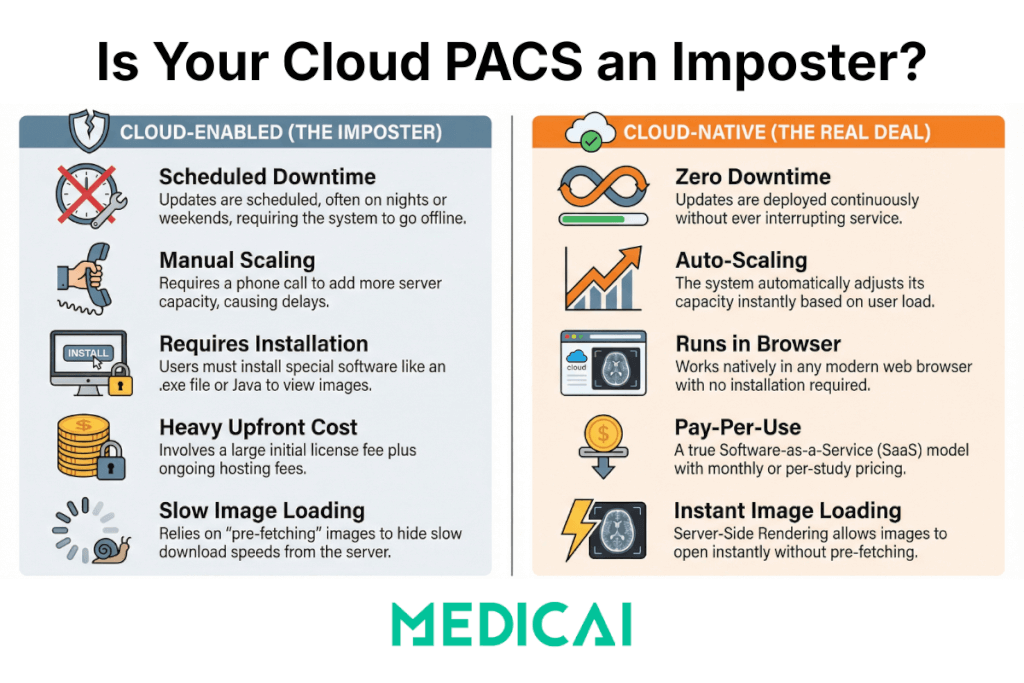
| Feature | Cloud-Enabled (The Imposter) | Cloud-Native (The Real Deal) |
| Upgrades | “We schedule updates on Sunday nights.” (Requires Downtime) | “We deploy updates continuously.” (Zero Downtime) |
| Scalability | “We can add more servers if you call us.” (Manual Vertical Scaling) | “The system auto-scales instantly based on load.” (Auto Horizontal Scaling) |
| Viewer Tech | Requires installing an .exe file, Java, or the Citrix Receiver. | Runs natively in the web browser (HTML5). |
| Pricing Model | Heavy upfront license + “Hosting Fee.” | Pay-per-study or Pay-per-month (True SaaS). |
| Image Loading | “Pre-fetching” is required to hide slow download speeds. | Server-Side Rendering allows instant open without pre-fetching. |
Financial Impact: CapEx vs. OpEx
Finally, the architecture dictates the business model.
Cloud-Enabled systems often still look like old contracts. You might pay a large upfront “Software License” fee (CapEx) and then a monthly “Hosting Fee” to cover the cost of the VMs running 24/7. Because VMs are expensive to run (even when idle), the vendor passes that inefficiency on to you.
Cloud-Native systems align with a pure OpEx (Operating Expense) model. Because microservices and serverless functions cost fractions of a penny and only run when used, the vendor has a lower cost basis. This allows for:
- Lower Total Cost of Ownership (TCO).
- Predictable Billing: You pay for the storage and the “rendering minutes” you actually use.
- No “Hardware Refresh” Cliff: You never face that dreaded 5-year meeting where you have to buy $200k worth of new servers.
Conclusion: Future-Proof Your Imaging Strategy
Buying a PACS is a 10-year commitment.
If you buy a Cloud-Enabled system today, you are essentially buying 15-year-old technology that is already reaching its limit. You will spend the next decade fighting latency, managing upgrades, and struggling to integrate new AI tools.
If you choose a Cloud-Native platform like Medicai, you are building on infrastructure designed for the next decade of healthcare. You gain the agility to plug in AI algorithms via simple APIs, the speed to let radiologists read from anywhere, and the security of a zero-trust architecture.
Don’t let a vendor sell you a server in the sky. Demand true cloud-native performance.


Related Articles


Lets get in touch!
Learn more about how Medicai can help you strengthen your practice and improve your patients’ experience. Ready to start your Journey?
Book A Free Demo