DICOM Format Explained: Understanding Your Medical Imaging Files
Medical images can feel confusing, especially when the files look nothing like the scans on your phone.
The DICOM format is a specialized medical imaging file format used by hospitals. The format is designed to store images with the clinical details needed for accurate diagnosis. It’s the universal language that keeps scans consistent, secure, and readable across hospitals.
Learn what DICOM files really are, why they matter, and how to view them smoothly.

What Is a DICOM File?
A DICOM (Digital Imaging and Communications in Medicine) file, or dcm file, is the standard format for storing and sharing medical images.
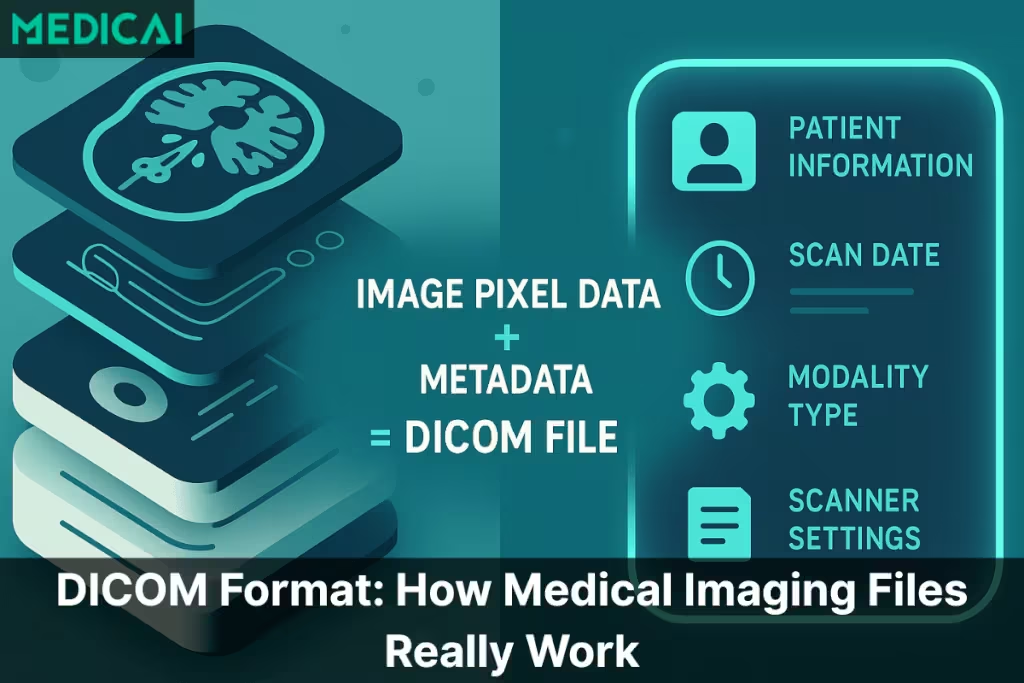
A DICOM file carries two things at once:
- The actual scan: the images from your MRI, CT, X-ray, ultrasound, or mammogram.
- The metadata: details like the patient’s name, scan date, hospital name, scanner type, and technical settings.

Instead of saving an MRI as a flat JPEG, which would lose both quality and medical context, the DICOM format keeps everything structured. It helps doctors and radiologists to know exactly what they’re looking at, who it belongs to, and how the scan was performed.
Unlike regular photos, DICOM files can contain a single image or hundreds of slices stacked together to create a 3D view of the body. That complexity is why they need a format designed specifically for healthcare.
As hospitals moved from film to digital imaging, they needed one universal format that every scanner and workstation could read. The DICOM format solved that problem. Today, it works across:
| DICOM Component | Description | Key Elements Inside | Clinical Importance |
| Image Pixel Data | The actual medical images captured during the scan. Represents anatomical detail across multiple slices or frames. | MRI slice stacksCT multi-slice seriesX-ray framesUltrasound cine loops | Provides the visual information needed for diagnosis. Radiologists rely on this to detect abnormalities, measure structures, and interpret pathology. |
| Metadata Header (DICOM Tags) | The structured, text-based information is embedded inside every DICOM file. Describes patient details, scanner settings, and scan context. | Patient demographicsStudy date & timeModality type (CT/MRI/US)Scanner model & settingsOrientation, slice thicknessAcquisition parameters | Ensures the scan is linked to the right patient and clinical scenario. Preserves safety, prevents mix-ups, supports reproducibility, and provides essential context for accurate diagnosis. |
- MRI and CT scanners
- Ultrasound machines
- X-ray systems
- PACS platforms
- Cloud viewers
What Makes the DICOM Format Universal Across Hospitals?
The biggest strength of the DICOM format is that it works everywhere. No matter which hospital, scanner, or imaging machine you visit, the files follow the same rules. This consistency makes medical imaging safer, clearer, and easier to share.
Interoperability in Action
Every MRI, CT, ultrasound, and X-ray machine speaks the DICOM “language.” It means:
- A scan done in one hospital can be opened in another without any issues.
- A specialist in a different city can read the same file exactly as it appears on the original machine.
- Doctors can collaborate without worrying about mismatched formats or missing information.
Before DICOM, every company used its own file style, and hospitals struggled to share scans. DICOM solved this by installing a single, reliable standard.
A Communication System
DICOM defines how files are saved and how imaging devices communicate. It manages how:
- A scanner sends images to a workstation
- A workstation sends scans to the PACS
- A hospital shares imaging with another facility
- Cloud platforms like Medicai display scans instantly in the browser
This communication protocol ensures consistent image appearance across all systems, including contrast, orientation, labels, and slice order.
Modern cloud platforms like Medicai follow these DICOM standards, ensuring that images appear consistent whether viewed on a hospital workstation or in a browser.
The Hidden Layer Inside Every DICOM: Metadata
A DICOM file appears as a regular image, but it contains a hidden layer of metadata that transforms it into a reliable medical record.
In simple terms, metadata is data about the scan. It gives several informations, including-
- Who the scan belongs to
- What part of the body was imaged
- When it was taken
- How the scanner captured it
Without metadata, a scan becomes disconnected from the patient’s story.
What Details Are Stored Inside a DICOM File?
Every DICOM file carries a full set of personal, clinical, and technical details. Common examples include:
- Patient name and ID
- Age and sex
- Study date and time
- Type of scan (CT, MRI, Ultrasound, etc.)
- Facility or hospital name
- Scanner brand and model
- Slice thickness
- Orientation of the body
- Radiation dose (for CT scans)
- Image dimensions and settings
This information helps radiologists understand exactly how the scan was created. It also helps hospitals track, compare, and store imaging safely over time.
Why This Metadata Is Protected and Important
All the details inside a DICOM file are part of the patient’s medical record. Because of this, they’re protected by strict privacy laws such as HIPAA and GDPR. This is also why JPEGs or PDFs aren’t used for clinical diagnosis. They strip away metadata, which can lead to confusion, lost context, or even patient mix-ups.
Metadata provides accuracy. It provides safety. And it ensures that every professional reviewing the scan knows exactly what they’re looking at.
Why DICOM Files Often Look “Strange” on a Normal Computer
If you’ve tried opening a DICOM file on your laptop, you’ve likely seen a blank screen or an error. This is normal, as DICOM files are meant for clinical viewing, not for standard photo apps.
Regular Apps Can’t Read the Medical Data Inside
Apps like Windows Photos, Mac Preview, or Google Photos can only read simple image formats like JPEG or PNG. They’re not built to understand:
- medical metadata
- multiple image slices
- scan orientation
- technical settings
- 16-bit grayscale used in medical imaging
So when you double-click a DICOM file, your computer simply doesn’t know what to do with it.
One File Can Contain Hundreds of Images
A CT or MRI study consists of thin slices that stack to form a 3D view. It helps doctors to examine anatomy layer by layer.
A single DICOM study might contain:
- 200+ CT slices
- 500+ MRI images
- multiple series (axial, coronal, sagittal views)
Regular image viewers can’t display or organize these slices, which is why the file can appear “broken” or “corrupted” to the average user.
Medical Images Need Proper Rendering
Radiologists use specific tools to “window” the image, adjusting contrast and brightness to reveal subtle details. For example:
- Bone requires one window
- Soft tissues require another
- Lung fields require a completely different setting
Without these tools, a scan can look too dark, too bright, or completely unreadable.
Cloud viewers such as Medicai instantly decode these slices, orientations, and metadata, removing the frustration people often face with CDs or incompatible software.
Specialized DICOM Viewers: Why They’re Necessary
DICOM files contain extensive details that standard apps can’t show properly. So, they need specialized DICOM viewers.
What a DICOM Viewer Offers
A proper DICOM viewer goes beyond simply opening the file; it reveals the full details of the scan.
A DICOM viewer provides features with which you can:
- Scroll through slices in order, from top to bottom or side to side.
- Adjust windowing to clearly reveal bone, organs, vessels, or soft tissue.
- Zoom in on small details without losing quality.
- Measure lengths, angles, and densities.
- Compare studies taken on different days.
- Review metadata safely and accurately.
- See 3D structures through multiplanar reconstruction (MPR).
These tools are essential for radiologists, surgeons, and even lawyers reviewing medical evidence.
Platforms like Medicai bring these tools directly into the browser, giving radiologists and clinicians full diagnostic control without relying on heavy desktop software.
Why Doctors Rely on These Viewers for Diagnosis
Medical diagnosis requires precision. A lesion that looks invisible on a JPEG can become clear with the right window setting in a DICOM viewer. Every adjustment matters: brightness, contrast, slice thickness, orientation. Without these tools, important findings can be missed.
JPEGs, PDFs, and screenshots also lose metadata, which creates risk. A proper DICOM viewer maintains integrity, which is why clinicians use them every day.
Why Patients Need Them Too
Patients often receive their scans on CDs or USB drives. Without a DICOM viewer, the files look confusing or won’t open at all. A good viewer makes the scan easier to understand and gives patients a clearer idea of what their doctors are seeing.
Medicai’s simple viewer also helps patients open and explore their scans without needing technical knowledge or special software.
Why Cloud-Based Viewers Make It Even Easier
Modern platforms, such as Medicai, take things a step further by offering zero-installation viewing. Instead of installing heavy software, you can open your scan in any browser. This makes it easier to:
- Share scans with specialists
- Request second opinions
- Collaborate across hospitals
- Avoid outdated CD software
In short, specialized DICOM viewers turn complex medical files into something clear, safe, and clinically useful for both professionals and patients.

How to View DICOM Files Smoothly
Imaging files are exchanged daily, making quick access to DICOM studies crucial for efficient workflows and coordinated care. Here’s an overview of the viewing process and how modern tools simplify it.
Using Hospital-Provided CDs or USBs
Many facilities still rely on CDs or USB drives to release imaging to patients or outside clinicians. These drives usually include:
- the DICOM files themselves, and
- a built-in viewer supplied by the scanner manufacturer or PACS vendor
To open these scans, you locate the executable viewer on the CD/USB and launch it. Once it loads, the program displays the study in a basic interface with limited tools.
However, these embedded viewers often create friction.
They are rarely updated, struggle on modern operating systems, and run inconsistently across devices. Professionals frequently face:
- slow loading speeds
- compatibility issues
- missing features like MPR or measurements
- viewer crashes on newer Windows/macOS versions
This results in time lost, especially when the imaging is needed urgently for clinical decisions.
Tools like Medicai remove these barriers by offering fast, consistent access to DICOM studies directly through the browser.
Online DICOM Viewers
Online DICOM viewers offer a more convenient workflow. These browser-based tools allow clinicians to upload and view imaging without installing heavy desktop applications.
It provides several benefits, including-
- Immediate access to studies
- No dependency on outdated CD software
- The ability to review imaging from any workstation
- Quick sharing for second opinions or multidisciplinary discussions
For cross-institution consultations, online viewers help eliminate the need for physical media and reduce delays caused by technical issues.
Cloud-Based Platforms
Healthcare is shifting toward fully web-based imaging ecosystems. Cloud viewers represent the next stage of digital radiology, removing the limitations of CDs, USBs, and fixed workstations.
Cloud platforms help to
- open studies instantly from any browser
- access full DICOM toolsets (MPR, windowing, annotations, measurements)
- collaborate across departments or facilities without transferring files manually
- maintain consistent, high-quality visualization across all devices
- ensure secure access aligned with HIPAA/GDPR requirements
- eliminate dependence on legacy media and outdated software
For radiologists, it means faster reading workflows.
For referring clinicians, it means reliable access to patient imaging without technical barriers.
For patients, it means smoother follow-ups and better-coordinated care.
Conclusion
The DICOM format makes medical imaging feel less mysterious. These files carry the context, detail, and accuracy that modern diagnosis depends on. With the right viewer, the complexity disappears and the scan becomes clear and usable.
As imaging moves to the cloud, platforms like Medicai make viewing, sharing, and collaborating faster and far more seamless. Our goal is simple: clearer images, smoother workflows, and better care for every patient.


Related Articles



Lets get in touch!
Learn more about how Medicai can help you strengthen your practice and improve your patients’ experience. Ready to start your Journey?
Book A Free Demo