PMS Imaging vs. Dedicated PACS: Why Your Practice Management Software Isn't Enough

In the dental industry, there is a concept called the “All-in-One Illusion.”
When you buy a Practice Management System (PMS) like Dentrix, Eaglesoft, or Open Dental, it usually comes with a built-in imaging module. It’s convenient. It’s included in the price. And for 90% of dentists, it becomes the default simply because it is there.
But convenience often comes at the cost of capability.
While your PMS is excellent at scheduling hygiene appointments and managing ledgers, it was not built to be a high-end diagnostic engine. By relying on a billing platform to handle your clinical imaging, you are unknowingly accepting limitations of PMS imaging that cap your diagnostic potential and expose you to unnecessary data security risks.
Here is the brutal truth about why the “Bundle” might be holding your practice back, and why modern tech stacks are moving toward a Dedicated PACS.

The Fundamental Conflict: Billing Logic vs. Clinical Logic
To understand the difference, you have to look at the DNA of the software.
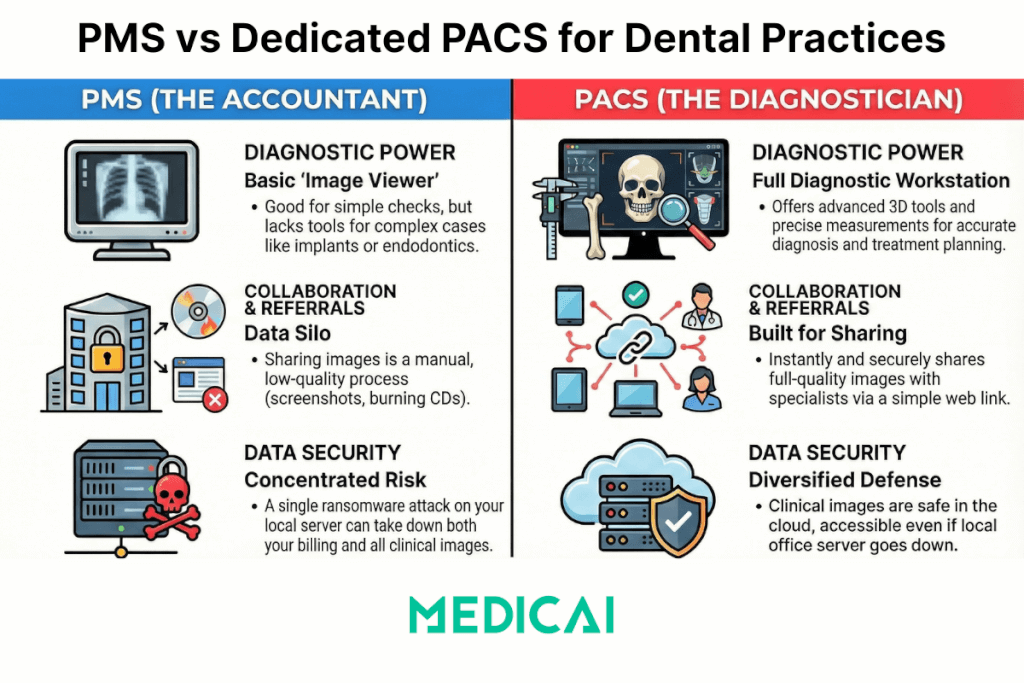
- The PMS (The Accountant): Its primary job is Revenue Cycle Management. It cares about CDT codes, insurance claims, and patient recall. The imaging module is often an afterthought—a basic “add-on” feature designed to store a file rather than analyze it.
- The Dedicated PACS (The Diagnostician): Its primary job is Clinical Fidelity. It is built on the DICOM standard and focuses on pixel depth, measurement accuracy, and interoperability.
When you force a PMS to do a PACS’s job, you run into three fatal flaws.
Flaw #1: The “Lite” Viewer (Diagnostic Ceilings)
Most PMS imaging modules are “image viewers,” not “diagnostic workstations.”
If you are just checking for a simple carious lesion on a bitewing, the PMS viewer is fine. But as you move into implantology, endodontics, or oral surgery, the toolset falls short.
What you miss without a Dedicated PACS:
- Advanced Diagnostic Tools: A dedicated Cloud PACS like Medicai offers server-side multi-planar reconstruction (MPR), true Hounsfield unit measurements, and advanced density mapping that basic PMS viewers lack.
- 3D Capability: Many PMS modules struggle with large CBCT volumes, so you end up launching a separate third-party app anyway. A PACS handles 2D and 3D natively in the same browser.
Flaw #2: The Data Silo (The Referral Problem)
Your PMS is designed to be a fortress. It keeps data in. This is great for billing, but terrible for clinical collaboration.
If you need to refer a patient to a Periodontist, how do you get the images out of your PMS?
- Do you take a screenshot? (Loss of diagnostic quality).
- Do you export a JPEG? (Loss of metadata).
- Do you burn a CD? (Loss of time).
The PACS Advantage: A dedicated PACS is built for interoperability. With a platform like Medicai, referring a patient isn’t a manual export process. You simply generate a secure, time-limited link. The specialist opens the full-quality DICOM study in their browser instantly. No “Bridging” headaches, no lost files.
Flaw #3: The Security Basket (Risk Concentration)
Ransomware targets dental practices aggressively.
If your images are stored on the same local server as your patient ledger (within the PMS database structure), a single breach can take down your entire business. You lose your schedule and your ability to see patients clinically.
The “Best-of-Breed” Defense: Separating your imaging data into a secure, cloud-native PACS diversifies your risk.
- Even if your local PMS server goes down or gets locked by ransomware, your clinical history is safe in the cloud.
- You can continue to view X-rays and treat emergency patients via a web browser on an iPad while IT restores your admin server.
The “Bridge” Strategy: You Don’t Have to Choose
The biggest myth is that you have to dump your PMS to get a better PACS.
You do not.
The industry standard solution is “Bridging.” You keep using Open Dental or Dentrix for the administrative work (Front Desk). But when you click the “X-Ray” button in the chart, instead of opening the inferior built-in viewer, the system “Bridges” (launches) the patient context in your Dedicated Web Viewer.
- Front Office: Stays in the PMS.
- Clinical Team: Works in the PACS.
- The Data: Stays synchronized but architecturally separate.
Why Medicai is the Clinical Upgrade You Need
Medicai is not a billing system. We don’t do scheduling. We do one thing perfectly: Medical Imaging.
We offer the “Best-of-Breed” imaging layer that sits on top of your existing practice management software.
- Universal VNA: We accept images from any sensor, freeing you from hardware lock-in.
- Cloud-First: We secure your data off-site with enterprise-grade encryption.
- Specialist Ready: We handle the heavy 3D files that choke standard PMS modules.
Don’t Settle for “Good Enough”
In 2025, the standard of care is shifting. Patients expect digital speed, and specialists expect high-fidelity data sharing.
Your Practice Management Software is the heart of your business, but it shouldn’t be the eyes of your clinical practice. By upgrading to a dedicated PACS, you unlock the advanced tools, security, and interoperability that modern dentistry demands.


Related Articles



Lets get in touch!
Learn more about how Medicai can help you strengthen your practice and improve your patients’ experience. Ready to start your Journey?
Book A Free Demo