Taming the CBCT Beast: Cloud Strategies for Implantology and Orthodontics

For the modern Oral Surgeon or Orthodontist, the CBCT (Cone Beam Computed Tomography) scan is the gold standard of diagnosis. It offers a window into anatomy that 2D X-rays simply cannot provide.
But it also comes with a heavy price tag—and I don’t just mean the cost of the machine.
I’m talking about the Data Tax. A single CBCT volume can range from 200 MB to over 600 MB. If you are doing Implant Planning or full-arch reconstructions, you are likely generating gigabytes of data every week.
For most specialty practices, this creates a “Data Beast” that crushes local servers, slows down networks, and makes remote treatment planning a nightmare.
This guide explores how cloud-native strategies can tame the CBCT beast, allowing you to view, share, and plan 3D cases from anywhere—without waiting for a download bar.
The Problem: Why Local Servers Fail the 3D Test
Most dental software was built for 2D bitewings (2 MB files). When you force massive 3D datasets into that same infrastructure, the cracks start to show.
The “Sneakernet” Bottleneck
If a referring dentist sends you a CBCT, how does it arrive? Usually on a physical CD or a USB drive carried by the patient. Or worse, a WeTransfer link that expires in 3 days. This manual data entry is slow, insecure, and unprofessional.
The Hardware Trap
To view these scans quickly, you often need a dedicated “High-Performance” workstation with an expensive graphics card in your office. The moment you try to open that scan on your laptop at home or on an iPad in a consult room, the performance tanks.
The Backup Nightmare
Backing up terabytes of CBCT data locally is risky. If your server crashes or gets hit by ransomware, your entire digital archive—and your legal protection—is gone.
The Cloud Solution: Streaming vs. Downloading
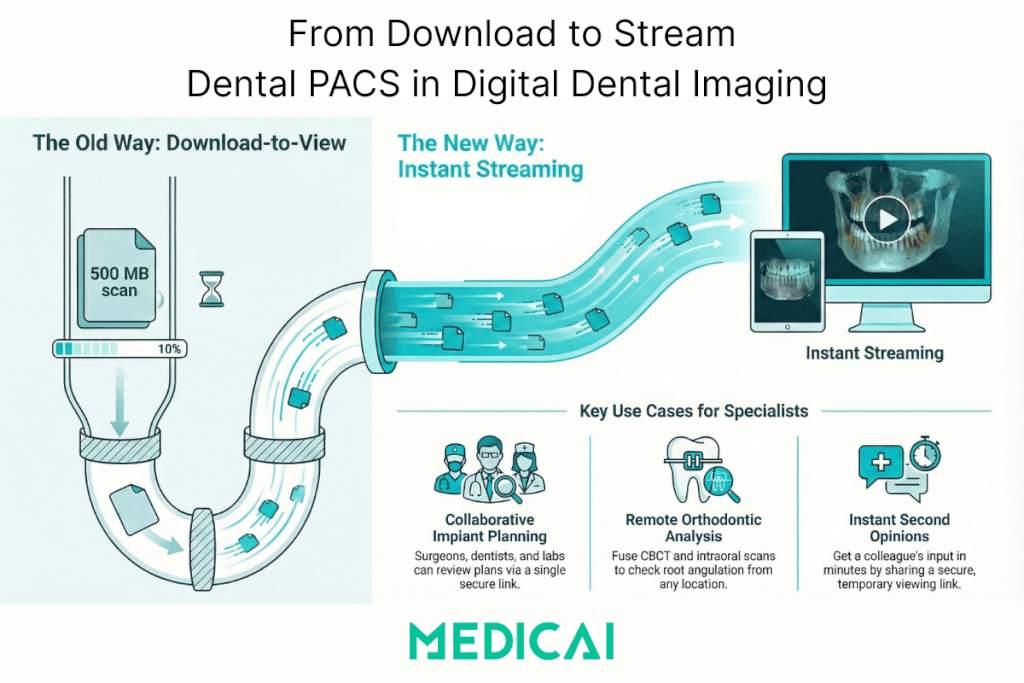
The old way of handling cloud data was simple storage: Upload to Dropbox, then Download to View.
For a 500 MB CBCT file, this “Download” step is a dealbreaker. You cannot wait 20 minutes to see a patient’s nerve canal.
The Solution is Streaming. Modern Cloud PACS platforms like Medicai use server-side rendering technology. Instead of downloading the whole file, the heavy processing happens on our powerful cloud GPUs. We stream the “video” of the scan to your device.
- Result: You can manipulate a massive 3D volume on a standard laptop or even a tablet, instantly. No download required.
Essential Use Cases for Specialists
Collaborative Implant Planning
Implantology is a team sport. The surgeon places the fixture, the restorative dentist places the crown, and the lab makes the guide.
- With Cloud: You can share CBCT and STL (intraoral) files via a single secure link. The restorative doctor can open the viewer, see the nerve position, and approve the plan through Dental PACS without needing expensive software installed.
Orthodontics & STL Fusion
Modern orthodontics relies heavily on fusing CBCT data with intraoral STL files to create digital setups.
- With Cloud: A cloud-native viewer can overlay these datasets, allowing you to check root angulation relative to the cortical plate from your home office before approving the aligner manufacturing.
Remote Second Opinions
When a complex pathology case comes in, you might want a colleague’s eye on it.
- With Cloud: Instead of burning a DVD and mailing it, you generate a secure, time-limited link. Your colleague opens the full 3D 3D Rendering in their browser, makes annotations, and sends it back in minutes.
Medicai: Built for Heavy Data
Medicai wasn’t built just for JPEGs. It was engineered for the “Heavy Data” of modern medicine.
- Format Agnostic: We handle DICOM, STL, OBJ, and PLY files natively.
- The Hybrid Edge: For clinics with slow internet, our Hybrid Edge technology keeps recent scans on a small local cache for LAN-speed viewing, while syncing everything to the cloud for safety.
- Vendor Neutral: We work with Carestream, Planmeca, Sirona, and Vatech. Your data is unified in a single viewer via VNA.
Stop Buying Hard Drives
You invested in a CBCT machine to see more. Don’t let your IT infrastructure limit what you can do with that vision.
By moving your CBCT storage and viewing to the cloud, you eliminate the hardware bottleneck. You gain the freedom to plan treatments from home, collaborate instantly with referring dentists, and scale your practice without worrying about server space.


Related Articles
Lets get in touch!
Learn more about how Medicai can help you strengthen your practice and improve your patients’ experience. Ready to start your Journey?
Book A Free Demo