PACS Workflow: RIS PACS Workflow Diagram, PACS Workflow Manager, Failures, KPIs, and Trends

PACS workflow is the digital backbone that moves imaging context from RIS and EHR systems into modality worklists, routes DICOM studies to the appropriate archive, and finally exposes them through the appropriate clinical access point.
PACS workflow keeps patient identities, accession numbers, and distribution rules aligned so clinicians can quickly find the right study, even when merges, updates, and unscheduled exams occur.
This guide breaks down PACS workflow in a workflow PACS system, including RIS PACS workflow, a RIS PACS workflow diagram you can reuse, and what a PACS workflow manager actually controls. You will see what breaks PACS workflow, what fixes PACS workflow, which KPIs prove PACS workflow is stable, and which trends are changing PACS workflow design.

What does PACS stand for, and what are the steps of a PACS system?
PACS stands for Picture Archiving and Communication System. The name describes the technology’s original purpose: a system for archiving medical images and communicating them across a clinical network without film. In modern deployments, PACS has expanded well beyond storage and retrieval into a full workflow orchestration layer that connects imaging departments, enterprise systems, remote readers, and clinical access points.
The steps of a PACS system follow a consistent sequence regardless of vendor, site size, or modality mix. Understanding this sequence is essential for identifying where workflow breaks and who owns the fix.
Step 1 — Order creation
An imaging order originates in the RIS, EHR, or HIS and generates the scheduling context that drives everything downstream. The order establishes the accession number, patient identifiers, procedure code, and priority level. Without a clean order, every downstream step starts with an identity deficit.
Step 2 — Worklist delivery
The modality worklist provider publishes scheduled exam items to acquisition devices. The modality pulls the worklist item and automatically pre-populates patient demographics and exam context. This step exists specifically to prevent manual demographic entry at the scanner — the single biggest source of patient identity mismatches in radiology operations.
Step 3 — Image acquisition
The modality acquires imaging data using the context loaded from the worklist. The acquired study inherits the patient and order identifiers established in steps one and two. Studies acquired without worklist context — emergency walk-ins, equipment failures, or worklist outages — create unscheduled acquisitions that require reconciliation before they can enter the clinical workflow.
Step 4 — DICOM transfer to archive
The modality sends DICOM objects to the PACS archive using the C-STORE operation. The PACS ingest layer receives objects, validates identifiers, and indexes the study to make it searchable. Studies that fail ingest validation land in an exceptions queue rather than the patient timeline — they are archived but invisible to clinical users until reconciled.
Step 5 — QA and routing
A QA workstation or automated routing layer reviews the ingested study, applies routing rules, and sends the study to the appropriate reading destination. Routing rules determine which radiologist pool, which site archive, and which external collaborators receive the study. Routing errors at this step create “missing study” complaints that are actually “wrong destination” events.
Step 6 — Interpretation and reporting
The radiologist reads the study, accesses priors through prefetch or on-demand retrieval, and generates a report. The PACS workflow layer supports this step by ensuring priors are available before reading begins, that the study is correctly identified in the worklist, and that report status updates flow back to the enterprise systems in real time.
Step 7 — Results distribution
The finalized report and study status return to the RIS, EHR, and referring systems via HL7 ORU messages or FHIR-based result delivery. The referring clinician accesses the study and report from inside the EHR chart. Distribution failures at this step are the most visible to clinical users — they appear as “report missing” or “images not loading in the chart” complaints.
These seven steps define the boundaries of the PACS workflow. Each step has a clear owner, defined inputs, and defined outputs. PACS workflow optimization means reducing failure rates at every handoff point, not improving any single step in isolation.
What is the PACS workflow in a workflow PACS system?
PACS workflow is the lifecycle that moves an imaging order from an acquired study to a searchable archive, and finally to clinical access points with the correct patient and encounter context. PACS workflow in a workflow PACS system covers orchestration, not interpretation.
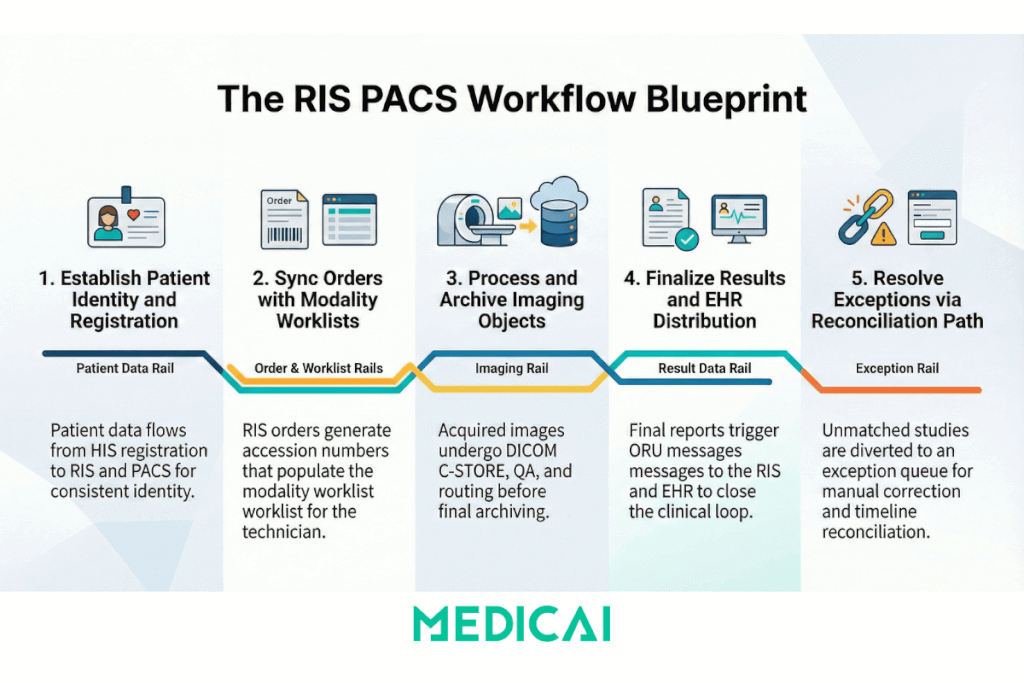
PACS workflow scope includes these workflow objects.
- Patient identity, MRN, encounter, merges, demographics updates
- Order identity, accession number, procedure code, scheduled time
- Worklist identity, modality worklist items that prevent manual typing
- Imaging object identity, study, series, instance identifiers
- Distribution identity, where the study becomes available, EHR launch, portal access, and external access
PACS workflow boundaries keep the page clean.
PACS workflow excludes diagnostic reading techniques and reporting content quality. The workflow includes routing, matching, visibility, and recoverability.
What systems participate in the PACS workflow?
PACS workflow spans RIS, EHR, modalities, PACS archive, viewer, and integration interfaces, and each handoff introduces a failure mode. PACS workflow improves when each system owns a clear job.
RIS role in PACS workflow
RIS owns the scheduling and order lifecycle. RIS creates the exam context, which serves as the “anchor” for matching images to the correct patient and visit.
EHR role in PACS workflow
EHR owns the chart context and enterprise identity. EHR launch behavior decides whether clinicians see a complete imaging timeline or a fragmented list.
HIS role in PACS workflow
The Hospital Information System (HIS) sits upstream of the RIS in many enterprise deployments and serves as the master source for patient registration, admission, discharge, and transfer events. In HIS-RIS-PACS environments, the patient identity that eventually anchors every imaging study originates in the HIS, flows into the RIS for scheduling enrichment, and then reaches the PACS through the ADT and order message chain.
HIS participation in PACS workflow matters in three specific scenarios.
- First, patient merges and demographic corrections initiated in the HIS must propagate downstream through the RIS and into the PACS archive — if the merge event stalls at any interface, the PACS builds a split imaging history under two patient records.
- Second, the HIS encounter context determines whether the PACS can correctly link a study to the correct visit when a patient has multiple concurrent admissions.
- Third, in facilities where the HIS generates the master patient index (MPI), the HIS identifier is the authoritative key for cross-system matching — any PACS integration that bypasses or mishandles the MPI identifier creates reconciliation debt that accumulates with every exam.
PACS workflow governance in HIS-RIS-PACS environments requires interface monitoring at both the HIS-to-RIS and RIS-to-PACS boundaries. A merge event that processes correctly in the HIS but fails to propagate through the RIS will appear in the PACS as a data integrity problem with no obvious upstream cause.
Modality role in PACS workflow
The modality worklist prevents manual demographic entry. Modality-acquisition metadata becomes part of the study’s identity.
PACS role in PACS workflow
PACS owns ingest, indexing, storage tiers, and distribution endpoints. PACS owns the “truth” about where imaging objects live and how they are retrieved.
Interface role in PACS workflow
Interface engines and routers move messages and imaging objects between systems. Interface monitoring decides whether failures get detected early or discovered by clinicians.
How does RIS PACS workflow work, from messages to worklists?
RIS PACS workflow works when clinical messaging creates exam context, modality worklists deliver that context to devices, and PACS stores studies under the same identifiers the RIS and EHR expect. RIS PACS workflow breaks when identity, order, or routing drift happens silently.
RIS PACS workflow relies on four rails that must stay aligned.
- Patient identity rail, demographic updates, and merges
- Order rail, orders, and scheduling updates
- Worklist rail, scheduled procedure context at acquisition time
- Result rail, report status, and delivery back to enterprise systems
Patient identity rail, ADT updates
Patient identity updates keep PACS matching stable when registration changes. Patient merges and demographic corrections require consistent downstream handling, or the archive builds duplicates and split histories.
Order rail, ORM events
Order events create the scheduled context that drives worklists and routing. Consistency of accession numbers matters because they serve as the reference key across systems.
Worklist rail, modality worklist
The modality worklist reduces manual entry. Manual entry creates the biggest spike in mismatches, duplicates, and “unmatched bucket” studies.
Imaging object rail, ingest, and indexing
Ingest and indexing attach imaging objects to a patient and an order. Indexing quality decides whether the search feels instant or unreliable.
Result rail, ORU results delivery
Result delivery keeps reports and statuses aligned with the study. Result delivery failures cause downstream confusion, delayed billing triggers, and “report missing” escalations.
RIS PACS workflow diagram
RIS PACS workflow diagram shows three rails: patient identity rail, order rail, and imaging object rail, and PACS workflow succeeds when the rails stay aligned. The clarity of the RIS PACS workflow diagram prevents teams from blaming the wrong system.
Scheduled imaging path
Patient identity rail
- EHR or HIS creates patient identity.
- ADT updates flow to RIS and downstream systems.
Order rail
- RIS creates the imaging order.
- Order context includes patient identifiers, accession number, and procedure context.
Worklist rail
- The modality worklist provider publishes scheduled items.
- Modality pulls the worklist item to avoid manual demographics.
Imaging object rail
- Modality acquires images using a scheduled context.
- Modality sends imaging objects to PACS.
- PACS indexes the study under the same identifiers.
Result rail
- The reporting system finalizes results.
- Results messages flow back to RIS and EHR.
- The EHR chart shows study access plus report status.
Unscheduled imaging and reconciliation path
Trigger
Unscheduled acquisition occurs, or identifiers do not match the order context.
PACS landing behavior
PACS places the study in an exceptions queue or an unmatched bucket.
Reconciliation behavior
Reconciliation maps the study to the correct patient identity and the correct order context.
Outcome
PACS publishes the study into the correct patient timeline, and EHR launch works again.
What is a PACS workflow manager?
A PACS workflow manager is the control layer that applies routing rules, manages worklists, prefetches priors, and handles exceptions so studies arrive at the right destination at the right time. PACS workflow manager scope stays operational, not clinical.
PACS workflow manager responsibilities fall into five groups.
- Routing rules and destinations
- Worklist logic and prioritization
- Prefetch logic for priors availability
- Exception handling and reconciliation
- Audit and observability for failures and retries
Routing rules
Routing rules determine where studies are routed based on site, modality, department, and service agreements. Routing rules prevent “wrong destination” events that appear to be missing studies.
Worklist logic
Worklist logic keeps acquisition aligned to scheduling. Worklist prioritization reduces backlog in time-sensitive service lines without changing clinical interpretation.
Prefetch logic
Prefetch logic pulls priors when a new order appears or a new study lands. Prefetch logic reduces “priors missing at open” friction, especially in multi-site networks.
Exception handling
Exception handling routes unmatched studies into a controlled process. Exception handling needs ownership, queue visibility, and time targets, or exceptions become permanent debt.
Audit and observability
Audit and observability surface failed messages, failed transfers, and mismatch rates. Observability reduces “someone noticed” monitoring and replaces it with measurable signals.
Which standards and profiles keep PACS workflow stable?
PACS workflow stability depends on DICOM for imaging objects, HL7 for clinical context, and IHE workflow profiles for predictable cross-vendor behavior. PACS workflow stability comes from consistent implementation, not from standard names in a brochure.
DICOM supports imaging workflow transport and identity
DICOM supports storage and retrieval patterns for imaging objects. DICOM supports modality worklist in many environments.
HL7 supports order, identity, and results context
HL7 supports patient identity updates and order lifecycle context. HL7 supports the delivery of results back to enterprise systems.
IHE profiles reduce “custom interface” drift
IHE Scheduled Workflow aligns the behaviors for orders, worklists, acquisition, and archiving. IHE Patient Information Reconciliation supports controlled fixes for mismatches and merges.
What breaks PACS workflow, and what fixes it?
PACS workflow breaks in predictable ways, identity drift, order drift, routing drift, and silent interface failures. PACS workflow repair requires ownership, monitoring, and repeatable remediation steps.
Denial-to-fix list
Problem: Duplicate patient or merge event
Fix: Patient identity update handling, merge processing, daily reconciliation, named exception queue owner
Problem: Orphan study with no order context
Fix: Reconciliation process, hold bucket rules, resolution SLA, documented escalation path
Problem: Manual demographics at modality
Fix: Modality worklist enforcement, interface health checks, stop-the-line policy for sustained worklist outages
Problem: Results stuck outside the chart
Fix: Results message monitoring, acknowledgement retry rules, queue alerts, and clear ownership between RIS, interface engine, and EHR team
Problem: Priors missing at point of care
Fix: Prefetch rules tied to order events, federated query strategy when multiple archives exist, and caching for remote sites
Problem: Routing loops or wrong destination
Fix: Rule versioning, dry-run testing, rollback rules, and audit log review after changes
Problem: Silent interface degradation
Fix: Latency thresholds, failure-rate alerts, dashboard for message queues, weekly review of exception trends
Which KPIs prove PACS workflow is working?
PACS workflow KPIs measure exception rate, identity match rate, interface latency, and priors availability, not vague “efficiency.” PACS workflow KPIs create a shared language between imaging operations and IT.
KPI 1, auto-match rate
Auto-match rate measures the percentage of studies that match the correct patient and order without manual intervention.
KPI 2, exception backlog
The exception backlog measures the count and age of unresolved studies. Exception backlog age matters more than raw count.
KPI 3, message latency
Message latency measures the time from order events to worklist availability. Message latency tracking identifies bottlenecks before clinicians complain.
KPI 4, retrieval latency for priors
Retrieval latency measures the time to open priors from a chart launch. Retrieval latency needs peak-hour measurement, not off-hours screenshots.
KPI 5, results delivery success rate
The results delivery success rate measures the percentage of report statuses delivered and acknowledged within the operations SLA.
KPI 6, mismatch rate by source
Mismatch rate by source identifies whether errors originate at registration, scheduling, modality entry, or interface translation.
What emerging trends change PACS workflow design?
PACS workflow trends push workflow control into unified worklists, API-first access, and automation layers that sit above single-vendor archives. PACS workflow trends change procurement language and operational expectations.
Trend 1, unified worklist overlays
Unified worklist overlays help in multi-PACS environments. Unified worklist overlays reduce operational silos by providing a single control plane for routing and exceptions.
Trend 2, DICOMweb endpoints for workflow access
DICOMweb endpoints support web viewers and cross-site access patterns. DICOMweb endpoints reduce dependence on workstation-bound workflows and simplify controlled distribution.
Trend 3, FHIR context for chart-native launch
FHIR context improves chart launch behavior and reduces the need for custom glue code. FHIR context supports consistent patient-context access patterns for apps and portals.
Trend 4, automation for triage and routing
AI in PACS workflow is not a single feature — it is a layer that sits between image acquisition and radiologist interpretation, changing how studies are prioritized, routed, and flagged before a human reads them. The operational value of AI in PACS workflow depends entirely on the quality of the identity and metadata infrastructure underneath it. AI triage that runs on studies with mismatched accession numbers, wrong patient demographics, or incorrect modality metadata produces outputs that cannot be trusted and creates more reconciliation work, not less.
AI-driven worklist prioritization
AI algorithms analyze incoming studies and assign priority scores based on clinical urgency signals — detecting a suspected intracranial hemorrhage, a pneumothorax, or a pulmonary embolism finding and moving that study to the top of the radiologist’s worklist without waiting for a manual triage review. For this to work within the PACS workflow, the AI output must integrate with the PACS worklist management layer or the PACS workflow manager — not just flag a finding in a separate dashboard. AI triage that surfaces in a secondary tool outside the reading workflow adds cognitive load rather than reducing it.
AI outputs as DICOM objects in the archive
AI results — segmentation masks, measurement annotations, probability scores, and structured findings — need to be stored as DICOM Secondary Capture objects or DICOM Structured Reports and attached to the originating study in the archive. This keeps the AI output co-located with the imaging data, ensures it is accessible from any standards-compliant viewer, and creates an auditable record of what the AI detected and when. AI outputs that exist only in a vendor’s proprietary database and cannot be exported as DICOM are a vendor lock-in risk embedded directly into the diagnostic chain.
Metadata quality as an AI prerequisite
AI model accuracy in clinical deployment is directly correlated with the consistency of the imaging metadata the model receives. Models trained on clean, well-structured DICOM datasets from controlled environments frequently underperform in production environments where series descriptions are inconsistent, study types are mislabeled, or patient demographics are entered manually. PACS workflow governance — specifically, the worklist enforcement, identity matching, and ingest validation disciplines described earlier in this guide — is therefore a prerequisite for reliable AI outputs, not a separate operational concern. Sites that invest in AI before fixing their metadata quality will see AI performance degrade in proportion to their exception backlog.
Trend 5, cloud gateway patterns for resilience
Cloud gateway patterns support resilient transfer, prefetch, and caching. Cloud gateway patterns reduce the blast radius of a single site outage.
Trend 6, security hardening as a workflow requirement
Security controls shape workflow design because access expands as integrations are added. Audit logging and least-privilege roles reduce risk without breaking operations.


Related Articles



Lets get in touch!
Learn more about how Medicai can help you strengthen your practice and improve your patients’ experience. Ready to start your Journey?
Book A Free Demo