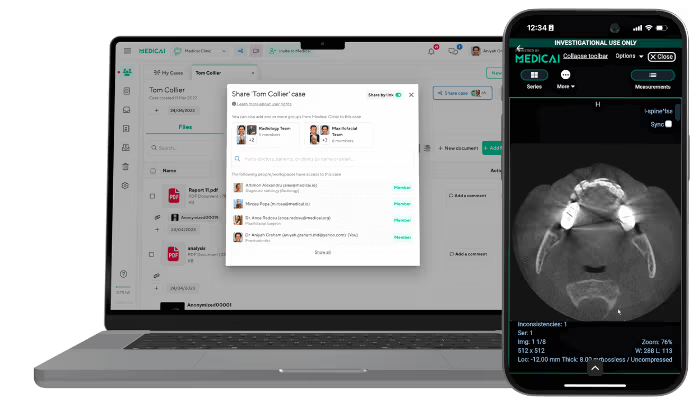
What is DICOMweb? QIDO-RS, WADO-RS, and STOW-RS explained

DICOMweb is DICOM’s web-native set of services: a family of RESTful web services defined in DICOM PS3.18 that makes medical imaging data accessible over standard HTTP. DICOMweb does not change the DICOM image format or the metadata model. It offers a web-based alternative to DIMSE, the original DICOM network protocol defined in PS3.7 and PS3.8, which was built for fixed connections between known systems inside a hospital network and fits poorly with cloud infrastructure, browser-based viewers, and AI pipelines.
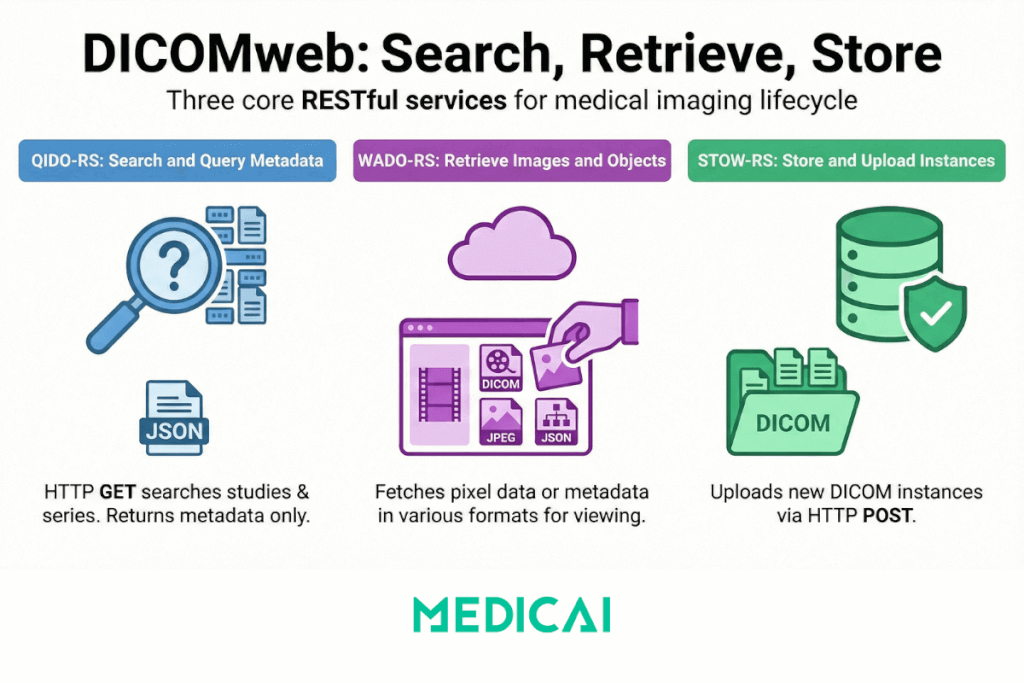
The three core DICOMweb services cover the full imaging data cycle. QIDO-RS queries for studies, series, and instances by returning JSON metadata without transferring pixel data. WADO-RS retrieves pixel data and metadata at the study, series, or instance level and streams them directly to the requesting client over HTTPS. STOW-RS stores DICOM instances to a remote system via HTTP POST, with no Application Entity pre-registration required on either side. UPS-RS, part of the Worklist Service, extends DICOMweb into workflow management, offering a RESTful option for the scheduling and procedure-step tasks that Modality Worklist and MPPS handle over DIMSE. The RESTful services were added to DICOM through a series of supplements from 2011 onward, starting with WADO-RS (Supplement 161), and are now consolidated in DICOM PS3.18.
DICOMweb is one of four layers in the imaging standards stack. DICOM defines the image format. HL7 V2 handles ordering and results messaging. HL7 FHIR provides cross-system API interoperability. DICOMweb is the transport that moves DICOM-format data between those systems over the web. Medicai’s cloud PACS and zero-footprint viewer use DICOMweb, including QIDO-RS to populate study lists and WADO-RS to stream images.
What DICOMweb is — and where it sits in the standards stack
DICOMweb is a family of RESTful services defined in DICOM Part 18. It is not a separate standard from DICOM. It is DICOM’s web-native set of services, published alongside the original DIMSE services rather than superseding them. What it changes is not the data format or the meaning of the information, but how that data moves between systems.
The imaging standards stack that most modern radiology environments run on has four layers.
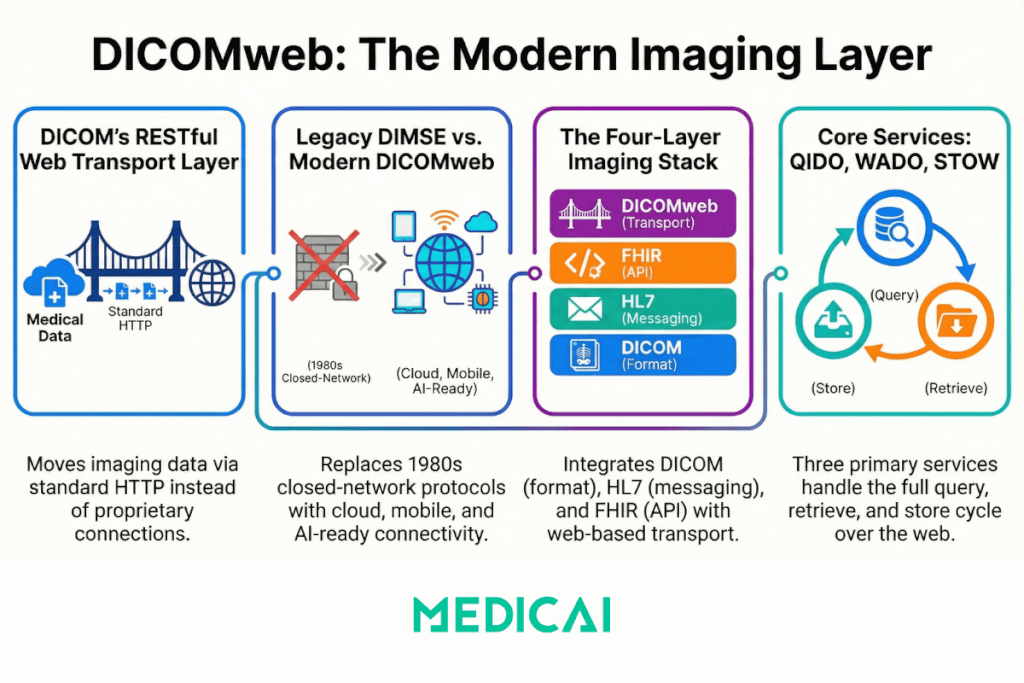
DICOM defines the image format and the metadata structure—the .dcm file and the tags within it. HL7 V2 handles the ordering and results messaging that connects RIS, EHR, and PACS — ORM, ORU, and ADT.
HL7 FHIR provides the API interoperability layer for cross-system data exchange and patient-facing applications.
DICOMweb is the layer that makes DICOM-format imaging data accessible via standard HTTP, so any HTTP client can do over the web what DIMSE connections do inside the hospital network.
DICOM’s network services were defined in the early 1990s (DICOM 3.0 was published in 1993), when the dominant networking model was persistent connections among known, pre-configured systems within a closed hospital network. That model served its purpose for three decades. It does not map onto cloud infrastructure, browser-based viewers, mobile access, or AI pipelines. DICOMweb was defined to solve that mismatch: same data, same format, same metadata semantics — accessible via the web services model everything else in modern IT runs on.
DICOMweb took shape through a series of supplements: WADO-RS (Supplement 161), STOW-RS (Supplement 163), and QIDO-RS (Supplement 166), developed from 2011, followed by UPS-RS (Supplement 171) and RESTful rendering (Supplement 174). They built on the original WADO web service from 2003 (Supplement 85) and are now consolidated in PS3.18. The three core services — QIDO-RS (query), WADO-RS (retrieve), and STOW-RS (store) — together cover the full read/write cycle for imaging data over HTTP. A fourth service, UPS-RS (Unified Procedure Step over REST), extends DICOMweb into workflow management, covering the same pre-acquisition scheduling that DICOM Modality Worklist handles over DIMSE.
How DICOMweb is organized in the standard today
PS3.18 groups DICOMweb into services, each made up of transactions. The Studies Service covers the Search (QIDO-RS), Retrieve (WADO-RS), and Store (STOW-RS) transactions. The Worklist Service covers UPS-RS. PS3.18 also defines a Non-Patient Instance Service for objects not tied to a patient, a URI Service for the older WADO-URI, a Retrieve Capabilities transaction that describes what a server supports, and notifications. Vendor documentation may use either the familiar QIDO-RS, WADO-RS, and STOW-RS names or the standard’s service and transaction names, so it helps to recognize both.
DIMSE and DICOMweb: How They Compare
Understanding DICOMweb starts with DIMSE, the original DICOM network protocol it complements. DIMSE — DICOM Message Service Element — is the original DICOM service model. It defines how DICOM systems communicate over persistent TCP/IP connections using a DICOM-specific request-response protocol. Every DIMSE operation assumes both endpoints are pre-configured DICOM Application Entities (AEs) that know each other by name.
The DIMSE services that appear throughout the radiology workflow map directly to DICOMweb equivalents:
| DIMSE service | DICOMweb equivalent | Function | Key difference |
|---|---|---|---|
| C-FIND | QIDO-RS | Query for matching studies/series/instances | DIMSE requires AE pre-registration; QIDO-RS requires only HTTP auth and a URL |
| C-MOVE | WADO-RS | Retrieve image data | C-MOVE pushes to a third AE the client designates; WADO-RS streams directly to the requester |
| C-GET | WADO-RS | Retrieve image data directly | C-GET requires the client to act as an SCP (server); WADO-RS requires only HTTP client capability |
| C-STORE | STOW-RS | Store DICOM instances to a remote system | C-STORE requires a pre-established association; STOW-RS is a stateless HTTP POST |
| C-ECHO | No direct equivalent | Connectivity verification | C-ECHO is a DICOM-level ping. DICOMweb has no echo transaction; the Retrieve Capabilities transaction (HTTP OPTIONS) describes what a server supports, and connectivity is checked with standard HTTP requests. |
| N-CREATE / N-SET (MPPS) | UPS-RS | Procedure step management | UPS-RS (Worklist Service) offers RESTful worklist and procedure-step management, covering use cases that Modality Worklist and MPPS handle over DIMSE |
Three DIMSE limitations that DICOMweb directly resolves are worth naming explicitly, as they explain why cloud PACS and web viewers are much harder to build on DIMSE alone.
AE Title pre-registration
Every DIMSE operation requires both the calling and called Application Entity to be statically configured in advance. A new system added to the network — a viewer workstation, a cloud node, an AI server — must be registered in every PACS and archive it needs to communicate with before it can send or receive a single message. DICOMweb replaces AE Title negotiation with standard HTTP authentication. Any system with valid credentials and a network path to the HTTPS endpoint can participate immediately.
The C-MOVE three-party problem
DIMSE study retrieval works by having the client send a C-MOVE request to the archive, instructing it to push the images to a third AE — the client’s own storage SCP. This requires the client to be running a DICOM storage server that listens on a network port. If the receiving AE is a browser or a cloud function, this is impossible. WADO-RS eliminates the third party entirely: the client requests the images, the server streams them directly to the requester over the same HTTP connection.
Firewall traversal
DIMSE uses non-standard TCP ports and persistent connection associations that require specific inbound firewall rules for every communicating pair. In a cloud or teleradiology context, this means VPN tunnels, port-forwarding rules, and network engineering effort for every new connection. DICOMweb uses port 443 HTTPS — the same port as every other web application, already open in virtually every network — and stateless requests that require no persistent connection.
The three DICOMweb services: QIDO-RS, WADO-RS, and STOW-RS
Each DICOMweb service covers one operation in the imaging data lifecycle. QIDO-RS finds data. WADO-RS retrieves it. STOW-RS stores it. Together, they cover everything DIMSE C-FIND, C-MOVE, C-GET, and C-STORE provide, with the addition of returning structured JSON metadata alongside or instead of raw DICOM binary.
QIDO-RS — Query based on ID for DICOM Objects
What it does: QIDO-RS is a search service. It accepts HTTP GET requests with query parameters and returns JSON metadata about matching DICOM studies, series, or instances. No pixel data moves in a QIDO-RS response — only metadata.
The URL structure reflects the DICOM information model hierarchy. A study-level query searches across all studies. A query at the series level searches within a specified study. A query at the instance level searches within a specified series. The three resource URLs follow this pattern:
{base}/studies?PatientID=MRN123&StudyDate=20250210&ModalitiesInStudy=CT
{base}/studies/{studyUID}/series
{base}/studies/{studyUID}/series/{seriesUID}/instances
The response is typically a JSON array (an XML format is also defined) where each element is a DICOM dataset represented as JSON — attributes keyed by DICOM tag number, with values encoded according to the DICOM JSON Model. This is the same metadata that lives in DICOM file headers, delivered in a format any web developer can parse without a DICOM library.
Operational use case
Every worklist or study list in a DICOMweb-enabled viewer — the list of today’s unread studies, the prior study search panel, the patient timeline — is driven by QIDO-RS queries. When a radiologist opens a PACS web interface and sees their worklist load, a QIDO-RS call has retrieved the study metadata. When they search for a patient’s prior CTs, another QIDO-RS call filters by patient ID and modality. No images transfer until the radiologist actually opens a study.
What to verify in conformance statements
QIDO-RS conformance must specify which resource levels are supported (studies, series, instances), which DICOM attributes can be used as query parameters (the standard defines a required set at each level: at the study level these include Patient ID, Patient Name, Study Date, Accession Number, Modalities In Study, and Study Instance UID; at the series level, Modality and Series Instance UID; at the instance level, SOP Instance UID), and which attributes are included in the response. Systems that return sparse metadata — for example, omitting Accession Number or Study Description — create downstream display problems in viewers that rely on those fields to populate the worklist.
WADO-RS — Web Access to DICOM Objects by RESTful Services
What it does: WADO-RS is a retrieval service. It accepts HTTP GET requests and returns pixel data, metadata, or both. It is the service that actually moves images from the archive to the viewer.
WADO-RS exposes three retrieval resources: a study (all instances), a series (all instances within a series), or a single instance. A metadata sub-resource on each returns DICOM JSON metadata without pixel data — useful when the viewer needs header information but not yet the images:
{base}/studies/{studyUID} — all instances
{base}/studies/{studyUID}/series/{seriesUID} — series
{base}/studies/{studyUID}/series/{seriesUID}/instances/{sopUID} — one instance
{base}/studies/{studyUID}/metadata — JSON metadata only{base}/studies/{studyUID}/series/{seriesUID}/instances/{sopUID}/rendered [colon] rendered image (JPEG or PNG)
The response format is controlled by the HTTP Accept header. Native DICOM instances come back as multipart DICOM, metadata as DICOM JSON, and pixel data as bulk data or individual frames, which can be in compressed formats such as JPEG or JPEG 2000. For simple display, WADO-RS also defines rendered resources (/rendered) and thumbnails, which return consumer formats such as JPEG or PNG that a browser can show directly. Most browsers cannot display JPEG 2000 natively, so viewers that work with it use a JavaScript decoder. A downstream system processing raw DICOM data requests multipart DICOM.
WADO-RS versus WADO-URI. WADO-URI is the older, non-RESTful predecessor to WADO-RS. It retrieves a single instance via a URI query string (?requestType=WADO&studyUID=…&seriesUID=…&objectUID=…), either as the original DICOM file or as a rendered image such as JPEG. WADO-URI is still encountered in legacy systems. WADO-URI remains part of the standard (the URI Service), but WADO-RS supports all resource levels and more formats, and is what most DICOMweb conformance claims refer to. When evaluating a system, verify whether WADO-RS or only WADO-URI is implemented.
Transfer syntax and transcoding. The format in which pixel data is stored in the archive — the DICOM transfer syntax — may differ from the format the client can render. A CT stored as JPEG 2000 lossless needs to be transcoded to JPEG or rendered via a JavaScript DICOM decoder before a browser can display it. A DICOMweb server that supports on-the-fly transcoding handles this transparently. A server that does not transcode requires the viewer to include a client-side DICOM decoder library (OHIF and similar open-source viewers do this). Transcoding support — and which transfer syntaxes are supported in each direction — must be documented in the conformance statement.
Operational use case: When a radiologist opens a study in a zero-footprint viewer, the viewer first sends a WADO-RS request for the series metadata (to populate the thumbnail panel and sequence the series), then progressively sends WADO-RS requests for instance pixel data as the radiologist scrolls. A CT with 500 axial slices does not load all 500 images before display — the viewer requests the current slice and buffers adjacent slices, driven by WADO-RS instance-level requests against the series.
STOW-RS — Store Over the Web by RESTful Services
What it does: STOW-RS is a store service. It accepts HTTP POST requests containing one or more DICOM instances and persists them to the server. It is the write half of the DICOMweb protocol — the equivalent of DIMSE C-STORE, without the AE pre-registration requirement.
A STOW-RS request sends DICOM instances as a multipart HTTP body to a studies endpoint:
POST {base}/studies
Content-Type: multipart/related; type=”application/dicom”
[multipart body: one or more DICOM instances]
The server response confirms which instances were stored successfully and which failed, and provides a reason for each rejected instance. A partial success — some instances stored, some rejected — is a valid STOW-RS response, which matters for error handling: the client must inspect the response and retry or alert on any rejected instances rather than assuming all-or-nothing success.
Operational use cases: STOW-RS covers three distinct write scenarios in the imaging workflow. First, direct modality upload: a DICOMweb-native modality or imaging gateway posts newly acquired instances directly to a cloud PACS STOW-RS endpoint without requiring DIMSE configuration. Second, AI result ingestion: an AI model that has processed a study posts its output — annotated images, secondary capture instances, structured report objects — back to the PACS archive via STOW-RS. Third, study import: an external imaging system, patient portal upload, or CD digitization workflow sends studies to the archive via HTTP POST, with no DICOM AE configuration on either side.
Authentication on STOW-RS DICOM does not define an authentication method for DICOMweb; PS3.18 leaves security to implementers. Most implementations use OAuth 2.0 and OpenID Connect for all DICOMweb services, including STOW-RS. The absence of AE Title negotiation means that authentication — who is authorized to write what — must be enforced at the HTTP layer through proper OAuth scopes and access control policies. A STOW-RS endpoint that accepts unauthenticated POST requests has no equivalent of DIMSE’s AE allow-list, which was itself a weak security control but provided some perimeter protection. Standard web authentication can be considerably stronger, but only when implemented correctly.
What DICOMweb enables that DIMSE cannot
The significance of DICOMweb is not the protocol mechanics — it is what those mechanics make possible at the architectural level. Four capabilities that either do not exist or require significant engineering workarounds under DIMSE are native to DICOMweb.
Zero-footprint clinical viewing
A DIMSE-based viewer requires local DICOM client software: a thick-client application installed on a workstation, configured with AE Title credentials, and connected to the PACS via VPN or a direct network link. The viewer is a DICOM Application Entity. The workstation is registered in the PACS. A radiologist at a remote location needs a VPN, an installed application, and IT-provisioned credentials for every archive they need to access.
A DICOMweb viewer is a web application. The browser calls QIDO-RS to populate the worklist, WADO-RS to retrieve images, and renders them using JavaScript. The radiologist needs only a browser and HTTPS credentials. The reading workstation is not a DICOM AE — it is an HTTPS client. This is the architectural foundation of teleradiology at scale, of reading from home, and of consultant access from outside the institution.
Zero-footprint viewing was possible in limited forms before DICOMweb — WADO-URI enabled single-image JPEG retrieval in browsers — but full diagnostic reading with series navigation, multi-planar reconstruction, and window/level adjustment over a pure browser interface requires WADO-RS. The generation of clinically capable web viewers (OHIF, Cornerstone, and derivatives) is built on DICOMweb, specifically on WADO-RS’s ability to stream pixel data at multiple resource levels with appropriate transfer syntax negotiation.
Cloud PACS architecture
A DIMSE-based PACS is a closed network node. Its storage and retrieval services are accessible only to DICOM Application Entities configured to communicate with it, which, in practice, means systems on the same network segment or connected via dedicated tunnels. Scaling a DIMSE-based PACS horizontally — adding compute nodes to handle higher load — requires each node to be a registered DICOM AE, which reintroduces the pre-registration problem for every client that might reach any node.
A DICOMweb PACS is a standard HTTPS service. It can be hosted in any cloud provider with no infrastructure assumptions beyond a stable URL and a TLS certificate. Any client with credentials can reach it from anywhere. Horizontal scaling is handled at the load balancer level, invisible to clients, because each DICOMweb request is stateless. There is no connection association to maintain across requests, no AE session to preserve. This is why cloud PACS architectures rely on DICOMweb for access, while DIMSE gateways often remain at the edge to connect existing modalities. The data format and the metadata model remain DICOM; the access model changes.
AI pipeline integration
An AI model that needs to access imaging data for training or inference under a DIMSE model must be configured as a DICOM AE — or must go through a DICOM gateway that translates between DIMSE and whatever interface the AI system actually uses. Every new AI application requires a registered AE, a network path to the PACS, and a DIMSE service configuration. In a large institution running multiple AI applications across multiple PACS nodes, this becomes a configuration management problem at scale.
A DICOMweb-enabled PACS exposes imaging data as HTTP resources. An AI pipeline queries for relevant studies using QIDO-RS, retrieves pixel data using WADO-RS, processes it, and posts the results back using STOW-RS. The AI system is an HTTP client. No DICOM AE configuration is required. The same credentials and endpoint URL that a viewer uses are used by the AI pipeline. New AI applications are added by provisioning credentials, not by configuring DICOM associations. This is why the growing market of PACS-integrated AI applications depends on DICOMweb adoption as a prerequisite.
FHIR linkage and cross-system access
The HL7 FHIR ImagingStudy resource carries DICOMweb endpoint URLs as part of its data model. Specifically, the series.endpoint and endpoint fields in an ImagingStudy resource reference WADO-RS URLs that resolve to the actual imaging data. When an EHR retrieves a FHIR ImagingStudy resource for a patient and wants to display the images, it follows those WADO-RS references. The FHIR administrative record and the DICOM imaging data are linked by DICOMweb URLs.
This integration is what closes the loop between the clinical record and the images in a FHIR-native architecture. A referring physician viewing a patient encounter in an EHR can open imaging directly from the FHIR ImagingStudy resource — not by launching a separate PACS viewer with separate credentials, but by following a WADO-RS URL from within the EHR’s own interface. That capability requires the PACS to expose a DICOMweb endpoint that the EHR can reach.
Evaluating DICOMweb support: what conformance actually means
The phrase “supports DICOMweb” in a vendor data sheet is not a conformance claim — it is a marketing statement. The gap between partial DICOMweb implementation and the full service coverage required for clinical workflows is significant. Four areas to evaluate in conformance statements and procurement conversations.
Service and resource level coverage
Each DICOMweb service (QIDO-RS, WADO-RS, STOW-RS) must be verified independently, and within each service, which resource levels are supported — study, series, and instance. A system that supports QIDO-RS at the study level but not the series or instance level cannot support the series-level navigation a viewer requires. A system that supports WADO-RS but only at the study level — returning all instances in a study as a bulk download — cannot support progressive instance-by-instance streaming.
DICOM Conformance Statements must document which services and resource levels are supported. Any system claiming DICOMweb conformance that cannot produce a Conformance Statement documenting this should be treated as unverified. For a step-by-step guide to reading these documents, see our guide to reading a DICOM conformance statement.
Media types and transfer syntax support
WADO-RS response format is negotiated via the HTTP Accept header. A WADO-RS server can return native DICOM, DICOM JSON metadata, bulk data and frames in its supported transfer syntaxes, and rendered images. A server that only returns rendered JPEG forces the client to use lossy images regardless of clinical requirements. A server that cannot return DICOM JSON metadata forces the client to parse raw DICOM binary headers for metadata.
For zero-footprint viewers, the critical question is whether the server supports on-the-fly transcoding — converting from the stored transfer syntax to the requested format. A server that stores JPEG 2000 lossless and can return JPEG on demand allows the browser to render images without a client-side DICOM decoder. One that cannot transcode shifts the decoding burden to JavaScript running in the browser, adding latency and requiring a larger client-side library.
Authentication and authorization model
DICOMweb services typically use standard web authentication: OAuth 2.0 for authorization and OpenID Connect for identity. The standard itself does not mandate a method (PS3.18 Section 8.11), so check what each vendor implements.. This means DICOMweb access should integrate with the institution’s existing identity provider: Active Directory via SAML, Okta, Azure AD, or any OAuth 2.0-compatible IdP. Verify that the DICOMweb server supports OAuth 2.0 token validation and that scopes are defined granularly enough to distinguish read access (QIDO-RS and WADO-RS) from write access (STOW-RS).
Systems that implement DICOMweb endpoints with proprietary authentication schemes — API keys, custom header tokens, or basic auth only — are not interoperable with FHIR Smart App Launch or with standard EHR integration patterns. This matters if the deployment goal includes EHR-embedded viewing or cross-enterprise imaging access.
UPS-RS for workflow management
Unified Procedure Step over REST (UPS-RS) extends DICOMweb into workflow management. It covers the use cases that DICOM Modality Worklist and MPPS cover over DIMSE — pre-acquisition scheduling queries and acquisition completion signals — but via HTTP rather than DIMSE C-FIND and N-CREATE/N-SET. UPS-RS is the DICOMweb option for worklist and procedure-step workflows.
In a fully DICOMweb-native environment — cloud PACS, web-connected modalities, no DIMSE infrastructure — UPS-RS handles the scheduling side of the workflow that MWL handles in traditional environments. UPS-RS support remains uneven across vendors, so hybrid environments running DIMSE Modality Worklist for scheduling and DICOMweb for storage and retrieval remain common. Verify specifically whether UPS-RS is in the conformance statement if the deployment includes DICOMweb-native modalities.
Related Guides
- DICOM Modality Worklist: how scanners query the RIS for scheduled exams over DIMSE, the workflow that UPS-RS covers in DICOMweb.
- How to read a DICOM conformance statement: how to check which DICOMweb services, resource levels, and media types a vendor supports.
- FHIR vs HL7: how FHIR ImagingStudy resources point to WADO-RS endpoints, linking the clinical record to the images.
- Vendor neutral archive: why a DICOMweb interface makes a VNA easier for any viewer or system to query and retrieve from.
- PACS interoperability: how DICOM, DICOMweb, HL7, and IHE profiles work together, including cross-enterprise image sharing.
- What is DICOM: the file format and data model that DICOMweb carries.
Sources
Facts in this guide are based on the official DICOM Standard, published by NEMA and freely available at dicomstandard.org (https://www.dicomstandard.org/).
- DICOM PS3.18 2026d, Web Services: the Studies Service (Search, Retrieve, and Store transactions), the Worklist Service (UPS-RS), the URI Service (WADO-URI), rendered resources, and security and privacy (Section 8.11). https://dicom.nema.org/medical/dicom/current/output/html/part18.html
- DICOM PS3.1 2026d, Introduction and Overview: the DICOM communication model, including DIMSE, web services, and the history of the Standard. https://dicom.nema.org/medical/dicom/current/output/html/part01.html
- DICOM Supplement 163, STOW-RS: https://www.dicomstandard.org/News-dir/ftsup/docs/sups/sup163.pdf
- DICOM Supplement 166, QIDO-RS: https://www.dicomstandard.org/News-dir/ftsup/docs/sups/sup166.pdf


Related Articles

Lets get in touch!
Learn more about how Medicai can help you strengthen your practice and improve your patients’ experience. Ready to start your Journey?
Book A Free Demo