Enterprise Imaging Architecture: How PACS, VNA, RIS, and EHR Fit Together

Enterprise imaging architecture is the technical framework that defines how all imaging systems in a healthcare organization — PACS, VNA, RIS, EHR, modalities, and AI tools — connect, exchange data, and maintain a single patient imaging record across departments, facilities, and care settings. A joint HIMSS-SIIM workgroup defines enterprise imaging as “a set of strategies, initiatives, and workflows implemented across a healthcare enterprise to consistently and optimally capture, index, manage, store, distribute, view, exchange, and analyze all clinical imaging and multimedia content to enhance the electronic health record.”
Understanding the architecture behind this definition is not an abstract IT exercise. Every clinical delay caused by a missing prior study, every billing denial triggered by an accession number mismatch, and every duplicate scan ordered because a prior result was inaccessible are direct consequences of a gap in the architecture — a broken connection between systems that should have been integrated but were not. The architecture determines clinical outcomes. The systems are only as valuable as the connections between them.
This guide explains what each system in an enterprise imaging stack does, how they connect technically, what data flows between them, and the differences between a legacy, siloed architecture and a modern, cloud-native enterprise imaging platform.

What Enterprise Imaging Is — and What It Is Not
Enterprise imaging is the strategy of managing all clinical imaging content — not just radiology — through a unified architecture that connects every imaging-producing department to a single patient record accessible from the EHR. The departments in scope include radiology, cardiology, pathology, ophthalmology, dermatology, gastroenterology, point-of-care ultrasound, and wound care. Each produces clinical images. In most legacy hospital environments, each manages those images in a separate system with no connection to the others.
The term enterprise imaging is frequently misused. It is used to mean “a large PACS” or “a hospital that has digitized its radiology department.” Neither is accurate. Enterprise imaging is an architectural goal, not a product category. No single vendor delivers enterprise imaging out of the box — it is achieved through the correct configuration and integration of multiple interconnected systems, each with a distinct function in the stack.
It is not a PACS. A PACS is one component of an enterprise imaging architecture — the departmental operational system. It is not a VNA. A VNA is the storage and normalization layer that sits above departmental PACS systems. It is not an EHR with image-viewing capabilities. An EHR that displays a thumbnail of an X-ray alongside a clinical note has image access but not imaging infrastructure — these are categorically different things. And it is not a teleradiology platform. Teleradiology is one use case enabled by enterprise imaging; it is not the architecture itself.
When enterprise imaging architecture is working correctly, a clinician opens a patient record in the EHR and every prior imaging study from every department — the chest X-ray from the emergency visit two years ago, the echocardiogram from cardiology last year, the MRI from the recent neurology referral — is visible, accessible, and interpretable from a single viewer without logging into a separate system. When the architecture is fragmented, the cardiologist’s echo is in a cardiovascular PACS that does not connect to the radiology PACS, and neither surfaces in the EHR without a separate login that most ordering physicians do not have. That fragmented environment is what enterprise imaging architecture is designed to replace.
The Four Core Systems and Their Distinct Roles
Each system in an enterprise imaging architecture has a specific function. Understanding what each system does — and equally what it does not do — is the foundation for understanding how they must connect.
PACS — Picture Archiving and Communication System
PACS is the imaging department’s operational system. Its primary function is to receive DICOM studies from imaging modalities — CT scanners, MRI systems, X-ray units, ultrasound machines — store them, route them to reading workstations, and manage the radiologist’s reading workflow. In a departmental context, PACS is the imaging system: it handles worklist management, hanging protocols, reading room collaboration, structured reporting, and preliminary read distribution.
In an enterprise context, PACS is one node in a larger architecture. Its studies must be sent to a VNA for long-term storage and cross-departmental access, and its signed reports must be sent to the EHR via HL7 or FHIR interfaces. What PACS does not do: it does not normalize imaging data from non-DICOM sources, it does not guarantee long-term accessibility when the PACS vendor changes or is decommissioned, and it does not provide cross-departmental image access outside its own proprietary viewing environment.
VNA — Vendor Neutral Archive
A VNA is the enterprise-level storage and normalization layer that sits above individual departmental PACS systems. Its defining characteristic is vendor neutrality — it stores imaging data in open standards (DICOM, HL7, FHIR) rather than proprietary formats, ensuring images remain accessible regardless of the viewing application or PACS system used to retrieve them. In an enterprise architecture, the VNA is the single source of truth for the organization’s complete imaging history.
Studies from each departmental PACS flow into the VNA, where they are normalized, deduplicated, linked to the master patient index, and made available to any authorized application via standard DICOMweb or FHIR APIs. The VNA then serves images to any requesting application — the EHR viewer, a diagnostic workstation, a web viewer, a teleradiology platform, an AI tool — without those applications needing to connect directly to individual PACS systems. What VNA does not do: it does not provide a reading workflow — radiologists do not interpret studies directly from the VNA. It does not replace the departmental PACS for clinical workflow management. It is a storage, normalization, and distribution layer, not a clinical workflow system.
RIS — Radiology Information System
The RIS manages the administrative and workflow layer of the radiology department — patient scheduling, imaging order management, exam worklists, report generation, transcription, and billing triggers. In the integration stack, the RIS is the origin of the imaging order: when a physician orders a CT scan, the order enters the RIS, which assigns an accession number and populates the PACS modality worklist with the patient demographics and exam description. When the radiologist signs the final report, the RIS triggers the billing workflow via an HL7 ORU message and distributes the report to the ordering physician’s EHR.
What RIS does not do: it does not store DICOM images. It does not provide diagnostic-quality image viewing. In a modern enterprise architecture, the RIS is increasingly being integrated into EHR-native ordering workflows — such as Epic Radiant and Oracle Health Radiology — or replaced by integrated RIS-PACS platforms that handle both administrative and clinical functions in a single system, reducing the number of interface dependencies in the stack.
EHR — Electronic Health Record in the imaging context
The EHR is the patient’s longitudinal clinical record — the system that ordering physicians, nurses, and clinical specialists use to document every aspect of care. In an enterprise imaging architecture, the EHR is the destination for imaging results: the radiology report is delivered to the EHR via HL7 ORU message, and the images themselves are surfaced within the EHR through a viewer integration — SMART on FHIR contextual launch, image hyperlinks, or an embedded zero-footprint viewer that retrieves images from the PACS or VNA via DICOMweb WADO-RS.
What the EHR does not do: it does not store DICOM images natively. It does not provide diagnostic-grade viewing tools with hanging protocols or calibrated measurements. It provides clinical access to imaging evidence — the images live in the PACS or VNA and are retrieved on demand when the clinician opens the patient record, rendered in a viewer that is either embedded within the EHR or launched in context from it.
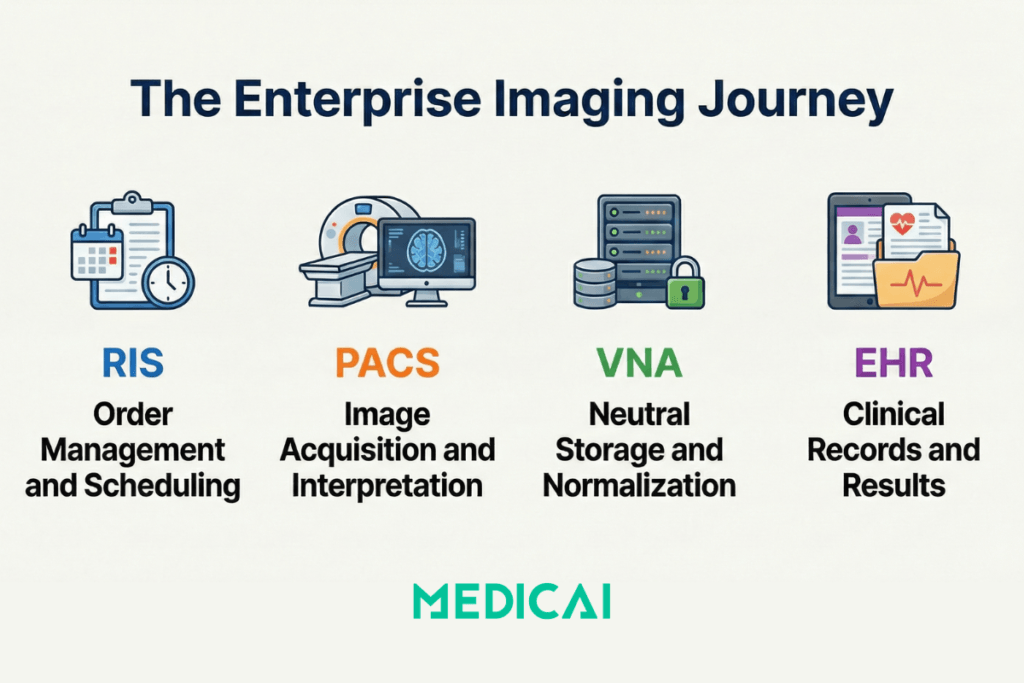
How the Systems Connect — The Data Flow Architecture
The four systems described above do not function independently. Every imaging study that enters the enterprise generates a chain of data exchanges between them — each hand-off governed by a specific protocol, carrying a specific data element that links the study to the patient, the order, the report, and the billing record. Understanding this chain is understanding enterprise imaging architecture.
The complete journey of a single imaging study from order placement to report delivery in the clinician’s EHR involves nine distinct system hand-offs:
- Step 1 — Order placed in EHR: The ordering physician creates an imaging order in the EHR. The EHR generates an HL7 ORM (Order Message) that carries the patient demographics, the ordering physician’s NPI, the exam type, and the clinical indication to the RIS.
- Step 2 — RIS creates the exam record: The RIS receives the HL7 ORM, creates an exam record for the study, assigns a unique accession number, and populates the DICOM Modality Worklist (MWL) with the patient information and accession number. The accession number is the linking key that will follow this study through every subsequent system hand-off.
- Step 3 — Technologist selects the patient from the worklist: The imaging modality queries the MWL via DICOM C-FIND, retrieves the patient demographics and accession number, and pre-populates the acquisition console. The technologist confirms the patient’s identity and acquires the study. The images are automatically tagged with the correct patient information and accession number embedded in the DICOM header.
- Step 4 — DICOM study transmitted to PACS: The modality sends the completed DICOM study to the PACS via DICOM C-STORE. The PACS receives the study, verifies the accession number against the open RIS order, and places the study on the radiologist’s reading worklist.
- Step 5 — PACS sends study to VNA: The PACS routes a copy of the study to the VNA via DICOM C-STORE or DICOMweb STOW-RS. The VNA normalizes the study, links it to the master patient index, and archives it in vendor-neutral format. From this point forward, the study is accessible to any system connected to the VNA — regardless of whether the PACS it originated from remains operational.
- Step 6 — Radiologist interprets the study: The radiologist opens the study from the PACS reading worklist, reviews the images with hanging protocol tools, and dictates or templates a structured report covering indication, technique, findings, and impression. The report is signed, and the PACS marks the study as final.
- Step 7 — Report delivered to RIS and billing triggered: The PACS sends an HL7 ORU (Observation Result) message to the RIS carrying the signed report and the accession number. The RIS updates the study status from “examined” to “finalized” and triggers the billing workflow — charge capture begins from the signed report content.
- Step 8 — Report delivered to EHR: The RIS (or PACS directly, in integrated architectures) sends a second HL7 ORU to the EHR. The report appears in the ordering physician’s patient record, linked to the original order. An alert or notification is generated for critical findings when the report indicates urgent findings.
- Step 9 — Images surfaced in EHR: When the ordering physician opens the imaging report in the EHR, a viewer integration retrieves the DICOM images from the PACS or VNA via DICOMweb WADO-RS and renders them in a zero-footprint viewer embedded within the EHR — or launched in context via SMART on FHIR. The clinician can view both the report and images from a single patient record without a separate login.
Every hand-off in this chain is a potential failure point. An accession number mismatch at Step 4 breaks the link between the image and the order — the study arrives in PACS unmatched and sits in a reconciliation queue, and the billing team must manually resolve. A misconfigured HL7 interface at Step 7 silently stops billing — studies are acquired, read, and signed, but never billed because the ORU message stopped flowing after a software upgrade. An absent SMART on FHIR integration at Step 9 means the clinician can see the report, but cannot access images from the EHR without a separate PACS login, which most ordering physicians do not have.
The Integration Protocols That Carry Data Between Systems
Four integration standards underpin the data flows described above. Which standards a healthcare organization uses — and how correctly they are configured — determines whether the enterprise imaging architecture functions reliably or fails silently.
HL7 v2
HL7 v2 messaging is the legacy standard for clinical data exchange. HL7 v2 messages are pipe-delimited text strings that carry orders (ORM), results (ORU), and patient demographic updates (ADT) between systems. HL7 v2 has been the dominant integration standard in healthcare for three decades and is still the most widely deployed. Its weakness is that it is a push-only, point-to-point protocol: each sending system pushes messages to each receiving system via a pre-configured interface. When the interface fails — after a software upgrade, a server migration, or a configuration change on either end — it fails silently. The sending system returns a positive acknowledgment (ACK) indicating “message delivered,” while the receiving system never processes the message. Studies stop flowing to billing, reports stop appearing in the EHR, and no alert fires. The failure is discovered hours or days later when a clinician reports missing results.
DICOM
DICOM services govern all image data exchange in the architecture. DICOM is both the file format for medical imaging data and a set of service classes that define how systems exchange those files. C-STORE sends images from a modality to a PACS or from a PACS to a VNA. C-FIND queries a PACS or RIS for study information. C-MOVE retrieves studies from a PACS to a workstation. The DICOM Modality Worklist (MWL) service allows the imaging modality to query the RIS for scheduled exams before acquisition begins. Every imaging system in the architecture communicates via DICOM — the critical configuration decisions are which DICOM services are enabled, which Application Entity (AE) Titles are registered in which systems, and whether compression settings are compatible across sending and receiving systems.
HL7 FHIR
HL7 FHIR (Fast Healthcare Interoperability Resources) is the modern API standard replacing HL7 v2 for clinical data exchange. FHIR exposes healthcare data through RESTful HTTPS endpoints — standard web APIs that any authorized application can query in real time. Where HL7 v2 requires the sending system to push a message at a specific trigger event (order created, report signed), FHIR allows any system to pull the current state of any resource at any time — a PACS can query the EHR for the latest patient demographics rather than waiting for an ADT message that may never arrive. FHIR also enables SMART on FHIR, the contextual application launch mechanism that allows a zero-footprint DICOM viewer to open within the EHR for a specific patient and study — the most important EHR-imaging integration pattern in modern enterprise imaging architecture. Epic, Oracle Health, athenahealth, and most major EHR vendors now require or strongly prefer FHIR-native integrations for new implementations.
DICOMweb
DICOMweb is DICOM’s RESTful extension — a family of web services defined in DICOM Part 18 that makes medical imaging data accessible over standard HTTPS. Three services form the DICOMweb stack: QIDO-RS (Query based on ID for DICOM Objects) allows a client to search for studies, series, or instances using standard web queries. WADO-RS (Web Access to DICOM Objects) allows a client to retrieve DICOM studies over HTTPS. STOW-RS (Store Over the Web) allows a client to send DICOM studies to a server over HTTPS. DICOMweb enables browser-based, zero-footprint viewers — the viewer retrieves images from the PACS or VNA via WADO-RS without requiring installed software on the client device. It is also the integration standard that enables AI tools to connect to imaging archives without traditional DICOM networking — any AI application that implements WADO-RS can retrieve studies from a DICOMweb-capable PACS or VNA through a standard endpoint.
PACS vs VNA — Understanding the Architectural Difference
The relationship between PACS and VNA is the most commonly misunderstood aspect of enterprise imaging architecture. They are frequently described as competing products or as alternatives. They are neither — they serve different functions in the same architecture, and a complete enterprise imaging stack requires both.
| Dimension | Departmental PACS only | VNA-centred enterprise architecture |
|---|---|---|
| Image storage | Images stored in the PACS vendor’s proprietary format — accessible only through that vendor’s viewer and retrieval tools; unreadable by other systems without a separate integration or conversion | Images stored in vendor-neutral DICOM — retrievable by any application that implements DICOMweb WADO-RS or standard DICOM C-MOVE, regardless of which PACS vendor was used to acquire the study |
| Cross-department access | Radiology PACS is isolated from cardiology, pathology, and ophthalmology — each department operates a separate imaging silo with no shared patient imaging record across specialties | All departmental imaging — radiology, cardiology, pathology, visible light — archived in and served from a single enterprise archive; any authorised clinician accesses all prior studies from one patient record view |
| Vendor lock-in | Switching PACS vendors requires migrating all studies from proprietary to new format — a project that typically takes 12–24 months, carries data loss risk, and cannot begin until the new vendor is contracted | Departmental PACS can be replaced without touching the underlying archive — the VNA continues serving historical studies in open standards while the new PACS connects to the same archive on day one |
| System replacement risk | Decommissioning a PACS without completing a full migration means permanent loss of access to studies stored in the vendor’s proprietary format — a risk that materialises when PACS vendors are acquired or discontinued | The VNA archive survives all PACS vendor transitions — studies are preserved in vendor-neutral format and remain accessible through any connected viewer regardless of what happens to the original PACS system |
| EHR integration | Each departmental PACS requires its own separate EHR integration — radiology images in one viewer, cardiology images in another, neither fully embedded in the patient record without a separate login | A single VNA endpoint connects to the EHR via SMART on FHIR — one zero-footprint viewer, one login, all departmental imaging visible within the patient record context from any care point |
| AI tool connectivity | Every AI tool requires a separate integration with each departmental PACS — a fracture detection tool and a chest X-ray triage tool each need their own DICOM configuration, doubling integration overhead per tool added | AI tools connect to the VNA through a single DICOMweb WADO-RS endpoint — any AI application implementing the standard retrieves studies from the unified archive without a bespoke per-PACS integration |
| Long-term archiving | Storage tiers, retention policies, and lifecycle rules managed independently per departmental PACS vendor — costs, configurations, and compliance responsibilities fragment across each silo | Unified lifecycle management across the entire organisation — single retention policy, single hot/warm/cold tiering strategy, single storage cost model covering every department’s imaging history |
Legacy Architecture vs Cloud-Native Enterprise Imaging
Most healthcare organizations today operate somewhere between a fully siloed legacy architecture and a fully integrated cloud-native enterprise imaging environment. Understanding what each extreme looks like makes the architectural decisions in the middle clearer.
What does legacy architecture look like in practice?
Multiple departmental PACS silos — radiology, cardiology, orthopedics, sometimes ophthalmology — each from a different vendor, installed at different points in the hospital’s history, connected to each other and to the EHR by point-to-point HL7 v2 interfaces that each required a custom implementation project and each requires individual maintenance. No central VNA — studies are stored in each vendor’s proprietary format in on-premise server rooms. Images are accessible only through each department’s proprietary reading workstation. The EHR receives radiology reports via HL7 but displays no images — the ordering physician reads the report in the EHR and then opens a separate browser tab to log into the PACS viewer, if they have credentials. Each PACS upgrade requires retesting every HL7 interface connected to it — a 6–8-week regression testing cycle for each upgrade. Studies from 10 years ago are archived by a PACS vendor that may have been acquired or discontinued, and are accessible only if the legacy system remains running.
What does a cloud-native enterprise imaging architecture look like?
A cloud VNA serves as the central archive — all departmental PACS systems write studies to the VNA via DICOMweb STOW-RS or DICOM C-STORE, regardless of modality or department of origin. A universal zero-footprint viewer retrieves images from the VNA via DICOMweb WADO-RS and launches in context within the EHR via SMART on FHIR — one viewer, one login, every departmental imaging study visible from the patient record. HL7 FHIR APIs handle order and result exchange between EHR, RIS, and PACS — bidirectional, real-time, with observable HTTP status codes rather than silent HL7 ACKs. AI tools connect to the VNA via the same DICOMweb API endpoint used by the viewer — no bespoke integration per tool, no per-PACS deployment. New imaging departments on board by connecting their modalities to the VNA rather than deploying a new departmental PACS silo with its own proprietary archive and its own integration project.
Medicai is a cloud-native PACS and VNA built on Microsoft Azure that implements this architecture in a single platform. It functions as both the departmental PACS — worklist management, structured reporting, zero-footprint viewer, teleradiology workflow — and the enterprise VNA — cross-department archive, DICOMweb API layer, FHIR integration, AI connectivity. For imaging practices and hospital networks building enterprise imaging architecture, Medicai consolidates the PACS and VNA functions that traditionally required two separate products from two separate vendors, eliminating the integration dependency between them.
Enterprise Imaging Beyond Radiology — The Multi-Department View
Radiology generates the majority of DICOM imaging studies in a hospital. But it represents one of many departments that produce clinical images — and in most legacy environments, it is the only department whose images are managed in a systematic imaging archive.
Cardiology produces echocardiograms, cardiac catheterization angiograms, nuclear cardiology studies, and cardiac MRI. Historically, these have been managed in separate Cardiovascular Information Systems (CVIS) — proprietary platforms that do not interoperate with the radiology PACS and require a separate login to access. A patient with both a cardiac catheterization and a chest CT has their images in two separate systems with no connection between them and no way for either specialist to see the other’s study without contacting the other department.
Pathology produces whole-slide images (WSI) — gigapixel-resolution digital scans of tissue specimens. WSI files are not standard DICOM — they are typically stored in proprietary scanner formats (SVS, NDPI, SCN) that require conversion or wrapping in DICOM Secondary Capture objects to be stored in a VNA alongside traditional modality studies. Pathology imaging integration is one of the most technically demanding aspects of enterprise imaging architecture, and most hospitals have not yet achieved it.
Ophthalmology produces fundus photographs, optical coherence tomography (OCT) studies, fluorescein angiography images, and visual field maps — most in proprietary formats from ophthalmic imaging devices that have only recently begun supporting DICOM output. An enterprise imaging architecture that incorporates ophthalmology must either support native DICOM from modern devices or convert legacy device outputs to DICOM before archiving in the VNA.
Point-of-care ultrasound (POCUS) presents a different architectural challenge. POCUS studies are encounter-based — they are acquired by the bedside clinician during patient assessment, without a prior imaging order in the RIS. There is no pre-assigned accession number, and no modality worklist entry to pull. The POCUS device acquires the study and must transmit it to the PACS or VNA with enough metadata — patient MRN, encounter date, and acquiring clinician — to allow it to be linked to the correct patient record without a matching RIS order. Enterprise imaging architectures must support both encounter-based and order-based workflows to accommodate POCUS, dermatology photography, wound care documentation, and similar specialties in which imaging occurs as part of clinical assessment rather than as a scheduled diagnostic procedure.
Visible light images — photographs, endoscopy video frames, arthroscopy images — can be wrapped in DICOM as Secondary Capture (SC) objects or managed in non-DICOM systems. A VNA that supports both DICOM and non-DICOM content types enables the organization to archive visible light clinical images alongside traditional imaging in the same patient record, searchable through the same interface. A VNA that supports only DICOM creates a second archive silo for visible light content — defeating the purpose of enterprise imaging consolidation.
Enterprise Imaging Strategy — Three Architecture Decisions Before Buying
Healthcare organizations evaluating enterprise imaging architecture face three strategic decisions before selecting any product. The decisions are sequential — the answer to the first constrains the options in the second, and the answer to the second constrains the third.
Decision 1 — Consolidate, federate, or migrate?
Consolidation means replacing multiple departmental PACS systems with a single enterprise PACS that handles all departments from a single platform. Federation means maintaining existing departmental PACS systems but adding a VNA above them to provide a unified archive and a single access layer. Migration means moving to a cloud-native platform that eliminates the traditional distinction between PACS and VNA by combining both functions into a single cloud service. Consolidation has the lowest long-term integration complexity but the highest short-term disruption — every department migrates simultaneously. Federation preserves existing departmental workflows but adds integration complexity — each departmental PACS now has two integration targets (EHR and VNA) instead of one. Migration has the lowest long-term total cost of ownership, but requires the organization to accept that a cloud service will replace on-premise infrastructure and that data sovereignty and network reliability must be addressed before implementation.
For a detailed evaluation of which VNA benefits are delivered in practice and which require specific prerequisites to be in place before deployment, see the vendor neutral archive benefits guide.
Decision 2 — What does the integration baseline look like?
Before any enterprise imaging implementation can succeed, the integration prerequisites must be verified. The master patient index (MPI) must be accurate — patient identity errors in the MPI propagate into the imaging archive, creating split records that are expensive to remediate after imaging data has been archived under incorrect identifiers. The HL7 ADT feed that delivers patient demographic updates from the registration system to all downstream systems must be functioning correctly — a patient whose name is corrected in registration must receive that correction in the RIS, PACS, and VNA, and the ADT route to each system must be configured and tested. EHR version compatibility with SMART on FHIR image launch must be verified before selecting a viewer — not all EHR versions across all deployment configurations support SMART on FHIR contextual launch, and some require specific EHR configuration changes involving the EHR vendor’s professional services team. Network bandwidth for DICOMweb over HTTPS must be assessed for each site — DICOMweb retrieves full-resolution DICOM studies over standard HTTPS, and a site with inadequate bandwidth will experience slow image loading times, which can create clinical workflow resistance to adoption.
Decision 3 — What does AI readiness require architecturally?
AI tools for radiology — fracture detection, incidental finding flagging, chest X-ray triage, and structured report generation assistance — require API-level access to imaging data. They cannot function from a PACS that supports only traditional DICOM C-MOVE retrieval without a DICOMweb layer. An enterprise imaging architecture that supports DICOMweb WADO-RS enables any AI tool that implements the same standard to connect to the imaging archive without a bespoke integration negotiated individually with each AI vendor. Organizations evaluating AI tools should verify WADO-RS support in their PACS or VNA before selecting an AI application — without it, every AI tool requires its own integration project, and the AI tool landscape is evolving too rapidly for bespoke, per-tool integrations to be a sustainable architecture.
Frequently Asked Questions: Enterprise Imaging Architecture
What is enterprise imaging?
Enterprise imaging is the strategy for managing all clinical imaging content across a healthcare organization — across all departments, modalities, and care settings — through a unified architecture that integrates with the electronic health record. A joint HIMSS-SIIM workgroup defines enterprise imaging as “a set of strategies, initiatives, and workflows implemented across a healthcare enterprise to consistently and optimally capture, index, manage, store, distribute, view, exchange, and analyze all clinical imaging and multimedia content to enhance the electronic health record.
What is the difference between PACS and enterprise imaging?
PACS is a component of enterprise imaging architecture — the departmental operational system that manages a radiology or cardiology department’s imaging workflow. Enterprise imaging is the overarching architecture that connects multiple PACS systems, a VNA, the RIS, and the EHR into a unified imaging environment. A hospital can have multiple PACS systems and still not have enterprise imaging if those systems are siloed — images are not accessible across departments, prior studies are not visible in the EHR, and each department manages its imaging data independently. Enterprise imaging requires the integration layer between systems, not just the systems themselves.
What is the difference between PACS and VNA?
PACS is the departmental imaging workflow system — it manages reading worklists, hanging protocols, structured reporting, and immediate image access for radiologists and departmental clinicians. VNA is the enterprise storage and normalization layer that sits above the PACS — it archives studies from all departmental PACS systems in vendor-neutral format, makes them accessible to any connected application via standard APIs, and preserves the imaging archive across PACS vendor changes. The key distinction is function: PACS manages the clinical workflow, while VNA manages the long-term archive and the enterprise access layer. A VNA without a PACS has no reading workflow. A PACS without a VNA lacks an enterprise-level archive, cross-departmental access, and protection against proprietary format lock-in when the PACS is eventually replaced.
What is enterprise PACS?
Enterprise PACS refers to a PACS deployment spanning multiple departments or facilities within a single organization, as opposed to a departmental PACS that serves a single radiology department at a single site. An enterprise PACS typically provides a single reading worklist aggregating studies from all connected sites, centralized hanging protocol management, shared structured reporting templates, and cross-site image access for radiologists reading across the network. In a modern cloud-native architecture, the distinction between enterprise PACS and VNA begins to blur — cloud PACS platforms that support DICOMweb and multi-site deployments serve as both the reading workflow system and the enterprise archive layer.
How does the EHR integrate with PACS in enterprise imaging?
EHR-PACS integration in enterprise imaging operates at two layers. The first is the report layer: when a radiologist signs a report in the PACS, an HL7 ORU message delivers the report text to the EHR, where it appears in the ordering physician’s patient record. This layer has existed since the 1990s and is present in most hospital environments. The second layer is the image access layer: when the clinician opens the report in the EHR, a viewer integration retrieves the DICOM images from the PACS or VNA and renders them within the EHR context — either embedded in the EHR interface or launched as a separate zero-footprint viewer via SMART on FHIR. Many hospitals have the first layer but not the second — clinicians see the report but cannot view the images from the EHR without a separate PACS login. Full enterprise imaging integration requires both layers functioning together.
What does an enterprise imaging architecture include?
A complete enterprise imaging architecture includes five layers. The acquisition layer covers all imaging modalities — CT, MRI, X-ray, ultrasound, echocardiography, endoscopy, point-of-care ultrasound, and visible light capture devices — connected to the network via DICOM. The workflow layer includes the PACS for radiology reading workflow and the RIS for scheduling, ordering, and billing — increasingly consolidated into integrated RIS-PACS platforms or absorbed into EHR ordering modules. The archive layer is the VNA — the vendor-neutral long-term store for all imaging content from all departments. The access layer is the zero-footprint viewer and EHR integration — the mechanism by which any authorized clinician retrieves and views imaging content from any application. The intelligence layer is the AI and analytics platform — connected to the archive via DICOMweb APIs, processing studies at acquisition time or retrospectively across the archived population. The integration fabric connecting all five layers consists of DICOM services, HL7 v2 or FHIR messaging, and DICOMweb APIs.
One Patient, One Record: What the Architecture Is For
Enterprise imaging architecture is an integration decision before it is a product decision. The choice of which PACS, VNA, RIS, and EHR components to deploy matters less than how correctly those systems are connected to each other — how reliably the accession number follows the study from the modality to the PACS to the VNA to the billing system, how dependably the signed report reaches the EHR, and how seamlessly the clinician can move from the report to the images without a separate login breaking the clinical workflow.
A healthcare organization can purchase the most capable enterprise imaging platform available from the most reputable vendor and still operate with fragmented imaging if the integration layer is unreliable — if HL7 interfaces fail silently after upgrades, if accession number mismatches create unbillable studies, if the VNA and EHR have never been connected. Conversely, a well-integrated architecture built on open standards — DICOMweb, HL7 FHIR, DICOM MWL — delivers the clinical outcome of enterprise imaging regardless of which specific products occupy each layer of the stack. One patient. One record. All imaging is visible from any care point. That is what the architecture is for.


Related Articles
Lets get in touch!
Learn more about how Medicai can help you strengthen your practice and improve your patients’ experience. Ready to start your Journey?
Book A Free Demo