Teleradiology: How It Works and When Healthcare Providers Use It

Teleradiology is the practice of transmitting medical images — CT scans, MRIs, X-rays, ultrasound, mammography — from the imaging facility where they’re acquired to a radiologist in a different physical location for interpretation. The radiologist reads the study, generates a report, and returns it to the originating site.
Hospitals and imaging centers use teleradiology to extend specialist coverage to nights, weekends, and rural sites where on-site radiologists aren’t available, and to subspecialty areas like pediatric imaging or interventional reads where local expertise doesn’t exist. The model now spans single-clinic urgent care setups to enterprise health systems running 24/7 nighthawk coverage across multiple states.
This guide covers what teleradiology is, how a study moves end-to-end through the workflow, the use cases that drive adoption, the deployment and licensing realities buyers run into, and what to look for when evaluating a platform.
What teleradiology actually is — and what it isn’t
Teleradiology is a subset of telemedicine focused specifically on radiology — it covers the remote interpretation of imaging studies, not generic remote consultations or video visits.

The operational definition is narrower than “remote healthcare.” Teleradiology means a radiologist, working from a different physical location than the patient and the imaging equipment, interprets the study and issues a report. That report is sent back to the ordering clinician via PACS, RIS, or EHR integration. The radiologist doesn’t see the patient. The patient doesn’t interact with the radiologist.
Three things teleradiology is not:
- It is not telemedicine more broadly. Telemedicine includes video visits, remote chronic-condition monitoring, and remote specialty consultations where the patient is part of the conversation. Teleradiology operates entirely in the background of those services.
- It is not a remote second-opinion service for patients. Patient-direct second opinions involve a paid consultation between a patient and a specialist. Teleradiology is a B2B service between an imaging facility and a radiology group.
- It is not AI-only image interpretation. Modern teleradiology platforms increasingly use AI for triage and pre-read flagging, but the legal report is still authored by a licensed human radiologist.
The model originated as nighthawk coverage in the late 1990s, when US hospitals began contracting with radiology groups in Australia and India to read overnight emergency studies. Two decades later, teleradiology has expanded into subspecialty reads, daytime overflow capacity, and primary coverage for sites that don’t employ on-site radiologists at all.
How a teleradiology workflow runs end-to-end
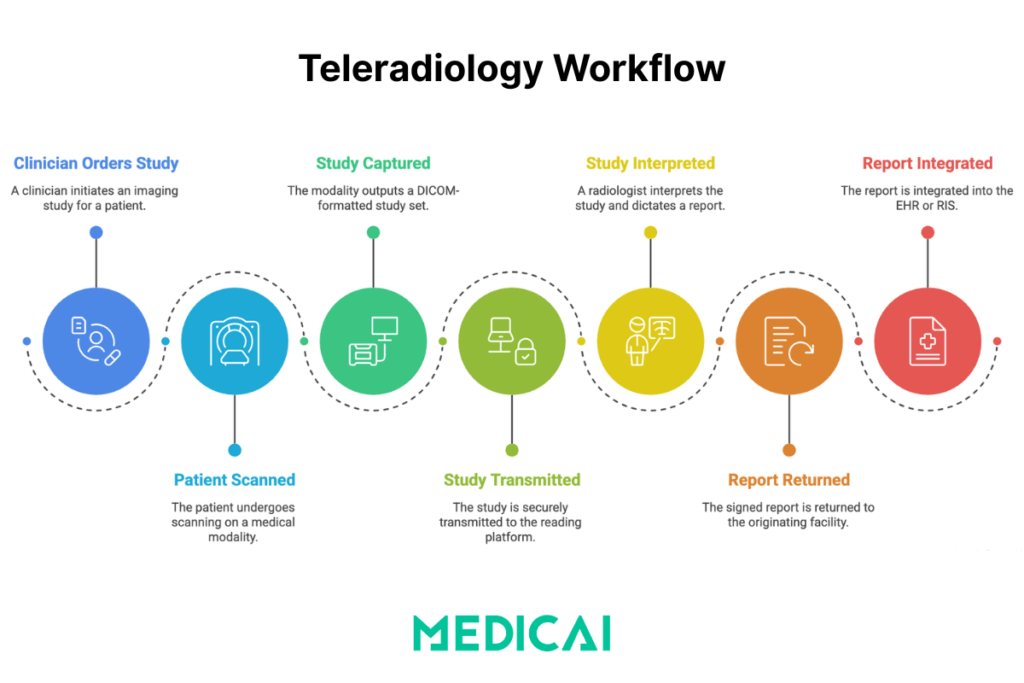
A teleradiology study moves through four stages: image acquisition at the originating site, secure transmission to a remote reading platform, interpretation and reporting by the radiologist, and report return to the originating site’s EHR or RIS.
Each stage has specific technical requirements and failure modes worth understanding before evaluating a platform.
Stage 1 — Image acquisition at the originating site
A clinician orders an imaging study. The patient is scanned on the modality (X-ray, CT, MRI, ultrasound). The modality outputs a DICOM-formatted study set, which the local PACS or DICOM gateway picks up automatically. No manual export, no CD burning, no courier.
Stage 2 — Secure transmission to the reading platform
The study is encrypted in transit (TLS) and either pushed to the cloud teleradiology platform or pulled from the originating PACS by the platform via a DICOM-compliant gateway. Modern cloud-native architectures replace the older VPN tunnel model between the hospital and the radiology group. VPNs are slow, brittle when one of multiple sites drops, and force the radiologist into a “swivel-chair” workflow of logging into a separate PACS instance for each covered facility.
Stage 3 — Remote interpretation and reporting
The platform routes the study to an available radiologist based on subspecialty, current workload, licensing footprint (covered in the licensing section below), and contractual turnaround targets. The radiologist opens the study in a zero-footprint web-based DICOM viewer — no software install on the radiologist’s machine, no PHI stored locally on the radiologist’s device. They review the images, compare them against priors (which the platform automatically pulls from the originating archive), and dictate or type a structured report.
Stage 4 — Report return and EHR integration
The signed report flows back to the originating facility through HL7 or FHIR integration, lands in the EHR or RIS, and the ordering clinician sees results in the same place they’d see an in-house read. The images and report stay archived in both the originating PACS and the cloud teleradiology archive, depending on the contract.
For an operational view of this workflow, including PACS routing rules and modality worklist handling, see the dedicated piece on the teleradiology workflow.
These workflow gains reflect the broader benefits of teleradiology, which are driving adoption across urgent care networks.
When healthcare organizations choose teleradiology
Hospitals, imaging centers, and outpatient facilities adopt teleradiology when on-site radiology coverage is insufficient — whether due to after-hours staffing gaps, geographic isolation, subspecialty demand, or volume exceeding in-house capacity.
Five use cases account for almost all teleradiology adoption.
Off-hours and overnight coverage (“nighthawk”)
Emergency departments and Level I trauma centers need real-time imaging interpretation 24/7. Staffing on-site radiologists for overnight and weekend shifts is expensive and unsustainable for most facilities. Nighthawk teleradiology — typically with radiologists in different time zones reading during their daytime hours — covers the gap. The radiologist issues a preliminary read at night; the in-house team finalizes the read the next morning if needed.
Rural and underserved area coverage
Rural hospitals and critical-access facilities often can’t recruit on-site radiologists at all. Teleradiology gives those sites coverage they couldn’t otherwise staff. The workflow is identical to Nighthawk except it runs continuously rather than only after hours, with the teleradiology partner serving as the primary radiology service.
Subspecialty reads (pediatric, neuro, MSK, breast)
A community hospital that occasionally needs a pediatric radiologist or a neuroradiologist can route those studies to a subspecialist through a teleradiology partner without employing a full-time specialist. See subspecialty teleradiology services for the service models and pricing, and pediatric teleradiology for that subspecialty’s specific workflow.
Capacity overflow and turnaround time pressure
Even hospitals with full in-house radiology departments use teleradiology for overflow during daytime peak volumes or when staffing dips below baseline. The teleradiology partner reads the surplus, the in-house team reads the rest. Turnaround time targets stay intact, no individual radiologist gets buried.
Urgent care and outpatient imaging centers
Walk-in urgent care clinics and standalone imaging centers operate on margins too thin to support in-house radiology. A teleradiology partnership lets them offer same-visit imaging interpretation: the patient is scanned, the study is routed to a radiologist instantly, the read returns within 30–60 minutes, and the clinician makes a treatment decision before the patient leaves. This eliminates the older urgent-care workflow of burning CDs or couriering images to an external reader.
Modalities supported in a teleradiology setup
Most teleradiology platforms support the full range of standard radiology modalities: CT, MRI, X-ray (including digital radiography and fluoroscopy), ultrasound, mammography, and increasingly nuclear medicine and PET.
The constraint is bandwidth and storage, not the modality itself. The image transmission relies on the DICOM standard, which every modern modality supports natively.
| Modality | Typical study size | Bandwidth need | Common subspecialty read | Notes |
|---|---|---|---|---|
| X-ray / DR | 5–20 MB | Low | Musculoskeletal, chest | Highest volume modality; lowest transmission overhead |
| CT | 100 MB – 2 GB | Medium-high | Neuro, body, trauma | Stroke and trauma reads dominate STAT teleradiology |
| MRI | 200 MB – 1 GB | Medium-high | Neuro, MSK, breast, body | Slower acquisition; less time-sensitive than CT |
| Ultrasound | 20–200 MB | Low-medium | OB, vascular, abdominal | Cine clips drive size variability |
| Mammography | 100–300 MB | Medium | Breast imaging subspecialty | Tomosynthesis pushes size to 1 GB+ |
| Nuclear medicine / PET | 50–500 MB | Medium | Oncology, cardiology | Often paired with CT for hybrid PET/CT studies |
Teleradiology vs in-house radiology vs hybrid models
Healthcare organizations rarely choose between fully in-house and fully outsourced teleradiology — most operate a hybrid model in which on-site radiologists handle daytime routine reads, while a teleradiology partner covers nights, weekends, and subspecialty work.
The decision isn’t binary. Three operating models cover almost every real-world setup.
| Dimension | In-house only | Teleradiology only | Hybrid |
|---|---|---|---|
| Coverage hours | Limited to staffed shifts | 24/7 possible | 24/7 possible |
| Subspecialty access | Whatever the in-house team covers | Broad — partner network | Broad — partner fills gaps |
| Cost structure | Salaries + benefits | Per-study fees | Salaries + variable per-study |
| Turnaround time | Tied to local staffing | Contractual SLAs | Best of both, if managed |
| Capital investment | On-site PACS and viewers | Cloud platform fees | Both |
| Geographic flexibility | Single site | Multi-site by design | Multi-site by design |
| Best fit | Large academic centers | Small clinics, urgent care | Mid-size hospitals, IDNs |
Deployment models: cloud, on-premise gateway, hybrid
Teleradiology platforms run in three deployment configurations: a fully cloud-hosted reading environment, an on-premise gateway that routes images out to remote radiologists, or a hybrid where the originating site keeps a local PACS and pushes specific studies to the cloud for remote reading.
The architecture choice affects radiologist productivity, IT overhead, and turnaround time.
Older teleradiology setups relied on VPN tunnels between each originating site and the radiology group. A radiologist reading for five hospitals had to log into five separate PACS instances, each behind its own VPN, and check each worklist independently. The result was the well-known “swivel-chair” workflow — productivity loss, missed studies sitting in hidden queues, and difficult cases left unread because the radiologist couldn’t see the global picture.
Modern cloud-native teleradiology architectures replace this with a unified global worklist. A single web-based interface aggregates studies from all covered sites, intelligently routes them by subspecialty and priority, and automatically prefetches priors when a new study arrives. The radiologist sees one queue, not five. Cloud PACS vendors and teleradiology platforms have effectively merged into a single category — a cloud PACS accessible from anywhere is, by definition, a teleradiology platform.
For the underlying architecture, see the cloud PACS commercial page on the main site.
HIPAA, GDPR, and data security in teleradiology
Teleradiology platforms must encrypt patient imaging data both in transit and at rest, control access by user role, log every study view and report action, and support business associate agreements (HIPAA, US) or data processing agreements (GDPR, EU).
Compliance is a property of the implementation, not of teleradiology as a category. A teleradiology platform can be HIPAA compliant or not, depending on five operational requirements.
Encryption in transit and at rest
Studies move between sites over TLS (Transport Layer Security) at a minimum. At rest in the cloud archive, data is encrypted with AES-256 or an equivalent algorithm. Encryption is non-negotiable for any platform handling US PHI or EU patient data.
Role-based access control
Radiologists see only studies routed to them. Hospital admins see only their facility’s studies. Audit roles can read everything but can’t modify reports. The access control model is enforced at the platform level, not by trusting users to behave correctly.
Audit logging
Every study view, every report draft, every download, and every share link is logged with a timestamp and user identity. Audit logs must be tamper-evident and retained for the duration specified by HIPAA or GDPR — typically 6 years for HIPAA.
Business associate agreements
Under HIPAA, any vendor handling PHI on behalf of a covered entity is a business associate and must sign a BAA. The BAA codifies the security and breach-notification obligations the vendor accepts. No BAA, no compliant relationship — full stop.
Zero-footprint reading
Modern teleradiology platforms use zero-footprint web viewers that ensure no PHI is ever stored on the radiologist’s personal device. Studies render in the browser; nothing is saved to disk. This is significantly more defensible than legacy VPN-plus-thick-client setups, where a radiologist’s home laptop became an extension of the hospital’s PHI footprint.
Licensing and credentialing for remote radiologists
A radiologist reading a study from another state, country, or jurisdiction must be licensed to practice in the location where the patient was scanned — not where the radiologist is physically located.
Three licensing realities shape teleradiology partnerships in 2026.
US state-level licensing. In the US, a radiologist physically located in Florida who reads a study from a hospital in Texas needs an active Texas medical license. The Interstate Medical Licensure Compact, adopted by most US states, streamlines multi-state licensing for qualified physicians but does not eliminate the requirement. Each covered hospital separately credentials the teleradiologist before they can read for that facility.
Cross-border reads. Cross-border reads (US radiologists reading studies from EU hospitals, or vice versa) add an additional regulatory layer. Most international teleradiology operates under “preliminary read, finalized locally” arrangements, where the international radiologist provides a preliminary interpretation that an in-country radiologist signs as the final.
EU data residency. For Medicai customers operating in the EU, GDPR data residency requirements often mean studies must remain hosted within the EU, even when read by radiologists elsewhere — a challenge solvable with an EU-resident cloud archive with controlled access from the reading site.
Turnaround time models — preliminary, final, STAT
Teleradiology contracts typically specify three turnaround time tiers: STAT reads (under 30 minutes for ED and trauma), preliminary reads (under 60 minutes for after-hours coverage), and final reads (4–24 hours for routine outpatient studies).
STAT turnaround applies to acute presentations where minutes affect outcomes — code stroke imaging, suspected aortic dissection, trauma CT. The radiologist reads the study as soon as it lands. Preliminary reads cover after-hours emergency department imaging that requires same-night interpretation but is less time-critical than a STAT. Final reads cover routine outpatient and inpatient studies — the radiologist reads within the standard business-day window.
SLAs vary by partner, by modality, and by study urgency flag. Buyers should specify their actual case mix when negotiating turnaround targets, not accept boilerplate numbers that don’t reflect operational reality.
What to look for when evaluating a teleradiology platform
When evaluating a teleradiology platform, healthcare organizations should weigh five factors: image transmission speed and reliability; integration with existing PACS, RIS, and EHR systems; the radiologist network; reporting and turnaround SLAs; and HIPAA or GDPR compliance posture.
Each criterion has a buyer-stage question worth asking before signing a contract.
- Image transmission speed. How long does a typical CT or MRI study take to land in the radiologist’s worklist after acquisition? Cloud-native platforms with prefetching should aim to keep most modalities under 2 minutes. Legacy VPN setups frequently take 5 to 15 minutes, which compounds across hundreds of daily studies.
- Integration with existing systems. Does the platform support DICOM C-STORE and DICOMweb push and pull from the originating PACS? HL7 ORM-to-FHIR for orders, HL7 ORU-to-FHIR for results? If the integration story requires custom work for every site, the deployment timeline doubles.
- Radiologist network — subspecialty and licensing footprint. Which subspecialties are covered? Which states or countries are the radiologists licensed in? A platform with depth in MSK and chest but no pediatric coverage is a constraint, not a partnership.
- Reporting and turnaround SLAs. Are STAT, preliminary, and final SLAs documented in the contract? What’s the remedy when an SLA is missed? Boilerplate “best effort” language is not an SLA.
- Compliance posture. BAA available? Encryption documented? SOC 2 Type II report? Penetration testing cadence? GDPR data residency options for EU operations?
This evaluation isn’t theoretical. Most teleradiology procurement decisions get made on price first and capability second, then quietly renegotiated 18 months in when capability gaps surface. Doing the evaluation properly upfront avoids that cycle.
How Medicai supports teleradiology workflows
Medicai’s cloud PACS platform supports teleradiology workflows through a DICOM teleradiology gateway that routes studies from the originating site to remote radiologists, a zero-footprint web-based DICOM viewer for remote reading, and EHR integration for report return.
The platform was built cloud-native rather than retrofitted from an on-premise PACS, which means the unified global worklist, automatic priors prefetching, and zero-footprint reading are core architecture rather than bolt-on features. For multi-site coverage — a teleradiology group reading for several hospitals — the global worklist eliminates the swivel-chair problem that older VPN-based setups created.
The viewer is browser-based and renders DICOM studies without installing anything on the radiologist’s device. PHI never lands on the local disk. For HIPAA and GDPR posture, that single architectural choice removes most of the home-laptop attack surface that legacy thick-client setups still carry.
Teleradiology customers typically deploy Medicai in one of two configurations: as the primary cloud PACS for the originating site (the imaging center or hospital), with the teleradiology partner reading directly from that platform; or as a routing layer in front of an existing on-premise PACS, where Medicai’s gateway extracts studies, normalizes the metadata, and pushes to the radiology group. Both models are in active use.
See how Medicai supports teleradiology, with platform capabilities mapped to specific use cases.
Frequently asked questions about teleradiology
These eight questions cover the queries radiology buyers and clinicians most often search for. Answers are intentionally short — the depth lives in the sections above.
What is teleradiology in simple terms?
Teleradiology is the remote interpretation of medical imaging studies — CT, MRI, X-ray, ultrasound, mammography — by a radiologist in a different physical location from where the patient was scanned.
How does teleradiology work step by step?
Images are acquired at the imaging facility, encrypted, and transmitted to a teleradiology platform, routed to an available radiologist, interpreted, and the resulting report is returned to the originating site’s EHR or RIS — typically within a contractually agreed turnaround time.
What’s the difference between teleradiology and telemedicine?
Telemedicine covers any remote clinical care, including video visits, remote monitoring, and consultations. Teleradiology is a specific subset focused on the remote interpretation of medical imaging studies — radiologists reading scans, not clinicians seeing patients.
Is teleradiology HIPAA compliant?
Teleradiology platforms can be HIPAA compliant if they encrypt data in transit and at rest, control access by user role, log all activity, and operate under a business associate agreement with the covered entity. Compliance is a property of the implementation, not of teleradiology itself.
What modalities can be read with teleradiology?
All standard radiology modalities: CT, MRI, X-ray, digital radiography, ultrasound, mammography (including tomosynthesis), nuclear medicine, and PET. The constraint is bandwidth and storage, not the modality itself.
How fast can a teleradiology report come back?
Standard turnaround times are 30 minutes for STAT reads, under 60 minutes for preliminary after-hours reads, and 4 to 24 hours for routine final reads. Specific SLAs vary by teleradiology partner and study type.
Do teleradiologists need a license in the patient’s state?
Yes. A radiologist must be licensed to practice in the jurisdiction where the patient was scanned, regardless of the radiologist’s physical location. The Interstate Medical Licensure Compact streamlines US multi-state licensing for qualified physicians.
What does teleradiology cost?
Teleradiology pricing is typically per-study, ranging from $4 to $25 for routine reads to $30 or more for subspecialty and STAT reads. Some platforms offer subscription pricing for predictable monthly volume. Cost depends on modality, urgency, and subspecialty.
Who uses teleradiology?
Hospitals, imaging centers, urgent care clinics, and outpatient facilities use teleradiology. Hospital emergency departments and Level I trauma centers use it for after-hours and overnight coverage. Rural hospitals use it as primary radiology coverage. Larger health systems use it for subspecialty reads and capacity overflow.
When did teleradiology start?
Teleradiology originated in the late 1990s when US hospitals began contracting with radiology groups in Australia and India to read overnight emergency studies — the “nighthawk” model. The practice expanded into subspecialty reads, daytime overflow, and primary coverage as digital imaging, PACS, and cloud platforms matured through the 2000s and 2010s.
Where teleradiology is heading
Three trends are reshaping teleradiology over the next five years: AI-assisted triage and pre-read flagging, deeper integration with structured reporting standards that make teleradiology output more usable downstream, and the consolidation of cloud PACS and teleradiology into a single category rather than two adjacent ones. The radiology workforce shortage in the US and EU continues to push more imaging volume toward teleradiology models even when on-site coverage is theoretically available.
For a deeper view of where teleradiology infrastructure and workforce models are evolving, see the future of teleradiology.


Related Articles


Lets get in touch!
Learn more about how Medicai can help you strengthen your practice and improve your patients’ experience. Ready to start your Journey?
Book A Free Demo