Vendor Neutral Archive (VNA): Full Guide

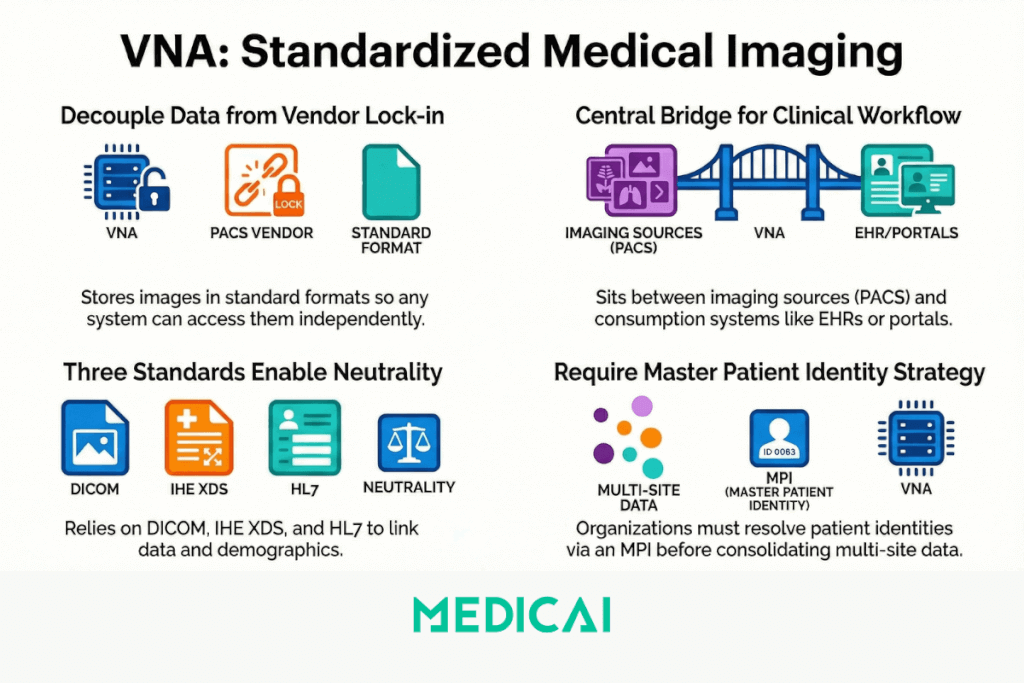
A Vendor Neutral Archive (VNA) is a medical imaging technology that stores clinical images and documents in a standard format (typically DICOM) and exposes them through standard interfaces, so any authorized system can access them regardless of which vendor or device created the data. A VNA sits between imaging sources (modalities, PACS) and consumption systems (EHRs, diagnostic viewers, web portals), acting as a centralized, long-term archive that decouples image storage from any single PACS vendor.
VNA functionality depends on 3 standards working together: DICOM for image encoding and query/retrieve, IHE XDS/XDS-I profiles for cross-enterprise document sharing, and HL7 for linking imaging data to patient demographics and clinical context. Without these, vendor neutrality breaks down. A VNA also requires metadata normalization and patient identity resolution across sites, which means organizations need a Master Patient Index (MPI) or equivalent identity strategy before a VNA can consolidate images from multiple facilities.
Medicai provides a cloud-native VNA built on Microsoft Azure that handles DICOM ingestion, DICOMization of non-standard formats, tiered cloud storage, and cross-enterprise image sharing through a single platform. This article explains what a VNA is, how it processes and stores medical images, what infrastructure it requires, what it can and cannot do, how it compares to PACS, which deployment models exist (on-premises, cloud, hybrid), how to evaluate VNA vendors, and what compliance and migration risks to plan for.
Medical Imaging Storage Solutions: Your Three Options
Healthcare organizations evaluating medical imaging data storage generally choose between three architectures. Each handles the storage, retrieval, and long-term retention of imaging data differently, and the right choice depends on how many systems and sites the organization runs and how it wants to control its imaging data.
Vendor neutral archive (VNA). A VNA is a centralized medical imaging storage solution that holds imaging data in a standards-based, vendor-independent format, so studies from any PACS or modality can be stored and retrieved regardless of the system that created them. The VNA separates the imaging archive from the PACS, which gives the organization control over its imaging data independent of any single vendor.
Cloud PACS. A cloud PACS combines the reading workflow (worklist, viewer, reporting) with cloud-based medical imaging data storage in a single platform. It stores, retrieves, and displays imaging without on-premise storage hardware, and it is typically the faster path for organizations that want reading workflow and storage together rather than as separate systems.
Hybrid. A hybrid approach combines on-premise storage for some imaging data with cloud storage for the rest, often keeping recent studies local for fast access while archiving older studies to the cloud. It suits organizations transitioning from on-premise to cloud storage, or those with specific data residency or latency requirements that a single architecture does not meet.
These three options overlap: a VNA can be deployed in the cloud, a cloud PACS can include vendor-neutral archiving, and a hybrid deployment can combine both. For a detailed comparison of how a vendor-neutral archive and a PACS differ in data ownership, cost structure, and architecture, see VNA vs PACS. To evaluate cloud-based storage specifically, see the Medicai cloud PACS; for vendor-neutral archiving, see the Medicai VNA.
How does a VNA work?
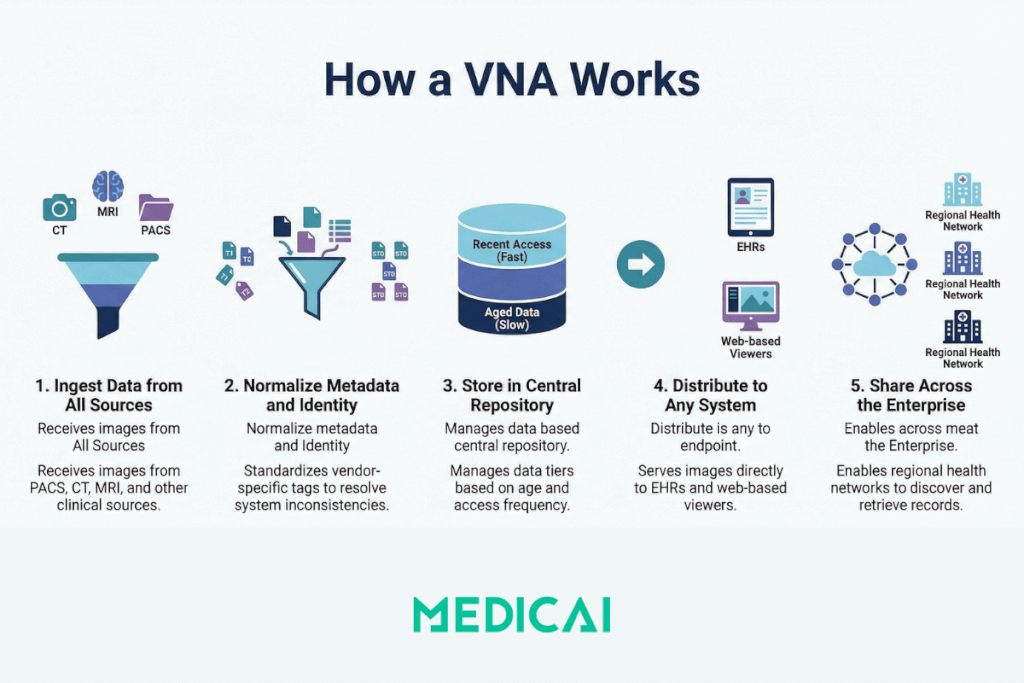
A VNA ingests medical images from PACS and imaging modalities, normalizes the metadata and format, stores the data in a centralized repository, and re-serves images to any requesting system in the format or profile that system requires. The core workflow follows 5 stages:
- Ingestion: The VNA receives images and associated data from PACS, modalities (CT, MRI, X-ray, ultrasound), and other clinical sources via DICOM C-STORE or web-based DICOMweb protocols.
- Normalization: The VNA normalizes DICOM metadata to resolve inconsistencies between different vendors. This includes tag morphing (remapping vendor-specific DICOM tags to standard fields) and patient identity reconciliation across systems.
- Storage: Normalized images and non-DICOM clinical documents (reports, PDFs, multimedia) are stored in a standards-based repository. The VNA applies Information Lifecycle Management (ILM) rules to tier data across storage classes (hot, warm, cold) based on age and access frequency.
- Retrieval and distribution: When a clinician, EHR, or viewer application requests a study, the VNA retrieves the images and serves them in the format required by the requesting system. This often happens on the fly, converting between DICOM transfer syntaxes or rendering for zero-footprint web viewers.
- Cross-enterprise sharing: VNAs that support IHE XDS/XDS-I profiles can register documents in a shared registry, enabling hospitals and clinics across a region or health information exchange (HIE) to discover and retrieve patient imaging records.
This architecture means clinicians can view images directly inside the EHR without launching a separate PACS application, and multiple departments or facilities share a single archive instead of maintaining siloed repositories.
Medicai implements all 5 stages through its integrated VNA platform, which includes a built-in DICOM Gateway for modality connections, automatic DICOMization for non-DICOM content, and a zero-footprint viewer for browser-based access.
What does a VNA require to function?
A VNA cannot operate in isolation. It depends on standards compliance, identity infrastructure, and network connectivity that must exist before deployment delivers value.
Core requirements for a functional VNA deployment:
- DICOM compliance across sources: Every modality and PACS sending data to the VNA must support standard DICOM operations (C-STORE, C-FIND, C-MOVE). Non-compliant devices require a DICOM gateway or middleware layer.
- Patient identity resolution: A Master Patient Index (MPI) or PIX/PDQ integration is needed when consolidating images from multiple sites. Without identity resolution, the same patient can appear under different IDs, fracturing the longitudinal record.
- Network bandwidth: Medical imaging generates large datasets. A single CT study can exceed 500 MB. Cloud-based or multi-site VNA deployments require sufficient bandwidth and low-latency connectivity (typically via dedicated links or VPN) to handle replication and retrieval loads.
- EHR/RIS integration: HL7 ADT and ORM/ORU messaging connect the VNA to patient demographics and order workflows. Without this integration, images exist in the archive but lack clinical context.
- Storage infrastructure: VNAs need tiered storage (fast SSD or NAS for recent studies, object storage or tape for long-term archive). Cloud deployments require HIPAA-compliant object storage with appropriate access controls and encryption.
Organizations that skip identity resolution or deploy a VNA without HL7 integration typically end up with a storage silo that replicates the same problems the VNA was meant to solve.
Medicai reduces this infrastructure burden by providing a managed cloud VNA where DICOM connectivity, storage tiering, and backup are handled as part of the platform, so organizations can focus on integration rather than infrastructure procurement.
What a VNA can and cannot do
A VNA centralizes and standardizes medical image storage, but it does not replace every function of a PACS or solve all interoperability problems. The following table separates real capabilities from common misconceptions.
| What a VNA does | What a VNA does not do |
| Stores DICOM and non-DICOM clinical content in a normalized, standard format | Does not provide diagnostic-grade reading tools or radiology workflow (hanging protocols, dictation, worklists) |
| Enables cross-vendor, cross-site image access through standard interfaces | Does not guarantee real-time performance for high-throughput diagnostic reading without a front-end PACS or cache layer |
| Applies ILM rules to tier data across hot, warm, and cold storage automatically | Does not eliminate the need for PACS entirely; most deployments use VNA alongside PACS, not as a replacement |
| Supports tag morphing and metadata normalization to reconcile vendor differences | Does not fix broken DICOM implementations at the modality level; garbage in, garbage out |
| Enables EHR-embedded image viewing through zero-footprint viewers | Does not replace the need for patient identity governance (MPI, data stewardship) |
| Reduces vendor lock-in by decoupling the archive from the PACS application layer | Does not make migration trivial; moving from one VNA to another still requires planning and validation |
The key takeaway is that a VNA is a storage and interoperability layer, not a complete imaging platform. It works best as a complement to PACS, not a substitute for it.
Medicai addresses this by combining its VNA with a cloud PACS, a zero-footprint DICOM viewer, and patient/doctor imaging portals in a single platform, so organizations get both the archive and the clinical access layer without stitching together separate systems.
How does a VNA compare to PACS?
A VNA and a PACS serve different functions in the medical imaging workflow, though their features overlap. The distinction matters because choosing the wrong tool for a given problem leads to either vendor lock-in (PACS-only) or missing diagnostic capability (VNA-only). For more details, check our blog post on VNA vs PACS.
| Attribute | VNA | PACS |
| Primary function | Centralized, vendor-neutral image storage and archiving | Image acquisition, display, diagnostic reading, and radiology workflow |
| Vendor dependency | Vendor-neutral by design; stores data in standard formats accessible by any compliant system | Often proprietary; data formats and workflows tied to a specific vendor |
| Data scope | DICOM and non-DICOM content (reports, PDFs, clinical documents, multimedia) | Primarily DICOM images; limited or no support for non-DICOM content |
| Cross-enterprise sharing | Designed for multi-site, multi-department, and regional image exchange via IHE XDS/XDS-I | Typically designed for single-organization use; cross-enterprise sharing requires additional infrastructure |
| Diagnostic tools | Basic viewing via integrated or third-party viewers; no native diagnostic toolset | Full diagnostic reading environment with hanging protocols, measurements, annotations, dictation integration |
| Storage model | Tiered ILM with on-prem, cloud, and hybrid options; optimized for long-term retention | Typically, on-prem storage is optimized for fast retrieval of recent studies |
| Migration risk | Lower; standard formats reduce lock-in and simplify transitions | Higher; proprietary formats and workflows make vendor switches costly and complex |
Most healthcare organizations use both: the PACS handles day-to-day diagnostic reading and workflow, while the VNA provides the long-term, vendor-neutral archive that outlives any single PACS contract cycle. This combination gives clinicians fast access to current studies through PACS and guaranteed access to historical studies through the VNA, regardless of which PACS was in use when those studies were originally acquired.
Medicai collapses this split by integrating cloud PACS and VNA into one platform. Studies ingested through the Medicai DICOM Gateway are stored in the VNA and simultaneously accessible through the cloud PACS viewer, eliminating the need to maintain separate systems for active workflow and long-term archive.
VNA deployment models: on-premises, cloud, and hybrid
VNA deployment model determines cost structure, scalability ceiling, disaster recovery capability, and how quickly remote sites can access archived studies. Three deployment models dominate the market:
On-premises VNA
An on-premises VNA runs on local servers and storage hardware inside the healthcare organizationâs data center. This model gives IT full control over infrastructure, latency, and security. It works best for single-site organizations with existing data center capacity and predictable growth in imaging volume. The trade-off is capital expense: hardware procurement, maintenance, and periodic refresh cycles add long-term costs that scale with data volume.
Cloud-based VNA
A cloud-based VNA stores images in a cloud infrastructure (public or private), accessed over secure connections. This model eliminates hardware procurement and shifts cost to an operational expense model. Cloud VNAs scale storage on demand, which suits organizations with rapidly growing imaging volumes or multi-site architectures where centralized cloud storage simplifies access. The tradeoffs are network dependency (retrieval latency depends on bandwidth) and the need for HIPAA-compliant cloud storage with appropriate encryption and access controls.
Medicai operates as a fully cloud-based VNA built on Microsoft Azure infrastructure. Storage scales automatically with imaging volume, and all data is encrypted at rest and in transit. Medicai manages backup and disaster recovery flows as part of the platform, removing the need for organizations to procure and maintain separate backup infrastructure.
Hybrid VNA
A hybrid VNA combines on-premises storage for recent, frequently accessed studies with cloud-based storage for long-term archiving. ILM policies automatically move data between tiers based on age and access patterns. This model balances fast local retrieval for active clinical work with cost-efficient cloud storage for retention compliance. Most enterprise VNA deployments follow a hybrid model because it addresses both performance and cost requirements without forcing a binary choice.
Medicai supports hybrid deployments by connecting to on-premises PACS and modalities through its DICOM Gateway, automatically replicating data to the cloud VNA for long-term archive and cross-site access.
How to evaluate VNA vendors
VNA vendor selection affects interoperability, scalability, and long-term cost for the entire imaging infrastructure. The following criteria separate capable VNA platforms from marketing claims:
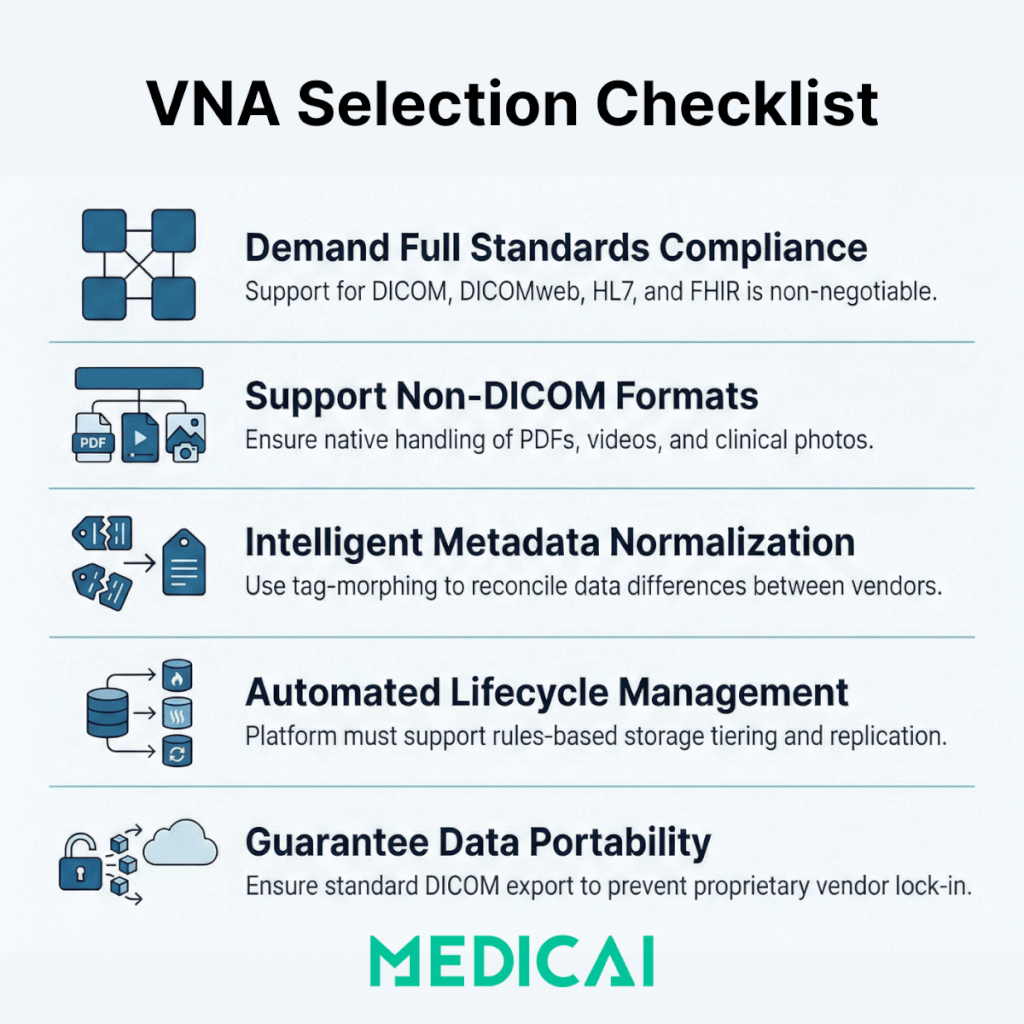
- Standards compliance: The VNA must support DICOM, DICOMweb, IHE XDS/XDS-I, HL7, and FHIR. Ask for IHE Connectathon results and verify which profiles the vendor has tested against.
- Non-DICOM support: A true enterprise VNA handles PDFs, scanned documents, clinical photos, video, and pathology images alongside DICOM studies. Verify what non-DICOM formats are supported natively.
- Tag morphing and metadata normalization: The VNA should support configurable DICOM tag-morphing rules to reconcile vendor-specific metadata differences during ingestion, and provide IOCM (Image Object Change Management) to correct errors post-storage.
- ILM and storage tiering: Evaluate how the VNA manages data lifecycle. Does it support automatic migration between storage tiers based on configurable rules? Does it support on-prem, cloud, and hybrid simultaneously?
- Disaster recovery and high availability: The VNA should support replication to a secondary site or cloud target, with documented RPO and RTO. Verify whether failover is automatic or manual.
- Multi-tenancy: Health systems with multiple facilities need a VNA that can logically separate data by site, department, or entity while maintaining a unified longitudinal patient record.
- Data portability: Ask how data is exported if you leave the vendor. A VNA that stores data in proprietary internal formats defeats its own purpose. Standard DICOM export with full metadata should be guaranteed under the contract.
For a detailed evaluation of which VNA benefits vendors commonly overstate and what to verify before contracting, see the vendor neutral archive benefits guide.
Medicai as a cloud-native VNA platform
Medicai is a cloud-native VNA and medical imaging platform that addresses the evaluation criteria above through a unified architecture rather than a patchwork of modules. Medicai stores all imaging data in the standard DICOM format on HIPAA- and GDPR-compliant, ISO 27001- and ISO 9001-certified Azure infrastructure. The platform includes DICOMization for non-standard image formats, a DICOM Gateway for connecting modalities and on-premises PACS, a zero-footprint DICOM viewer for browser-based reading, and dedicated patient and doctor imaging portals for cross-organization sharing.
Medicai supports multi-enterprise deployments where imaging data from multiple sites, specialties (radiology, cardiology, orthopedics, neurology, oncology, ophthalmology, ob-gyn), and referring providers is consolidated into a single cloud archive. The platform includes built-in backup and disaster recovery, a medical imaging API for developers building on top of the archive, and a mobile imaging app for access from any device.
Medicai offers a free 14-day trial for organizations evaluating VNA platforms.
VNA compliance, security, and data migration risks
VNA implementations carry regulatory, security, and operational risks that must be addressed during planning, not after deployment.
Regulatory compliance
In the United States, VNAs that store Protected Health Information (PHI) must comply with HIPAA Security and Privacy Rules. This includes encryption at rest and in transit, role-based access controls, audit logging of all data access events, and a Business Associate Agreement (BAA) with any cloud storage provider. The FDA classifies some VNA products as Class II medical devices, which means the vendor must maintain 510(k) clearance and comply with Quality System Regulations.
Outside the US, equivalent regulations apply: GDPR in Europe governs patient data handling, and regional health information standards (such as NHS Digital standards in the UK) may impose additional requirements on data residency and access controls.
We maintain HIPAA and GDPR compliance, as well as ISO 27001 certification for information security management and ISO 9001 certification for quality management. These certifications cover the entire platform, including VNA storage, data transit, viewer access, and sharing workflows.
Security considerations
VNA security risks include unauthorized access to patient imaging data, data loss due to storage failures or ransomware, and data interception during replication or retrieval over a network. Effective mitigations include:
- AES-256 encryption at rest and TLS 1.2+ encryption in transit
- Role-based access control (RBAC) with integration to enterprise identity providers (LDAP, SAML, OAuth)
- Immutable audit logs for all access, modification, and deletion events
- Geographically separated replication targets for disaster recovery
- Ransomware protection through write-once or immutable storage tiers for archived data
Data migration risks
Data migration is the most common failure point in VNA projects. Moving imaging data from a legacy PACS to a VNA involves extracting studies, validating the integrity of DICOM metadata, resolving patient identity conflicts, and confirming that all studies are accessible post-migration. Common risks include:
- Metadata corruption: Some legacy PACS store data in proprietary internal formats that do not map cleanly to standard DICOM. Tag morphing rules must be tested against a representative sample before full migration.
- Patient identity mismatches: Merging data from multiple PACS often reveals duplicate patient records, merged records, and ID conflicts. These must be resolved before migration, not after, to prevent clinicians from seeing incomplete or incorrect longitudinal records.
- Study count validation: Post-migration audits must confirm that every study from the source system exists in the VNA with all series and instances intact. Automated reconciliation tools are essential for large migrations.
- Downtime and dual-operation: Most VNA migrations run in parallel with the existing PACS for weeks or months. Planning for the cost and complexity of operating two systems simultaneously is essential to avoid gaps in clinical access.
Organizations that treat VNA migration as a simple file copy consistently underestimate the effort. Successful deployments allocate 30 to 50 percent of the total project timeline to migration planning, testing, and validation.
Medicai simplifies inbound migration through its DICOM Gateway and medical imaging uploader, which handle ingestion from multiple source systems and automatically apply DICOMization and indexing to incoming data.
Frequently Asked Questions
A medical imaging storage solution is the system that stores, retrieves, and retains medical imaging data (the DICOM studies produced by CT, MRI, X-ray, ultrasound, and other modalities) over the required retention period. The three main architectures are the vendor neutral archive (a centralized, vendor-independent archive), cloud PACS (which combines reading workflow with cloud storage), and hybrid (which combines on-premise and cloud storage). The right solution depends on how many systems and sites the organization runs and how it wants to control its imaging data.
A PACS stores imaging within a specific reading workflow and is often tied to a single vendor’s ecosystem, whereas a vendor-neutral archive stores imaging in a standards-based, vendor-independent format that any PACS or modality can read. The practical effect is that a VNA gives the organization control over its imaging data independent of any single PACS vendor. For a detailed comparison of how the two differ on data ownership, cost, and architecture, see the VNA vs PACS guide.
Medical imaging storage requirements are substantial and continue to grow because imaging studies are large (a single CT study can be hundreds of megabytes) and retention requirements often span many years. A busy imaging operation accumulates terabytes annually, and retention periods set by regulation and clinical need mean that data is kept for years or decades. This scale and growth are primary reasons organizations move imaging storage to the cloud, where capacity scales without adding on-premises storage hardware.
Cloud medical imaging storage can be secure and compliant when it implements the required safeguards: encryption in transit and at rest, role-based access controls, audit logging, a Business Associate Agreement, and compliance with HIPAA and, where applicable, GDPR. A well-architected cloud imaging storage solution meets the same security and compliance standards as on-premise storage while adding the scalability and accessibility that on-premise hardware cannot match. Organizations should verify the specific compliance posture and certifications of any storage platform used for Protected Health Information.
The choice depends on the organization’s specific situation. A vendor neutral archive suits organizations running multiple PACS or multiple sites that need a single vendor-independent archive across all of them. A cloud PACS suits organizations that want reading workflow and storage together in one platform, particularly those deploying or migrating to cloud-native imaging. A hybrid approach suits organizations transitioning from on-premise to the cloud, or those with data residency or latency requirements that a single architecture cannot meet. For the detailed VNA-versus-PACS comparison, see the dedicated guide; for cloud-based storage specifically, see the Medicai cloud PACS.


Related Articles

Lets get in touch!
Learn more about how Medicai can help you strengthen your practice and improve your patients’ experience. Ready to start your Journey?
Book A Free Demo