Why Cloud-Based Medical Image Sharing Matters More Than Ever

Waiting days for a CD just to get a doctor to view your scan is indeed frustrating.
Cloud-based medical image sharing helps hospitals, clinics, and patients store and share imaging, such as CTs, MRIs, and X-rays, through secure online platforms rather than physical media or on-prem servers. The result is instant access, smoother collaboration, and fewer barriers between diagnosis and treatment.
Read to learn how cloud-based medical image sharing works and why it matters for real-world care.

What Is Cloud-Based Medical Image Sharing?
Cloud-based medical image sharing offers a modern solution for storing, accessing, and sharing medical images like X-rays, CT scans, and MRIs via a secure online platform. It helps clinicians to quickly access images from any device, eliminating the need for physical CDs or local servers and reducing delays in patient care.
Healthcare today moves fast, and cloud sharing keeps pace.
- Specialists work across multiple locations.
- Patients expect online access to their records.
- Multidisciplinary teams rely on quick collaboration.
- Emergency cases need rapid image access.
- Second opinions require a smooth, secure file transfer.
Cloud-based medical image sharing streamlines processes by cutting wait times, eliminating physical media, and enhancing connected care. It keeps radiologists, physicians, surgeons, and patients aligned without unnecessary delays or complications, enabling quicker clinical decisions.
Core Components of a Cloud-Based Medical Image Sharing Platform
A cloud-based medical image sharing platform is a comprehensive ecosystem that enables quick, secure, and frictionless image transfer. Each part works together so clinicians can access scans instantly and collaborate.
Check the core components that enable smooth cloud-based medical image sharing.
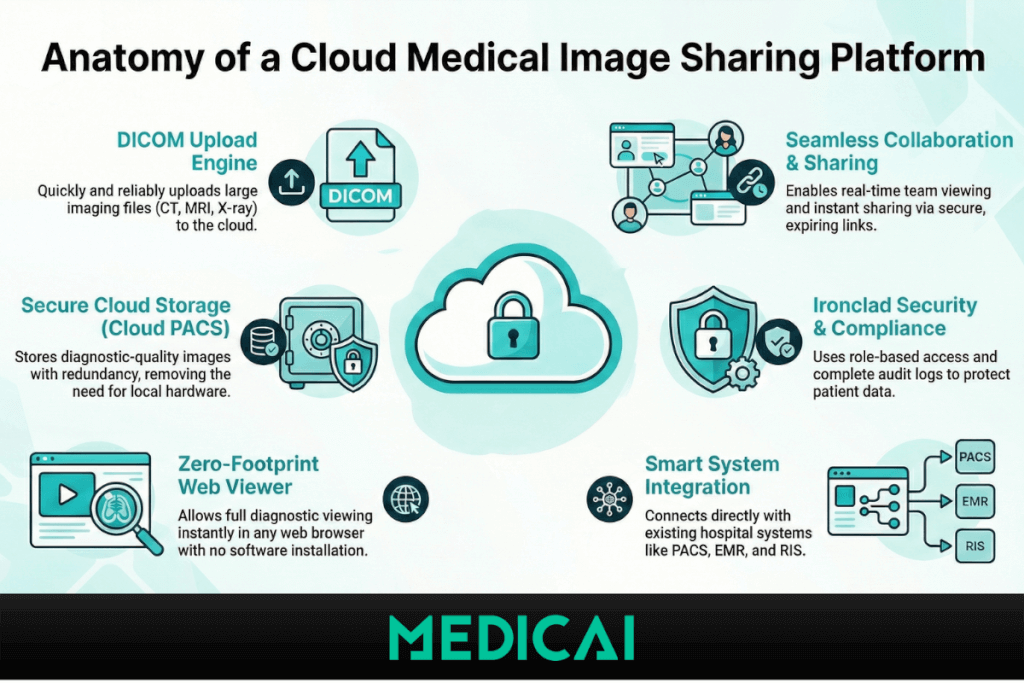
DICOM Upload Engine
A cloud-based platform needs a fast and reliable way to upload CT, MRI, ultrasound, and X-ray studies. And DICOM format upload engine is the tool that quickly and reliably uploads imaging files to the cloud.
What it does:
- Handles large DICOM files without slowing down
- Reads metadata instantly
- Supports drag-and-drop uploads
- Works with scanners, PACS, or local folders
A strong upload engine is crucial because it sets the pace for everything that follows
Cloud PACS or Cloud Storage Layer
In cloud-based medical image sharing, images don’t sit on a single hospital computer.
They live in secure, encrypted cloud storage built for healthcare.
Key functions of Cloud PACS:
- Stores files in diagnostic quality
- Maintains redundancy so nothing gets lost
- Ensures fast loading from anywhere
- Removes hardware and local server dependencies
It keeps the experience consistent whether you’re reading in a hospital, a clinic, or a home office.
Zero-Footprint Web Viewer
A zero-footprint viewer means the clinician doesn’t need to install anything, not even a plugin. It:
- Opens instantly in any web browser
- Supports full DICOM tools (zoom, pan, windowing, measurements)
- Handles multi-slice studies smoothly
- Works on desktops, laptops, and tablets
The viewer is the heart of every cloud-based medical image sharing platform. It turns a simple link into a full diagnostic experience.
Role-Based Access Control
Security is a non-negotiable part of medical imaging.
Healthcare teams can further protect credentials and system access by using a password manager offline, ensuring sensitive login data remains secure even without internet connectivity.
Cloud platforms use role-based permissions to control who can see, download, or share certain images. It:
- Protects patient information
- Limits sensitive access to authorized users
- Allows different permissions for radiologists, referring physicians, and patients
The role-based access ensures compliance without slowing down the workflow.
Collaboration Layer
One of the biggest benefits of cloud-based medical image sharing is teamwork. Collaboration features include:
- Real-time viewing for multiple users
- Live annotations
- Secure messaging inside the viewer
- Shared cases for tumor boards or MDT meetings
These tools allow teams to discuss cases even when they’re not in the same room.
Link-Based Sharing System
Instead of burning CDs or sending files through email attachments, the platform creates secure links. You can achieve:
- Instant sharing with any specialist
- Protected access with passwords or expiration dates
- Simple patient-facing sharing
- No software installation for the receiver
This is what makes cloud-based sharing fast and practical in real-world clinical settings.
Audit Logs & Activity Tracking
Every action, from opening a scan to sharing a link, is recorded. The process provides benefits, including:
- Ensures full compliance
- Tracks who accessed which images
- Helps hospitals maintain transparency and accountability
Integration Layer (PACS, EMR, RIS)
Modern cloud platforms often connect directly with existing hospital systems. Integrations include:
- PACS → cloud sharing
- EMR/RIS → study lists
- Automated retrieval from scanners
The integration allows hospitals to use the cloud without disrupting their current setup.
How Cloud-Based Medical Image Sharing Works
Cloud-based medical image sharing may seem simple on the surface, but several layers work together to deliver a fast, secure, and reliable experience.
Step 1. Uploading the Images
The process starts when a CT, MRI, ultrasound, or X-ray study is uploaded into the cloud platform. This can happen directly from a scanner, from a PACS, or from a local folder.
- The system reads the DICOM files
- Metadata is extracted instantly
- Large studies upload without manual compression
- Files are prepared for cloud storage
Step 2. Storing the Files in Secure Cloud Storage
Once uploaded, the studies are stored in a secure, encrypted cloud hosting environment.
- Files remain in full diagnostic quality
- Multiple backups protect against data loss
- The storage scales automatically as cases increase
Step 3. Rendering and Preparing the Images
Before viewing, the cloud system processes the DICOM files so they load instantly in the browser.
During this stage:
- Multi-slice CT and MRI studies are pre-rendered
- Viewer tools (windowing, zoom, measurements) are enabled
- Images are optimized for smooth loading on any device
This step is what makes cloud-based medical image sharing incredibly fast.
Step 4. Viewing Through a Web-Based DICOM Viewer
Now the images are ready to open on any laptop, desktop, or tablet without installing anything, and review the study
The viewer allows:
- Full diagnostic tools
- Side-by-side comparisons
- Cine mode for CT/MRI
- Measurements and annotations
- Easy navigation through slices
Step 5. Setting Access and Permissions
Before sharing, the platform applies security rules, including-
- Role-based permissions
- User authentication
- Expiration dates for links
- Download restrictions, if needed
Step 6. Sharing the Images Securely
Once ready, the study can be shared through a secure link. This link can be sent to another clinician, a specialist, or directly to the patient.
Sharing options include:
- One-click link sharing
- Password-protected access
- Time-limited viewing
- Patient-friendly URLs
This is the moment where cloud-based medical image sharing proves its value, no physical media, no delays.
Step 7. Viewing by the Recipient
The recipient opens the secure link and views the study directly in their browser.
They can:
- See the full study instantly
- Use diagnostic tools
- Download files if allowed
- Request additional images
- Join collaborative review sessions
Cloud vs. On-Prem Image Sharing
Cloud-based medical image sharing offers instant access, easy collaboration, stronger security, and automatic scalability without relying on local hardware. On-prem systems depend on hospital servers, VPNs, and physical media, limiting remote access and adding maintenance costs.
Cloud workflows are faster, lighter, and better suited for modern diagnostic needs.
| Category | Cloud-Based Medical Image Sharing | On-Prem Image Sharing |
| Accessibility | Access from any device without VPN; instant viewing | Limited to the hospital network; remote access requires VPN |
| Speed | Fast loading even for large CT/MRI studies | Slower loading, especially for multi-slice studies |
| Collaboration | Real-time, multi-user collaboration across locations | Mostly internal; external sharing requires CDs/exports |
| Security | Built-in encryption, link-based sharing, and automatic updates | Relies on local IT; higher risk if CDs/USBs are used |
| Maintenance | No hardware upkeep; automatic backups and updates | Local servers need constant upgrades, patches, and checks |
| Scalability | Expands instantly as imaging volume grows | Scaling requires costly hardware and IT support |
| User Experience | Zero-install web viewer; easy for clinicians and patients | Requires installed software; limited patient access |
| Cost | Lower long-term cost; no physical media needed | Higher hardware, software, and maintenance expenses |
| Disaster Recovery | Cloud redundancy ensures high uptime and fast recovery | Vulnerable to local server failures; slow recovery |
| Best For | Multi-site groups, teleradiology, fast referrals, modern workflows | Single-site setups with heavy on-prem IT resources |
Benefits of Cloud-Based Medical Image Sharing
Cloud-based medical image sharing offers several benefits.
- Faster Diagnoses: Images open instantly without CDs, downloads, or VPN delays, helping radiologists report faster. It’s critical during emergencies.
- Better Collaboration: Teams across locations can view the same study at the same time, making tumor boards, trauma consults, and surgery planning smoother.
- Lower Costs: Cloud systems eliminate the costs of CDs, hardware upgrades, and on-premises server maintenance.
- Improved Patient Experience: Patients can access and share their images via simple links rather than carrying physical media.
- Faster Referrals and Second Opinions: Secure sharing links help specialists to review studies immediately, reducing unnecessary repeat scans and delays.
- Stronger Security: Encryption, access controls, and audit logs protect PHI better than physical media or email attachments.
- Minimal IT Maintenance: Automatic updates and zero-install tools reduce IT teams’ workload.
- Supports Telehealth and Teleradiology: Radiologists and clinicians can review imaging from anywhere, supporting modern remote workflows.
- Smooth Cross-Facility Transfers: Images move instantly between hospitals, improving continuity of care and preventing repeat imaging.
- Better Preparation for Treatment: Surgeons and specialists can view studies early, improving planning and communication before procedures.
Medical Image Sharing Companies: What They Offer Today
Medical image-sharing companies shape how imaging moves through the healthcare system.
Cloud PACS Vendors
Cloud PACS vendors replace or extend on-prem systems with cloud-based storage and viewing. They let hospitals securely store DICOM studies, open them with zero-install viewers, and access cases across multiple sites without relying on local hardware.
Teleradiology Platforms
These platforms enable radiologists to read cases remotely, after hours, or across multiple facilities. They offer fast uploads, shared worklists, and real-time tools that keep reporting smooth and timely.
Second-Opinion Platforms
Second-opinion services allow patients or clinicians to get expert reviews online. They offer easy upload portals, secure sharing links, and simple communication for follow-up questions, removing the need for CDs.
Patient-Sharing Platforms
These platforms give patients direct access to their imaging. With clean portals and one-click sharing, individuals can store, view, and send their scans anytime, supporting better personal health management.
Hospital-to-Hospital Sharing Providers
These solutions connect facilities within a network, enabling secure, fast transfers and system-to-system integrations for smooth multi-site access.
Hybrid Workflow Platforms
Hybrid platforms combine cloud PACS, sharing tools, teleradiology features, and patient access in a single platform. It supports modern imaging teams working across locations.
Medicai offers hybrid workflows with cloud-based PACS, secure sharing, and collaboration tools built into one system.
Top Five Medical Image Sharing Companies
Let’s check the five leading companies shaping how medical images are shared today.
Medicai
Medicai offers a cloud-based PACS designed for fast, compliant medical image sharing.
Key features:
- Secure link-based sharing
- Zero-install web viewer
- Multi-location collaboration
- Teleradiology-ready workflows
- Simple, lightweight cloud PACS architecture
Sectra
Sectra provides a strong enterprise imaging platform used across radiology, pathology, cardiology, and ophthalmology.
Key features:
- Secure, scalable cloud and hybrid architecture
- AI-enhanced tools for diagnostics
- Cross-specialty image management
- Enterprise-level cybersecurity
- Smooth collaboration across multi-site health systems
Collective Minds
Collective Minds focuses on cloud-based radiology collaboration for clinical teams.
Key features:
- Case-sharing for remote consultation
- Tools for joint clinical review and teaching
- Easy second-opinion workflows
- Browser-based viewing
- Multi-institution collaboration support
MyMedicalImages
MyMedicalImages focuses on patient-controlled access to and sharing of images.
Key features:
- Patient upload and storage portal
- One-click sharing with physicians
- Cloud-based viewing for all devices
- Simplified second-opinion access
- No need for CDs or external drives
Candelis ASTRA Cloud
Candelis ASTRA Cloud supports efficient sharing of radiology studies and reports between providers.
Key features:
- Fast cloud transfer of DICOM studies
- Secure, HIPAA-compliant access
- Simple external sharing tools
- Integrated reporting support
- No software installation required
Conclusion
Cloud-based medical image sharing is now the backbone of modern diagnostics. It cuts delays, strengthens collaboration, and gives both patients and clinicians instant access to the images they depend on.
As healthcare becomes more distributed, cloud-based platforms like Medicai make it easier for teams to connect. With tools that simplify image access and sharing, Medicai enables faster, more confident teamwork without complexity.


Related Articles



Lets get in touch!
Learn more about how Medicai can help you strengthen your practice and improve your patients’ experience. Ready to start your Journey?
Book A Free Demo