Top Advantages of Migrating PACS to the Cloud

Storage Tiers, Cost Model, Zero-Footprint Access, Security, AI Integration, and a Migration Readiness Checklist
Cloud PACS replaces on-premise server hardware with cloud object storage, lifecycle tiering policies, and browser-based viewers, allowing hospitals and imaging centers to scale their medical imaging archive without hardware refresh cycles while converting large capital expenses into predictable monthly operating costs. A cloud-based Picture Archiving and Communication System receives DICOM images from modalities in the same way an on-premise system does, but stores, retrieves, and distributes those images through cloud infrastructure rather than local servers.
Cloud PACS adoption is accelerating across healthcare. According to the KLAS Imaging in the Cloud 2024 report, nearly two-thirds of healthcare organizations are already using or plan to use the cloud for image viewing and storage within three years. The shift is driven by practical constraints: imaging volumes grow by terabytes per month as new modalities and AI outputs compound the curve, and on-premise storage hits capacity limits when procurement, racking, and migration lag behind demand.
This article covers the migrating to cloud PACS advantages: elastic storage tiers that lower frequent-access costs, CapEx-to-OpEx cost conversion with concrete five-year modeling, zero-footprint clinical access, security and compliance architecture, AI integration patterns, and a migration readiness checklist with acceptance thresholds. Medicai operates as a cloud-native PACS built on a VNA foundation, and the architecture patterns described below reflect how a well-designed cloud PACS should function.
Scalability and elastic storage for cloud PACS
Cloud PACS decouples storage capacity from local compute infrastructure. Cloud object storage automates tiering with lifecycle policies and stores large, immutable DICOM datasets economically. Lifecycle rules keep recent studies immediately available on hot or warm tiers while moving infrequently accessed data to cheaper cold tiers, reducing the frequent-access storage footprint by roughly half in typical configurations.
How to size cloud PACS storage
Cloud PACS sizing requires concrete metrics collected from your current environment before engaging cloud PACS vendors for pilot quotas. Track the following baseline numbers:
- Average studies per day and peak concurrent ingest rate
- Average study size (GB) and average series count per study
- Retention rules and acceptable archive retrieval latency
- Peak read concurrency and expected annual growth rate
Apply the baseline formula to estimate annual growth:
TB/year ≈ (studies/day × average study size in GB × 365) ÷ 1024
For example, 5 TB of new imaging per year is approximately 0.42 TB per month. With a 90-day warm retention policy, roughly 1.25 TB stays in the warm tier and 3.75 TB ages past the warm window. If a lifecycle rule moves 70% of that older data to cold storage, the frequent-access footprint drops to approximately half of the total archive.
Those numbers determine pilot quotas, caching strategies for diagnostic versus clinical reads, and cost projections for different tiering policies.
Cloud PACS storage versus VNA: when to choose which
Cloud PACS storage and a Vendor Neutral Archive serve different architectural roles. Choose a VNA when you need vendor neutrality, long-term non-DICOM object support, or consolidation of multiple PACS across hospitals. For straightforward single-vendor migrations, a cloud archive alone is often sufficient. A VNA adds an abstraction layer that separates the archive from the viewer vendor, which prevents future vendor lock-in but adds integration complexity. The full VNA architecture and its role in migration planning are covered in the Vendor Neutral Archive guide.
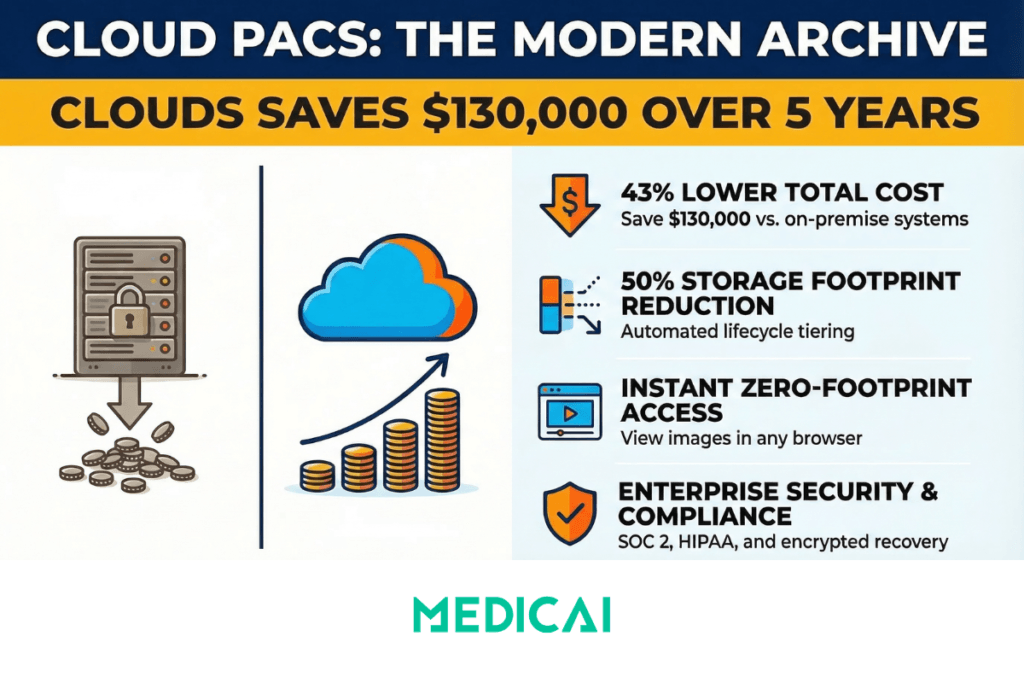
Reduced IT overhead and predictable costs for cloud PACS
Cloud PACS converts the imaging storage cost model from large, lumpy capital expenditures to predictable monthly operating expenses. This financial shift simplifies budgeting, but requires explicit modeling of variable charges that on-premise systems do not have.
Five-year cost comparison: on-premise versus cloud PACS
| Cost category | On-premise (5 years) | Cloud PACS (5 years) |
|---|---|---|
| Storage servers | $120,000 | — |
| Cooling and racks | $30,000 | — |
| Staff and support | $150,000 | — |
| Cloud storage | — | $60,000 |
| Egress and retrieval | — | $20,000 |
| Managed service fees | — | $90,000 |
| Total | $300,000 | $170,000 |
| Estimated savings | ≈ $130,000 over five years | |
These figures are representative estimates for a mid-size imaging operation. Your actual numbers depend on archive size, study volume, tiering policy, and cloud provider pricing. Run a five-year forecast that explicitly includes restore fees, egress charges, API call costs, and integration labor before comparing subscription and pay-per-study options against an on-premise plan.
Operational tasks that disappear or shrink after migration
Cloud PACS eliminates or reduces specific IT maintenance tasks that consume staff time in on-premise environments: RAID rebuilds, local backup orchestration, complex disaster-recovery drills, hardware refresh procurement cycles, and OS patching. Teams can reallocate that time to integration work, automation, and direct clinician support. Track a metric such as IT hours saved per month to quantify operational ROI.
What a managed cloud PACS SLA should include
Cloud PACS service-level agreements should define uptime targets, RPO (recovery point objective) and RTO (recovery time objective), first-image load commitments, support response tiers, and approved change windows. Negotiate service credits for missed SLAs and require explicit handoffs where integrations touch RIS or EHR systems. Insist that export and migration procedures are covered contractually so you retain control of your data at exit.
Enhanced accessibility and clinical collaboration with cloud PACS
Cloud PACS enables zero-footprint viewing: browser-based image access that removes the need for VPNs, local installs, and heavy desktop clients. Clinicians open studies directly in a browser from any location with internet access.
Zero-footprint viewer performance requirements
Cloud PACS viewers must meet different performance thresholds for different use cases. For diagnostic reads, ensure full fidelity and low latency. For clinical reads, prioritize fast first-image load and smooth series navigation. Before go-live, measure two benchmarks on representative hospital bandwidth:
- First-frame time — the time from study request to the first image displayed
- Series scroll time — the time to scroll through a 50-image series end to end
If either metric exceeds clinical tolerance on your network, investigate edge caching, CDN configuration, or progressive image loading before committing to production deployment. Medicai addresses this with a hybrid edge architecture: an edge server deployed locally at the hospital caches recent studies for LAN-speed diagnostic reading, while the full archive syncs to the cloud for disaster recovery and remote access.
Multi-site sharing and federated access
Cloud PACS enables multi-site sharing with centralized worklists, study routing, and role-based access across hospitals and clinics. A federated access pattern synchronizes the identity provider across sites, applies cross-site permissions, and logs every access in an immutable audit trail. Export access logs to your SIEM daily and align retention with your organization’s policy so you can demonstrate who accessed which study and when.
Integration with RIS, EHR, and clinical workflows
Cloud PACS integrations connect the clinical workflow end to end: RIS orders populate modality worklists, modalities push images into the archive or VNA, and final reports flow back to the EHR via HL7 or FHIR. Use DICOMweb for web-native image retrieval and wrap image metadata with FHIR resources when the EHR must own the clinical record. Validate order matching and patient reconciliation with end-to-end tests, automate those checks in your CI pipeline, and re-run them after any middleware or integration change.
Security, compliance, and resilient disaster recovery for cloud PACS
Cloud PACS security must be verified with specific proofs before migrating any imaging data. Ask vendors for the encryption algorithms used at rest and in transit, their key management model, customer-managed key (CMK) and HSM options, and how they export access logs to your SIEM.
Access controls and audit requirements
Cloud PACS deployments require role-based access control (RBAC) and multi-factor authentication (MFA) for both viewers and archive consoles. Require tamper-evident audit logs that record who accessed which study and when. Include a scheduled test in your deployment plan: delete and recover a non-production study to verify data integrity and timestamps.
Disaster recovery architecture
Cloud PACS disaster recovery design must meet your RTO and RPO targets. Choose synchronous replication for sub-minute RPOs and asynchronous or streaming replication for longer windows. Use automated failover orchestration for warm standby regions. Run periodic failover drills with clear scripts and log start and end times, data deltas, application errors, and clinician-impact metrics such as viewer latency and study access failures. Those logs become evidence for SLA compliance and process improvement.
Regulatory and contractual controls
Cloud PACS compliance requires documented regulatory controls before deployment. Confirm these contractual and regulatory items early:
- A signed Business Associate Agreement (BAA)
- Explicit data residency terms specifying where imaging data is stored geographically
- Recent vendor audit reports (SOC 2, HITRUST, or equivalent)
- Mapped HIPAA and GDPR obligations with documentation of where local residency rules apply
- Right-to-audit clauses in the vendor agreement
- For cross-border transfers: standard contractual clauses, encrypted transport, and a documented legal basis
Faster innovation: APIs, AI integration, and vendor neutrality with cloud PACS
Cloud PACS architecture enables API-driven workflows and AI integration that on-premise systems make difficult or impossible.
RESTful imaging APIs and zero-footprint embedding
Cloud PACS RESTful APIs let you embed a zero-footprint viewer directly into an EHR or clinical portal and automate retrieval with standard HTTP calls. A common click-to-open pattern works as follows: the EHR requests a short-lived token, exchanges it with the imaging API, and opens the viewer to the requested study without requiring an additional login.
AI integration pattern for cloud PACS
Cloud PACS simplifies AI integration compared to on-premise systems because compute resources scale independently of the archive. A safe integration pattern follows three steps:
- Prefetch — stage studies into a processing area from the cloud archive
- Infer — push image instances to an inference queue connected to the AI model
- Persist — write structured results back to the archive or a connected RIS
Treat AI outputs as provisional until clinically validated. Include test datasets, clinical oversight, continuous performance monitoring, and a process to detect drift and false positives. Validation and governance are non-negotiable for clinical deployment.
Avoiding vendor lock-in
Cloud PACS vendor neutrality requires explicit contractual and technical safeguards. Insist on open web APIs (DICOMweb WADO-RS, STOW-RS, QIDO-RS), exportable archives in standard DICOM format, and a VNA strategy that separates storage from viewer and workflow tools. Require documented export formats and a migration plan in your contract, then exercise that plan during the pilot to verify restore performance and costs. Ask vendors how long a full export and re-import takes and who bears the cost, then prove it with a test migration during the evaluation phase.
Medicai stores imaging data in standard DICOM format on a VNA foundation — not in a proprietary wrapper. If an institution changes viewers or leaves the platform, the data does not require extraction or conversion. The platform is native to HL7 FHIR and DICOMweb, which means imaging data integrates with EMR, patient portals, and AI research algorithms without custom interface development.
Cloud PACS migration readiness checklist
Cloud PACS migration should begin with a structured readiness assessment before any data moves. Run each check below, document the test method, and set acceptance thresholds so you can sign off objectively.
| Check | Method | Acceptance threshold |
|---|---|---|
| Baseline metrics | Export 90 days of logs; measure studies/day, average series size, and retention rules | Documented growth rate and retention map with sampling error under 5% |
| Network | Load-test WAN with concurrent viewers; measure throughput per viewer and round-trip latency | At least 5 Mbps per concurrent viewer; median latency under 150 ms for clinical sites |
| Identity | Validate SSO, RBAC, and MFA across roles via staged logins | 99% successful SSO logins; MFA enforced for all privileged accounts |
| Governance | Confirm retention policy, legal approvals, and signed BAAs | Policies signed and scheduled for automated enforcement |
| Integration tests | Send sample studies through DICOM hooks and HL7/FHIR flows; verify end-to-end ingest and indexing | Zero critical errors; retrieval within target SLA (e.g., under 30 seconds) |
| Rollback and DR | Run a dry-run restore and failback | Meet RTO/RPO targets with written verification steps |
Recommended migration phases
Cloud PACS migration follows a phased approach to minimize clinical disruption:
- Discovery and metrics collection (2–4 weeks, IT owner) — collect the baseline numbers from the readiness checklist above
- Pilot (approximately 4 weeks, radiology lead plus vendor integrator) — run on a subset modality or single clinic to validate workflows end to end
- Parallel reconciliation (4–8 weeks) — run old and new systems in parallel; enable data prefetching and staged synchronization to reduce read latency
- Cutover — a defined freeze window of 48 to 72 hours with a two-week post-cutover validation window
For the technical details of DICOM C-MOVE migration, private tag auditing, patient identity reconciliation, and validation KPIs, see the full PACS migration guide.
Cloud PACS vendor selection criteria
Cloud PACS vendor evaluation should weight these categories when comparing offerings on equal footing:
| Category | What to evaluate |
|---|---|
| Integration capability | HL7, FHIR, DICOMweb support; RIS/EHR connectivity; modality routing rules |
| Viewer performance | First-frame time; series scroll speed; diagnostic versus clinical viewing modes; mobile access |
| Security posture | Encryption (at rest and in transit); RBAC; MFA; audit logs; SOC 2 or HITRUST certification |
| Deployment model | Pure cloud, hybrid with edge caching, or multi-cloud; data residency options |
| SLAs | Uptime target; RPO/RTO; first-image load commitment; support response tiers |
| Price transparency | Subscription vs. pay-per-study; egress fees; retrieval charges; lifecycle tier costs |
| Exit provisions | Data portability in standard DICOM; export timeline; bandwidth non-throttling; migration support obligation |
| VNA compatibility | Vendor-neutral storage; IHE profile support; enterprise imaging API availability |
Maintain a five-year TCO worksheet listing CapEx, OpEx, staff costs, indirect costs, and estimated savings from lifecycle policies. Those items allow direct comparison across vendors regardless of pricing model differences. For a broader vendor comparison, see the cloud PACS vendors guide.
Related guides
Cloud PACS connects to several other entities in the enterprise imaging chain. The following guides cover the specific topics referenced in this article.
| Guide | Relevance to cloud PACS |
|---|---|
| PACS Migration | The technical migration lifecycle: DICOM C-MOVE, private tag auditing, patient identity reconciliation, delta data management, validation KPIs, and vendor contract exit terms. |
| Vendor Neutral Archive (VNA) | When cloud PACS storage alone is not enough and a VNA layer is needed for vendor neutrality, multi-PACS consolidation, or non-DICOM support. |
| Cloud PACS Vendors | Comparison of cloud PACS vendors by capabilities, pricing model, and deployment architecture. |
| Radiology Information System (RIS) | How RIS scheduling, worklist, and accession number generation integrate with cloud PACS workflows. |
FAQ: Migrating to Cloud PACS Advantages
What is cloud PACS?
Cloud PACS is a Picture Archiving and Communication System that stores, retrieves, and distributes medical images through cloud infrastructure rather than local servers. It receives DICOM image files from modalities (CT, MRI, X-ray, ultrasound) in the same way an on-premise system does, but the archive, compute, and viewer components run in cloud data centers. Cloud PACS typically operates on a subscription model, with storage costs scaling based on study volume and tiering policies.
How much does cloud PACS cost compared to on-premise?
Cloud PACS costs depend on archive size, study volume, tiering policy, and vendor pricing model. A representative five-year comparison for a mid-size imaging operation shows approximately $300,000 total cost of ownership for on-premise (servers, cooling, staff) versus approximately $170,000 for cloud (storage, egress, managed services). The cloud model shifts cost from capital expenditure to operating expenditure, but variable charges for egress, retrieval, and API calls must be modeled explicitly to avoid surprises.
Is cloud PACS HIPAA compliant?
Cloud PACS can meet HIPAA compliance requirements when deployed with the correct security controls. Required elements include encryption at rest and in transit (with customer-managed key options), role-based access control, multi-factor authentication, tamper-evident audit logs, a signed Business Associate Agreement with the cloud vendor, and documented data residency terms. Compliance is not inherent in the cloud model — it depends on the specific configuration, vendor certifications (SOC 2, HITRUST), and operational practices of the deployment.
What is the difference between cloud PACS and VNA?
Cloud PACS is a complete system that includes image storage, a viewer, and workflow tools running in the cloud. A Vendor Neutral Archive (VNA) is specifically the storage layer, designed to hold imaging data in vendor-neutral format independent of any viewer. A cloud PACS may or may not include a VNA foundation. Choose a VNA when you need vendor neutrality across multiple viewer vendors, multi-PACS consolidation, or long-term storage of non-DICOM objects. Choose a cloud PACS without a separate VNA when doing a straightforward single-vendor migration.
How long does cloud PACS migration take?
Cloud PACS migration timelines depend on archive size and methodology. A phased approach typically takes 14 to 20 weeks: 2–4 weeks for discovery and metrics collection, 4 weeks for a subset pilot, 4–8 weeks for parallel reconciliation, and a 48–72 hour freeze window for cutover with a two-week post-cutover validation period. For archives over 50TB, physical seeding may be required to avoid transfer timelines measured in months or years. Background migration of deep historical archives may continue for 12–18 months after clinical go-live.
Can cloud PACS work without stable internet?
Cloud PACS depends on internet connectivity for image access, which creates a vulnerability during network outages. Hybrid architectures address this by deploying a local edge server that caches recent studies for LAN-speed access independent of internet availability. Diagnostic reading continues on cached studies even if the cloud connection is interrupted. Older studies that are not cached require cloud retrieval and are unavailable during outages. The edge cache size should be configured to hold at least 90 days of recent studies for uninterrupted clinical reading.


Related Articles



Lets get in touch!
Learn more about how Medicai can help you strengthen your practice and improve your patients’ experience. Ready to start your Journey?
Book A Free Demo