DICOM Modality Worklist (MWL): How It Works, Why It Fails, and What Happens When It Does

DICOM Modality Worklist is a DICOM service that allows an imaging device — a CT scanner, MRI machine, X-ray unit, or any DICOM-compliant modality — to query a server (typically the RIS) for the list of scheduled examinations it is expected to perform. Before the technologist positions the patient and initiates the scan, the imaging device sends a query asking: “What patients am I scheduled to see, and what are their details?” The RIS responds with the scheduled examination data. The device pre-populates its acquisition interface with that data — patient name, date of birth, MRN, accession number, procedure description — and the technologist presses the Acquire button.
The purpose of this transaction is to eliminate manual data entry at the modality. Without MWL, a technologist types the patient’s name, MRN, and accession number directly into the scanner’s keyboard. Every keystroke is an opportunity for a transcription error. A single character difference between the accession number in the RIS and the accession number embedded in the DICOM file causes the study to arrive in PACS without a matching order — the unmatched study problem that PACS administrators spend significant time resolving.

| DICOM Modality Worklist (MWL) | Radiologist Reading Worklist | Unified Worklist | |
| Who queries it | The imaging device (CT, MRI, X-ray) | The radiologist at their reading workstation | The radiologist at their reading workstation |
| What it contains | Scheduled examinations, the modality is expected to perform today | Studies that have been acquired and are ready to be read | Studies from multiple PACS systems aggregated into one queue |
| When it’s used | Before image acquisition, at patient check-in at the scanner | After image acquisition, when the radiologist begins reading | After image acquisition, in multi-site or enterprise reading environments |
| The DICOM service | DICOM C-FIND (MWL SOP class) | DICOM C-FIND (Study Root Query) or proprietary | Proprietary orchestration layer above DICOM |
| The server | RIS MWL server | PACS query/retrieve server | Workflow orchestrator or VNA overlay |
| What it feeds | The modality’s DICOM tag pre-population | The radiologist’s worklist display | The radiologist’s unified reading queue |
The DICOM service underneath — C-FIND SCP and SCU
DICOM Modality Worklist is implemented using the DICOM C-FIND service with the Modality Worklist SOP (Service-Object Pair) class. The transaction involves two roles: the SCU (Service Class User) is the modality — it initiates the query. The SCP (Service Class Provider) is the RIS MWL server — it receives the query and returns matching scheduled procedure steps.
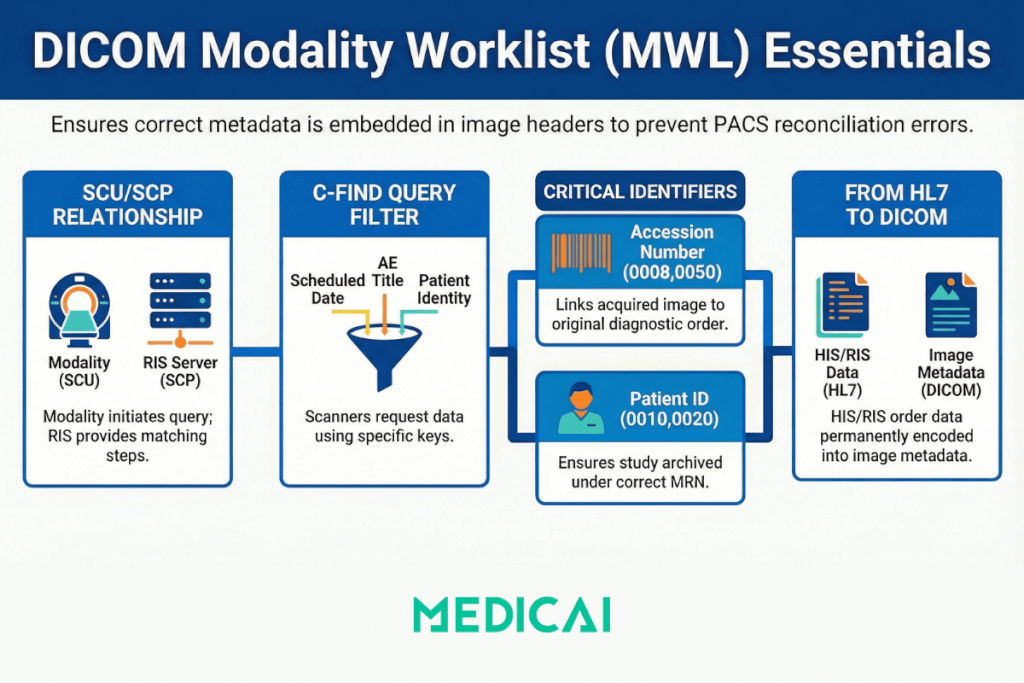
The query sequence in practice: the technologist selects “query worklist” at the modality console. The scanner sends a C-FIND request to the configured MWL server address (the RIS, or an interface engine acting as MWL proxy). The request includes matching keys — typically the scheduled date, the scheduled station’s AE title (the scanner’s identity), and, optionally, the patient’s MRN or name. The RIS processes the query against its scheduled examination database and returns one row per matching scheduled procedure step.
Each row in the response is a Scheduled Procedure Step — a DICOM dataset containing specific attributes. The ones that matter most in production:
| DICOM attribute | Tag | What it carries | What breaks if it’s wrong |
| Patient Name | (0010,0010) | Patient name in DICOM format (Last^First^Middle) | Images arrive in PACS under the wrong name; patient identity mismatch |
| Patient ID | (0010,0020) | MRN | Fundamental identity error; the study appears as a new patient in PACS if the MRN doesn’t match the existing record |
| Accession Number | (0008,0050) | The RIS-assigned identifier linking the image to the order | Without a matching accession number, PACS cannot auto-reconcile the study with the order; the study lands in the unmatched bucket |
| Requested Procedure Description | (0032,1060) | Plain-language procedure name | Populates the DICOM Study Description tag; affects how the study appears in PACS worklist and report |
| Scheduled Procedure Step Start Date | (0040,0001) | Scheduled date | Used as a filter in modality query; a wrong date means the study doesn’t appear in today’s worklist |
| Scheduled Station AE Title | (0040,0001) | The DICOM AE title of the scanner expected to perform this procedure | If the AE title doesn’t match the querying scanner, the worklist entry may not be returned |
| Modality | (0008,0060) | DICOM modality code (CT, MR, CR, etc.) | A mismatch between the scheduled modality and the acquired modality causes PACS routing rules to fail |
The DICOM modality takes these attribute values and writes them into the DICOM header of every image file it acquires. This is the moment when the HL7 world ends, and the DICOM world begins — the patient identity that HIS originated, transmitted to the RIS via ADT A01 and ORM O01, is now encoded in the DICOM metadata of a medical image. Every downstream event in PACS — study routing, worklist display, billing reconciliation, report association — depends on these tags being correct.
MWL in the IHE Scheduled Workflow profile
DICOM defines the C-FIND service and the MWL SOP class. IHE Scheduled Workflow (SWF) defines how and when that service should be used within a clinical workflow — the sequence of transactions, the actors involved, and the conformance requirements. MWL is Step 4 in the IHE SWF transaction sequence. The section below maps all eight steps so you can see where the C-FIND query fits relative to the HL7 order that precedes it and the MPPS signal that follows it. Understanding this sequence matters for troubleshooting: a modality can be DICOM-conformant (it implements C-FIND correctly) while still failing IHE SWF conformance (it queries the wrong actor, at the wrong time, with the wrong matching keys).
The eight IHE SWF transactions in order:
- Order Placer → Department System Scheduler: The HIS or CPOE sends an HL7 ORM O01 message placing the imaging order. This is the event that initiates the entire workflow. The RIS-PACS Integration guide covers this HL7 transaction in detail.
- Department System Scheduler creates the Scheduled Procedure Step: The RIS receives the ORM, creates a Scheduled Procedure Step record, and makes it available on the MWL server. No DICOM transaction occurs yet — this is internal RIS processing.
- Department System Scheduler → Image Manager (optional): The RIS may notify the PACS that a study has been scheduled, allowing the PACS to pre-allocate storage or pre-fetch relevant priors.
- Acquisition Modality → Department System Scheduler: MWL C-FIND query. This is the Modality Worklist transaction. The scanner queries the RIS MWL server, receives the Scheduled Procedure Step, and pre-populates its acquisition interface. Everything in this post — the C-FIND mechanics, the attribute table, the failure modes — describes this single step.
- Acquisition Modality performs the examination: The technologist acquires the images. The DICOM tags in every image file are written from the MWL response data retrieved in Step 4.
- Acquisition Modality → Image Manager: DICOM Store (C-STORE). The modality sends the acquired images to the PACS archive. The DICOM tags written in Step 5 are what the PACS uses to route the study to the correct patient and link it to the correct order.
- Acquisition Modality → Department System Scheduler: MPPS N-CREATE / N-SET. The modality sends a Modality Performed Procedure Step signal back to the RIS, confirming that acquisition is complete. This is the transaction that closes the loop — it updates the Scheduled Procedure Step status in RIS from “in progress” to “completed” and records the actual performance data: the actual start and end times, the number of series acquired, and radiation dose information, where applicable. The MPPS section below covers this in detail.
- Image Manager → Report Manager: study availability notification. The PACS notifies the reporting system that images are available for reading, triggering the study’s appearance on the radiologist’s reading worklist.
IHE SWF Step 4 is specifically the Modality Worklist Query transaction. The five actors in IHE SWF that interact with MWL:
- Order Placer (HIS/CPOE): places the imaging order
- Department System Scheduler (RIS): receives the order, creates the Scheduled Procedure Step, and makes it available on the MWL server
- Image Manager/Archive (PACS): receives completed studies
- Acquisition Modality (CT, MRI, etc.): queries MWL (Step 4), acquires images (Step 5), sends images to PACS (Step 6)
- Image Display (DICOM viewer): retrieves images for reading
The MWL server role — maintained by the RIS — is defined in IHE SWF as the “Department System Scheduler/Order Filler” actor. When an institution says “our RIS is IHE SWF-compliant,” it means the RIS implements the MWL SCP role per the SWF profile, which specifies which DICOM attributes must be returned in the Scheduled Procedure Step response.
MWL failure modes — the break-fix table
| Failure | Symptom visible to staff | Root cause | Resolution path |
| MWL server unreachable | Modality cannot query worklist; technologist gets blank list or timeout error | Network connectivity between modality and RIS; wrong MWL server IP or port in modality AE configuration | Verify network path, check RIS MWL server process is running, confirm AE title and port in modality configuration match RIS configuration |
| Scheduled Procedure Step created but AE title mismatch | Study exists in RIS schedule but doesn’t appear on the specific scanner’s worklist | Scheduled Station AE Title in RIS doesn’t match the querying scanner’s configured AE title | Verify AE title registration in both RIS and modality; ensure RIS schedule associates the correct station with the exam |
| Accession number format rejected by PACS | Study arrives in PACS but auto-reconciliation fails; study goes to unmatched bucket | Accession number generated by RIS uses a format (length, character set, or pattern) that PACS’s reconciliation engine doesn’t recognize | Audit accession number format agreement between RIS configuration and PACS reconciliation rules; may require interface engine mapping |
| MRN format mismatch between RIS and PACS | Study reconciles in PACS but appears under wrong patient, or creates new phantom patient | RIS transmits MRN in different format than HIS uses (leading zeros stripped, facility prefix absent) | Trace MRN from HIS ADT message through RIS MWL response and PACS patient record; identify transformation point and normalize |
| Patient name format causes partial mismatch | Study arrives with correct accession number but patient name differs between order and image | DICOM name format (Last^First^Middle) not consistently applied; RIS and modality format name differently | Standardize name formatting in RIS MWL server configuration; ensure modality writes DICOM tags using exact format received in C-FIND response |
| MWL query returns no results for valid scheduled exam | Technologist manually enters data; study acquires without worklist pre-population | Scheduled date mismatch (exam scheduled for tomorrow appears today), or scheduled modality code mismatch | Check scheduled date in RIS versus current date on modality; verify modality code in scheduled procedure step matches acquiring device’s modality code |
| Worklist entry not cleared after acquisition | Same exam appears on worklist the next day; technologist may acquire duplicate study | Modality Procedure Step Completed notification (MPPS N-SET) not sent or not received by RIS | Verify MPPS implementation in modality and RIS; MPPS is the DICOM service that signals acquisition completion and should trigger RIS to remove the entry from the worklist |
| Late ORM arrival creates a worklist race condition | Technologist queries worklist before ORM arrives from HIS; patient not on list; manually enters data; ORM arrives later, creatinga duplicate order | HIS-to-RIS ORM transmission delay; interface engine latency; high-volume periods | Monitor ORM transmission latency; establish escalation threshold; for emergency workflows, implement walk-in patient protocol that pre-creates worklist entry in RIS while ORM is in transit |
MPPS — the signal that closes the acquisition loop
Modality Worklist handles the pre-acquisition side of the SWF transaction sequence: it carries scheduled exam data from the RIS down to the scanner so acquisition can begin with accurate DICOM tags. Modality Performed Procedure Step (MPPS) handles the post-acquisition side: it carries the confirmation that the acquisition occurred — and what actually occurred — back to the RIS so the Scheduled Procedure Step can be closed.
MPPS uses two DICOM N-class services rather than C-FIND. The modality sends an N-CREATE when it begins acquiring images, opening the performed procedure step record. It sends an N-SET when acquisition is complete, updating that record with the final state: actual start and end times, the number of series and images acquired, the radiation dose structured report reference, where applicable, and a completion status of COMPLETED or DISCONTINUED.
The RIS receives the MPPS N-SET and uses it to transition the Scheduled Procedure Step from “scheduled” or “in progress” to “completed.” This transition removes the exam from the active worklist, triggers billing status updates, and confirms with the department that the acquisition phase is closed.
What breaks when MPPS is absent or unmatched
When a modality does not implement MPPS, or when the MPPS N-SET cannot be associated with the original Scheduled Procedure Step — which happens when acquisition occurred without a prior MWL query — the RIS has no signal that the exam is done. The Scheduled Procedure Step remains in “scheduled” or “in progress” status indefinitely. The images exist in PACS, the radiologist reads them, the report is signed, but the RIS administrative record still shows the exam as pending. Billing systems that depend on MPPS completion status to trigger charge capture fire nothing. Worklist entries accumulate. Departments running reports on scheduled but not performed exams cannot distinguish genuine no-shows from completed studies in which MPPS failed.
The MPPS row in the failure modes table above describes the specific scenario where MPPS is implemented, but the N-SET is not received by the RIS — typically a network or configuration issue. The more fundamental failure is the modality that never implemented MPPS at all. This is more common than it should be: MPPS is optional in DICOM conformance terms, and older modalities frequently shipped without it. In IHE SWF, MPPS is not optional — it is a required transaction for the Acquisition Modality actor. Checking a vendor’s IHE SWF Connectathon results for MPPS N-CREATE and N-SET actor conformance is the most reliable way to verify this before procurement.
What happens when MWL fails — the manual entry fallback and its consequences
When MWL fails for any reason — server unreachable, configuration mismatch, late ORM arrival — the modality technologist falls back to manual data entry. They type the patient’s name, MRN, and accession number directly into the scanner console. This is the failure mode that the RIS-PACS Integration post calls the “swivel-chair disconnect,” but that post doesn’t map the specific consequences at the DICOM level.
When data is entered manually, three things follow:
The DICOM tags are only as accurate as the keystrokes
A single transposition — “SMTH” instead of “SMITH,” or “123456” instead of “123465” — creates a DICOM file whose patient identity doesn’t match any order in RIS or patient in PACS. The study arrives as an unknown patient, is placed in the unmatched studies bucket, and requires manual reconciliation by a PACS administrator who must identify the patient, locate the correct order, and reassociate the study. In high-volume departments, unmatched study queues fill faster than administrators can process them during MWL outage periods.
The accession number may be wrong or absent
Without the MWL-provided accession number, the technologist must locate the correct number in the RIS scheduling screen separately. In time-pressured environments, they often skip this step and either leave the accession number field blank or enter a placeholder. A study without a valid accession number cannot be automatically linked to its radiology order in PACS or billed correctly in RIS.
MPPS cannot be associated with the correct Scheduled Procedure Step
MPPS (Modality Performed Procedure Step) is the DICOM service that signals when acquisition is complete and updates the Scheduled Procedure Step status in RIS from “in progress” to “completed.” When acquisition happens without an MWL pre-population step, MPPS cannot reference the original Scheduled Procedure Step — it becomes an “unmatched MPPS” that RIS cannot process. The exam status in RIS may remain “scheduled” indefinitely while the images sit in PACS, creating a disconnect between the administrative record and the imaging archive.
MWL in modern architectures — DICOMweb Worklist Service (UPS)
DICOM C-FIND MWL is a DIMSE (DICOM Message Service Element) service — it operates over traditional DICOM network connections. Modern DICOMweb architectures introduce the Unified Procedure Step (UPS) Pull SOP class as the RESTful equivalent, implemented via the DICOMweb WADO-RS, STOW-RS, and UPS-RS APIs. UPS-RS allows modalities and workflow managers to query for scheduled procedure steps using HTTP REST calls rather than DIMSE C-FIND, enabling integration with cloud-native PACS platforms and web-based workflow systems.
UPS occupies the same functional position as C-FIND MWL in the worklist comparison table above — it is the pre-acquisition scheduling query that populates the modality’s interface before the technologist begins — but it uses HTTP REST transport rather than DIMSE, making it compatible with cloud-native PACS platforms and browser-based workflow systems.
IHE Unified Worklist and Procedure Step (UPS) profile governs how UPS is used in clinical workflows, analogous to how IHE SWF governs classic MWL. Institutions migrating to cloud PACS platforms should verify whether their existing modalities support UPS-RS or whether an interface layer is required to translate legacy C-FIND MWL queries to the new UPS-RS backend.


Related Articles



Lets get in touch!
Learn more about how Medicai can help you strengthen your practice and improve your patients’ experience. Ready to start your Journey?
Book A Free Demo