

At the heart of radiology sits DICOM.
DICOM is the universal standard for storing and transferring medical images. It combines the scan and its metadata into one reliable format. In radiology, DICOM keeps images consistent across different machines and viewers, ensuring every CT, MRI, or X-ray opens correctly.
Learn how DICOM works, why it matters, where it struggles, and how modern cloud workflows make it even stronger.
The Core Idea Behind DICOM Radiology
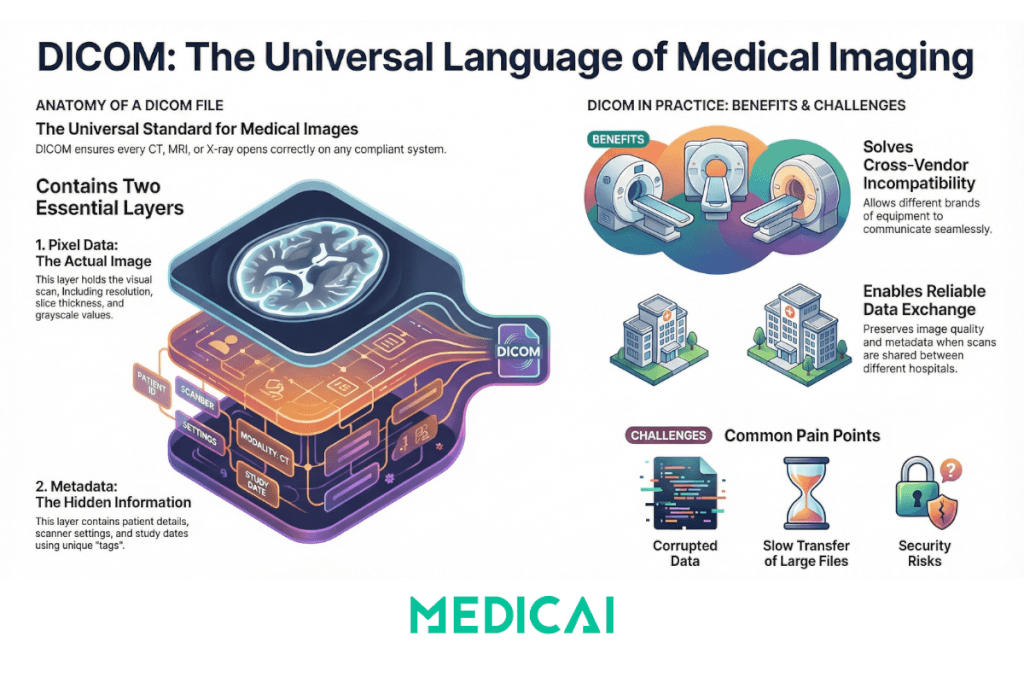
DICOM (Digital Imaging and Communications in Medicine) is the international standard for storing, transmitting, and managing medical images and their related clinical information across various devices and healthcare systems. It is the quiet engine that keeps the entire imaging world running.
At its core, DICOM works like a universal language for medical images. It ensures that every scanner, workstation, PACS, and viewer interprets images consistently. It works perfectly even if they come from different vendors or different countries.
Each DICOM file (dcm file format) contains two essential layers:
- Pixel data: the actual medical image.
- Metadata: everything that gives the image meaning.
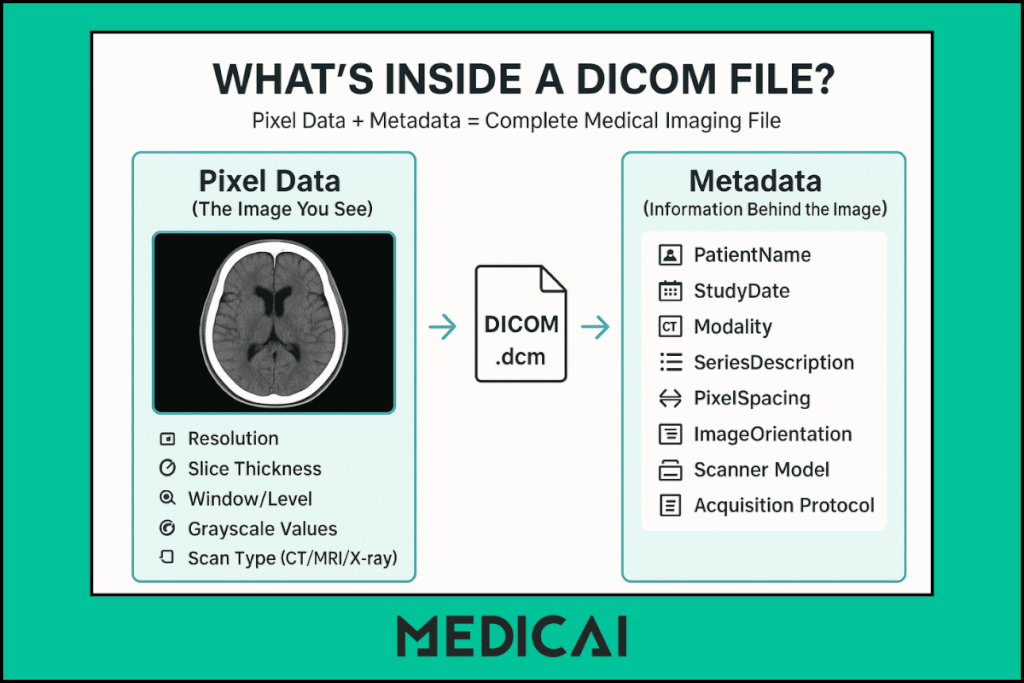
The pixel data is what the radiologist sees. The metadata is what helps them understand who the image belongs to, how the scan was taken, and what they’re looking at.
This structure provides radiologists with a complete clinical context alongside images, essential for accurate diagnosis and workflow integration. Data elements are organized with unique DICOM tags (in the format XXXX, XXXX) to standardize identification and referencing across systems.
Why Radiology Cannot Function Without DICOM
DICOM keeps radiology predictable. It protects image quality, preserves metadata, and ensures clinicians always receive complete, accessible imaging.

Cross-Vendor Compatibility
Radiology depends on DICOM because it allows different systems to work together. A hospital might use a CT from GE, an MRI from Siemens, an ultrasound from Philips, and an X-ray from Fujifilm.
DICOM makes all these systems speak the same language, so images move between them without breaking.
Standardized Study–Series–Image Structure
DICOM also provides a predictable structure. Images are organized into studies, series, and individual slices, making it far easier to navigate large scans. This structure remains consistent regardless of where the scan was taken or which machine created it.
Smooth Transfer Across the Imaging Workflow
Finally, DICOM enables smooth movement across scanners, PACS systems, and viewers. A CT scan captured at one facility can be viewed instantly at another, used in a tumor board, or opened in a cloud viewer like Medicai without conversions or loss of quality.
Inside a DICOM File: What Radiologists Need to Know
A DICOM file may look simple on the surface, but inside it contains everything needed for accurate interpretation.
Pixel Data: The Actual Image
The pixel data is the part radiologists interact with first. It contains the visual details of the scan, whether it’s a single X-ray or hundreds of slices from a CT or MRI.
Pixel data determines:
- Image resolution
- Slice thickness
- Grayscale values
- Window and level settings
These details directly affect what the radiologist can see. Subtle findings like small nodules, bleeds, or fractures often depend on clean pixel data and correct technical parameters.
When the pixel layer is captured correctly, it preserves clarity across all viewers, from workstation monitors to cloud platforms like Medicai.
Metadata: The Hidden Information Layer
If the pixel data shows what was scanned, the metadata explains everything around it.
This layer stores key information, including:
- Patient demographics
- Modality type
- Acquisition protocol
- Study and series numbers
- Timing, orientation, and positioning
- Scanner manufacturer and settings
Radiologists depend on this metadata far more than most patients realize. It helps confirm that the image is linked to the correct patient record, verifies that the scan was performed properly, and ensures that all slices are aligned in the intended orientation. When integrated with EHR software, this metadata also supports seamless access to patient histories and reduces the chance of errors across the diagnostic workflow.
Without accurate metadata, even a clear image can lead to confusion or misinterpretation.
The DICOM Tags Radiologists Use Most
Inside every DICOM file, data is stored as tags. These are the small labeled elements that carry specific pieces of information. Some tags matter more during interpretation and workflow, including:
- PatientName: confirms identity
- StudyDate: shows when the scan was taken
- SeriesDescription: clarifies which sequence or phase is being viewed
- SOPClassUID: defines the type of DICOM object
- WindowCenter / WindowWidth: controls brightness and contrast
- PixelSpacing: crucial for measurements
- ImageOrientationPatient: ensures correct view alignment
These tags help radiologists quickly understand the study without hunting for details. They also help modern cloud platforms normalize inconsistent scans, making viewing smoother.
How DICOM Flows Through a Radiology Department
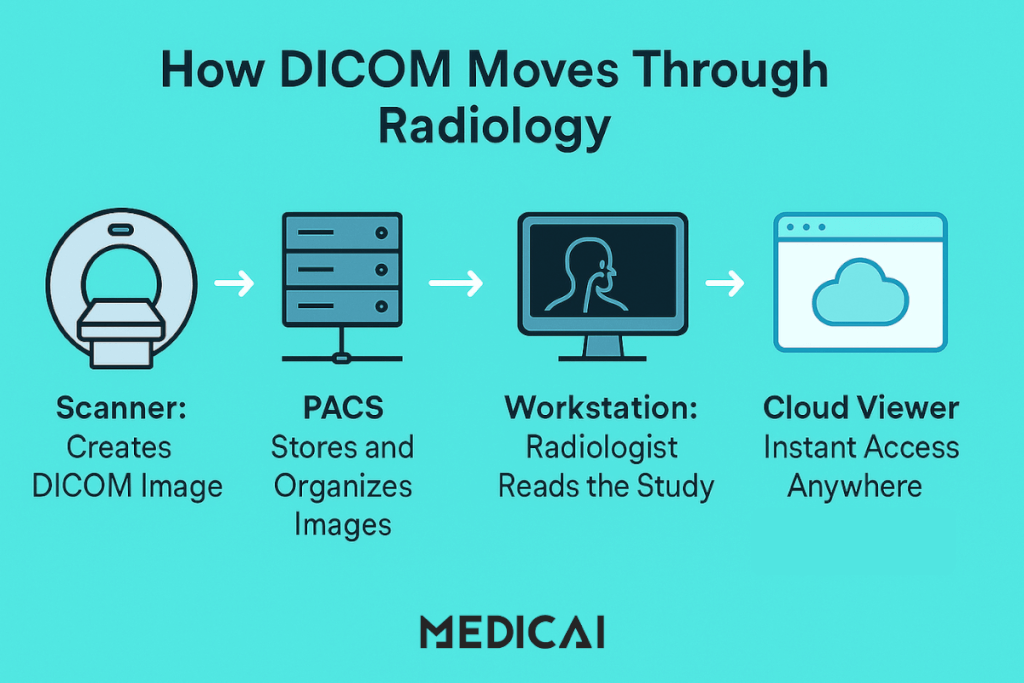
DICOM files move through a radiology department in a carefully structured path. Every step, from capturing an image to viewing it on a workstation, depends on this standard working smoothly.
Scanner → PACS → Radiologist: The Core Path
A DICOM file begins its life on the scanner. As soon as a CT, MRI, or X-ray is taken, the machine wraps the image and metadata into a DICOM package.
From there, the file travels to:
- The PACS server: where studies are stored and organized
- The workstation or viewer, where a radiologist interprets them
This path is the backbone of every imaging department. Whether the hospital uses a local PACS or a cloud-based one, the flow stays the same:
create → store → read → share.
The consistency is what makes radiology predictable and efficient.
Local PACS vs Cloud-Based PACS
Local PACS and cloud PACS offer distinct features.
Local PACS: The Traditional Setup
A local PACS stores all images within the hospital. It works well for onsite reading but struggles with slow access for remote radiologists, storage limits, and hardware maintenance.
If the system goes down, image access goes down with it.
Cloud PACS: The Modern Setup
A cloud PACS stores DICOM files securely online, making them accessible from any device.
This setup offers:
- Faster access for off-site radiologists
- Seamless collaboration across locations
- Built-in redundancy and fewer hardware worries
- Smooth streaming of large datasets
Platforms like Medicai follow this cloud approach, giving radiologists instant access without waiting for downloads or plugins. It keeps the DICOM flow quick and predictable, even when teams work from different cities or hospitals.
The Role of DICOM Viewers in the Workflow
The DICOM viewer is where the radiologist spends most of their time. It’s the window into the study, letting them adjust, analyze, and interpret the scan with precision.
A DICOM viewer provides features including:
- Slice navigation
- Window/level adjustments
- Zoom, pan, and measurements
- MPR and basic 3D views (for CT/MRI)
- Comparison with prior studies
Older desktop viewers require installations and local hardware. Modern web-based viewers make this process easier. They launch in the browser, load instantly, and stream large studies smoothly.
Problems DICOM Solves in Radiology
DICOM standardizes imaging formats, ensuring data quality and efficient collaboration across devices and departments.
Interoperability Between Vendors
Radiology departments rarely run on one brand of equipment. A typical setup might include:
- CT from GE
- MRI from Siemens
- Ultrasound from Philips
- X-ray from Fujifilm
Without DICOM, these systems would speak different “languages.” Files wouldn’t open reliably across machines, and each device would require its own separate workflow.
DICOM removes this barrier by providing a shared standard for all vendors. As long as a machine produces DICOM images, they can be viewed anywhere, on any compliant system. This single standard keeps the entire department connected.
Reliable Data Exchange Across Hospitals
Hospitals constantly send and receive imaging for second opinions, tumor boards, referrals, and transfers. DICOM makes this exchange safe and predictable by:
- Keeping metadata intact
- Preserving image quality
- Ensuring the same study structure appears exactly the same everywhere
Even if a CT is performed at Hospital A and viewed at Hospital B, the radiologist sees the same information.
Cloud platforms like Medicai allow instant file access in the browser, eliminating the need for CDs, downloads, or extra software.
A Standard Structure That Speeds Up Reporting
Radiologists work faster when images are organized in a familiar way. DICOM’s standard structure removes confusion and helps radiologists navigate large datasets without losing track.
This matters most in complex scans like:
- Multiphase CT abdomen
- Multi-sequence MRI brain
- Trauma CT with multiple reconstructions
When images follow a predictable layout, radiologists can focus on interpretation rather than sorting through messy folders or mislabeled files.
Protecting PHI Through Metadata Management
DICOM stores sensitive patient information in its metadata: names, IDs, birthdates, study times, and more. By keeping this data structured and secure, DICOM supports:
- HIPAA-compliant workflows
- Accurate patient matching
- Safe sharing with other institutions
When needed, metadata can also be anonymized for research or teaching without harming the pixel data.
Modern PACS platforms like Medicai streamline this with automated anonymization features that preserve patient privacy while allowing safe image use.
Common DICOM Pain Points
DICOM isn’t flawless. It has some issues that can hinder the workflow.
Corrupted Headers and Missing Tags
DICOM relies on accurate metadata. When scanners save files with:
- Incomplete patient details
- Wrong orientation tags
- Missing study or series information
- Inconsistent identifiers
The viewer may fail to load the study or display slices in the wrong order.
Most of these issues come from older equipment or inconsistent tagging, and they often require manual cleanup or automated normalization.
Slow Import and Large File Sizes
CT and MRI studies can be large, and their size affects how quickly they move through the system. Large files often cause:
- Slow imports into PACS
- Lag during viewing
- Delays in 3D reconstruction
- Slow transfers between locations
Cloud-based DICOM addresses this problem through streaming, but file size still affects overall speed.
Compatibility Issues with Older Software
Not every viewer interprets DICOM the same way. Older systems may:
- Fail to read newer DICOM formats
- Mis-handle the advanced series
- Skip important metadata
- Freeze on large datasets
These inconsistencies often push radiologists to switch between multiple viewers or rely on newer web-based tools.
Security Risks from Embedded PHI
DICOM embeds sensitive patient details inside its metadata. Without proper handling, this creates risks around:
- Patient names
- IDs
- Timestamps
- Hospital identifiers
Manual anonymization is slow, so modern systems automate the process to protect privacy while preserving clinical value.
Conclusion
DICOM remains the foundation that keeps radiology consistent, connected, and dependable. It shapes how images are stored, shared, and interpreted across every step of care.
Medicai enhances DICOM by enabling instant file streaming, preserving metadata, and simplifying collaboration. This streamlined workflow allows radiologists to focus more on diagnoses and patient care rather than file fixes.


