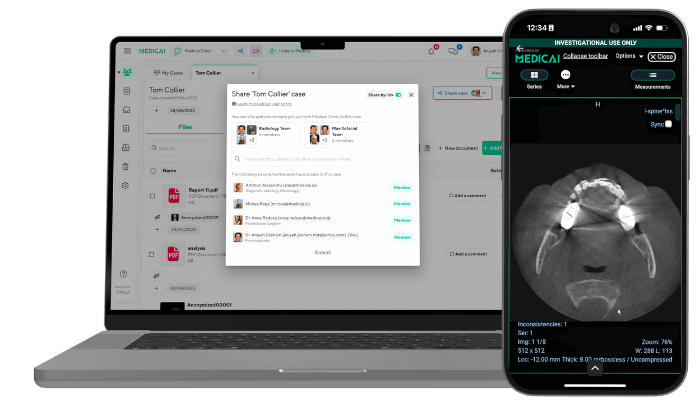
EMR vs EHR: Key Differences, Examples, and How to Choose

An electronic medical record (EMR) is a digital version of the paper chart used within a single practice or organization. An electronic health record (EHR) contains the same clinical data but is designed to be shared among providers, labs, hospitals, and the patient. The difference lies in scope and sharing, not in the type of data.
People often use the two terms interchangeably, and many vendors now sell products that do both. The distinction still matters when you choose a system, because it determines how easily patient data, including imaging results, can be transferred to the next clinician.
This guide covers definitions, key differences, real examples, how HIPAA applies, how both relate to medical imaging, and a checklist for choosing.
EMR vs EHR at a glance
| EMR | EHR | |
|---|---|---|
| What it is | Digital patient chart for one practice | Patient record designed to be shared across organizations |
| Who uses the data | Clinicians and staff in that practice | Clinicians across settings, plus the patient |
| Data sources | Visits and tests ordered in the practice | Multiple providers, labs, pharmacies, imaging, and patient-entered data |
| Interoperability | Limited; sharing often means export, print, or fax | Built for exchange through standards such as HL7 and FHIR |
| Patient access | Usually limited to that practice’s records | Longitudinal view across care settings through portals and apps |
| Certification | Optional | Often certified under the voluntary ONC program, which CMS programs require |
| Cost and complexity | Lower; simpler setup | Higher; more integration work |
| Best fit | Small, standalone, or specialty practices | Health systems, hospital networks, multi-site groups |
What is an EMR?
An EMR is the digital chart a practice keeps for its own patients. It stores the medical and treatment history recorded by that practice: diagnoses, medications, allergies, vital signs, notes, lab results, and immunizations.
Inside the practice, an EMR replaces paper. Clinicians can find a patient’s history in seconds, track when screenings are due, and see trends in values such as blood pressure over time. Outside the practice, the record does not travel easily. If a patient sees a specialist, the data often has to be exported, printed, or faxed.
EMR example: a solo family medicine office uses an EMR to document visits, send prescriptions, and track preventive care for its own patients. When it refers a patient to a cardiologist, it sends a summary by fax or a portal upload rather than through a shared record.
What is an EHR?
An EHR contains everything an EMR does, but it is designed to follow the patient. It brings together information from all clinicians involved in a patient’s care and makes it available, with appropriate permissions, to other providers, labs, pharmacies, and the patient.
Because EHRs exchange data through standards such as HL7 and FHIR, a hospital, a specialist, and a primary care office can each see the same allergies, medications, and results. That reduces duplicate tests and gaps in the history.
EHR example: a health system runs one EHR across its hospitals, clinics, and urgent care centers. A patient seen in the emergency department has a record the primary care doctor can open the next day, and the patient can view results in a patient portal.
Key differences between EMR and EHR
1. Scope of the record
An EMR covers the care provided by a single practice. An EHR is a longitudinal record: it pulls together data from every setting the patient visits, providing a fuller picture of health over time. For a practice that sees patients who rarely receive care elsewhere, the narrower EMR scope can be enough.
2. Sharing and interoperability
This is the biggest difference. EHRs are built to send and receive data using standards such as HL7 v2 messages and FHIR APIs, and the federal USCDI data classes define a common set of data that they should be able to exchange. EMRs usually offer basic exports and a narrower set of integrations.
Interoperability is also becoming a regulatory expectation. Under the 21st Century Cures Act, information blocking rules apply to health care providers, certified health IT developers, and health information networks. TEFCA creates a nationwide network of networks for exchanging records. Both push organizations toward systems that can share data.
3. Patient access and care coordination
With an EHR, patients can often view test results, visit notes, and medications from multiple providers in a single portal or app. Referrals, hospital discharges, and specialist consults are easier because the next clinician sees the same record. With an EMR, patients may need separate logins for each practice, and coordination depends on manual exports.
4. Cost and implementation
EMRs are generally cheaper and faster to set up because they serve a single practice and require fewer interfaces. EHRs cost more and take longer to implement, largely due to integrations, data migration, and training across sites. Cloud deployment has narrowed the gap for smaller groups. The actual cost depends on the number of users, the hosting model, the number of interfaces, and support. For a fuller view of the tradeoffs, see EHR advantages and disadvantages.
5. Certification and regulation
In the US, the ONC Health IT Certification Program is voluntary. Certification still matters in practice: CMS’s Promoting Interoperability program is built on certified EHR technology (CEHRT). If you plan to participate in CMS programs, make sure the system you buy is certified. Both EMRs and EHRs are subject to HIPAA when used by a covered entity.
Is Epic an EHR or an EMR?
Epic is generally classed as an EHR. It is used across hospitals, clinics, and other settings within a health system and exchanges records with external organizations. Epic itself describes its software as a single comprehensive health record. The same reasoning applies to other enterprise platforms: if a system is built to share the record across sites and organizations, it is an EHR, even if people still call it “the EMR.”
That everyday mix-up is common. Many clinicians say “EMR” to mean whatever charting system they use, and many products marketed as EMRs now offer some level of exchange functionality. Judge a system by what it can share, not by its label.
EMR, EHR, and HIPAA
HIPAA applies the same way to EMRs and EHRs. What matters is whether the organization using the system is a covered entity (or a business associate), not which type of system it is.
- Privacy Rule. Limits how protected health information (PHI) is used and disclosed. Covered entities may use and disclose PHI for treatment, payment, and health care operations without the patient’s authorization (HHS). Most other disclosures require authorization or must fall under a specific exception.
- Security Rule. Requires administrative, physical, and technical safeguards for electronic PHI, such as access controls, audit logs, and encryption where appropriate.
- Breach Notification Rule. Breaches of unsecured PHI must be reported to affected individuals and to HHS. Breaches affecting 500 or more people must be reported to HHS within 60 days, and breaches affecting more than 500 residents of a state or jurisdiction must also be reported to prominent media. Smaller breaches can be reported to HHS once a year (HHS).
EHRs add one practical layer: because they exchange data with more systems, there are more interfaces, users, and vendors to cover in risk assessments and business associate agreements.
How EMRs and EHRs connect to medical imaging
Neither an EMR nor an EHR is built to store or display diagnostic images. CT, MRI, X-ray, ultrasound, and PET studies are large DICOM files that need a specialized viewer, so they live in a picture archiving and communication system (PACS) or a vendor-neutral archive (VNA). The EMR or EHR holds the order, the report, and a link to the images.
How the data flows
- Patient and order. The EHR sends patient demographics and the imaging order to the radiology system, usually as HL7 ADT and ORM messages.
- Exam. The modality acquires the study and sends it to the PACS in DICOM format.
- Report. The radiologist’s report returns to the chart as an HL7 ORU message or a FHIR DiagnosticReport.
- Image access. A link in the chart opens the study in a web viewer. Modern setups use DICOMweb services (QIDO-RS to search, WADO-RS to retrieve, STOW-RS to store) and FHIR ImagingStudy resources to reference studies.
For message-level detail, see our guide to HL7 ADT, ORM, and ORU messages.
Why it matters for EMR vs EHR
- EHR environments usually require images to be available across sites, so referring physicians, specialists, and sometimes patients can open them from the record.
- EMR environments often rely on CDs, separate portals, or emailed reports. A cloud PACS with a browser-based viewer closes that gap without replacing the EMR.
Whichever system you use, ask your vendor which imaging standards it supports (HL7 v2, FHIR, DICOMweb) and whether it can launch an external viewer from the patient chart.
Where Medicai fits
Medicai’s cloud PACS integrates with EHR and RIS systems via HL7 and FHIR, and its zero-footprint DICOM viewer can be embedded, allowing clinicians to open studies from the record without installing software. Medicai is HIPAA-ready. For vendor-specific examples, see integrating medical imaging with your EHR.
How to choose between an EMR and an EHR
Start with how far your data needs to travel. Then work through the rest of this list.
- Interoperability needs. Do you regularly refer patients, receive outside results, or share care with hospitals? If yes, you need EHR-level exchange. If your workflow is self-contained, an EMR may be enough.
- Size and growth plans. A single site with a stable team can run well on an EMR. Plans to add locations, merge, or join a network favor an EHR, because migrating later is harder than starting with room to grow.
- Value-based care and CMS programs. If you report quality measures or participate in CMS programs that require certified EHR technology, confirm the certification before you buy.
- Integrations. List the systems the record must talk to: labs, pharmacies, billing, patient portal, and imaging (PACS, RIS, viewer). Ask each vendor which standards it supports (HL7 v2, FHIR, DICOMweb).
- Budget and resources. Compare total cost over several years, not only licenses: hosting, interfaces, data migration, training, and support staff.
Quick rule: if patient data needs to leave your practice routinely, choose an EHR. If it rarely does, an EMR can do the job at lower cost.
Frequently asked questions about EHR vs EMR
An EMR is a digital chart used inside one practice. An EHR holds the same kind of clinical data but is designed to be shared across providers, labs, hospitals, and the patient. The difference is scope and sharing, not the type of data stored.
Epic is generally classed as an EHR. It is used across hospitals, clinics, and other settings in a health system and exchanges records with outside organizations. Many people still call it “the EMR” out of habit.
A solo family medicine office that uses a digital chart to document visits, send prescriptions, and track preventive care for its own patients is using an EMR. When it refers a patient elsewhere, it usually sends records by fax, export, or portal upload.
Usually, yes. EHRs need more interfaces, data migration, and training across sites, so they cost more and take longer to implement. Cloud deployment has narrowed the gap for smaller groups. Actual cost depends on users, hosting, interfaces, and support.
Yes. HIPAA applies to both when they are used by a covered entity or business associate. The Privacy, Security, and Breach Notification Rules apply the same way regardless of whether the system is called an EMR or an EHR.
Not on their own. Images are stored in a PACS or vendor-neutral archive. The EMR or EHR holds the order and report and links to the images, usually through HL7 messages, FHIR resources, and DICOMweb, so clinicians can open studies in a web viewer from the chart.
The EMR vs EHR choice comes down to how far your patient data needs to travel. An EMR digitizes the chart for one practice; an EHR carries the record across the care team. Either way, images need a home outside the chart. Medicai connects a cloud PACS and browser-based viewer to the record your clinicians already use, so imaging travels with the patient.


Related Articles



Lets get in touch!
Learn more about how Medicai can help you strengthen your practice and improve your patients’ experience. Ready to start your Journey?
Book A Free Demo