Simplify Imaging: The Power of Online DICOM Viewers

Medical images tell powerful stories, and an online DICOM viewer is changing how we access medical images today.
These browser-based tools let users view, share, and discuss medical images instantly. You need no downloads, no technical setup, and no privacy trade-offs. They’re fast, secure, and accessible from anywhere.
Read to learn why online DICOM viewers matter these days, their advantages, and how to use them.

Why Online DICOM Viewers Stand Out
In healthcare, everyone interacts with medical images, but viewing DICOM files often involves cumbersome software and IT hurdles.
Online DICOM viewers simplify image access and sharing across hospitals, clinics, and personal computers. They provide a faster, safer, and more flexible experience for radiologists, clinicians collaborating remotely, and patients seeking second opinions.
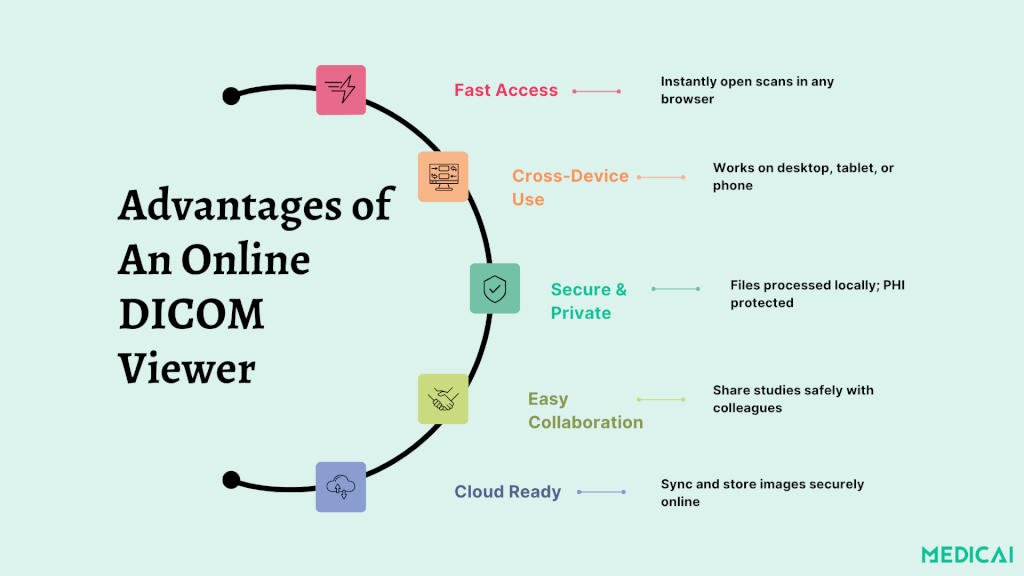
Zero Install Means Zero Friction
Patients benefit immediately with no installations or logins needed. Just open your browser, drag in your study, and view it instantly. For radiologists and clinicians, this means more focus on interpretation and less time on system setup.
Access cases from any device during consultations without delays from software updates or IT permissions.
Platforms like Medicai exemplify this simplicity, letting users visualize scans directly in the browser. We provide seamless access with local, secure processing, so images never leave your device.
So, radiologists save time, clinicians collaborate faster, and patients gain autonomy, all without compromising privacy.
Works on Any Modern Device
For hospitals and imaging centers juggling multiple operating systems, compatibility is often a challenge. Online DICOM viewers’ features eliminate that concern.
Whether it’s a Windows workstation in radiology, a MacBook in administration, or an iPad in a consultation room, the same study loads flawlessly in any modern browser.
For radiologists, it means continuity where they can review urgent cases from anywhere. For clinicians, it offers flexibility as they can quickly check patient images before referrals or surgery. For patients, it’s empowerment. They can view their scans easily without specialized equipment.
Always Up to Date
Keeping medical software current is a constant IT headache. With online DICOM viewers, those updates happen automatically.
For healthcare organizations, this reduces maintenance and ensures compliance with security standards. Radiologists gain new visualization tools without manual upgrades, while patients and caregivers enjoy a seamless experience with no installations or outdated versions.
Medicai’s cloud-based platform delivers instant access to new features and improvements, ensuring secure and consistent performance for everyone.
That means no downtime, no IT tickets, and no lag between innovation and access.
Built for Sharing & Second Opinions
Collaboration is vital in modern healthcare for better outcomes. Radiologists share findings, clinicians consult specialists globally, and patients seek second opinions.
While online DICOM viewers aid this collaboration, secure sharing methods are essential. Many educational platforms compromise compliance by exposing patient identifiers, making them unsuitable for clinical use.
Medicai offers secure, private data sharing with encrypted links, ideal for radiologists and patients seeking second opinions.
Privacy Deep-Dive: Local Browser Processing vs. Uploads
Whether you’re a radiologist reviewing cases, a clinician sharing studies, or a patient seeking a second opinion, how a DICOM viewer manages your data defines how safe your information truly is.
Online DICOM viewers generally follow one of two privacy models:
- Local browser processing, where all image rendering happens within your device.
- Upload-based viewing involves sending images to external servers before display.
Local Processing: Files Stay With You
In local browser processing, your files remain on your computer. When opening a DICOM study, decompression and rendering occur directly in your browser without data transmission to external servers.
This approach allows secure case previews and cross-hospital consultations for radiologists without VPNs or PHI exposure. You can access DICOM files from secure storage during conferences, ensuring compliance with HIPAA and GDPR.
For clinicians and patients, it provides peace of mind—view scans at home, monitor progress between appointments, or prepare for telehealth sessions without sharing data with unknown servers.
With local browser processing, you have-
- No external uploads; full control stays with the user.
- Eliminates risk of unauthorized access or data leaks.
- HIPAA and GDPR-aligned approach by default.
- Ideal for sensitive cases, second opinions, or confidential consultations.
Upload-Based Viewing: Convenience With Caution
Upload-based viewers require users to upload DICOM files to servers, enabling remote sharing and collaborative teaching. However, they raise significant privacy concerns, particularly regarding patient data.
Patients lose oversight of image access, while clinicians risk compromising Protected Health Information (PHI) if not properly anonymized. Radiologists may also violate data policies by sharing even anonymized files externally.
While these viewers are useful for academic collaborations and demonstrations, they are unsuitable for private clinical workflows or sensitive patient information.
However, several risks are there to consider:
- Possible temporary storage of identifiable data.
- Unclear data deletion timelines.
- Public share links that may expose PHI if mishandled.
- Often lack formal HIPAA or GDPR compliance certifications.
Online vs. Desktop DICOM Viewer
Online DICOM viewers offer great accessibility, privacy, and collaboration, making them perfect for clinicians and telehealth. Conversely, desktop DICOM viewers provide superior diagnostic capabilities and offline performance for radiology departments.
| Criteria | Online DICOM Viewer | Desktop DICOM Viewer |
| Installation | No install needed: opens in a browser. Ideal for patients and clinicians needing quick access; useful for radiologists during case discussions. | Requires installation; IT-managed. Standard for hospital-based radiologists and research teams. |
| OS Compatibility | Cross-platform: Windows, macOS, Linux, tablets. Great for remote consultations and multidisciplinary teams. | OS-specific (RadiAnt on Windows, OsiriX/Horos on macOS). May limit cross-hospital collaboration. |
| Updates | Automatic, no manual patching or maintenance. Keeps clinicians and patients secure with the latest version. | Manual: hospital IT or users must update periodically. Reliable for institutions with dedicated support. |
| Accessibility | Web access from anywhere; perfect for telemedicine, second opinions, and outpatient reviews. | Limited to local networks or VPN. Best for radiology workstations within healthcare systems. |
| Privacy Model | Files can stay local in the browser. No upload, ensuring patient privacy and compliance. | Files stored locally on computers; secure if encrypted, but harder to share safely. |
| Best For | Patients, clinicians, and radiologists who prioritize convenience, mobility, and collaboration. | Radiologists and institutions require offline, diagnostic-grade performance. |

5 Best Online DICOM Viewers for Medical Images
Let’s check the top trusted DICOM viewers that deliver reliability, security, and smooth viewing experiences for medical imaging.
Medicai DICOM Viewer
Medicai is a next-generation DICOM viewer designed for today’s connected healthcare. It features a user-friendly interface and advanced tools, enabling professionals and patients to easily view, adjust, and analyze scans directly in the browser.
Medicai ensures data privacy by processing files locally in your browser, keeping sensitive information on your device. When shared, it uses encrypted Cloud PACS for secure collaboration among doctors, clinics, and patients worldwide.
Key Features:
- HIPAA- and GDPR-compliant cloud integration
- Local browser processing (no upload required)
- Supports CT, MRI, PET/CT, and ultrasound images
- Ideal for telemedicine, research, and patient access
RadiAnt DICOM Viewer
RadiAnt is a lightweight yet powerful DICOM viewer for Windows. Known for its speed and straightforward interface, it supports MPR, MIP, and image fusion, making it excellent for radiology residents and educators.
Although it doesn’t offer built-in storage or cloud connectivity, RadiAnt remains one of the fastest tools for quickly loading and reviewing medical images offline. It’s ideal for education and research environments.
Key Features:
- Windows-based, fast, and intuitive
- Supports 3D and image fusion
- Exports to standard image formats
- Best for teaching and quick offline reviews
Horos DICOM Viewer
Horos is a free, open-source DICOM viewer built specifically for macOS. It provides comprehensive visualization and analysis tools, supporting 2D, 3D, and 4D image navigation.
Horos easily integrates with Radiopaedia for educational uploads and case sharing, making it popular among medical students and educators. While it lacks PACS integration, its advanced plug-ins and image enhancement features are suitable for learning and light clinical review.
Key Features:
- Open-source and free for macOS
- Supports 2D/3D/4D image navigation
- Integrates with Radiopaedia for teaching
- Ideal for academic and non-diagnostic use
MicroDicom Viewer
MicroDicom is a compact, easy-to-use Windows DICOM viewer perfect for quick access on the go. It supports structured reports and standard viewing functions like zoom, rotate, and measure.
Its standout feature is portability. The software can be downloaded as a ZIP file and run without installation, which makes it useful for doctors or students who need a temporary or portable DICOM solution.
Key Features:
- Portable and lightweight (no installation required)
- Supports DICOM reports and basic image editing
- Simple interface for beginners
- Great for quick offline viewing
OsiriX DICOM Viewer
OsiriX MD is a professional imaging solution for macOS that supports 2D, 3D, and 4D visualization. It uses multi-threaded processing for smooth navigation of large datasets.
The viewer integrates with PACS servers via DICOM, allowing secure data retrieval and collaboration. It features an intuitive design for clinicians and researchers requiring diagnostic precision.
Key Features:
- Advanced 3D/4D imaging
- PACS connectivity for hospital workflows
- Optimized for Apple hardware
- Great for diagnostic and research applications
How to Use an Online DICOM Viewer
Using an online DICOM viewer is simple. Let’s see how to get started securely and easily.
Step 1. Open the Viewer
Access a trusted online DICOM viewer such as Medicai through your web browser. No installation required.
You can use it on any device: desktop, laptop, or tablet.
Step 2. Load Your DICOM Files
Drag and drop your files into the viewer, or import them from your PACS, CD, USB, or cloud folder. Your studies will load directly in the browser for instant access.
Step 3. View and Adjust Images
Explore your scans using basic tools like zoom, rotate, pan, and window leveling.
You can adjust brightness and contrast or scroll through image slices for detailed visualization.
Step 4. Annotate or Measure
Use measurement and annotation tools to mark findings, take notes, or highlight key areas.
This step is helpful for radiologists writing reports, clinicians reviewing findings, or students studying anatomy.
Step 5. Share Securely
When collaboration or consultation is required, share studies via encrypted, time-limited links instead of sending raw files.
In Medicai, sharing happens securely within the platform, keeping patient data private and compliant.
Step 6. Manage and Store Safely
Save your cases in a secure workspace or cloud PACS if supported. You can organize studies, revisit previous scans, or use anonymized versions for learning and research.
Conclusion
Online DICOM viewers bring imaging closer to people. They eliminate installation barriers, enabling instant sharing and protecting patient privacy.
Medicai’s online DICOM viewer unites all these benefits, offering a fast, secure, and collaborative way to view medical images anytime, anywhere.


Related Articles


Lets get in touch!
Learn more about how Medicai can help you strengthen your practice and improve your patients’ experience. Ready to start your Journey?
Book A Free Demo