How to Read a DICOM Conformance Statement Before You Buy a PACS

A DICOM conformance statement is the document in which a manufacturer states exactly which parts of the DICOM Standard its product supports, and how. Almost every imaging product claims to be “DICOM compliant,” but that phrase alone tells a buyer little. DICOM is a large standard with many optional parts, and two products that both “support DICOM” can still fail to work together. The conformance statement details which image and document types the product handles, which roles it plays on the network, which compression formats it accepts, and how it secures its connections.
This guide explains what a conformance statement contains, how it is organized under the current DICOM template, and how to use two statements side by side to find gaps before they become integration problems.
What Is a DICOM Conformance Statement?
A DICOM conformance statement is a formal technical document, written by the manufacturer, that describes how a specific product implements the DICOM Standard. It is required of any implementation that claims conformance, and its structure is defined in Part 2 of the Standard (PS3.2, Conformance).
The reason it exists is simple. No product implements all of DICOM. The Standard lets each implementation choose the optional components it needs, and it also allows products to extend or specialize standard services or define private ones. The conformance statement lets a buyer or integration engineer see which components a product supports and what it adds. By comparing two products’ statements, a knowledgeable reader can judge whether, and to what extent, they will communicate.
Since recent editions of the Standard, a single conformance statement covers every way a product uses DICOM: classic DICOM networking (often called DIMSE services), media exchange such as CDs and USB, DICOMweb services over HTTPS, and DICOM real-time video. We keep sections that don’t apply and mark them as not applicable, so you can see at a glance what a product does and doesn’t do.
What “DICOM Compliant” and “DICOM Certified” Really Mean
Two phrases appear on product sheets more often than any detail does: “DICOM compliant” and, occasionally, “DICOM certified.” Both need care.
There is no official DICOM certification. The DICOM Standard does not define a testing or validation procedure to assess whether a product conforms. The manufacturer declares conformance in its conformance statement. Industry testing events exist, but the Standard does not issue a “DICOM certified” label.
DICOM enables interoperability; it does not guarantee it. The Standard’s own introduction (PS3.1) says it facilitates interoperability between products that claim conformance but does not, by itself, guarantee it. Two conformant products can still not exchange a particular image type if one supports it and the other does not.
Ask for conformance to specific services, not to “DICOM.” PS3.1 recommends that requirements reference specific units of conformance rather than the Standard in general. In practice, that means writing requirements such as: “The archive shall be conformant to the DICOM CT Image Storage and MR Image Storage SOP Classes as a Service Class Provider, and to the DICOMweb Studies Service as an origin server.” You can check a requirement written this way line by line against a vendor’s conformance statement. “Must be DICOM compliant” cannot.
What’s Inside a DICOM Conformance Statement
The current DICOM template for conformance statements is Annex N of PS3.2. Older guides often describe the retired Annex A template, so the section names you see in a recent statement may differ from what you have read elsewhere. Statements written to the current template follow this structure:
- Cover page: identifies the product and the document.
- Overview: a short description of the product’s DICOM functionality, a diagram of the services it implements and the systems it connects to, and a set of summary tables. This is the most useful part of the document for a buyer (see below).
- Introduction: revision history, intended audience, remarks, terms, abbreviations, and references.
- Implementation model: the product’s application entities (the named DICOM endpoints) and how data flows between them and remote systems.
- Service and interoperability description: the detailed behavior for each service the product supports, organized by classic DICOM services, DICOMweb services, media services, and real-time video, plus character set support.
- Configuration: the parameters an installer sets, such as application entity titles, ports, timeouts, and audit logging.
- Network and media communication details: technical specifications and status codes.
- Security: network requirements, port configuration, supported DICOM security profiles, user identity support, and web services security.
- Annexes: the information object definitions the product creates, structured report content, security details, attribute mapping, and code sets.
Start with the overview tables
The overview opens with a “Content and Transfer” table that summarizes almost everything a buyer needs on one page. For every type of object the product handles (for example, CT images, mammography images, or structured reports), it shows:
- The transfer syntaxes the product supports for that object, which tells you which compression formats it can send and receive.
- The roles it plays for classic DICOM networking (sender, receiver, or both), for DICOMweb (client or server), and for media (creating, reading, or updating CDs and other media).
- What the product does with the object: create, display, process, or archive it.
Further overview tables list the classic DICOM services supported (verification, storage, workflow management, query and retrieve, printing), the DICOMweb services supported, media and real-time video services, de-identification profiles, and supported character sets. If you read only one part of a conformance statement, read the overview.
Key Terms in Plain Language
| Term | What it means | Why a buyer should care |
|---|---|---|
| SOP Class | A specific service applied to a specific type of object, such as “CT Image Storage.” | If the product does not list the SOP Class for an image type you use, it cannot handle that image type over DICOM. |
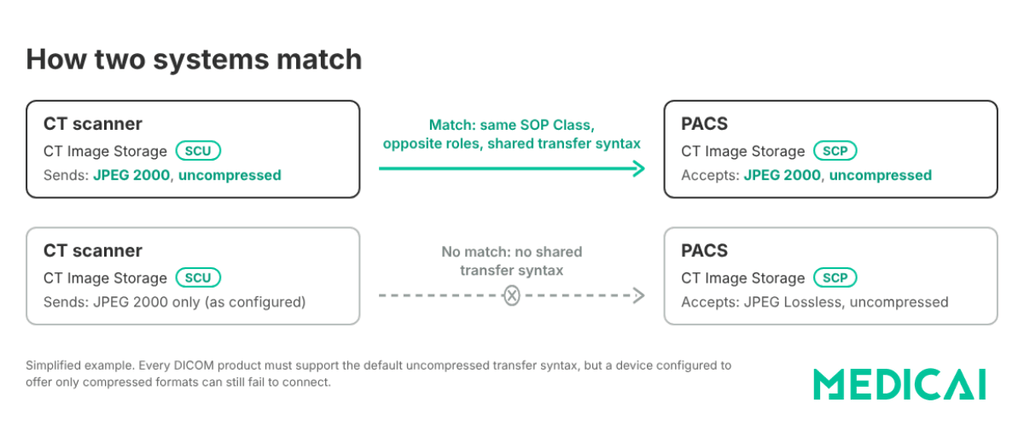
| SCU and SCP | Service Class User (the side that requests a service) and Service Class Provider (the side that performs it). | Two systems connect only if one is the SCU and the other the SCP for the same SOP Class. A modality that stores images is an SCU; the archive that receives them is an SCP. |
| Application entity (AE) title | The name a DICOM endpoint uses on the network. | Needed for configuration; a mismatch is a common cause of failed connections. |
| Transfer syntax | The encoding of the data, including compression (for example, uncompressed, JPEG, JPEG 2000). | If the sender and receiver share no transfer syntax for an object, the transfer fails, or the images cannot be displayed. |
| Presentation context | A pairing of a SOP Class and transfer syntax that two systems agree on when they connect. | Where SOP Class and transfer syntax support meet in practice. |
| Association | A DICOM network connection between two application entities. | Limits on simultaneous associations affect throughput at busy sites. |
| Private attributes | Vendor-specific data elements outside the standard set. | Important during migrations; undocumented private data can be lost. |
| DICOMweb services | DICOM services over HTTPS, such as QIDO-RS (query), WADO-RS (retrieve), and STOW-RS (store). | Essential for cloud PACS, web viewers, and AI integrations. |
How to Compare Two DICOM Conformance Statements
The most common use of a conformance statement is to check whether a new product will work with your existing systems, for example, a new PACS with your existing modalities or a new viewer with your archive. The Society for Imaging Informatics in Medicine (SIIM) outlines a matching process that works well as a checklist. Put the two statements side by side and work through these steps:
- Compare the application descriptions. Read both overviews and confirm the products are meant to do what you need them to do together.
- Match the SOP Classes. For every type of object that will move between the systems, confirm both products list the corresponding SOP Class.
- Match the roles. For each SOP Class, one product must be the SCU and the other the SCP. A modality that stores CT images as an SCU needs an archive that accepts them as an SCP.
- Check simultaneous associations. Confirm the receiving system can handle enough simultaneous connections for your devices and peak volume.
- Compare presentation contexts. Confirm the two products share at least one transfer syntax for each object type, ideally the compressed formats your modalities produce.
- Compare communication and security profiles. Check network and security support, such as secure transport (TLS) and user identity features, against your organization’s requirements.
- Check special attribute requirements. Look for attributes one system requires that the other may not send, and for private attributes that must be preserved.
Additional checks for cloud PACS and web viewers
- DICOMweb support: confirm which DICOMweb services are supported, at which levels (study, series, instance), and in which roles. A product described as cloud-based or web-based should have a filled-in DICOMweb section. For more detail, see our guide to DICOMweb services.
- Transcoding: check whether the product converts between transfer syntaxes when a client requests a format different from the stored one. This matters for zero-footprint viewers. Transfer syntax mismatches are a common cause of DICOM interoperability failures.
- Character sets: if you handle names in non-Latin scripts or multiple languages, confirm the supported character sets in the overview.
- Private attributes: if you are replacing a system, check how each product handles the other’s private data. Our guide to PACS migration covers why this matters.
Conformance statements describe what a product can do with DICOM. They do not describe workflow behavior across systems, which is where IHE integration profiles come in. Our guide to PACS interoperability explains the difference between DICOM conformance and IHE profile conformance.
Red Flags in a DICOM Conformance Statement
- No statement, or a statement that does not match the product version. Capabilities change between versions; the statement should correspond to the version you are buying.
- Vague claims. “Supports DICOM 3.0” or “fully DICOM compliant” without SOP Class detail is not a conformance statement.
- No Verification SCP. Without it, other systems cannot run a basic DICOM connectivity test (often called a DICOM echo) against the product.
- A missing role. For example, a product can send structured reports but cannot receive them, even though you need both.
- Limited transfer syntaxes. Supporting only uncompressed data can mean larger transfers and storage, or failures with modalities that send compressed images.
- Cloud or web claims with an empty DICOMweb section.
- Undocumented private attributes, especially if the product will receive data from other vendors’ systems.
- No security section, or no supported security profiles, for a product that will exchange data over networks outside a protected hospital segment.
Conformance Statements for Cloud Services
Conformance statements are not only for scanners and on-premise archives. Cloud imaging services publish them too, usually with a detailed DICOMweb section. For example, Microsoft publishes a conformance statement for its cloud DICOM service that documents its DICOMweb behavior in detail, including that it sanitizes the DICOM file preamble for security, with the trade-off that it cannot preserve preambles used for dual-format files. Details like these are exactly what a buyer would otherwise discover only after deployment. For background on the file preamble, see our guide to what DICOM is.
Questions to Ask a Vendor
- Can you provide the DICOM conformance statement for the exact version we are buying?
- Does it follow the current PS3.2 template?
- Which SOP Classes do you support for each of our modalities, and in which roles?
- Which transfer syntaxes do you accept and send for each object type?
- Do you support the Verification service as both SCU and SCP?
- Which DICOMweb services do you support, at which levels and in which roles?
- Do you transcode between transfer syntaxes for web clients?
- Which character sets do you support?
- How do you handle private attributes from other vendors’ systems?
- Which DICOM security profiles do you support, and how do you handle user identity?
Download the DICOM Conformance Statement Checklist (PDF).
Frequently Asked Questions
A DICOM conformance statement is a technical document, written by a product’s manufacturer, that describes exactly which parts of the DICOM Standard the product supports and how. It lists the types of objects the product handles, the roles it plays on the network, the transfer syntaxes it supports, its DICOMweb and media capabilities, and its security features. DICOM PS3.2 defines its structure.
No. The DICOM Standard does not define a testing or certification program. Manufacturers declare conformance in their conformance statements, and buyers verify it by comparing statements and testing connectivity. A “DICOM certified” label is not issued by the Standard.
Most manufacturers publish conformance statements on their websites, often in an interoperability or DICOM section listing statements by product and version. If you cannot find one, ask the vendor directly, and confirm that the statement matches the product version you are evaluating.
SCU stands for Service Class User, the side that requests a DICOM service, and SCP stands for Service Class Provider, the side that performs it. For two systems to exchange a type of object, one must act as SCU and the other as SCP for the same SOP Class. For example, a CT scanner sending images is a Storage SCU, and the archive receiving them is a Storage SCP.
No. A conformance statement describes what a product supports; it does not guarantee that two products will work together. Interoperability depends on matching SOP Classes, roles, transfer syntaxes, and configuration on both sides. Comparing the two statements shows whether the products should be able to communicate, and connectivity testing confirms it.
Sources
- DICOM PS3.2 2026d, Conformance, including Annex N (DICOM Conformance Statement Template). Read PS3.2
- DICOM PS3.1 2026d, Introduction and Overview. Read PS3.1
- Society for Imaging Informatics in Medicine, DICOM Conformance Statements (SIIM OTpedia). Read the entry
- Microsoft, DICOM Conformance Statement v2 for Azure Health Data Services. Read the statement
For practices evaluating cloud imaging, see how Medicai’s cloud PACS fits into existing DICOM environments.


Related Articles
Lets get in touch!
Learn more about how Medicai can help you strengthen your practice and improve your patients’ experience. Ready to start your Journey?
Book A Free Demo