AI and PACS: Revolutionizing Radiology Practice

What if your PACS could do more than just store images? What if it could help interpret them, prioritize cases, and reduce reporting time?
That’s exactly what AI is now bringing to radiology departments around the world.
AI integration in radiology PACS refers to the seamless embedding of artificial intelligence tools within imaging workflows. It helps in automated analysis, real-time decision support, and smarter reporting directly from the PACS viewer.
Discover how it works, why it matters, and what you need to bring AI into your PACS environment successfully

Why AI Integration in PACS Is a Game Changer
Radiology departments today face a growing crisis: too many scans, too few hands, and increasing pressure to deliver faster, more accurate interpretations. With burnout rates reaching up to 62% among radiologists and image complexity intensifying, integrating AI into PACS is no longer optional; it’s essential.
AI tools enhance diagnosis speed by prioritizing urgent cases, highlighting critical findings, and pre-sorting lesions. This alleviates the mental load on radiologists, allowing them to focus on interpretation instead of just identification.
When integrated directly into the PACS interface, these tools create seamless, smarter workflows without the need for extra clicks or platform switching.
On the administrative front, AI is streamlining everything from exam scheduling and protocol selection to automated report generation. Natural language processing (NLP) tools improve dictation speed and accuracy, while structured reporting systems help ensure consistency across cases.
The data underscores the urgency. Medical imaging now contributes around 90% of all hospital data, and the global volume of radiologic exams is projected to exceed approximately 5 billion studies by 2030. Without automation, human-led workflows simply can’t scale to meet that demand.
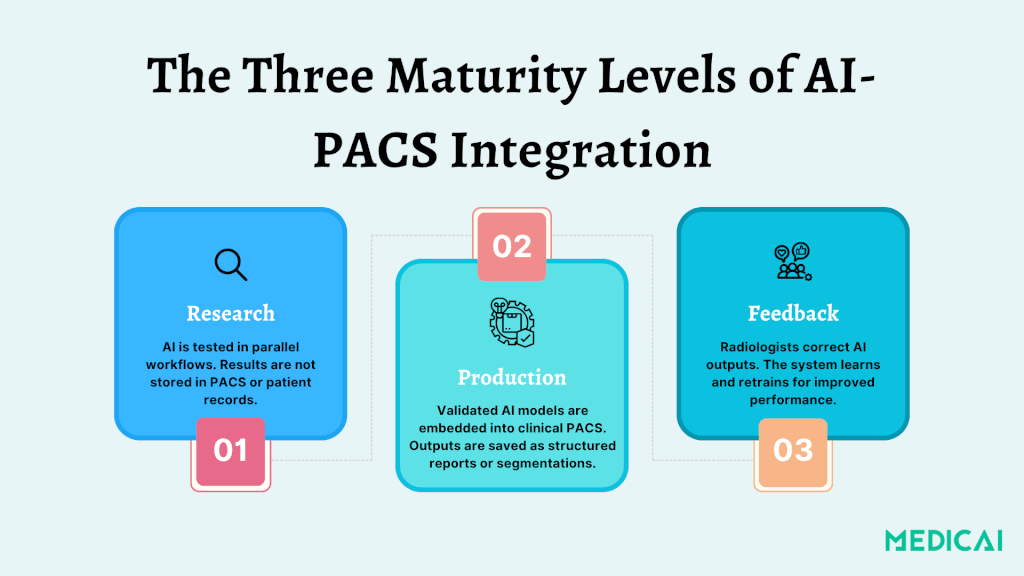
Understanding the Three Maturity Levels of AI-PACS Integration
Integrating AI in radiology involves three maturity levels in PACS, from experimental overlays to adaptable systems, aligning AI outputs with clinical practice.
Level 1: Research — Testing AI in Parallel Workflows
At this stage, AI algorithms are used solely for research. Radiologists can review AI-generated segmentations or annotations, but these results are not added to the patient’s medical record. Instead, they go to a separate research PACS or viewer.
The process allows institutions to:
- Safely evaluate model performance without clinical risk
- Fine-tune workflows before clinical deployment
- Compare AI findings with radiologist assessments in parallel
These research environments are crucial for regulatory approval, performance validation, and safety testing. However, AI’s clinical utility is limited since its output is not visible to clinicians or included in patient records.
Level 2: Production — AI Becomes Part of Clinical Workflow
Once validated, AI models can be integrated into clinical PACS. It allows radiologists to access findings like lesion segmentation and calcium scores directly within their usual platforms, enhancing workflow.
AI triage tools can help prioritize critical studies, provide auto-generated measurements, and streamline the reporting process by providing structured report language.
AI results at this level are saved as:
- DICOM SEG (segmentation objects)
- DICOM SR (structured reports)
- GSPS (grayscale softcopy presentation states)
AI actively shapes diagnostic workflows, such as prioritizing studies flagged for suspected pulmonary embolism in lung CT triage. It indeed accelerates urgent care.
Level 3: Feedback — Continuous Learning from Radiologist Input
This is the highest level of integration, allowing radiologists to edit AI outputs (e.g., removing false positives, refining segmentations). It helps improve the system’s future performance.
A feedback-enabled architecture typically includes:
- A zero-footprint viewer for editing AI annotations
- A dedicated training server to collect, validate, and retrain the model
- Annotation storage that securely captures radiologists inputs
This creates a continuous learning loop that allows AI to evolve based on real-world clinical data.
In a real-world deployment for brain metastasis detection, the feedback system reduced false positives from 14.2 to 9.12 per patient and increased the training datasets from 93 to 217 scans. This resulted in improved performance, achieving a high sensitivity of 90%.
This level turns AI from a static tool into a collaborative assistant, learning from radiologists like a trainee and improving without a full model rebuild.
Technical Foundations: PACS, APIs, and Workflow Triggers
Let’s break down the core components that make AI-PACS integration work in the real world.
PACS, DICOM Standards, and Imaging Infrastructure
The Picture Archiving and Communication System (PACS) is at the core of radiology workflow. It stores, retrieves, and displays medical images. For effective AI integration, PACS must support standardized protocols.
- DICOM (Digital Imaging and Communications in Medicine) for images and segmentations
- DICOM SR (Structured Reports) for measurement outputs
- DICOM SEG (Segmentation Objects) for visual overlays
- GSPS (Grayscale Softcopy Presentation State) for image annotations
These allow AI-generated results to be viewed directly in the radiologist’s environment without additional platforms or viewers.
APIs and Interoperability
Integration relies on well-documented APIs and data standards to ensure seamless communication between PACS, RIS (Radiology Information System), AI engines, and EHRs. These include-
- HL7 for clinical data exchange
- FHIR for modern web-based healthcare interoperability
- RESTful APIs and DICOMweb for accessing and transmitting imaging data
Not all PACS solutions are equal; many use proprietary formats that hinder AI corrections. This fragmentation can result in uncorrected AI errors, undermining trust and clinical adoption.
Orchestration Engines and Workflow Triggers
One of the biggest technical challenges is how and when an AI algorithm gets triggered.
The AI system often needs manual intervention in legacy workflows, like routing specific image series from the PACS to the AI server. This process is error-prone; sending the wrong series or a failed trigger can lead to invalid or incomplete AI output.
To solve this, modern systems use an AI orchestration engine that automates:
- Routing images from modalities (CT, MRI) to the AI server
- Processing the data in real-time (edge or cloud-based)
- Returning outputs directly to the PACS viewer
- Logging AI executions for traceability
Orchestration engines also enable multi-series input, which is necessary for complex tasks like temporal comparisons, 3D segmentation, or longitudinal disease tracking.
Cloud vs Edge Computing
Depending on the use case and infrastructure, AI inference can happen:
- On the cloud (scalable, ideal for training or multi-site access)
- At the edge (faster, ideal for real-time triage or intra-procedural AI)
According to a study, cloud solutions offer flexibility and scalability, while edge devices reduce latency and enable sub-second turnaround in time-critical imaging like ultrasound or trauma.
Hence, hospitals must carefully evaluate:
- Network bandwidth
- GPU hardware availability
- Data privacy & HIPAA compliance
- IT team capacity for managing updates, security, and storage
Workflow of AI Integration in Radiology PACS
Discover how AI typically fits into the radiology workflow once it’s integrated into PACS.
Step 1: Image Acquisition and Routing
The workflow begins when a modality (CT, MRI, X-ray) captures an imaging study. The resulting DICOM files are then automatically routed through the DICOM router, a system that can forward images to:
- PACS (for archival and clinical review)
- Vendor-neutral archives (VNA)
- AI engines (for processing and analysis)
In an AI-integrated workflow, images are automatically or selectively sent to an AI system based on preset rules such as modality type, body part, or protocol.
Step 2: AI Processing and Inference Generation
Once received, the AI engine processes the images to perform a specific task, such as:
- Lesion detection (lung nodules, brain metastases)
- Organ segmentation (liver, heart chambers)
- Abnormality classification (fractures, effusions)
- Risk scoring or triage (PE, stroke)
The AI generates results in standard formats like:
- DICOM SEG (segmentation masks)
- DICOM SR (structured reports with measurements)
- GSPS (grayscale overlays)
These outputs are tagged with version identifiers and relevant metadata, ensuring traceability and audit readiness.
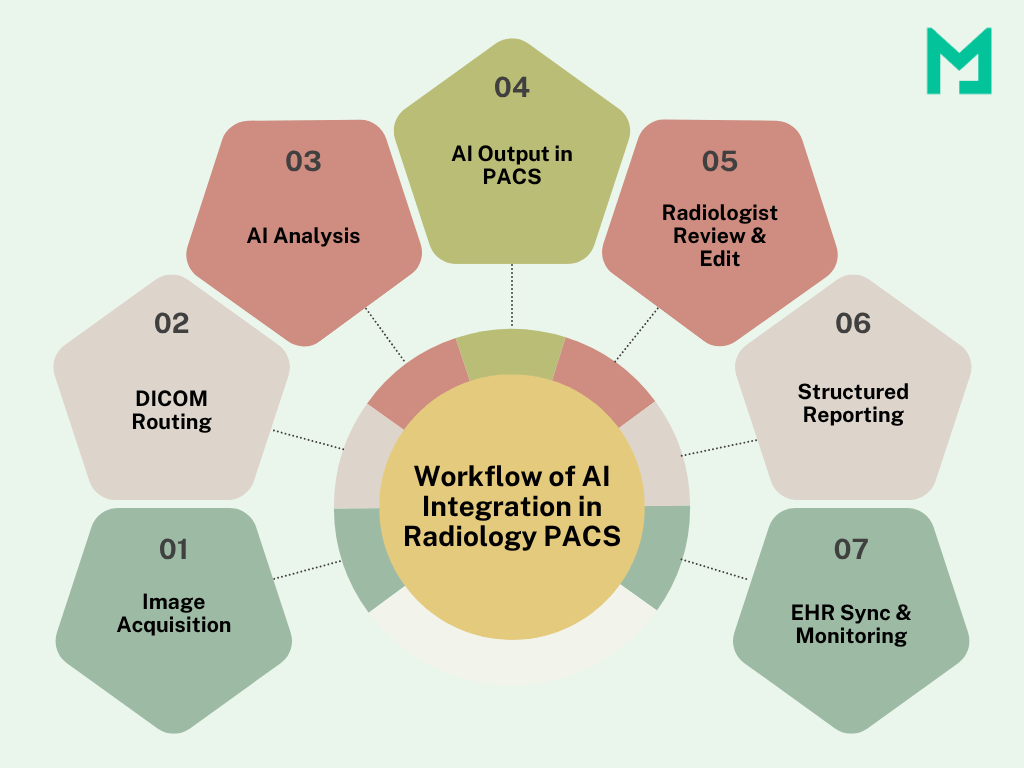
Step 3: Results Delivery in PACS Viewer
AI integration in radiology PACS aims to provide insights within the radiologist’s reading environment. AI outputs appear as new series or overlays in the PACS viewer, allowing easy comparison with original images.
Some workflows can prioritize worklists by flagging urgent cases based on AI findings.
Unlike standalone AI dashboards, PACS integration ensures that AI insights are delivered contextually, with no extra clicks or switching platforms.
Step 4: Radiologist Review, Feedback, and Reporting
Radiologists review both the raw images and the AI-enhanced outputs. Organizations respond to AI findings by accepting, modifying, or providing feedback. Feedback loops help improve the AI over time.
Step 5: Report Generation and EHR Integration
Final radiology reports may include AI-derived measurements or findings, particularly in structured reporting environments. These are:
- Auto-populated in the RIS or reporting system
- Synced with the Electronic Health Record (EHR) for clinician access
- Stored alongside image data in PACS for medico-legal purposes
Step 6: Monitoring and Governance
After launching the workflow, monitoring system uptime and AI latency is important for efficiency. Assessing output accuracy and usage patterns, along with tracking feedback volume and model drift, is crucial for maintaining reliability.
The Benefits: Why AI in PACS Is Worth the Hype
Let’s check how AI benefits PACS.
Faster Turnaround and Prioritization
AI helps radiologists prioritize critical cases in high-volume settings, quickly flagging scans for conditions like intracranial hemorrhage or pulmonary embolism. This allows for faster triage of life-threatening situations, reducing delays in diagnoses.
One study reported a 24% reduction in average reporting time when radiologists used AI-assisted tools for interpretation.
Enhanced Quality Control and Error Reduction
AI doesn’t fatigue and is a second reader, boosting diagnostic confidence by identifying missed findings. In clinical QA systems, it reduced radiologist audit efforts by 98.5%, uncovering subtle issues that might go unnoticed.
Improved Scalability
Radiology departments are expected to handle ever-growing imaging volumes without a proportional increase in staffing. AI helps meet this demand by handling repetitive tasks and assisting with early-stage interpretation.
Continuous Learning and Feedback Loops
In more advanced deployments, radiologists can edit or correct AI outputs, which are fed back into the model to retrain and improve performance. This is particularly valuable in dynamic areas like neuroimaging, oncology, and trauma.
The Challenges: What Holds Integration Back
Integrating AI into PACS has potential but often faces roadblocks.
Workflow Fragmentation
One major complaint from radiologists is that AI tools operate in silos, requiring separate logins and disrupting workflow. It decreases the likelihood of using AI insights.
Ensure AI outputs are embedded directly into PACS viewers as DICOM SEG or SR objects.
Limited Correction Capability
Many commercial PACS systems don’t allow radiologists to edit or correct AI-generated outputs. It restricts the model’s ability to improve and discourages user engagement.
Adopt PACS systems or AI interfaces that support feedback and editable overlays, enabling continuous learning.
AI Triggering and Routing Errors
Manual routing of images to the AI engine can be error-prone, especially in complex studies involving multiple series. The AI may process irrelevant data or miss the intended target if the wrong series is routed.
Use orchestration engines that automate series selection, validate metadata, and route images based on predefined logic.
Regulatory Complexity
Deploying AI in clinical settings requires adherence to safety and privacy regulations, such as FDA clearance and HIPAA. Poor planning can slow implementation.
Develop or adopt a Quality Management System (QMS) aligned with these standards to streamline deployment and facilitate future audits.
Infrastructure and Cost Burdens
AI processing for large datasets like 3D MRIs or multi-phase CTs requires substantial compute power and storage. Cloud-based AI may raise latency or security issues, while local edge devices could need new hardware and energy management.
Consider a hybrid cloud-edge model using on-prem GPU servers for urgent processing and the cloud for large-scale training or archiving.
Conclusion
AI integration in radiology PACS is reshaping clinical workflows today. When AI insights are delivered seamlessly within the PACS, radiologists gain speed, accuracy, and support without added complexity.
That’s where Medicai comes in—helping healthcare systems bridge the gap between innovation and usability.
Why wait? Modernize your imaging workflow.


Related Articles



Lets get in touch!
Learn more about how Medicai can help you strengthen your practice and improve your patients’ experience. Ready to start your Journey?
Book A Free Demo