5 Best Free Mobile DICOM Viewers: Usability, Options, and Ways to pick the right one
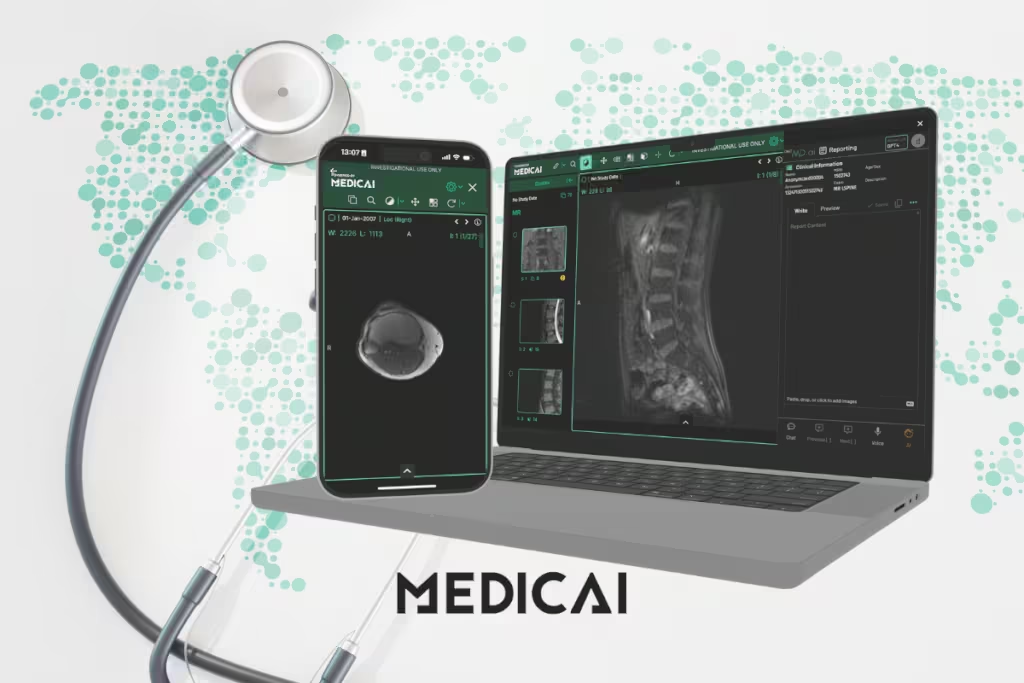
Ever wished you could carry medical imaging right in your pocket?
A mobile DICOM viewer enables this.
Mobile DICOM viewer apps and cloud platforms let you open CT, MRI, ultrasound, and other medical images securely on your smartphone or tablet at any time, anywhere. From quick case reviews to patient consultations, mobility is transforming how imaging fits into everyday healthcare. Unlike free online DICOM viewers, mobile versions are handy and easy to use.
Discover why you need a mobile DICOM viewer, the best mobile DICOM viewers, and how to choose the right one.

Why Use a Mobile DICOM Viewer?
In today’s healthcare environment, time and accessibility matter more than ever. Clinicians, students, and even patients expect to access medical images without being tied to a workstation.
That’s where a mobile DICOM viewer changes the game. It takes the power of imaging out of the radiology suite and puts it directly into your pocket.
Convenience: Access Images Anywhere
Mobile DICOM viewers enable you to review scans from anywhere, whether you’re on hospital rounds, consulting from home, or traveling. Instead of waiting to log into a desktop PACS system, images can be pulled up instantly on a phone or tablet.
This saves valuable time in urgent care scenarios and improves collaboration between care teams. Medicai, for example, offers cloud-based access, making this process seamless on any device.
Accessibility: Quick Reference for Teaching and Communication
Medical images are often needed beyond the reading room. A surgeon may want to show a patient their CT before a procedure. A professor might use anonymized scans in a lecture.
With mobile viewers, this information is right at your fingertips. By lowering the barriers to access, mobile DICOM tools support both clinical communication and medical education.
Versatility: For Clinicians, Students, and Patients
The value of mobile imaging isn’t limited to radiologists.
Emergency physicians can review scans at the bedside. Radiology students can study real cases on their phones. Even patients can engage more actively in their care by viewing their own studies through secure platforms.
Workflow Integration: Connect with PACS and Cloud
Mobile DICOM viewers don’t exist in isolation; they tie directly into existing systems.
Most modern apps integrate with PACS servers or cloud storage, enabling the secure retrieval of images without additional steps. That means clinicians can move fluidly from desktop to mobile without losing context.
With Medicai’s cloud-first design, healthcare teams can upload, view, and share studies securely across devices, making collaboration faster and more reliable.
Key Features to Look For in a Mobile DICOM Viewer
Not all DICOM viewers are created equal. Let’s see the key features of DICOM viewers to consider when evaluating mobile options.
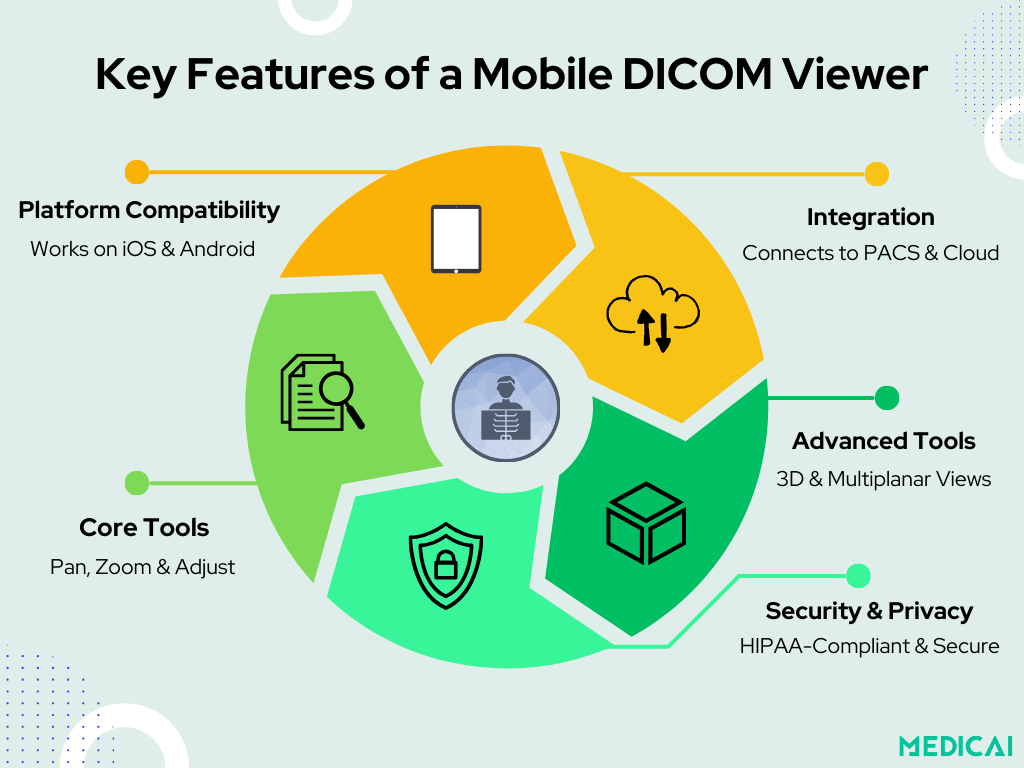
Platform Compatibility: iOS and Android
The first thing to check is whether the app is compatible with your device. Many tools are built for either iOS or Android, but not both. Cross-platform solutions are more flexible, especially for teams working across multiple devices.
Cloud-based viewers, such as Medicai, take this a step further by working directly in mobile browsers, eliminating the need for downloads.
PACS Support and Integration
A strong mobile viewer should connect to hospital PACS systems or cloud PACS. This helps in direct querying, retrieval, and review of images from the central archive, eliminating the need for manual transfers.
For practices that rely on speed, this integration is essential.
Core Viewing Tools
Even on a phone, radiologists and clinicians need reliable tools:
- Pan and zoom for detailed exploration.
- Window and level adjustments to highlight different tissues.
- Distance and angle measurements for accurate clinical use.
- Image inversion and rotation for flexible analysis.
These features turn a mobile app into a practical diagnostic tool rather than just a file opener.
Advanced Features: MPR and 3D Rendering
Some mobile viewers go beyond basics. Multiplanar reconstruction (MPR) lets you scroll through cross-sections of CT or MRI scans. 3D rendering tools allow for interactive visualization of anatomy.
While not every free app includes these, advanced mobile viewers are bringing these capabilities to handheld devices.
Security and Privacy
The most critical feature is compliance with data security standards.
A mobile viewer must protect patient health information through encryption, secure login, and adhere to HIPAA/GDPR guidelines. While free apps that open local files are great for learning, they may not be safe for clinical use.
Cloud PACS platforms, such as Medicai, stand out because they combine mobility with enterprise-grade security, ensuring that access is both easy and compliant.

5 Best Free Mobile DICOM Viewers
Not every clinician or student needs the full power of an enterprise DICOM system on their phone. Sometimes, a free and lightweight mobile viewer is all that’s required.
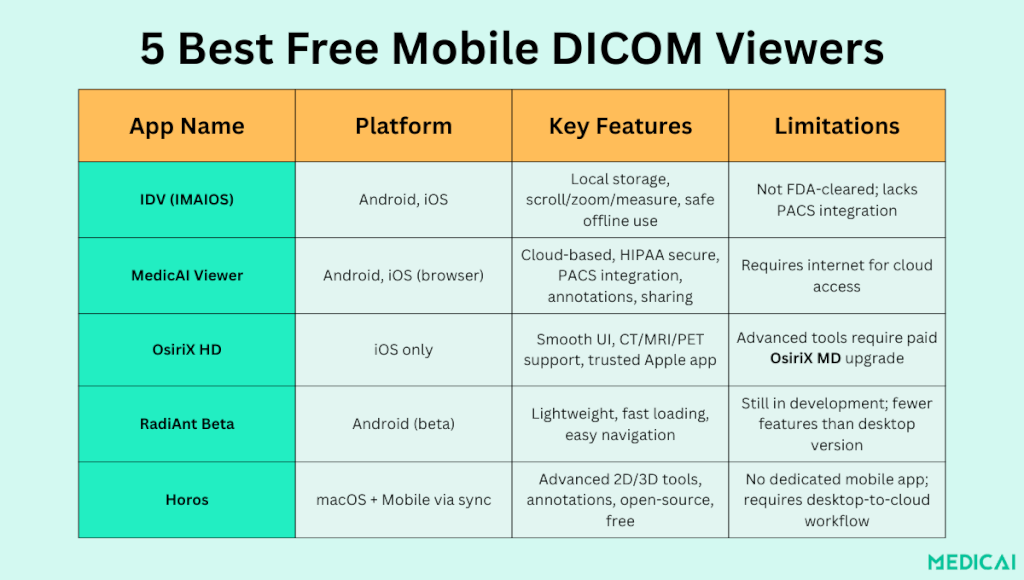
Luckily, there are several free DICOM Viewer tools that make this possible. Here are five of the best options.
1. IDV – IMAIOS DICOM Viewer (Android & iOS)
A long-standing favorite in the medical education community, IMAIOS IDV offers a simple yet reliable way to view DICOM files on mobile devices. It’s ideal for private study and non-commercial use where quick access is more important than advanced tools.
- Supported modalities: CT, MRI, PET, and ultrasound.
- Viewing tools: scroll, zoom, contrast adjustments, and basic measurements.
- Offline access: images are stored locally, ensuring privacy.
- Best for: medical students and educators who need quick, safe access to images without relying on internet connections.
- Limitation: not FDA-cleared for diagnostic use in clinical settings.
2. Medicai Free DICOM Viewer (Cloud + Mobile Access)
Medicai combines the accessibility of a free viewer with the power of a cloud PACS. Accessible directly through a secure mobile browser for imaging, it’s designed to support both education and professional workflows without the need to download heavy apps.
- Cross-platform: works on Android and iOS through any secure browser.
- Integration: connects to cloud PACS for study upload, storage, and sharing.
- Collaboration: includes annotations and secure study sharing with colleagues or patients.
- Best for: clinicians, students, and small practices who want a free yet professional-grade tool.
- Advantage: unlike many free apps, Medicai is continuously updated and built for both educational and clinical workflows.
3. OsiriX HD (iOS only)
A trusted name in the world of DICOM, OsiriX HD brings the same smooth viewing experience of its desktop counterpart to iPhones and iPads. It’s especially popular among Apple users seeking a well-designed and dependable app.
- Supported modalities: CT, MRI, PET, ultrasound.
- Viewing tools: scrolling, basic measurements, and smooth navigation.
- Best for: iOS users seeking a polished, professional viewer backed by a long-standing brand.
- Limitation: advanced features are locked behind the paid OsiriX MD version.
4. RadiAnt DICOM Viewer (Mobile Beta – Android)
Known for its speed and simplicity on desktop, RadiAnt has begun testing its mobile beta on Android devices. It’s lightweight, fast, and great for quick study reviews without overwhelming users with too many tools.
- Lightweight: optimized for fast loading and smooth navigation.
- Viewing tools: basic pan, zoom, and scrolling functions.
- Best for: radiology residents or professionals who already use RadiAnt on a desktop and want a mobile companion.
- Limitation: still in beta; not yet as feature-rich as the desktop version.
5. Horos (macOS + Mobile Access via Sync)
Horos is a free, open-source DICOM viewer designed for macOS, but it earns a place on this list because of its popularity and mobile-friendly workflows when paired with cloud access.
- Platform: native for macOS, mobile accessible via cloud sync.
- Features: advanced tools for 2D/3D reconstruction, measurements, and annotations.
- Best for: clinicians and students who already use macOS and want free access to powerful DICOM tools, with mobile viewing via cloud links.
- Limitation: no dedicated Android/iOS app; requires desktop-to-cloud workflow for mobile access.
Conclusion
Mobile DICOM viewers are revolutionizing the way medical images are accessed, shared, and interpreted. From quick offline study with IDV to advanced Mac workflows with Horos, these tools bring flexibility to students, clinicians, and patients alike.
For those seeking a secure, cloud-first solution that works on any device, Medicai’s free DICOM viewer stands out as the most practical choice.
Whether you’re learning, teaching, or treating, having imaging at your fingertips makes healthcare faster, smarter, and more connected.


Related Articles


Lets get in touch!
Learn more about how Medicai can help you strengthen your practice and improve your patients’ experience. Ready to start your Journey?
Book A Free Demo