How PACS and RIS Systems Improve Imaging Workflows in Healthcare
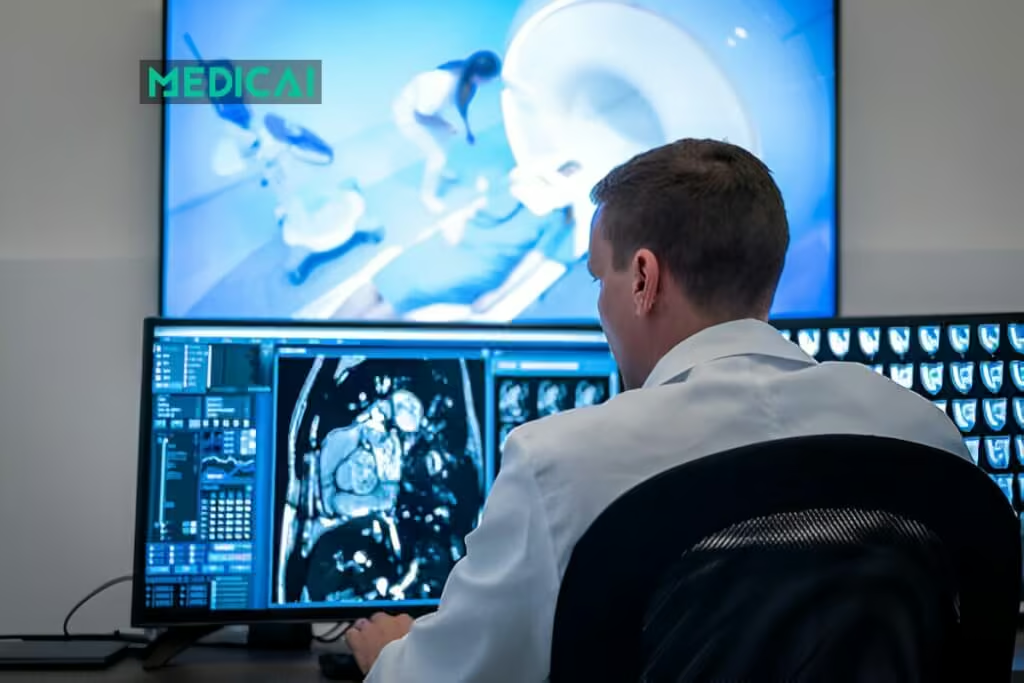
Imagine a radiologist receiving an urgent case at 3 AM. Instead of wrestling with slow servers and missing files, she instantly accesses high-resolution brain scans on her tablet, collaborates with specialists across the hospital, and delivers a life-saving diagnosis in minutes.
This isn’t science fiction—it’s the reality that modern PACS and RIS systems integration makes possible.
RIS-PACS integration is the technical and workflow connection between a Radiology Information System — which manages scheduling, ordering, worklists, and billing — and a Picture Archiving and Communication System — which stores, retrieves, and displays diagnostic images — allowing the two systems to exchange patient data, exam status, and report information automatically through HL7 and DICOM interfaces.
PACS is your digital imaging backbone, storing and delivering crystal-clear medical images on demand. RIS orchestrates your entire workflow, from scheduling to reporting. PACS and RIS transform radiology departments from siloed operations into seamless, efficient care delivery centers.
For a direct comparison of what RIS and PACS each do — including the differences in data type, protocol, and user — see the RIS vs PACS comparison guide. This post covers how the two systems work together in an integrated radiology department, the workflow efficiency gains integration produces, and the implementation challenges that most deployments encounter.

How Do PACS and RIS Systems Complement Each Other?
PACS and RIS serve distinct roles in radiology, but work best when integrated.
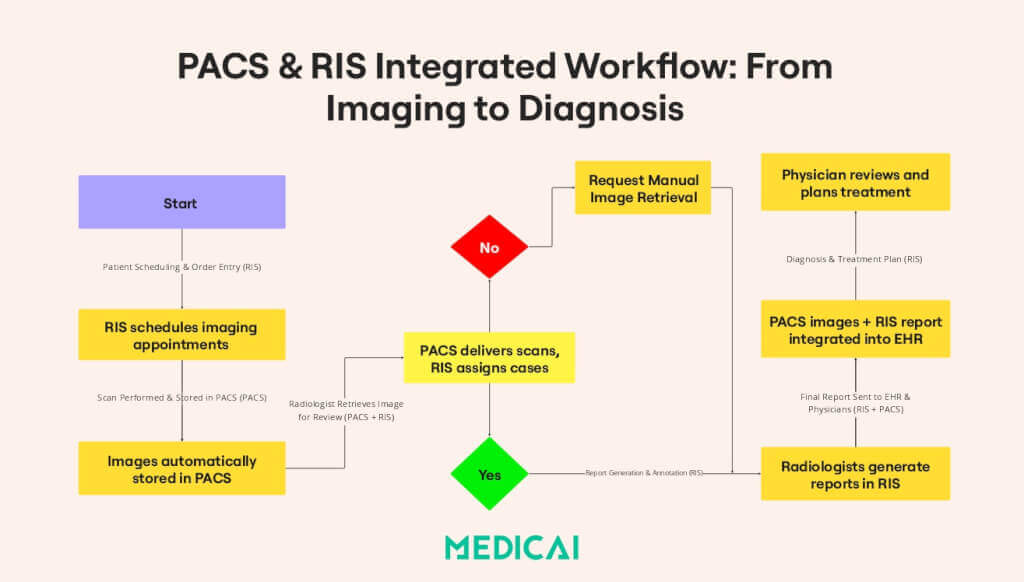
The Integrated Radiology Workflow: From Patient Order to Final Report
A fully optimized radiology workflow begins when a physician orders an imaging test and continues through the final diagnostic report. PACS and RIS complement each other at every stage, ensuring a smooth transition between processes.
PACS and RIS integrated workflow includes-
- Patient Scheduling (RIS): Physicians order imaging tests, and RIS automatically schedules appointments.
- Image Acquisition & Storage (PACS): Imaging devices send scans to PACS for immediate access.
- Diagnosis & Reporting (RIS + PACS): Radiologists review images from PACS and generate reports via RIS.
- Report Distribution (RIS): Finalized reports are sent to referring physicians, ensuring timely patient care.
- Billing & Compliance (RIS): Automates insurance claims and ensures error-free financial transactions.
What is the purpose of integrating PACS with RIS?
| Integration point | Without integration | With integration | Operational impact |
|---|---|---|---|
| Scheduling → Modality Worklist | Technologist manually enters patient demographics at the scanner before each acquisition | RIS pushes scheduled exam data to the DICOM Modality Worklist automatically via HL7 ORM | Eliminates transcription errors in DICOM headers — patient identity in the image file matches the order exactly |
| Study completion → Billing | Radiologist or admin manually notifies the billing team when a study is complete | PACS notifies RIS automatically when a study is committed to archive, triggering the billing workflow | Faster claim generation, fewer missed or delayed charges, reduced administrative overhead |
| Report → EHR distribution | Radiologist or admin manually faxes, uploads, or calls with results after signing the report | RIS sends an HL7 ORU message to the EHR automatically on report sign-off | Signed report reaches the ordering physician within minutes — no manual step, no delivery delay |
| Image access from EHR | Clinician logs into a separate PACS viewer with a different set of credentials to see the images | FHIR-native integration launches the DICOM viewer in EHR context — one click from the patient record | No separate login, full image access within the EHR interface — report text and images in one view |
Faster Image Access & Remote Collaboration
One of the most significant advantages of PACS and RIS integration is the ability to access images instantly.
In traditional systems, radiologists had to search for physical films or wait for manual image transfers. PACS stores imaging data digitally, enabling quicker diagnoses. Cloud-based PACS enables remote collaboration among radiologists and physicians, a crucial feature for telemedicine.
RIS links patient records and imaging studies, giving healthcare teams a complete view of a patient’s condition.
Improved Accuracy & Fewer Errors
Manual record-keeping often leads to misfiled reports, incorrect patient details, and delays in diagnosis. With PACS and RIS integration, every imaging study is automatically linked to the correct patient record, reducing the chances of administrative errors.
Some key benefits include:
- Automated Patient Tracking: RIS tracks all imaging requests and results, reducing the risk of lost or duplicated records.
- Error-Free Data Entry: With RIS, patient details are entered once and used throughout the radiology process, preventing mistakes.
- Centralized Access to Patient History: PACS and RIS integration enables radiologists to quickly access prior scans and reports for comparison of findings.
By reducing manual errors, radiology departments can ensure greater diagnosis accuracy and improved patient safety.
Better Data Security & Long-Term Storage
Healthcare data security is increasingly important, especially in radiology departments. Compliance with regulations like HIPAA and GDPR is essential. PACS and RIS help hospitals protect patient records through encryption and restricted access for authorized personnel.
Besides, radiology images often need to be stored for years or even decades.
PACS provides a structured way to archive medical images, ensuring that historical scans can be retrieved whenever necessary. RIS organizes imaging records so that past reports can be easily accessed, eliminating the need to search through paperwork.
PACS and RIS systems ensure data security, regulatory compliance, and long-term access to critical medical records.
Cost Savings & Increased Revenue
Switching to digital imaging enhances efficiency and reduces costs. Traditional film-based radiology incurs high expenses for printing, storage, and processing. Hospitals can eliminate physical film by using PACS, reducing material costs and saving space.
RIS further helps financial efficiency by automating billing and insurance claims, ensuring accurate payments, and reducing claim denials. Hospitals and imaging centers benefit from the following:
- Faster insurance reimbursements due to automated billing processes.
- Higher patient throughput since reduced wait times allow more scans to be performed daily.
- Lower administrative costs by minimizing paperwork and manual data entry.
The downstream revenue impact of PACS and RIS integration quality — including how accession number accuracy, report completion rates, and FHIR connectivity affect claim denial rates and days in AR — is covered in the radiology revenue cycle management guide.
HIS, RIS, and PACS: The Three-Layer Integration Stack
A fully integrated radiology IT environment has three layers: HIS (Hospital Information System) at the top — managing patient registration, admission/discharge/transfer, and master patient identity across the entire hospital; RIS in the middle — managing radiology-specific scheduling, worklists, reporting, and billing; PACS at the bottom — managing image storage, retrieval, and viewing. Data flows downward on admission (HIS to RIS to MWL to Modality) and upward on completion (PACS to RIS to EHR). When all three layers are integrated, a patient who registers at the hospital front desk automatically appears on the radiology worklist with correct demographics, and their signed radiology report automatically reaches their referring physician’s EHR record — with no manual data entry at any point in the chain.”
Common Challenges in Implementing PACS & RIS
Implementing PACS and RIS comes with several challenges. Let’s focus on the three most common technical failures first.
Modality Worklist connection failure
The most common and most damaging integration failure: when the HL7 ORM message from the EHR to the RIS arrives correctly but the DICOM MWL service is misconfigured or offline, the modality cannot query the worklist, technologists enter data manually, and DICOM header errors propagate throughout the imaging chain. Studies may be committed to PACS with incorrect patient IDs, requiring a Patient Information Reconciliation workflow to correct them.
Report distribution interface failure
The HL7 ORU message that carries the signed radiology report from RIS to EHR uses an interface engine that requires manual retesting after every software upgrade on either end. When this interface silently breaks — a common occurrence after version updates — reports stop reaching referring clinicians without any error alert. The failure is often not detected until a clinician calls to ask why results are missing.
Accession number mismatch
When the RIS generates an accession number that the PACS cannot match to an incoming study — due to character encoding differences, number format discrepancies, or duplicate accession number generation — studies arrive in PACS without a linked order, creating unmatched studies that bypass the reading worklist and may go unread.
And of course, there are some generic limitations.
High Initial Cost of Implementation
Setting up PACS and RIS requires a significant investment in hardware, software, and integration tools. Licensing, cloud storage, and IT infrastructure add to the cost.
Solution:
- Opt for cloud-based PACS/RIS to lower hardware expenses.
- Choose vendor-neutral solutions to prevent costly lock-ins.
- Leverage government or private grants for healthcare IT upgrades.
Data Migration & Compatibility Issues
Hospitals moving from legacy systems face challenges in transferring thousands of imaging files and ensuring vendor compatibility.
Solution:
- Use Vendor-Neutral Archives (VNA) for standardized data storage.
- Migrate data in phases to minimize disruptions.
- Ensure DICOM & HL7 compliance for smooth integration with EHRs.
User Training & Adoption Challenges
Staff accustomed to older systems may struggle with the transition. It can lead to resistance, errors, and slower adoption.
Solution:
- Provide hands-on training and step-by-step onboarding for radiologists and admin staff.
- Designate superusers to support team members.
- Roll out the system gradually to allow time for adaptation.
Security & Compliance Risks
Medical imaging data is highly sensitive and requires strict security measures to prevent unauthorized access and regulatory violations (HIPAA, GDPR).
Solution:
- Ensure vendors provide HIPAA- and GDPR-compliant solutions.
- Implement data encryption, multi-factor authentication, and access controls.
- Conduct regular security audits to identify vulnerabilities.
For a full comparison of what RIS and PACS each do — including differences in data type, protocol, primary user, and billing role — see the RIS vs PACS: Key Differences guide.
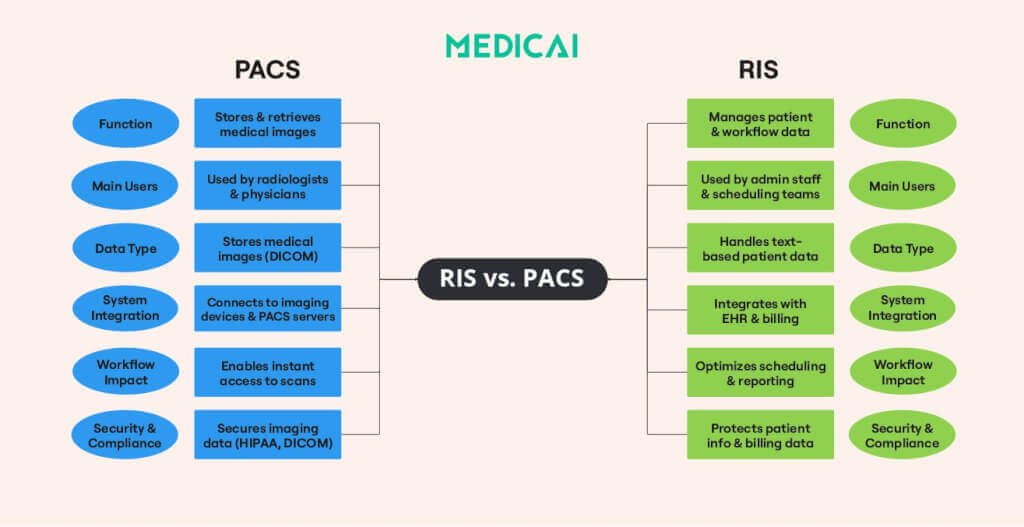
For a complete technical breakdown of PACS architecture, components, and storage models, see the PACS Architecture and How It Works guide.
Conclusion
Implementing PACS and RIS systems is more than a technical upgrade—it’s a step toward a more efficient, patient-centered healthcare system. While challenges like cost, data migration, and security exist, choosing the right partner makes all the difference. With
With Medicai’s advanced, cloud-based PACS-RIS solutions, healthcare providers can effortlessly streamline workflows, enhance collaboration, and ensure compliance. Our seamless integration ensures faster diagnoses and improved efficiency, allowing you to focus on what matters most—patient care.


Related Articles
Lets get in touch!
Learn more about how Medicai can help you strengthen your practice and improve your patients’ experience. Ready to start your Journey?
Book A Free Demo