RIS vs PACS: Key Differences, Workflow, and Integration Explained
The acronyms RIS and PACS often sound like the same thing for a medical student or a new hospital administrator. They both store patient data and deal with radiology. So, why do we need two separate systems and be concerned about the difference between RIS vs PACS?
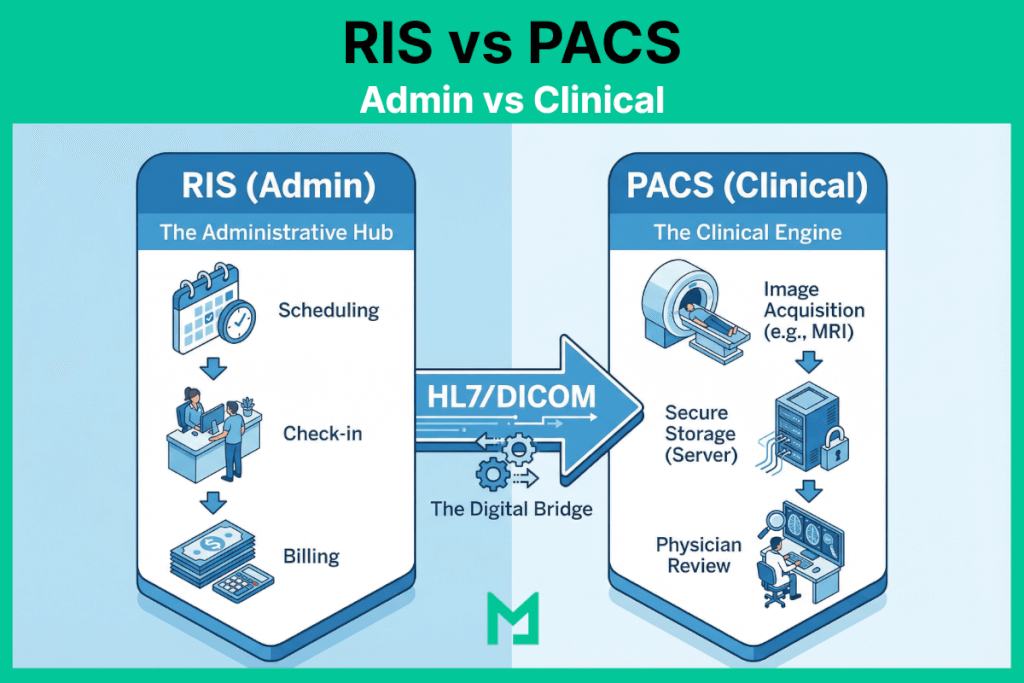
The easiest way to understand the difference isn’t to look at a feature list—it is to look at the Process Map of RIS PACS integration.
Think of the hospital as a restaurant. The RIS (Radiology Information System) is the “Front of House” (the host who takes the reservation and the waiter who takes the order). The PACS (Picture Archiving and Communication System) is the “Back of House” (the kitchen where the actual product is made and plated).
In this visual guide, we will trace the patient journey mapping step-by-step, from scan to diagnosis, to show exactly where each system takes charge.

RIS vs PACS (Administrative vs. Clinical)
Here is a summary of all the differences between RIS vs PACS in a concise table.
| Feature Category | RIS (Radiology Information System) | PACS (Picture Archiving & Communication System) |
|---|---|---|
| Primary Domain | Administrative Workflow (The “Front Office”) | Clinical Diagnosis (The “Back Office”) |
| Data Type | Text-Based Data: Patient Demographics, Insurance info, Scheduling slots, Billing codes (CPT/ICD-10). | Pixel-Based Data: X-Rays, MRIs, CT Scans, Ultrasound loops, and 3D Reconstructions. |
| Key Protocol | HL7 (Health Level 7): Uses standard messaging (ORM/ORU) to talk to the EHR and Billing systems. | DICOM (Digital Imaging and Communications in Medicine): The standard for handling image storage and transmission. |
| Primary User | Schedulers, Receptionists, Billers, and Technologists (for worklists). | Radiologists, Surgeons, and Referring Physicians. |
| Core Function | “The Tracker”: Tracks the patient’s status (Arrived, Scheduled, Exam Complete, Report Distributed). | “The Viewer”: Allows the doctor to manipulate images (Zoom, Pan, Measure) to find pathology. |
| Billing Role | Critical: Generates the “Superbill,” links diagnosis codes to procedure codes, and sends claims. | Non-Existent: PACS does not handle money; it handles anatomy. |
| Integration protocol | HL7 ORM/ORU messages carry imaging orders from EHR to RIS and completed reports from RIS back to EHR; DICOM Modality Worklist (MWL) feeds scheduled exam data from RIS to the scanner. | DICOM C-STORE, C-FIND, C-MOVE connect PACS to imaging modalities for image transmission and retrieval; DICOMweb (STOW-RS, WADO-RS) used in cloud and web-based deployments. |
| Integration Point | Connects to the EHR (Electronic Health Record) to pull patient history. | Connects to the Modalities (Scanners) to pull images. |
What is a Radiology Information System (RIS)?
A Radiology Information System (RIS) is a software platform that manages the administrative and operational workflow of a radiology department — handling patient scheduling, exam ordering, technologist worklists, report distribution, and billing from a single system. RIS is the operational layer that tracks every patient’s status from referral to final report, connecting the referring physician’s EHR order to the radiologist’s completed diagnosis. RIS communicates with EHR systems via HL7 messaging and with PACS via the DICOM Modality Worklist interface, which pre-populates patient demographics on imaging equipment before acquisition.
The Definitions: Administrative vs. Clinical
Before walking the path, let’s define the vehicles.
- RIS (The Manager): Handles the administrative workflow. Scheduling, billing, patient check-in, and report distribution.
- PACS (The Archive): Handles the clinical workflow. Storing images, viewing X-rays, and 3D reconstruction.
For a deeper dive into the technical architecture of the archive, read our Comprehensive Guide to PACS.
The Step-by-Step Workflow
The following workflow traces exactly where RIS responsibility ends, and PACS responsibility begins — the handoff point at Step 2 (Acquisition) is where the two systems exchange control and where integration failures most commonly occur.
Let’s follow a standard case: John Doe needs a Chest X-ray.
Step 1: The Order (Domain of RIS)
The Actor: Ordering Physician / Scheduler The Action: John’s doctor places an order in the EHR. This order flows into the RIS.
- What happens here: The RIS checks John’s insurance eligibility, schedules the appointment, and generates a unique Accession Number.
- Why it matters: Without the RIS, the radiology department wouldn’t know John is coming.
Step 2: The Acquisition (The Handshake)
The Actor: Technologist The Action: John arrives. The technologist queries the “Modality Worklist” on the X-ray machine.
- What happens here: The X-ray machine pulls John’s demographics from the RIS but prepares to send the actual images to the PACS.
- The Critical Link: If the data here doesn’t match, you get “broken links.” (See our guide on Preventing Data Mismatches).
Step 3: The Image Storage (Domain of PACS)
The Actor: The Server / Archive The Action: The scan is complete. The heavy image files—encoded in the DICOM standard—are transmitted to the PACS server.
- What happens here: The PACS acts as the vault. It stores the pixels and ensures they are available for viewing anywhere in the hospital.
Step 4: The Diagnosis (Domain of PACS)
The Actor: Radiologist The Action: The radiologist sits at their workstation. They open the study in the DICOM Viewer.
- What happens here: This is pure clinical work. The radiologist uses tools like Window/Leveling and measurement calipers to analyze the image. They aren’t looking at billing codes; they are looking at anatomy.
Step 5: The Report (The Synchronization)
The Actor: Radiologist / Transcription The Action: The radiologist dictates their findings: “Clear lungs, no pneumonia.”
- What happens here: This is where it gets tricky. The diagnosis (text) is created in the PACS (or a dictation system), but it must be sent back to the RIS so the bill can be generated and the result sent to John’s doctor.
For a detailed breakdown of how PACS and RIS integration improves imaging workflow efficiency — including implementation considerations and common failure modes — see how PACS and RIS systems improve imaging workflows.
The Future: Do We Still Need Both?
Historically, you needed an RIS from Vendor A and a PACS from Vendor B. This required complex HL7 integration to keep them talking.
Today, the lines are blurring. Modern, cloud-native platforms are moving toward a “Unified Radiology Platform” model.
By using a Vendor Neutral Archive (VNA) approach, modern systems can store both administrative data (RIS) and image data (PACS) in a single, seamless database. This eliminates the “swivel chair” effect and ensures that the radiology workflow diagram is a straight line, not a tangled web.
What is the purpose of integrating PACS with RIS?
The purpose of integrating PACS with RIS is to eliminate the manual data transfer between administrative and clinical systems. Without integration, technologists manually enter patient demographics at the modality — the source of DICOM header errors and patient identity mismatches. With RIS-PACS integration via DICOM Modality Worklist, the RIS pushes scheduled exam data directly to the modality, and the PACS pushes completed studies back to the RIS for billing and report distribution. The integration layer uses HL7 for text data and DICOM for image metadata — two separate standards, each with its own interface.
Where Does HIS Fit? RIS, PACS, and the Hospital Information System
A Hospital Information System (HIS) is the enterprise layer above both RIS and PACS — it manages patient admissions, discharge, transfers, and master patient identity across the entire hospital. In the imaging workflow, HIS is the source of patient registration that flows into RIS for scheduling. When HIS, RIS, and PACS are all integrated, the following steps occur:
- The patient registers at the HIS
- Demographics flow to RIS
- RIS generates the MWL
- PACS receives studies tagged with the correct identity
- Completed reports flow from PACS back through RIS to the ordering physician’s EHR
FAQ: RIS vs PACS
What is the difference between PACS and RIS?
PACS and RIS are two separate systems that manage different dimensions of the radiology workflow. RIS — Radiology Information System — is the administrative layer: it handles patient scheduling, exam ordering, technologist worklists, report distribution, and billing. It communicates via HL7 messaging and tracks every patient’s status from referral to final invoice. PACS — Picture Archiving and Communication System — is the clinical layer: it stores, retrieves, and displays the actual diagnostic images — X-rays, CT scans, MRIs, ultrasounds — and provides radiologists with the tools they need to interpret studies. The key distinction is data type: RIS manages text-based administrative data; PACS manages pixel-based imaging data. The two systems are tightly coupled in practice — RIS feeds the DICOM Modality Worklist that pre-populates patient demographics on the scanner, and PACS sends completed studies back to RIS for billing and report distribution — but they are architecturally separate systems built on different standards (HL7 for RIS, DICOM for PACS).
What is the difference between RIS and EMR?
RIS and EMR (Electronic Medical Record) are both clinical information systems, but they serve different scopes and audiences. An EMR is a system used by the ordering clinician — the primary care physician, specialist, or emergency physician — to document patient encounters, manage prescriptions, track diagnoses, and coordinate care across the patient’s full medical history. A RIS is a system used specifically within the radiology department to manage the imaging-specific workflow: scheduling imaging exams, generating worklists for technologists, tracking study status, and distributing radiology reports. The relationship between the two is directional: the EMR generates the imaging order, which flows via HL7 ORM message into the RIS; the RIS generates the radiology report, which flows back via HL7 ORU message to the ordering clinician’s EMR. The EMR sees the radiology report text but does not manage the imaging workflow or store the DICOM images — that is the role of the RIS and PACS, respectively.
What is RIS in DICOM?
RIS and DICOM operate at the boundary between administrative and clinical data. In the DICOM workflow, RIS is the system that provides the Modality Worklist — the scheduled exam data that a CT scanner, MRI, or X-ray machine queries before each acquisition using the DICOM C-FIND operation. The RIS sends patient name, patient ID, accession number, and exam description to the modality via the Modality Worklist Management Service. The modality then embeds these demographics into the DICOM header of every image file it produces. This is the most critical integration point between RIS and DICOM: when the Modality Worklist connection is functioning correctly, DICOM image files contain accurate patient identity data sourced from the RIS order. When the connection is broken or the technologist overrides it with manually entered data, DICOM header errors propagate through the entire imaging chain — affecting archiving, retrieval, report matching, and patient identity reconciliation downstream. RIS also receives completed DICOM study notifications from PACS, which trigger report generation and billing workflows.
What is the purpose of integrating PACS with RIS?
The purpose of integrating PACS with RIS is to eliminate the manual data transfer between administrative and clinical workflows — specifically the hand-off points where patient identity, exam status, and report data move between the two systems. Without integration, technologists manually enter patient demographics into the imaging modality before each scan, creating transcription errors that corrupt DICOM image headers. Radiologists must navigate between two separate systems to access images and reports. Billing is triggered manually after the radiologist communicates scan completion. With full RIS-PACS integration, the workflow becomes automated at every hand-off: the RIS pushes scheduled exam data to the DICOM Modality Worklist so the scanner pre-populates correctly; the PACS notifies the RIS when a study is complete so billing can be initiated; the RIS distributes the signed radiology report to the referring physician’s EHR without manual intervention. The integration uses two protocol layers — HL7 for text-based order and result messages, and DICOM for image metadata and worklist management — both of which must be configured and maintained for the integration to function reliably.
From Scan to Diagnosis
Understanding RIS vs. PACS is effectively understanding the difference between the “Ticket” and the “Meal.”
The RIS ensures the patient reaches the scanner and the bill is paid. The PACS ensures the doctor can see inside the patient to find the cure. Both are essential, but the future belongs to platforms that can do both without forcing users to switch screens.


Related Articles


Lets get in touch!
Learn more about how Medicai can help you strengthen your practice and improve your patients’ experience. Ready to start your Journey?
Book A Free Demo