VNA vs PACS: Key Differences, Use Cases, and When to Use Both

A VNA (Vendor Neutral Archive) stores medical imaging data in standard DICOM format independent of any specific vendor, while a PACS (Picture Archiving and Communication System) manages the active clinical imaging workflow — acquisition, viewing, worklist, and reporting — within a single department or vendor ecosystem.
The relationship between a healthcare provider and its PACS vendor was simple: you bought the software and “rented” the storage infrastructure. The PACS owns your data format, your workflow, and your migration path.
But in 2026, the rise of Enterprise Imaging has exposed the flaw in this model. Enterprise Imaging is an enterprise-wide imaging program that unifies storage, access, and Vendor Neutral Archive (VNA), typically serving as the archive layer. When data is locked inside a proprietary PACS, migration becomes a multimillion-dollar hostage negotiation.
The debate is no longer just “VNA vs. PACS.” It is a question of architecture: Do you want your data tied to a specific viewing software, or do you want to own it independently?
For a full technical breakdown of what a VNA is, how it works, and its deployment requirements, see our full guide to Vendor Neutral Archives. This post focuses specifically on the functional differences between VNA and PACS, and on how to decide which architecture — or combination — is right for your organisation.

Vendor Neutral Archive vs PACS: At a Glimpse
| VNA | PACS | |
|---|---|---|
| Primary function | Long-term vendor-neutral storage and migration independence | Active clinical workflow — acquisition, viewing, worklist, reporting |
| Data format | Standard DICOM only — no proprietary formats | May use proprietary formats in legacy systems |
| Scope | Enterprise-wide — radiology, cardiology, pathology | Typically one department or site |
| Vendor dependency | None — data portable to any conformant system | High in legacy systems — data tied to vendor schema |
| Access protocol | DICOMweb (QIDO-RS, WADO-RS, STOW-RS) and DIMSE | DIMSE and DICOMweb |
| Migration risk | Low — standard format readable by any future system | High — exit requires data conversion or vendor cooperation |
| Used together? | Yes — VNA holds the archive; PACS serves the reading room | Yes — PACS handles active workflow; VNA holds long-term storage |
The Philosophy Gap: Vendor Neutral Archive vs PACS
To understand the difference, we must look at the intent of each system.
PACS (The “Viewer”)
A Picture Archiving and Communication System (PACS) is designed for Workflow. Its primary job is to deliver images to a radiologist’s eyes as fast as possible.
- The Priority: Speed, hanging protocols, and diagnostic tools.
- The Flaw: To achieve speed, legacy PACS vendors often wrap images in proprietary metadata headers. This makes the data “sticky”—it works great inside that specific viewer but breaks when you try to move it to another system.
VNA (The “Library”)
A Vendor Neutral Archive (VNA) is designed for Data Sovereignty. Its primary job is to normalize data so it can be read by any system.
- The Priority: Standards (DICOM, HL7, XDS), interoperability, and long-term retention.
- The Advantage: It strips away proprietary “wrappers” from the PACS, storing the image in its purest, most standard form.
The Commercial Argument: How VNA Kills Migration Costs
The strongest argument for a VNA is financial. It solves the “Vendor Lock-In” tax.
In a traditional PACS-only environment, switching vendors requires a massive Data Migration project. You have to pay to extract petabytes of data, “clean” the proprietary tags, and re-ingest it into the new system. This process is slow, risky, and expensive.
The VNA Advantage: When you place a VNA at the core of your architecture, you perform that migration one last time.
- Decoupling: The VNA becomes the “Source of Truth.”
- Plug-and-Play: Your PACS viewer becomes just an “app” that sits on top.
- Freedom: If you want to switch PACS viewers in 5 years, you simply unplug the old one and plug in the new one. The data never moves. The migration cost drops to near zero.

Vendor Neutral Archive vs PACS: 5 Key Differences
VNAs and PACS differ significantly in functionality, adaptability, and long-term value. PACS is effective for specific departmental workflows and offers efficient imaging storage and retrieval. VNAs excel in interoperability, standardization, and scalability, providing a future-proof solution for managing imaging data across various systems and locations.
Let’s explore the differences between VNA and PACS in detail.

Scope and Functionality
A VNA offers broader capabilities. It is a centralized storage solution for all imaging data across an organization, regardless of department or imaging equipment.
VNAs are for long-term storage and archiving. They help facilities consolidate data from multiple PACS systems into a single location, making it easier for staff to find and access information across departments. VNAs are particularly useful for large hospital networks or organizations with various imaging needs.
PACS helps store and manage medical images, particularly in radiology and cardiology. Its primary function is to ensure that specialists and referring doctors can quickly access critical diagnostic imaging data, enhancing workflow and improving patient care.
For example, radiologists use PACS to review X-rays or MRIs, add notes on what they see, and share their findings with doctors in the same network.
Vendor Neutrality
A key highlight of a VNA is its compatibility with multiple vendors. By using widely accepted formats like DICOM (Digital Imaging and Communications in Medicine), VNAs enable smooth data sharing across various healthcare systems.
For example, a hospital can use a VNA to easily connect imaging data from different machines, such as a GE MRI scanner or a Siemens ultrasound machine.
PACS systems are often vendor-specific. They might use special formats or protocols, making it difficult for facilities to share data with other systems or change vendors.
Vendor lock-in can limit growth and force organizations to rely on a single vendor for updates, support, and new features, often at a high cost.
Interoperability
A standard PACS talks to radiology modalities (CT, MRI). A VNA talks to the entire enterprise.
Because VNAs are built on IHE XDS (Cross-Enterprise Document Sharing) profiles, they excel at ingesting “non-DICOM” content that a PACS often rejects:
- Dermatology photos (JPEG).
- Pathology slides (WSI).
- Cardiology waveforms (PDF/ECG).
- Video from endoscopy scopes (MPEG).
By centralizing these diverse formats into a single patient record, the VNA becomes the engine for true Patient-Centric Care, allowing the EMR to pull a complete visual history of the patient via HL7 FHIR APIs.
Data Standardization
VNAs use open standards such as DICOM and formats such as PDF and JPEG to acquire imaging data from various sources. It allows consistent access, viewing, and management of all data across the organization.
Standardization also protects data from obsolescence, ensuring long-term usability even as technology evolves.
PACS systems often use vendor-specific data formats. This lack of standardized formats makes sharing data with other systems or moving data during upgrades or platform changes difficult.
For instance, a healthcare provider may face significant technical and financial barriers if they want to transition to a new PACS or integrate it with a different system.
Cost
VNAs require a more significant initial investment but can save money in the long run. By avoiding vendor lock-in, VNAs make switching vendors or adding new systems cheaper. Their scalability allows organizations to grow without needing major system overhauls.
Besides, VNAs optimize storage costs through tiered data management, archiving older data on cost-effective platforms while keeping frequently accessed data readily available.
PACS systems often have lower initial costs, making them appealing for smaller facilities or departments with limited budgets. However, the long-term costs associated with vendor lock-in, proprietary upgrades, and limited scalability can increase over time.

What is the difference between VNA, PACS, and Enterprise Imaging?
VNA vs PACS vs Enterprise Imaging differs by layer ownership, PACS owns diagnostic workflow and short-term access, VNA owns long-term, vendor-neutral storage, and Enterprise Imaging owns cross-department governance and enterprise-wide access.
PACS is a departmental system that optimizes radiology and cardiology reading workflow, and PACS prioritizes speed, hanging protocols, and diagnostic tools.
Vendor Neutral Archive (VNA) is an enterprise archive that normalizes imaging data for long-term retention and cross-system interoperability, independent of a single PACS viewer.
Enterprise Imaging is the enterprise strategy and platform layer that connects multiple departments and sites into one imaging record through shared governance, shared access, and EMR integration.
Comparison criteria: VNA, PACS, and Enterprise Imaging
Primary job
- PACS: Fast diagnostic interpretation and reporting.
- VNA: Durable retention and standards-based exchange.
- Enterprise Imaging: Single longitudinal imaging record across departments and sites.
Scope of content
- PACS: Radiology-first, cardiology second, DICOM-first.
- VNA: DICOM plus non-DICOM content, governed at the enterprise level.
- Enterprise Imaging: Radiology, cardiology, pathology, dermatology, endoscopy, and more, unified under one access model.
Lock-in pressure
PACS: Highest, workflow and archive behavior ties to one vendor.
VNA: Lowest, archive stays stable while viewer apps change.
Enterprise Imaging: Medium, platform choices matter, VNA-centered designs reduce lock-in.
Integration surface
- PACS: Modalities and radiology ops systems first.
- VNA: Enterprise exchange patterns, standards, and long-term identity mapping.
- Enterprise Imaging: EMR launch points, identity and access controls, cross-site sharing, auditability.
Buying owner and success metric
- PACS: Radiology leadership plus IT, success equals reading speed and report turnaround.
- VNA: IT leadership plus compliance, success equals migration cost reduction and retention integrity.
- Enterprise Imaging: CIO and clinical governance, success equals cross-department access and fewer imaging silos.
Enterprise Imaging architecture usually puts VNA as the data source of truth, then treats PACS as one application layer for diagnostic reading, not the place where data gets trapped.
When to Invest in a VNA?
If you are a small clinic with one modality, a standard Cloud PACS is likely sufficient. But you should consider a VNA architecture if:
- You have a Multi-Site Network: You need to share images between different hospitals with different PACS vendors.
- You fear Vendor Lock-In: You are tired of paying exorbitant migration fees every time you upgrade software.
- You need “Enterprise” Scope: You want to store images from Cardiology, Derm, and Pathology, not just Radiology.
Don’t Rent Your Data. Own It. The future of imaging is not about “storage”—it’s about sovereignty. Medicai’s Cloud-Native VNA architecture ensures your data remains yours—standardized, secure, and ready for whatever viewer you choose next.
Deploying a VNA: From PACS to VNA or VNA to PACS?
The decision to transition between PACS and VNA depends on your organization’s long-term goals, operational needs, and technological infrastructure. However, these transitions come with challenges and considerations.
Here’s how platforms like Medicai simplify the process.
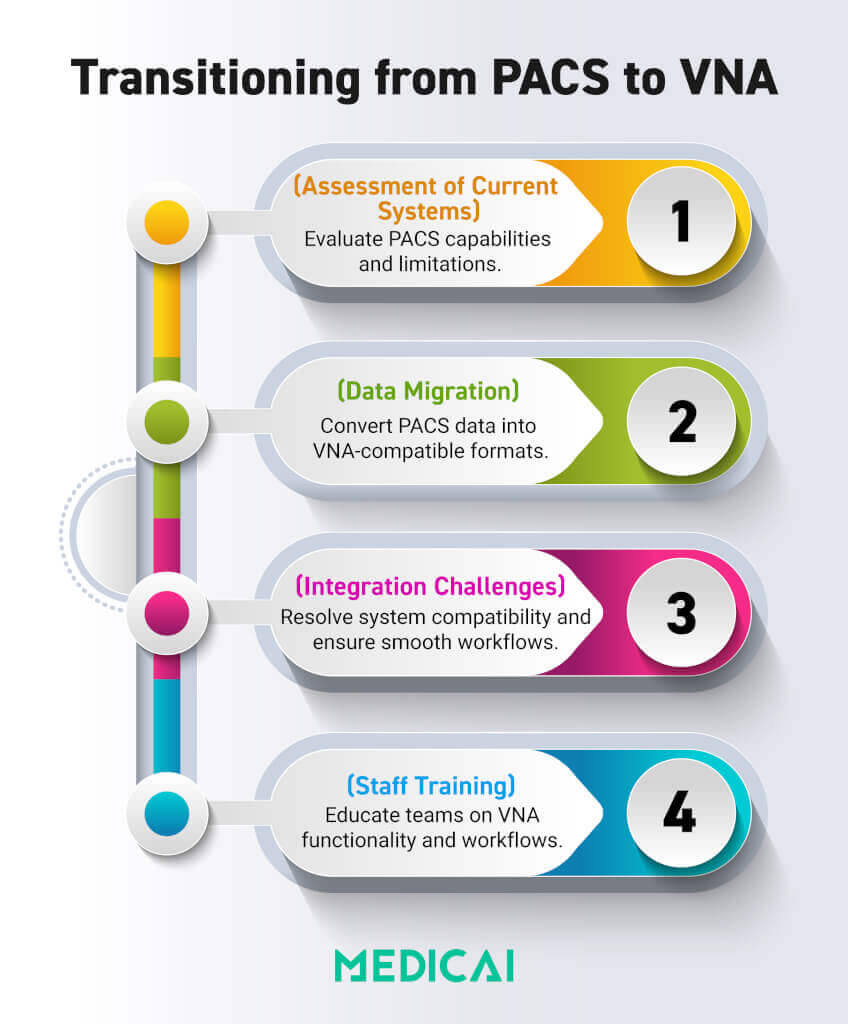
Transitioning from PACS to VNA
Upgrading from a PACS to a VNA is often about wanting more flexibility, better connections, and centralized storage. PACS is great for specific departments, but its vendor focus can limit scalability and create silos.
VNAs solve these problems by consolidating data from different PACS systems into a single standard location, making it easier for everyone in the organization to access the information.
Steps in the Transition Process
Assessment of Current Systems
- Evaluate the existing PACS infrastructure, including storage capacity, vendor lock-in limitations, and interoperability issues.
- Identify data volumes, formats, and integration points with other systems, such as EMRs or RISs.
Data Migration Strategies
- Extract imaging data from proprietary PACS systems and convert it to standardized formats such as DICOM.
- Develop a phased approach to avoid disruptions, starting with non-critical data and gradually moving to live data.
- Use advanced tools to validate data integrity during the migration process, ensuring no file loss or corruption.
Integration Challenges
- Ensure the VNA integrates seamlessly with existing healthcare IT systems, such as EMRs and RIS, to maintain workflow continuity.
- Address compatibility issues between the VNA and legacy PACS systems that may still be used during the transition phase.
Staff Training
- Train healthcare professionals and IT staff to use the VNA system, focusing on data access, workflow adjustments, and the resolution of potential issues.
Benefits of Moving to VNA
- Improved data accessibility across departments and locations.
- Elimination of vendor lock-in, allowing healthcare providers to adopt best-in-class solutions.
- Long-term cost savings through centralized storage and reduced reliance on proprietary upgrades.
Transitioning from VNA to PACS
Some healthcare organizations may switch from VNA to PACS to simplify workflows, reduce complexity, or manage budgets. However, this change can introduce new challenges that need careful consideration.
Challenges of Reverting to PACS
- Data Migration Complexity: Moving data from a VNA to a PACS system involves reformatting standardized files to vendor-specific formats, which can be costly and time-consuming.
- Loss of Interoperability: A PACS system may not support the same level of cross-departmental and multi-vendor integration, creating silos and limiting data sharing.
- Vendor Lock-In Risks: Returning to PACS reintroduces the risk of dependency on a single vendor, potentially restricting future upgrades.
Medicai.io simplifies transitions between PACS and VNA with secure data migration, seamless integration, and robust interoperability. Its tailored solutions address organizational needs, while real-time data sharing and compatibility with DICOM and HL7 ensure efficiency.
Vendor Neutral Archive (VNA) and PACS market
The US market for vendor-neutral archives (VNA) and picture archiving and communication systems (PACS) is experiencing robust growth driven by rising imaging volumes, healthcare digitalization, regulatory pressures for electronic health records (EHR), and adoption of cloud and AI technologies.
Key Market Drivers
- Escalating imaging volumes and need for interoperability: Hospitals and health systems are deploying VNA and PACS to manage growing and diverse imaging data, enabling sharing across different departments and vendor systems.
- Cloud Adoption: Many healthcare providers are migrating from on-premise to cloud-based solutions, with cost savings, scalability, disaster recovery, and easier integration with other systems as major benefits—operational costs can drop by up to 30%.
- AI and analytics: The integration of artificial intelligence and analytics into imaging archives enhances diagnostic support, workflow automation, and data analysis for personalized care.
- Regulatory compliance: Increasing requirements for image retention, security, and integration with EHRs drive demand for VNA solutions with robust interoperability and data protection.
- Shift to value-based care: Hospitals aim for interoperable, scalable imaging platforms that support collaborative care and remote consultations, particularly highlighted by the expansion of telehealth and teleradiology.
Market Segmentation
Specialty PACS: These systems are growing in parallel, fueled by the trend toward precision medicine and AI-enhanced diagnostic workflows.
PACS systems continue to command the largest segment, accounting for roughly 64% of overall market revenue, due to longstanding use in radiology practices.
Cloud-based VNA and PACS deployments are growing rapidly, with regional adoption especially strong in North America due to advanced healthcare infrastructure and regulatory incentives.
Trends and Outlook
Data security and regulatory compliance remain critical: VNAs’ ability to provide secure, auditable, and standards-based long-term storage is making them indispensable for modern healthcare networks.
Growth is being shaped by digital transformation (virtual care models, telemedicine).
AI-driven PACS systems are rapidly gaining market share, powering faster and more accurate diagnostics.
Cloud migration is accelerating, partly due to reduced IT maintenance and more flexible disaster recovery options.
Interoperability and scalability are central to purchasing decisions as systems seek to avoid vendor lock-in and accommodate larger multi-site provider networks.
Conclusion
Vendor-neutral Archive VNA vs PACS: Understanding the differences between VNAs and PACS is vital for healthcare organizations that aim for efficiency and flexibility. VNAs provide better system compatibility and vendor independence, while PACS streamlines departmental workflows.
Choosing the right solution depends on your organization’s needs and future goals.
Medicai helps connect the dots by providing cool tools that streamline imaging workflows, boost teamwork, and smooth transitions. We make sure healthcare providers can provide top-notch patient care.


Related Articles



Lets get in touch!
Learn more about how Medicai can help you strengthen your practice and improve your patients’ experience. Ready to start your Journey?
Book A Free Demo