What Is DICOM? A Complete Guide to the Medical Imaging Standard and File Format
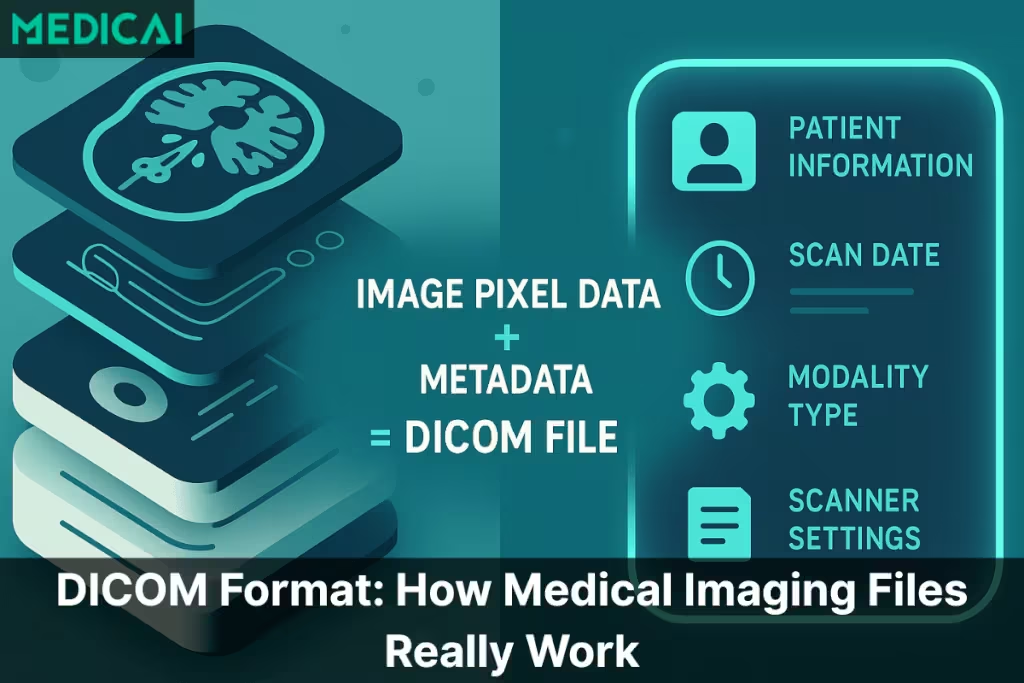
DICOM (Digital Imaging and Communications in Medicine) is the international standard that defines how medical images and associated patient data are stored, transmitted, and exchanged among imaging devices, picture archiving and communication systems (PACS), and electronic health records. The standard governs both the file format for medical image data (the .dcm file you might receive on a CD or USB drive after an imaging study) and the network protocols that transfer those files between systems.
Its predecessor, the ACR-NEMA standard, was first published in 1985, and it was substantially revised and renamed DICOM in 1993. Today it is the universal standard for medical imaging across CT, MRI, X-ray, ultrasound, mammography, and other clinical imaging modalities worldwide.

What is DICOM? The medical imaging standard explained
DICOM is two things in one. As a file format, it’s a structured container that holds medical image pixel data, along with patient demographics, study details, modality information, and acquisition parameters needed for clinical interpretation. As a communications protocol, it’s the standardized way that imaging devices, archives, and viewing workstations exchange those files across hospital networks. The standard exists because medical imaging needs to work the same way regardless of which manufacturer made the scanner, which vendor runs the PACS, or which software the radiologist uses to read the study.
The standard is developed by the DICOM Standards Committee, an independent international standards organization; the National Electrical Manufacturers Association (NEMA) and its Medical Imaging and Technology Alliance (MITA) division serve as its Secretariat. It develops through a multi-stakeholder process involving imaging equipment manufacturers, software vendors, clinical professional societies, and healthcare institutions. New parts of the standard get added as imaging technology evolves, and existing parts get refined as the community identifies gaps or ambiguities. DICOM is published in 22 numbered parts, 20 of them active (PS3.9 and PS3.13 are retired), covering everything from data structures to network communications, media exchange, and web services.
Three core concepts define how DICOM works in practice.
- First, every piece of information in a DICOM file is identified by a unique tag (a Group-Element pair, such as (0010,0010) for patient name), which allows software to identify each data element and skip the ones it does not need.
- Second, DICOM defines a set of Information Object Definitions (IODs) that specify the data required for each imaging study type (the CT Image IOD differs from the Digital Mammography X-Ray Image IOD).
- Third, DICOM specifies Service Classes, such as Storage and Query/Retrieve, that move imaging data between systems using operations like C-STORE (sending a study to PACS), C-FIND (querying for studies), and C-MOVE (retrieving studies from an archive).
Virtually every modern imaging modality exports DICOM. CT scanners, MRI machines, X-ray units, ultrasound systems, mammography units, PET scanners, nuclear medicine cameras, fluoroscopy units, and digital radiography systems all export their images as DICOM. This is what makes DICOM the practical backbone of medical imaging: a study acquired on one vendor’s scanner can be read on another vendor’s viewer. DICOM enables this interoperability, though it does not guarantee it on its own; each product’s conformance statement specifies exactly what it supports.
The DICOM file format explained
A DICOM file uses the .dcm file extension and contains two main sections: a header that holds metadata about the study, and the pixel data that contains the actual image. Unlike standard image formats (JPEG, PNG, GIF), which contain only visual data and minimal metadata, a DICOM file embeds extensive clinical and technical context directly within the file. This is what allows a DICOM file to travel between systems without losing the patient identity, study context, and acquisition parameters that are essential for diagnostic interpretation.
| DICOM Component | Description | Key Elements Inside | Clinical Importance |
|---|---|---|---|
| File Meta Information | The opening section of every DICOM file describing the file itself, including which encoding rules apply and which software wrote it | Preamble bytes, DICM magic number, transfer syntax UID, implementation UID, source application entity title | Allows DICOM viewers and PACS systems to identify and correctly decode the file before reading its contents, ensuring interoperability across vendors |
| Metadata Header (DICOM Tags) | The structured, binary-encoded information embedded inside every DICOM file describing patient, study, series, and acquisition context | Patient demographics, study date and time, modality type (CT, MRI, ultrasound), scanner model and settings, slice thickness, orientation, acquisition parameters | Links the scan to the right patient and clinical context, prevents identity mix-ups, supports reproducibility, and provides the technical parameters radiologists need for accurate diagnosis |
| Image Pixel Data | The actual medical image data captured during the scan, representing anatomical detail across multiple slices or frames | MRI slice stacks, CT multi-slice series, X-ray frames, ultrasound cine loops, mammography views, OCT volumes | Provides the visual information radiologists use to detect abnormalities, measure structures, compare against priors, and interpret pathology for clinical decisions |
| Transfer Syntax | The encoding rules that specify how the DICOM file is byte-encoded, including any compression applied to the pixel data | Implicit and Explicit VR Little Endian, JPEG Baseline, JPEG Lossless, JPEG-LS, JPEG 2000, High-Throughput JPEG 2000, RLE Lossless, Deflated Explicit VR Little Endian | Determines file size and decode performance, affects storage costs across PACS archives, and dictates which viewers can open the file based on supported encodings |
The file begins with a 128-byte preamble reserved for application- or implementation-specific use (set to all zeros when unused), followed by the four characters “DICM,” which identify the file as DICOM. After the magic number comes the File Meta Information (which describes the file itself—what transfer syntax it uses and what software wrote it), followed by the dataset containing the actual study data. The dataset is structured as a sequence of data elements, each consisting of a tag, a value representation (VR), a value length, and the value itself.
DICOM file sizes vary dramatically by DICOM modality. Typical uncompressed sizes vary by system and protocol: a single intraoral dental X-ray is often a few megabytes, a chest X-ray roughly 5 to 15 MB, a CT study with several hundred slices commonly 100 to 500 MB, and a multi-sequence MRI study can exceed 1 GB. Cone-beam CT and OCT volumes often range from hundreds of megabytes. The cumulative storage burden across a busy imaging center generates terabytes of DICOM data annually, which is the primary driver behind cloud-native PACS adoption.
DICOM tags are organized into Groups and Elements, written in hexadecimal format, such as (0010,0010) for the patient name or (0020,000D) for the Study Instance UID. Each tag has a defined data type (Value Representation or VR) that tells software how to interpret the value — PN for person name, DA for date, UI for unique identifier, OB for other byte string (often used for pixel data), and so on. The DICOM standard publishes a complete data dictionary that maps every standardized tag to its VR, name, and meaning.
Common DICOM file operations include opening (using a DICOM viewer or compatible imaging software), converting (to standard formats like PNG or JPEG for non-clinical use, though this loses the metadata), anonymizing (removing or replacing patient-identifying tags before sharing for research or teaching), and validating (checking that the file conforms to the DICOM standard). Anonymization is particularly important in clinical research and educational contexts where DICOM files need to be shared without disclosing patient identity. In these research and medical affairs settings, a medical science liaison often works with anonymized imaging when discussing clinical evidence with healthcare providers. Specialized tools and viewers handle anonymization by replacing or removing the patient demographic tags while preserving the imaging data and study context.
For practical viewing of DICOM files, see Medicai’s best DICOM viewers comparison covering free desktop viewers, web-based viewers, and diagnostic-grade clinical viewers.
How the DICOM standard works: services, protocols, and network
The DICOM standard goes beyond file format to define how imaging systems communicate with each other. The network communication layer is what allows a CT scanner in one department to send images to a central PACS, a radiologist’s workstation to query the PACS for prior studies, and a teleradiology platform to receive studies from a remote hospital — all using the same standardized protocols regardless of which vendors made each system.
DICOM services define the operations that imaging systems perform on each other. Storage services (C-STORE in classic DIMSE protocols) handle the transfer of a study from one system to another, typically from a modality to PACS. Query services (C-FIND) allow one system to search another for studies that match specific criteria— such as patient name, date range, modality, and accession number. The Retrieve services (C-MOVE and C-GET) allow one system to request that another send specific studies. Print services handle sending images to DICOM-compatible printers and film recorders. Modality Worklist (MWL) services allow imaging devices to query a worklist provider, typically the RIS or a worklist broker, for the patient and study context of a scheduled exam, eliminating manual data entry at the scanner.
The classic DICOM communication protocols run over dedicated TCP ports (typically 104 or 11112) using DIMSE (DICOM Message Service Element) services. Each DICOM-capable device maintains an Application Entity (AE) Title that identifies it on the network — a CT scanner might have an AE Title of “CT_SCANNER_1,” a PACS might be “MAIN_PACS,” and so on. Devices establish associations between AE Titles to perform DICOM services on each other. This architecture worked well for traditional hospital networks where every device sat on the same internal network, but it doesn’t translate cleanly to cloud-based or multi-site architectures.
DICOMweb (also known as Web Services for DICOM) is the modern evolution of DICOM communication. Defined in DICOM PS3.18, DICOMweb implements the same conceptual services over standard HTTPS: WADO-RS for retrieval, QIDO-RS for querying, and STOW-RS for storage. A DICOMweb server can also act as a gateway to systems that use classic DIMSE. The advantages are significant: DICOMweb operates over standard web protocols, traverses firewalls cleanly, supports REST-based queries that integrate naturally with modern cloud architectures, and enables browser-based viewers without the network engineering overhead required by DIMSE. New DICOM deployments increasingly default to DICOMweb, while legacy DIMSE remains common in established systems for backward compatibility.
For deeper coverage of how DICOM integrates with PACS workflows, see Medicai’s PACS integration and workflow guide.
DICOM tags and metadata: what’s inside a DICOM file
DICOM tags are the structured metadata fields inside every DICOM file. Each tag contains specific information about the patient, the study, or the imaging acquisition, and software reads these tags to display, route, archive, or process the file appropriately. The DICOM Data Dictionary (PS3.6) defines more than 5,000 standard data elements, including several hundred retired ones, plus vendor-specific private tags that manufacturers add for proprietary use.

Patient-level tags identify who the imaging study belongs to. Patient name (0010,0010), patient ID (0010,0020), patient birth date (0010,0030), and patient sex (0010,0040) are the most commonly referenced patient tags. These tags are the ones that get replaced during anonymization for research or teaching use, since they directly identify the patient.
Study-level tags describe the imaging study as a whole. Study instance UID (0020,000D), the unique identifier for the study; study date (0008,0020), the study date; study description (0008,1030), the study description; accession number (0008,0050), linking the study to the hospital information system order; and referring physician name (0008,0090), all study-level tags. These tags help systems track the study across its lifecycle from ordering through reading to the archive.
Series-, equipment-, and image-level tags describe the imaging acquisition itself. Series description (0008,103E), modality (0008,0060) identifying CT, MRI, X-ray, ultrasound, and so on, manufacturer (0008,0070), institution name (0008,0080), body part examined (0018,0015), and the various acquisition parameters specific to the modality (slice thickness, kilovoltage, exposure time, magnetic field strength, repetition time, echo time) all live at this level. These tags carry the technical context that determines how the radiologist interprets the image.
Pixel data is stored in a special tag (7FE0,0010), typically near the end of the dataset. Unlike other tags that hold structured metadata values, the pixel data tag contains the raw image data — typically encoded with a transfer syntax that may apply compression (JPEG, JPEG 2000, JPEG-LS, RLE) or store the pixels uncompressed. The pixel data is the actual diagnostic content; everything else in the DICOM file provides the context needed to interpret it correctly.
DICOM in clinical workflows: PACS, EHR, and modality integration
DICOM operates as the connective tissue of clinical imaging workflows. From the moment a clinician orders an imaging study to the moment the final report appears in the patient’s chart, DICOM is moving data between systems at every step.
The workflow typically starts when a referring clinician orders an imaging study in the electronic health record (EHR). The EHR sends an HL7 order message to the radiology information system (RIS), which schedules the study and makes it available on the modality worklist. When the patient arrives, the modality queries the worklist with a DICOM C-FIND request, and the technologist selects the patient; the modality acquires the imaging study, and the resulting DICOM files are pushed to the PACS via DICOM C-STORE or DICOMweb STOW-RS. The radiologist opens the study on their PACS workstation, dictates the report, and the finalized report is sent back to the EHR via an HL7 ORU message or a FHIR DiagnosticReport resource.
PACS (Picture Archiving and Communication System) is the central DICOM archive — the storage and retrieval layer that holds all the imaging studies a facility has acquired and supports the workflow tools that radiologists use to read them. Modern PACS handles both classic DIMSE services for legacy device compatibility and DICOMweb for cloud-native workflows. The PACS connects to the imaging modalities (which send studies in), the radiologist workstations (which retrieve studies for reading), the RIS (which provides ordering and scheduling context), and the EHR (which surfaces imaging results in the patient chart).
Vendor-neutral archive (VNA) architecture has emerged as a structural evolution of traditional PACS. A VNA decouples the imaging storage layer from the PACS reading software, allowing a single archive to serve multiple imaging vendors, multiple reading workflows, and multiple sites. The 2026 Best in KLAS winner in the Vendor Neutral Archive segment is AGFA HealthCare Enterprise Imaging, with a KLAS score of 89.8 for the second consecutive year. For deeper coverage of VNA, see Medicai’s vendor-neutral archive guide.
The integration between DICOM imaging and the broader healthcare data ecosystem happens through HL7 (the traditional healthcare messaging standard) and FHIR (the modern API-based healthcare standard). HL7 v2 messages carry patient demographics, orders, and results between the imaging systems and the EHR. FHIR APIs increasingly handle the same workflows in cloud-native deployments, with FHIRcast and similar integration frameworks bridging DICOM imaging with FHIR-based clinical workflows. For modern cloud-based imaging deployments like Medicai’s cloud PACS platform, DICOMweb and FHIR are the default integration protocols.
The history and evolution of DICOM
DICOM has a history of more than 40 years, tracing the evolution of digital medical imaging from its earliest days to the cloud-native present. The standard predates most modern healthcare interoperability efforts and has outlasted many competing approaches.
The origin story begins in 1983 when the American College of Radiology (ACR) and the National Electrical Manufacturers Association (NEMA) formed a joint committee to develop a standard for digital medical imaging. The driver was practical: early CT and MRI scanners produced digital images, but each manufacturer used proprietary file formats and communication protocols. A radiologist couldn’t transfer a study from a Siemens scanner to a GE workstation without manufacturer-specific conversion tools. The interoperability problem was blocking the broader adoption of digital imaging in clinical practice.
ACR-NEMA Version 1.0 was published in 1985 as the first version of what would become DICOM. Version 2.0 followed in 1988 with refinements. The breakthrough was Version 3.0 in 1993, which restructured the standard around object-oriented Information Object Definitions and added comprehensive network communication services. Version 3.0 also adopted the DICOM name (Digital Imaging and Communications in Medicine), replacing the original ACR-NEMA label. The structural decisions made in DICOM 3.0 remain the foundation of the current standard. In 1995, after cardiology joined the effort, the ACR-NEMA joint committee was reorganized as the DICOM Standards Committee, a broad collaboration across medical imaging specialties.
The standard has continued to evolve ever since, with supplements and corrections approved several times a year and consolidated into regular editions. Major additions over the years include DICOM Structured Reporting (DICOM SR) for structured findings data, DICOMweb for HTTPS-based communication, support for newer modalities (digital mammography, breast tomosynthesis, optical coherence tomography, and whole slide microscopy), and integration with adjacent standards such as HL7 and FHIR. The current version is updated multiple times per year as new supplements are incorporated.
The longevity of DICOM is uncommon in healthcare technology. Most standards introduced in the 1980s have been replaced multiple times by successor standards. DICOM has instead absorbed new capabilities while maintaining backward compatibility with files produced decades ago. In most cases, a DICOM file written by a CT scanner in 1995 can still be opened and read correctly by a 2026 DICOM viewer. This stability is what allows hospitals to retain decades of imaging studies in their archives without migration or conversion concerns.
DICOMweb and the future of the DICOM standard
The DICOM standard is undergoing its largest architectural transition since the introduction of DICOM 3.0 in 1993. The migration from classic DIMSE communications to DICOMweb is reshaping how new imaging systems get architected, while AI integration is changing what DICOM data the standard needs to carry.
DICOMweb implementation is accelerating across new deployments. Cloud-native PACS platforms default to DICOMweb. New medical imaging device firmware increasingly supports DICOMweb alongside or instead of classic DIMSE. Browser-based DICOM viewers that use open-source toolkits such as Cornerstone and OHIF rely on DICOMweb for network communication. The structural advantage is operational simplicity: DICOMweb operates over standard HTTPS, traverses firewalls and load balancers like any web service, and integrates with REST-based development patterns familiar to every modern developer.
DICOM Structured Reporting (DICOM SR) is becoming the carrier for AI-generated structured findings. As AI tools receive FDA clearance and deploy clinically, the structured output those tools generate (quantitative measurements, anatomical locations, confidence scores) needs a structured carriage format. DICOM SR has existed for more than two decades but is finally seeing widespread implementation because AI outputs require structured data carriage rather than narrative description. New AI-cleared tools increasingly include DICOM SR support as a baseline capability.
The relationship between DICOM and FHIR is evolving from parallel standards toward integrated workflows. DICOM handles imaging-specific data; FHIR handles general healthcare data exchange. FHIRcast and FHIR ImagingStudy resources bridge the two, enabling launch-in-context viewing where an EHR pulls imaging from a separate PACS with proper patient and study context. The two standards aren’t competitors but complementary layers of the healthcare interoperability stack.
Looking ahead to 2030, DICOM remains the universal medical imaging standard, but its implementation patterns continue to shift. Cloud-native deployments default to DICOMweb. AI integration drives DICOM SR adoption. Browser-based viewers replace thick-client workstations. Multi-site practice consolidation depends on DICOM’s universal interoperability to make centralized imaging archives operationally workable. For broader coverage of where medical imaging is heading, see Medicai’s future of medical imaging analysis.
How to View DICOM Files Smoothly
Imaging files are exchanged daily, making quick access to DICOM studies crucial for efficient workflows and coordinated care. Here’s an overview of the viewing process and how modern tools simplify it.

Using Hospital-Provided CDs or USBs
Many facilities still rely on CDs or USB drives to release imaging to patients or outside clinicians. These drives usually include:
- the DICOM files themselves, and
- a built-in viewer supplied by the scanner manufacturer or PACS vendor
To open these scans, you locate the executable viewer on the CD/USB and launch it. Once it loads, the program displays the study in a basic interface with limited tools.
However, these embedded viewers often create friction.
They are rarely updated, struggle on modern operating systems, and run inconsistently across devices. Professionals frequently face:
- slow loading speeds
- compatibility issues
- missing features like MPR or measurements
- viewer crashes on newer Windows/macOS versions
This results in time lost, especially when imaging is urgently needed for clinical decisions.
Tools like Medicai remove these barriers by offering fast, consistent access to DICOM studies directly through the browser.
Online DICOM Viewers
Online DICOM viewers offer a more convenient workflow. These browser-based tools allow clinicians to upload and view imaging without installing heavy desktop applications.
They provide several benefits, including:
- Immediate access to studies
- No dependency on outdated CD software
- The ability to review imaging from any workstation
- Quick sharing for second opinions or multidisciplinary discussions
For cross-institution consultations, online viewers help eliminate the need for physical media and reduce delays caused by technical issues.
Cloud-Based Platforms
Healthcare is shifting toward fully web-based imaging ecosystems. Cloud viewers represent the next stage of digital radiology, removing the limitations of CDs, USBs, and fixed workstations.
Cloud platforms help to
- open studies instantly from any browser
- access full DICOM toolsets (MPR, windowing, annotations, measurements)
- collaborate across departments or facilities without transferring files manually
- maintain consistent, high-quality visualization across all devices
- ensure secure access aligned with HIPAA/GDPR requirements
- eliminate dependence on legacy media and outdated software
For radiologists, it means faster reading workflows.
For referring clinicians, it means reliable access to patient imaging without technical barriers.
For patients, it means smoother follow-ups and better-coordinated care.
Frequently asked questions about DICOM
DICOM (Digital Imaging and Communications in Medicine) is the international standard that defines how medical images and associated patient data are stored, transmitted, and exchanged between imaging devices, picture archiving systems (PACS), and electronic health records. The standard governs both the file format that holds medical image data (the .dcm file) and the network protocols that move those files between systems. Its predecessor, the ACR-NEMA standard, was first published in 1985; it was renamed DICOM in 1993 and remains the universal standard for medical imaging worldwide.
The DICOM file format is the structured container that holds medical image data alongside extensive patient and study metadata. A DICOM file uses the .dcm file extension and contains two main sections: a header with patient demographics, study details, and acquisition parameters, and the pixel data containing the actual image. DICOM files differ from standard image formats (JPEG, PNG) by embedding clinical context directly inside the file, allowing the file to travel between systems without losing patient identity or study information.
A DICOM file is a single file containing one or more medical images plus the structured metadata needed to interpret them clinically. The file uses the .dcm extension and is produced as the native output of medical imaging equipment (CT scanners, MRI machines, X-ray units, ultrasound systems, mammography units, and other modalities). DICOM files are read by DICOM viewers and stored in PACS archives. File sizes range from a few megabytes for X-rays to over a gigabyte for large MRI studies.
DICOM files (.dcm) are opened using DICOM viewer software. Desktop options include MicroDicom (free) and RadiAnt (commercial, with a free trial) for Windows, Horos and OsiriX Lite for Mac, and Weasis and 3D Slicer cross-platform. Web-based viewers like Medicai’s free online DICOM viewer open .dcm files in any browser without installation. Standard image software (Windows Photos, Preview, Photoshop) cannot open DICOM files because they require interpretation of the DICOM metadata structure, not just pixel data.
DICOM is the standard that defines how medical images are formatted and transmitted. PACS (Picture Archiving and Communication System) is the infrastructure that stores, retrieves, and distributes those images across a hospital or imaging center. DICOM is a standard; PACS is a system built using DICOM. PACS includes a DICOM-compatible archive, integration with EHR systems, and workflow management tools that radiologists use to read studies. A standalone DICOM file is just the data; PACS is the operational system around it.
The .dcm file extension identifies a file as DICOM-formatted (Digital Imaging and Communications in Medicine). When you receive medical imaging on a CD, USB drive, or download from a patient portal, the imaging studies are typically delivered as .dcm files that contain both the medical images and the structured metadata describing the patient, study, and acquisition. Opening .dcm files requires DICOM viewer software that can interpret the DICOM file structure and display the pixel data.
DICOM makes interoperability across medical imaging vendors possible. Without DICOM, every imaging device manufacturer would use proprietary file formats and communication protocols, making it impossible to share imaging studies between vendors, integrate imaging with electronic health records, or use third-party viewing software. DICOM allows a radiologist to read a study from any vendor’s scanner using any compatible viewer, supports cross-institution image sharing for second opinions and care coordination, and enables the modern imaging infrastructure (PACS, teleradiology, cloud imaging) that healthcare depends on.
DICOMweb is the modern web-based evolution of DICOM communications, introduced in DICOM Part 18. It implements the same conceptual services as classic DICOM (storage, query, retrieve) but over standard HTTPS using REST APIs. The three core DICOMweb services are STOW-RS (store), QIDO-RS (query), and WADO-RS (retrieve). DICOMweb is increasingly used in new deployments, alongside classic DIMSE, because it works over standard web infrastructure, traverses firewalls cleanly, and integrates naturally with cloud-native and browser-based imaging applications.
Conclusion
The DICOM format makes medical imaging feel less mysterious. These files carry the context, detail, and accuracy that modern diagnosis depends on. With the right viewer, the complexity disappears, and the scan becomes clear and usable.
As imaging moves to the cloud, platforms like Medicai make viewing, sharing, and collaborating faster and far more seamless. Our goal is simple: clearer images, smoother workflows, and better care for every patient.
Sources
Facts in this guide are based on the official DICOM Standard, published by NEMA and freely available at dicomstandard.org.
List:
- DICOM PS3.1 2026d, Introduction and Overview: the scope of the Standard, its history from ACR-NEMA to DICOM, and the structure of its parts. Read PS3.1
- DICOM PS3.6 2026d, Data Dictionary: the registry of standard data elements (tags), with their names and value representations. Read PS3.6
- DICOM PS3.10 2026d, Media Storage and File Format for Media Interchange: the DICOM file format, including the preamble, the “DICM” prefix, and File Meta Information. Read PS3.10
- DICOM PS3.18 2026d, Web Services: DICOMweb services, including QIDO-RS, WADO-RS, and STOW-RS. Read PS3.18


Related Articles
Lets get in touch!
Learn more about how Medicai can help you strengthen your practice and improve your patients’ experience. Ready to start your Journey?
Book A Free Demo