Radiology Workflow Software: Features, Evaluation Criteria, and Buyer's Guide

Radiology workflow software is a category of medical imaging IT products that orchestrates the movement of imaging studies through the reading workflow, from order intake and worklist prioritization to image display, interpretation, structured reporting, and report delivery. Where the underlying radiology workflow is the clinical and technical process itself (covered in detail in the Medicai radiology workflow and PACS integration guide), radiology workflow software is the product an imaging center or radiology practice buys to run that process efficiently. The distinction matters for buyers: you are not evaluating whether to have a workflow; you are evaluating which software will orchestrate the workflow you already have.
The category is crowded, and the terminology is inconsistent across vendors. Some vendors sell “workflow orchestration” as a standalone layer that sits atop an existing PACS (the Merative Merge Workflow Orchestrator is the clearest example). Others bundle workflow management into a broader cloud PACS or RIS platform (RamSoft, Medicai). Others sell workflow optimization as an AI-driven feature added to a reading platform (Rad AI, Enlitic). An imaging center owner evaluating this category has to see past the marketing terminology to the actual capabilities: what the software does at each stage of the reading workflow, how it integrates with the systems already in place, and whether it solves the specific bottleneck the practice is trying to eliminate.
This guide covers the buyer’s decision: the feature categories that define radiology workflow software, the evaluation criteria an imaging center owner should apply, the competitive landscape of named products, and the specific questions to ask vendors before purchase. It is written for imaging center owners, radiology practice administrators, and operations leaders evaluating a workflow software purchase or migration. For the total cost of ownership framework that accompanies this evaluation, see the Medicai cloud PACS cost guide.
What Radiology Workflow Software Actually Does
Radiology workflow software operates across the full reading workflow, but different products emphasize different stages. Understanding the eight functional areas below lets a buyer map a specific product’s capabilities against the practice’s actual needs rather than accepting a vendor’s framing of what matters.

1. Worklist Orchestration and Prioritization
Worklist orchestration is the core function of radiology workflow software: presenting the radiologist with the right studies in the right order across all the sources the practice reads for. A modern worklist aggregates studies from multiple sites, filters by modality, subspecialty, and urgency, supports subspecialty routing so that the right radiologist reads the right study, and increasingly incorporates AI triage that reorders the worklist by case-level suspicion scores. For multi-site imaging operations and teleradiology groups, unified worklist orchestration across all sites is often the single most important capability, because the alternative (logging into separate PACS systems per site) is the productivity killer that workflow software exists to eliminate.
2. RIS and Scheduling Integration
The Radiology Information System layer manages orders, scheduling, patient tracking, and the administrative workflow around imaging. Some radiology workflow software includes native RIS functionality; others integrate with an existing RIS through HL7 messaging. For imaging centers that bill directly and manage their own scheduling, the RIS and scheduling capabilities of the workflow software directly affect front-office efficiency and revenue cycle performance. The relationship between PACS and RIS in the integrated workflow is covered in the Medicai PACS and RIS systems guide.
3. DICOM Viewer Integration
The reading workstation where the radiologist actually interprets the images is the DICOM viewer. Radiology workflow software either includes a native viewer or integrates with a separate diagnostic viewer. The integration quality between the worklist and the viewer determines whether the radiologist moves seamlessly from selecting a study to reading it, or whether context switching between separate applications consumes reading time. Zero-footprint browser-based viewers have become the standard for cloud-native workflow platforms because they eliminate the need for workstation installations and enable reading from any location.
4. Structured Reporting and Dictation
The reporting layer is where the radiologist produces the diagnostic report. Radiology workflow software integrates structured reporting templates, voice recognition dictation, and report distribution. The integration between the viewer and the reporting interface is a frequent differentiator: platforms where measurements from the viewer automatically populate structured report fields save meaningful time versus platforms where the radiologist re-enters data. The structured reporting evaluation is covered in depth in the Medicai structured radiology reporting guide.
5. AI Triage and Workflow Automation
AI capabilities in radiology workflow software operate at three points: worklist triage (reordering studies by suspected pathology severity so critical findings surface first), reading assistance (detection and measurement tools that augment interpretation), and reporting automation (AI-drafted report content the radiologist reviews and signs). Buyers should distinguish between workflow software with genuine AI triage integration and software that markets AI as a feature without FDA-cleared triage algorithms that actually reorder the worklist.
6. EHR and HL7 Integration
Radiology workflow software must connect to the broader healthcare enterprise through HL7 messaging (orders in via ORM, results out via ORU) and increasingly FHIR API access. The integration determines whether imaging orders flow automatically into the worklist and whether signed reports flow automatically back to the referring physician’s EHR. Integration quality is a frequent source of buyer disappointment, so the HL7 conformance of the workflow software (covered in the Medicai HL7 in radiology guide) should be evaluated specifically rather than accepted as a generic “we integrate with everything” claim.
7. Analytics and Business Intelligence
For imaging center owners, the analytics layer of radiology workflow software provides the operational visibility that drives business decisions: radiologist- and modality-level turnaround times, study volume trends, worklist backlog, report addendum rates, and utilization metrics. Workflow software that surfaces these metrics in dashboards provides the practice owner with operational data to identify bottlenecks, balance radiologist workloads, and demonstrate performance to referring physicians and payers.
8. Multi-Site and Cloud Architecture
For any imaging operation with multiple sites, or any teleradiology arrangement, the workflow software’s multi-site architecture is decisive. Cloud-native platforms provide inherent multi-site capability because all sites connect to the same cloud instance, whereas on-premises platforms require VPN connectivity and per-site infrastructure. The cloud architecture also determines disaster recovery, scalability, and the total cost of ownership that the Medicai cloud PACS cost guide analyses in detail.
Evaluation Criteria for Imaging Center Owners
The eight functional areas above define what radiology workflow software does. The evaluation criteria below define how an imaging center owner should choose between products. These are the questions that separate a purchase that solves the practice’s problem from one that adds a system without fixing the bottleneck.
Identify the Specific Bottleneck First
The most common purchasing mistake is buying comprehensive workflow software when the practice has a specific bottleneck that a targeted capability would solve. Before evaluating products, identify the actual constraint: is it multi-site worklist fragmentation, slow report turnaround, inefficient reporting, poor EHR integration, or lack of operational visibility? The bottleneck determines which of the eight functional areas matters most, and a buyer who leads with the bottleneck evaluates products more effectively than one who compares feature lists.
Integration With Existing Systems
Most imaging centers are not building from scratch; they have an existing PACS, RIS, EHR, or dictation system. The critical evaluation question is how the new workflow software integrates with the systems the practice is keeping. A workflow orchestration layer that sits on top of the existing PACS is a different purchase than a full platform replacement, and the integration burden differs accordingly. Buyers should map out exactly which existing systems will stay and which the new software will replace before evaluating any product.
Multi-Site Support If Applicable
An imaging center with multiple locations, or a practice that reads for multiple facilities, must evaluate multi-site capability as a primary criterion rather than an add-on. The question is whether the software provides a genuine unified worklist across all sites or requires per-site instances that the radiologist navigates separately. Cloud-native architecture generally provides better multi-site support than on-premise software retrofitted for multi-site operation.
Total Cost of Ownership, Not Subscription Price
The subscription price is one component of the total cost of ownership. The full cost includes implementation, integration, data migration, training, ongoing support, and the infrastructure the software requires. On-premise workflow software carries server, storage, and IT staff costs that cloud-native software does not. The Medicai cloud PACS cost guide provides the total cost of ownership framework that applies directly to radiology workflow software evaluation.
Implementation and Migration Approach
The implementation approach determines how disruptive the transition is to the practice’s ongoing operations. Buyers should evaluate the vendor’s data migration methodology, the parallel-running period during transition, the training approach, and the go-live support. A workflow software purchase that looks attractive on features can still fail if the implementation disrupts reading operations for weeks. The Medicai cloud PACS migration playbook covers the migration methodology for workflow software transitions.
Radiologist Adoption and Reading Efficiency
Radiology workflow software succeeds or fails on radiologist adoption. Software that adds clicks, requires context switching, or slows the reading workflow will be resisted regardless of its administrative benefits. The evaluation should include radiologist testing of the actual reading workflow, not just administrator review of the feature set. Reducing the non-interpretation time in the reading workflow is the core value proposition, and it is directly connected to the radiologist burnout problem covered in the Medicai radiologist burnout guide.
The Radiology Workflow Software Competitive Landscape
The radiology workflow software market includes workflow orchestration layers, integrated cloud PACS platforms, RIS-centric platforms, and AI-driven workflow tools. The products listed below are representative of the category and are organized by their primary approach.
Workflow Orchestration Layers
Merge Workflow Orchestrator (Merative) is the clearest example of a dedicated workflow orchestration layer. It sits atop existing PACS infrastructure and provides unified worklist orchestration, intelligent routing, and load balancing across an enterprise imaging environment. Merge is positioned for large enterprise health systems with existing multi-vendor PACS infrastructure that need an orchestration layer to unify reading across systems. It is an orchestration purchase, not a full platform replacement.
Integrated Cloud PACS Platforms
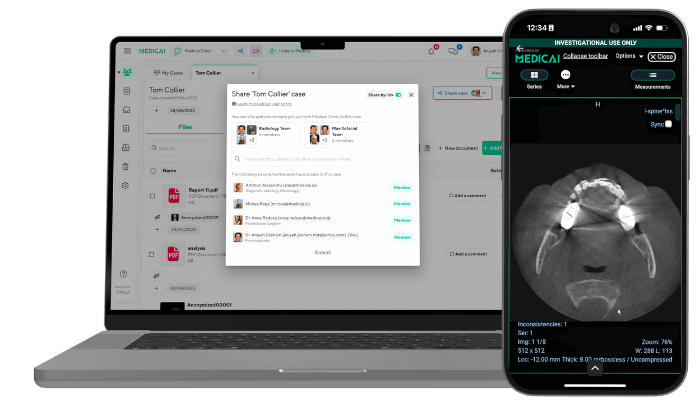
RamSoft provides a cloud-based radiology platform that combines PACS, RIS, and workflow management and is particularly well-suited for imaging centers and teleradiology operations. Medicai provides a cloud-native platform where worklist orchestration, the zero-footprint DICOM viewer, structured reporting, and multi-site support operate as components of a single platform on Microsoft Azure infrastructure, positioned for imaging centers and specialty practices deploying or migrating to cloud-native imaging. The integrated approach eliminates the inter-system integration burden that arises when worklist, viewer, and reporting are separate products.
Enterprise Imaging Platforms
Philips and other large enterprise imaging vendors provide unified radiology workflow as part of broad enterprise imaging suites, positioned for large hospital systems making enterprise-wide imaging IT decisions. These platforms offer depth and integration within the vendor’s ecosystem, at enterprise scale and enterprise cost.
AI-Driven Workflow Tools
Rad AI and Enlitic approach workflow from the AI direction, adding AI-driven triage, reporting automation, and workflow optimization to the reading process. These are typically deployed alongside an existing PACS and workflow platform rather than replacing it, adding AI capability to an existing workflow rather than providing the full workflow orchestration themselves. AbbaDox integrates RIS, worklist management, dictation, and report distribution in a single platform, positioned for outpatient radiology operations with strong workflow management needs.
Radiology Workflow Software Compared at a Glance
| Product | Category | Primary approach | Best fit for |
|---|---|---|---|
| Medicai | Integrated cloud PACS platform | Worklist, zero-footprint viewer, structured reporting, and multi-site support as one cloud-native platform on Azure | Imaging centers and specialty practices deploying or migrating to cloud-native imaging |
| Merge Workflow Orchestrator (Merative) | Workflow orchestration layer | Unified worklist and intelligent routing on top of existing multi-vendor PACS infrastructure | Large enterprise health systems with existing multi-vendor PACS |
| RamSoft | Integrated cloud PACS platform | Cloud-based PACS, RIS, and workflow management combined | Imaging centers and teleradiology operations |
| AbbaDox | RIS-centric workflow platform | RIS, worklist management, dictation, and report distribution in one platform | Outpatient radiology operations with strong workflow management needs |
| Philips | Enterprise imaging platform | Unified radiology workflow within a broad enterprise imaging suite | Large hospital systems making enterprise-wide imaging IT decisions |
| Rad AI / Enlitic | AI-driven workflow tools | AI triage, reporting automation, and workflow optimisation added to existing platforms | Practices adding AI capability to an existing PACS and workflow platform |
Frequently Asked Questions
Radiology workflow software is the category of medical imaging IT products that orchestrate the movement of imaging studies through the reading workflow, from order intake through worklist prioritisation, image display, interpretation, structured reporting, and report delivery. It differs from the radiology workflow itself (the clinical and technical process) in that the software is the product a practice buys to run that process efficiently. The category includes dedicated workflow orchestration layers (Merge Workflow Orchestrator from Merative), integrated cloud PACS platforms that bundle workflow management (RamSoft, Medicai), RIS-centric platforms (AbbaDox), enterprise imaging suites (Philips), and AI-driven workflow tools (Rad AI, Enlitic). The right choice depends on the practice’s existing systems, multi-site needs, and the specific bottleneck the software is meant to solve.
Radiology workflow software spans eight functional areas: worklist orchestration and prioritisation (presenting the right studies in the right order across all sites), RIS and scheduling integration (managing orders and appointments), DICOM viewer integration (the reading workstation), structured reporting and dictation (producing the diagnostic report), AI triage and workflow automation (reordering the worklist by suspected severity and automating report drafting), EHR and HL7 integration (connecting to the broader healthcare enterprise), analytics and business intelligence (operational visibility into turnaround time and volume), and multi-site and cloud architecture (supporting operations across multiple locations). Not every practice needs every feature; the buyer should identify the specific bottleneck first and prioritise the functional areas that address it.
Radiology workflow software pricing varies by deployment model, practice size, and feature scope. Cloud-native platforms typically use subscription pricing that scales with study volume or radiologist count, while on-premise platforms carry licensing plus server, storage, and IT infrastructure costs. The subscription price is only one component of the total cost of ownership, which also includes implementation, integration, data migration, training, and ongoing support. On-premise software carries infrastructure and IT staffing costs that cloud-native software does not, which often makes cloud-native platforms lower in total cost of ownership despite comparable subscription pricing. Buyers should evaluate total cost of ownership over a multi-year period rather than comparing subscription prices alone.
A PACS (Picture Archiving and Communication System) is the system that stores, retrieves, and displays medical imaging studies. Radiology workflow software orchestrates the movement of studies through the reading workflow, including worklist management, routing, and the connection between the stages of interpretation. The distinction has blurred as modern cloud PACS platforms increasingly include workflow orchestration as a native capability, and workflow orchestration layers increasingly integrate viewing capability. In practice, an imaging center may buy an integrated cloud PACS platform that includes workflow software as one product, or buy a dedicated workflow orchestration layer to sit on top of an existing PACS. The right approach depends on whether the practice is replacing its PACS or adding workflow capability to an existing one.
Radiology workflow software helps imaging centers in several ways: unified worklist orchestration across multiple sites eliminates the productivity loss of logging into separate systems per site, AI triage surfaces critical findings faster, integrated reporting reduces the time from interpretation to signed report, EHR and HL7 integration automates order intake and report delivery, and analytics provide the operational visibility to identify bottlenecks and balance radiologist workload. For multi-site imaging operations and teleradiology groups specifically, the unified worklist is often the single most valuable capability because the alternative fragments the radiologist’s reading across separate systems. The core value proposition is reducing the non-interpretation time in the reading workflow, which directly addresses both practice throughput and radiologist burnout.
Imaging center owners should evaluate six criteria: the specific bottleneck the software is meant to solve (identified before comparing products), integration with the existing systems the practice is keeping, multi-site support if the practice operates across multiple locations, total cost of ownership rather than subscription price alone, the implementation and data migration approach, and radiologist adoption based on actual reading workflow testing rather than administrator feature review. The most common purchasing mistake is buying comprehensive workflow software when a targeted capability would solve the actual bottleneck, and the second most common is selecting on feature lists without testing the reading workflow that determines radiologist adoption. Buyers should lead with the bottleneck, map their existing systems, and test the actual reading experience before purchase.


Related Articles

Lets get in touch!
Learn more about how Medicai can help you strengthen your practice and improve your patients’ experience. Ready to start your Journey?
Book A Free Demo