How Much Does Cloud PACS Cost? A Total Cost of Ownership Framework for Radiology Practices

Most PACS pricing conversations start and end in the wrong place. A vendor quotes a monthly subscription fee. A competitor quotes a lower one. The practice administrator compares the two numbers and calls it a cost comparison. What that comparison misses is everything that actually determines how much a PACS system costs over the period the practice will use it — and those omitted costs frequently dwarf the subscription fee difference between competing platforms.
Total cost of ownership for a PACS system over a five-year period includes storage growth costs, IT staffing and maintenance, integration professional services, hardware refresh cycles, implementation costs, and the revenue cost of unplanned downtime. A practice that evaluates PACS on sticker price and discovers the real cost in year two has already signed the contract. A practice that builds a five-year TCO model before evaluating vendors leads to different procurement decisions — and usually better ones.
This guide provides the framework: what drives PACS cost, how to calculate five-year TCO for on-premise and cloud deployments, what hidden costs sticker price comparisons consistently miss, and the six questions to ask every vendor before comparing numbers. For Medicai’s specific cloud PACS subscription pricing, see the Medicai pricing page.
The Six Cost Drivers That Determine Total Cloud PACS Cost
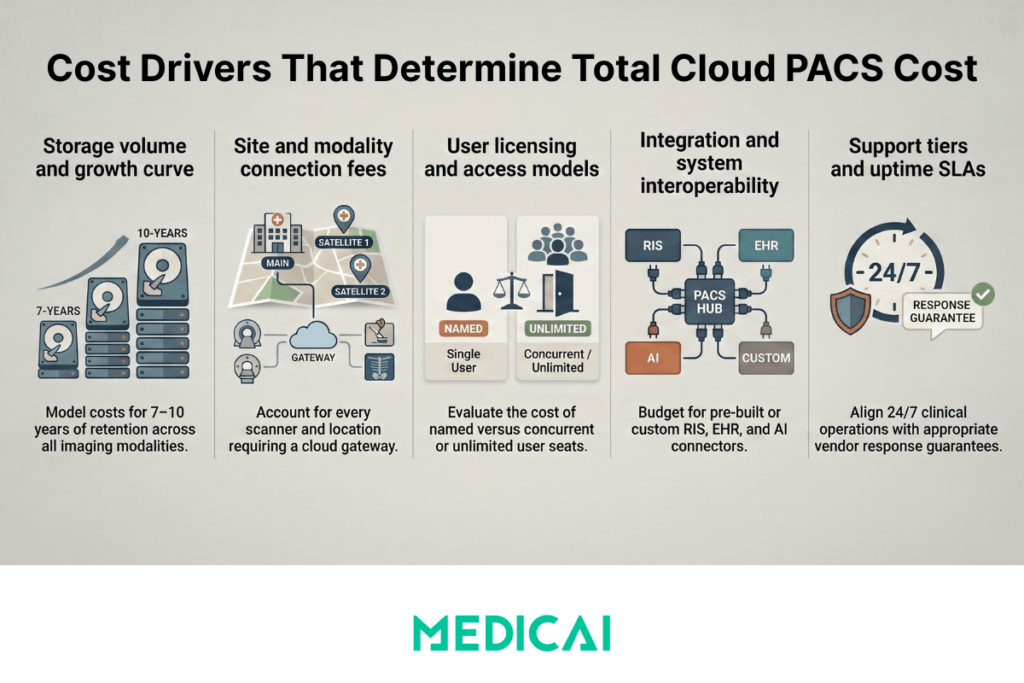
Before calculating TCO, the cost drivers that apply to every PACS deployment — cloud or on-premise — need to be identified. Each driver has a different weight depending on the practice’s size, study volume, number of sites, and existing infrastructure.
Cost driver 1 — Storage volume and growth rate
A radiology practice continuously generates DICOM data. Every CT study, MRI, X-ray, and ultrasound adds to the archive, which must be stored, accessible, and retrievable for the retention period required by local regulations — typically 7 to 10 years for adult patients, longer for pediatric cases. The average DICOM study size varies significantly by modality: a chest X-ray is 10–30 MB, a standard CT study is 50–200 MB, a brain MRI with multiple sequences is 200–600 MB, and a full-body PET-CT is 400–900 MB.
A practice performing 300 studies per month — a typical outpatient imaging center — with an average study size of 100 MB generates 30 GB of new DICOM data monthly, 360 GB annually, and approximately 2 TB over five years before accounting for study volume growth. Storage cost is not a one-time calculation — it is a growth curve that must be modeled over the full TCO period.
Cost driver 2 — Number of sites and modality connections
Each originating site — each location where a modality (CT scanner, MRI, X-ray) produces DICOM studies that need to reach the PACS — requires a connection to the PACS. In on-premise PACS, this connection is a DICOM network configuration that may require professional services to establish and maintain. In cloud PACS, this connection is a DICOM Gateway — a lightweight software component installed at the originating site that forwards studies to the cloud archive. The cost of this connection varies dramatically by vendor: some charge per modality connection, some per site, some include all connections in the base subscription.
A practice with four originating sites pays a per-site fee four times, regardless of how many modalities are at each site. A practice growing from two to six sites over five years needs to model the cost of those additional connections in the TCO calculation, not just the cost of the connections at year one.
Cost driver 3 — User licensing model
Some PACS vendors charge per named user — each radiologist, technologist, and referring physician who needs platform access is a separately licensed seat. Others charge per concurrent user — the number of simultaneous active sessions rather than total registered users. Others charge unlimited users as part of the base subscription. For a small practice with three radiologists and five technologists, per-seat licensing is manageable. For a teleradiology operation with 40 reading radiologists, unlimited user licensing is the only model that does not result in a per-seat cost exceeding the platform’s base value. The user licensing model must be evaluated against the practice’s total user population — not just the primary users at the time of purchase.
Cost driver 4 — Integration requirements
A PACS does not operate in isolation. It integrates with the RIS (Radiology Information System) for worklist management and order-to-report workflow, with the EHR (Electronic Health Record) for report delivery and image access, and potentially with AI tools, structured reporting platforms, and patient portals. Each integration requires either a pre-built connector (included in the subscription or licensed separately) or a custom professional services engagement. HL7 ORM/ORU integration between PACS and RIS is the minimum standard. FHIR-based EHR integration is increasingly expected. The cost of integration is one of the most variable and consistently under-estimated elements of PACS TCO — practices frequently discover that the integration they assumed was included is a separately billed professional services engagement.
Cost driver 5 — Support tier and SLA
PACS support costs vary by response time and the PACS vendor’s availability guarantee. A basic support tier with business-hours response and no uptime SLA is cheaper than a 24/7 support tier with a 99.9% uptime SLA and defined remedies for breach. For a practice with 24/7 clinical operations — emergency radiology coverage, overnight teleradiology — the support tier is not a discretionary cost reduction. Downtime outside business hours with no support response is a clinical and revenue problem that the monthly cost difference between support tiers does not justify.
Cost driver 6 — Hardware (on-premise only)
On-premise PACS requires dedicated server infrastructure: the PACS server itself, storage arrays for the active archive, and backup infrastructure. This hardware has an initial acquisition cost and a refresh cycle — servers typically need to be replaced every 5 to 7 years. In cloud PACS deployments, hardware cost is eliminated entirely — the cloud infrastructure is the vendor’s capital expenditure, not the practice’s. This single cost driver accounts for the largest single-year cost difference between on-premise and cloud PACS in most practice-size deployments.
On-Premise PACS: Five-Year Total Cost of Ownership
On-premise PACS total cost of ownership is front-loaded — the highest costs occur in year one and are fixed regardless of how much the system is used. The following cost model applies to a single-site radiology practice performing approximately 300 studies per month with three radiologists and standard RIS integration.
Year-one costs
Server hardware for a single-site deployment — PACS application server plus storage arrays for the active archive — ranges from $15,000 to $80,000 depending on storage capacity, redundancy configuration, and vendor hardware requirements. A 300-study-per-month practice needs approximately 4–5 TB of active storage at deployment, growing to 8–10 TB by year five. Purpose-built PACS servers from established vendors (Philips IntelliSpace, Agfa Enterprise Imaging, Sectra) often require vendor-specific hardware priced at a premium over commodity server hardware.
PACS software licensing for a single-site deployment ranges from $20,000 to $150,000 upfront, depending on the vendor, the licensed feature set, and the number of user seats. Enterprise PACS platforms from the established market leaders sit at the upper end of this range. Mid-market platforms from smaller vendors sit in the $20,000–$60,000 range. In all cases, the upfront software license is a capital expenditure that must be depreciated over the license period.
Implementation and professional services for a single-site on-premise PACS deployment — covering DICOM networking configuration, RIS integration, worklist setup, user training, and go-live support — range from $10,000 to $40,000 as a one-time professional services engagement. Complex integrations with multiple RIS systems, EHR platforms, or AI tools add professional services costs that are rarely included in the initial implementation estimate.
Ongoing annual costs
IT staffing for on-premise PACS administration is the most consistently under-estimated ongoing cost in PACS TCO. A dedicated PACS administrator — responsible for system monitoring, backup verification, software updates, interface engine maintenance, and incident response — represents 0.5 to 1.0 FTE depending on system complexity and the number of integrated systems. At a loaded salary cost of $70,000 to $120,000 per year for a healthcare IT professional, this represents $35,000 to $120,000 in annual staffing cost directly attributable to PACS administration. Practices that allocate this function to a general IT generalist rather than a dedicated PACS administrator frequently experience higher downtime rates and longer incident resolution times.
Software maintenance fees — the annual cost of software updates, bug fixes, and vendor support — are typically priced at 15-20% of the original software license cost. On a $60,000 software license, annual maintenance costs $9,000 to $12,000, totaling $45,000 to $60,000 over five years — approaching the original license cost again.
Storage expansion as the archive grows is an ongoing capital expenditure. As the active archive approaches capacity, additional storage must be purchased and installed. For a practice growing its archive at 360 GB per year, storage expansion is required every 2 to 3 years at the original storage infrastructure cost.
Hardware refresh at year five or six — replacing the server and storage hardware at the end of its reliable operational life — repeats the year-one hardware cost at the current market price. This cost is frequently absent from TCO calculations because it falls outside the initial planning horizon, but it is a certain cost for any practice that continues operating an on-premise PACS beyond the hardware’s useful life.
Five-year on-premise PACS TCO — worked example (300 studies/month, single site):
| Cost category | Year 1 | Years 2–5 (annual) | Five-year total |
|---|---|---|---|
| Server hardware | $25,000–$50,000 | $0 | $25,000–$50,000 |
| Software licensing | $30,000–$80,000 | $0 | $30,000–$80,000 |
| Implementation and professional services | $15,000–$30,000 | $0 | $15,000–$30,000 |
| IT staffing — PACS administration (0.5 FTE) | $40,000–$60,000 | $40,000–$60,000 | $200,000–$300,000 |
| Software maintenance — 15–20% of license cost annually | $5,000–$15,000 | $5,000–$15,000 | $25,000–$75,000 |
| Storage expansion | $0 | $3,000–$8,000 | $12,000–$32,000 |
| Hardware refresh — due at year 5–6 | $0 | $0 — cost falls outside the annual recurring period; see five-year total | $25,000–$50,000 — one-time cost due at year 5 to replace end-of-life server and storage hardware |
| Five-year TCO total | $115,000–$235,000 | $48,000–$83,000 per year | $332,000–$617,000 |
The dominant cost in this model is IT staffing — not hardware or software licensing. IT staffing at 0.5 FTE accounts for $200,000 to $300,000 of the five-year total, more than all other cost categories combined. This is the cost that sticker price comparisons most consistently exclude and that practice administrators most consistently underestimate when evaluating on-premise PACS options.
Cloud PACS: Five-Year Total Cost of Ownership
Cloud PACS total cost of ownership is distributed rather than front-loaded — the cost is predictable and recurring rather than capitalized in year one. The following model applies to the same single-site practice performing 300 studies per month used in the on-premise comparison above.
Year-one costs
Cloud PACS subscription at a flat monthly rate eliminates hardware investment, software licensing, and implementation professional services. For a 300-study-per-month practice with an average study size of 100 MB, annual storage growth is approximately 360 GB. A cloud PACS subscription covering 2 TB of storage — sufficient for approximately five years of archive at this volume before requiring a storage upgrade — costs in the range of $200 to $800 per month, depending on the vendor and the features included. No server hardware. No upfront licensing. No implementation engagement beyond DICOM Gateway setup, which is typically completed in hours rather than weeks.
DICOM Gateway setup — connecting the practice’s local modality to the cloud archive — is the only implementation task for a single-site cloud PACS deployment. For most cloud PACS platforms, this involves installing a lightweight software component on a standard Windows or Linux machine at the practice, configuring the DICOM send settings on the local modality, and verifying that studies transmit correctly. This can be completed by a practice administrator following documented steps without vendor professional services.
Ongoing annual costs
IT staffing for cloud PACS is the most dramatic cost difference from on-premise deployment. The vendor manages the server infrastructure, storage scaling, security patching, software updates, and backup verification. The practice’s IT team has no PACS administration function — their involvement is limited to the initial DICOM Gateway setup and occasional connectivity troubleshooting. A practice that would have required a 0.5 FTE PACS administrator for an on-premise system requires zero dedicated PACS administration headcount for a cloud deployment. At a loaded cost of $40,000 to $60,000 for 0.5 FTE annually, this represents a direct saving of $200,000 to $300,000 over five years.
Storage growth is absorbed by scaling the subscription — moving from a lower to a higher storage tier as the archive grows, at the vendor’s published per-tier pricing. There is no capital expenditure for additional storage hardware, no procurement process for storage expansion, and no downtime risk from storage arrays approaching capacity.
There is no hardware refresh cost in year five. The cloud infrastructure is the vendor’s capital expenditure, not the practice’s. The practice’s monthly subscription cost remains constant regardless of what infrastructure the vendor upgrades on the back end.
Five-year cloud PACS TCO — worked example (300 studies/month, single site):
| Cost category | Year 1 | Years 2–5 (annual) | Five-year total |
|---|---|---|---|
| Server hardware | $0 — no on-premise server required | $0 | $0 |
| Software licensing | $0 — included in subscription | $0 — included in subscription | $0 |
| Implementation | $0 — DICOM Gateway setup completable by practice administrator in hours; no on-site vendor engagement required | $0 | $0 |
| Subscription (flat monthly) | $2,400–$9,600 | $2,400–$9,600 | $12,000–$48,000 |
| IT staffing (PACS administration) | $0 — vendor manages all infrastructure, patching, backups, and updates | $0 | $0 |
| Software maintenance | $0 — updates included in subscription | $0 — updates included in subscription | $0 |
| Storage expansion | $0 | $0–$1,200 — absorbed by moving to the next subscription storage tier when the current tier ceiling is reached; no hardware procurement required | $0–$4,800 — absorbed into subscription scaling over five years |
| Hardware refresh | $0 | $0 — cloud infrastructure refreshed by vendor; no capital expenditure required from the practice | $0 |
| Five-year TCO total | $2,400–$9,600 | $2,400–$10,800 per year | $12,000–$48,000 |
The five-year TCO difference between on-premise ($332,000–$617,000) and cloud ($12,000–$48,000) at the same 300-study-per-month volume is explained almost entirely by two line items: IT staffing and hardware. A practice that does not have a PACS administrator today and would need to hire or designate one for an on-premise deployment is comparing a $12,000–$48,000 five-year cost against a $332,000–$617,000 cost. The monthly subscription fee is not the relevant comparison. The total staffing and infrastructure cost over the deployment period is.
The Hidden Costs That Sticker Price Comparisons Miss
Beyond IT staffing and hardware — which are large and calculable — three additional cost categories consistently appear in post-implementation PACS budget reviews that were absent from the initial procurement comparison.
Downtime cost
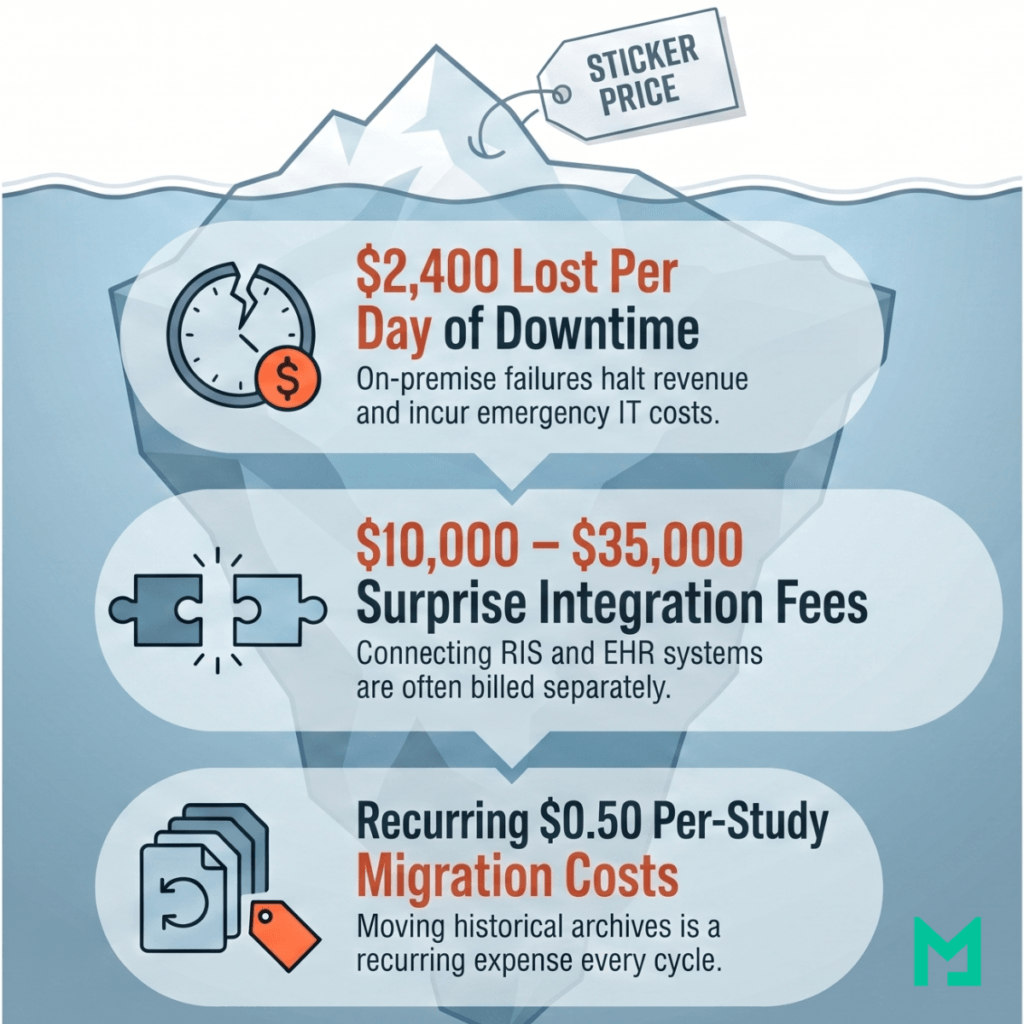
An on-premise PACS failure — server hardware failure, storage array failure, or software crash — takes 4 to 48 hours to restore, depending on the failure type, the quality of the backup infrastructure, and the availability of vendor support. During that window, radiologists cannot access the PACS, studies cannot be read, and reports cannot be issued.
For a practice performing 60 studies per day at an average professional fee of $40 per study, a 24-hour PACS outage costs $2,400 in lost revenue — before accounting for the cost of emergency IT support, overtime for staff managing the incident, and any regulatory reporting obligations triggered by a system outage affecting patient care. A cloud PACS with geographic redundancy, automated failover, and a contractual 99.9% uptime SLA has a defined maximum downtime of approximately 8.7 hours per year. The revenue cost of that downtime is calculable and budgetable. The revenue cost of an on-premise PACS failure is neither.
Integration professional services
Connecting a new PACS to an existing RIS for worklist management typically costs $5,000 to $15,000 in professional services, regardless of whether the PACS is cloud or on-premise. The HL7 interface development and testing is a discrete project that most vendors bill separately from the platform subscription or license. Connecting the PACS to an EHR for SMART on FHIR image access integration adds another $5,000 to $20,000.
These are one-time costs, but they are often absent from initial pricing quotes and appear as surprises in the professional services statement of work provided after the platform decision has been made. Any TCO calculation that does not include integration professional services for all required integrations is understating the year-one cost.
Data migration cost
A practice migrating from one PACS to another — whether from on-premise to cloud, from one cloud vendor to another, or from one on-premise system to a replacement — must migrate the historical DICOM archive. PACS data migration is a specialized service priced per study or per terabyte of data. At 300 studies per month over five years, the archive to be migrated at the end of the first deployment cycle contains approximately 18,000 studies.
Migration pricing varies from $0.05 to $0.50 per study, depending on data volume, source PACS format, and required metadata validation — a range of $900 to $9,000 for this archive size. Data migration costs are not year-one costs for a new deployment, but rather a recurring cost at the end of every PACS deployment cycle and must be included in long-term TCO planning.
The TCO Calculator Framework: Model Your Own Numbers
The table below provides a framework for calculating five-year PACS TCO based on a practice’s specific operating parameters. Replace the example values with your practice’s actual figures to produce a cost comparison specific to your situation.
| Cost variable | What to measure | On-premise cost impact | Cloud cost impact |
|---|---|---|---|
| Monthly study volume | Average number of DICOM studies acquired per month across all modalities and sites | Determines storage hardware size at deployment and the timing of storage expansion and hardware refresh cycles | Determines which storage tier and subscription level applies — verify the vendor’s tier boundaries against your projected five-year volume growth |
| Average study size | Average DICOM study size in MB across your modality mix — X-ray 10–30 MB, CT 50–200 MB, MRI 200–600 MB | Multiply average study size × monthly volume × 12 × 5 to calculate your five-year archive size — this determines the storage hardware specification and expansion schedule | Same five-year archive calculation applies — determines how quickly you will move between storage tiers and what the total subscription cost will be at year five |
| Number of originating sites | Number of physical locations where imaging modalities produce DICOM studies that need to reach the PACS — including any sites you plan to add within five years | Each additional site typically requires DICOM networking configuration and may require dedicated networking infrastructure — add professional services cost per new site | Each additional site requires a DICOM Gateway — ask the vendor whether per-site fees apply and what the cost of adding a site in year three is, not just the starting cost |
| Total user count | Total number of named users who need platform access — radiologists, technologists, referring physicians, administrators | If the vendor charges per named seat, multiply total user count by the per-seat annual fee — this cost grows as headcount grows | Verify whether the vendor includes unlimited users in the subscription or charges per seat — for practices with large referring physician networks, unlimited user licensing is critical |
| Dedicated IT staff cost | Annual loaded salary cost of the staff member who will administer the PACS — including benefits, employer taxes, and overhead | On-premise PACS requires 0.5 to 1.0 FTE for system monitoring, backup verification, interface engine maintenance, and incident response — multiply by five for the full TCO impact | $0 dedicated PACS administration required — the vendor manages all infrastructure, patching, backups, and updates as part of the subscription |
| Integration requirements | List every system the PACS must connect to — RIS for worklist, EHR for report delivery and image access, AI tools, structured reporting platform, patient portal | Add $5,000–$15,000 per integration for professional services — HL7 ORM/ORU for RIS, SMART on FHIR for EHR, DICOMweb for AI tools — and confirm whether these are one-time or recurring fees | Verify in writing which integrations are included in the subscription and which require a separate professional services engagement — this is the most common source of year-one budget surprises |
| Revenue per study | Average professional fee collected per interpreted study — used to calculate the revenue cost of downtime | Multiply revenue per study × daily study volume to calculate revenue lost per day of unplanned downtime — on-premise outages average 4 to 48 hours with no contractual ceiling on restoration time | Multiply revenue per study × daily study volume × 0.364 days (8.7 hours ÷ 24) to calculate the maximum annual revenue at risk under a contractual 99.9% uptime SLA |
Six Questions to Ask Every PACS Vendor Before Comparing Prices
Vendor pricing sheets answer the questions vendors want to answer. The following six questions surface the cost information that pricing sheets consistently omit — and that consistently determine the actual five-year TCO.
- Question 1: Is storage priced per gigabyte, per study, or as a tiered flat rate — and what is the cost when I exceed the included storage? Per-GB pricing scales predictably with archive growth but can be difficult to budget for practices with variable study volumes or large modality mixes. Per-study pricing is predictable month-to-month but does not account for the growing archive from prior periods, which continues to consume storage. Tiered flat-rate pricing (a defined storage ceiling at each plan level) is the most budget-predictable model, but requires understanding what happens when the tier ceiling is reached — automatic upgrade to the next tier, overage charges, or a manual upgrade process that could result in service interruption.
- Question 2: Are there per-modality connection fees, per-site fees, or per-DICOM Gateway fees — and what is the cost if I add a site in year three? The connection architecture is one of the most variable cost elements between PACS vendors. A platform that charges $500 per year per DICOM Gateway connected is cheap for a single-site practice and expensive for a five-site group. Ask for the total cost for your specific site count at the time of contract, and the cost to add one additional site—the growth cost is often more revealing than the starting cost.
- Question 3: What is the data transfer or egress cost — what do I pay to retrieve or share studies? Cloud storage platforms built on AWS or Azure infrastructure may pass through egress fees — charges for transferring data out of the cloud storage environment — to the end customer. A teleradiology operation that retrieves hundreds of studies daily for remote reading can accumulate significant egress costs that are not visible in the subscription fee. Ask specifically: Is data transfer for retrieval and sharing included in the subscription, or is it billed separately per gigabyte?
- Question 4: What integrations are included in the subscription — and which require a separate professional services engagement? HL7 ORM/ORU integration with a standard RIS should be included in any PACS platform’s standard feature set. SMART on FHIR EHR integration may be included or may require a separately billed implementation. AI tool integration via DICOMweb WADO-RS may be standard or may require a custom integration module. Ask the vendor to list every integration required for your workflow and confirm in writing which are included in the subscription and which are additional.
- Question 5: What is the contractual uptime SLA — and what is the remedy if it is not met? A vendor that states “99.9% uptime” but documents it as a target rather than a contractual commitment with defined financial remedies for breach is not providing an SLA—they are providing a marketing statement. Ask for the SLA as a contractual clause, the defined measurement methodology, and the remedy (credit, service extension, or refund) when the SLA is not met.
- Question 6: What is the data export process and cost if I decide to switch vendors at the end of the contract? Data portability at contract termination is the most important question in PACS procurement and the one most consistently omitted from initial vendor conversations. A vendor who stores DICOM data correctly but charges prohibitive per-study export fees, or who takes 6 to 12 months to complete a full export, has created vendor lock-in regardless of how the contract describes data ownership. Ask for the export process in writing, the per-study or per-terabyte export fee, and the maximum time to complete a full export of the production archive.
Frequently Asked Questions
How much does a PACS system cost?
PACS system cost varies significantly by deployment model. On-premise PACS systems from established vendors carry year-one costs of $70,000 to $160,000 for a single-site deployment — covering server hardware, software licensing, and implementation — plus $45,000 to $75,000 per year in ongoing IT staffing and maintenance, producing a five-year TCO of $300,000 to $600,000 for a practice performing 300 studies per month. Cloud PACS platforms eliminate hardware, licensing, and IT staffing costs, replacing them with a flat monthly subscription of $200 to $800 for the same practice size, resulting in a five-year TCO of $12,000 to $48,000. The difference is not the subscription fee — it is the staffing and infrastructure cost that on-premise deployments require, and cloud deployments eliminate.
Is cloud PACS cheaper than on-premise PACS?
For most practice sizes — single-site and multi-site practices performing under 2,000 studies per month — cloud PACS is significantly cheaper than on-premise PACS when the total cost of ownership is calculated over a five-year period. The cost advantage comes from three eliminated cost categories: server hardware ($25,000–$80,000 upfront plus refresh at year five), IT staffing for PACS administration ($40,000–$120,000 per year at 0.5–1.0 FTE), and software maintenance fees (15–20% of license cost annually).
Large academic medical centers and hospital networks with existing IT infrastructure, long-term PACS contracts, and specialized radiology IT teams may find that on-premise or hybrid deployments remain cost-competitive when existing infrastructure can be amortized across multiple systems. For most practices evaluating PACS for the first time or replacing an end-of-life system, the cloud is the more cost-effective model.
What is the PACS total cost of ownership?
PACS total cost of ownership (TCO) is the complete five-year cost of deploying, operating, and maintaining a PACS system — including all costs that a subscription fee or sticker price does not capture. The full TCO includes: hardware acquisition and refresh, software licensing and annual maintenance fees, implementation and professional services, IT staffing for ongoing administration, storage expansion as the archive grows, integration costs for RIS and EHR connectivity, and data migration costs at the end of the deployment cycle. TCO is the appropriate basis for comparing PACS options because it accounts for costs incurred throughout the deployment period, rather than only at the point of purchase.
What is the average cost of PACS per study?
The effective cost per study for a PACS system depends on the total annual cost divided by the annual study volume. For an on-premises PACS with a five-year TCO of $400,000 and 18,000 studies over five years, the effective cost per study is approximately $22, before the professional component revenue generated by the studies. For a cloud PACS with a five-year TCO of $30,000 and the same 18,000 studies, the effective cost per study is approximately $1.67. Some cloud PACS vendors offer explicit per-study pricing ranging from $0.10 to $0.50 per study — most cost-effective for practices with very low monthly volumes where a flat subscription fee would represent a high per-study cost.
How much does it cost to migrate from on-premise to cloud PACS?
PACS data migration — moving the historical DICOM archive from an on-premise system to a cloud PACS — is priced per study or per terabyte of data. Per-study pricing typically ranges from $0.05 to $0.50, depending on data volume, source PACS format, and the level of metadata validation required. A practice with 5 years of archive, averaging 300 studies per month, has approximately 18,000 studies to migrate — a migration cost of $900 to $9,000 at this volume.
Per-terabyte pricing for the same archive (approximately 1.8 TB at an average study size of 100 MB) typically ranges from $200 to $800 per terabyte — a migration cost of $360 to $1,440. Migration cost is a one-time expense that should be included in the first-year TCO calculation for any practice switching from an existing system to a new platform.
Conclusion
The monthly subscription fee is the least informative number in a PACS cost evaluation. The most informative numbers are the ones that do not appear in pricing sheets: the IT staffing cost that on-premise deployments require and cloud deployments eliminate, the hardware refresh cost that arrives at year five regardless of budget cycle, the integration professional services cost that surfaces after the platform decision is made, and the downtime revenue cost that only becomes visible when the system fails.
A five-year TCO model that captures all six cost drivers yields a materially different comparison than a sticker-price comparison—and consistently leads to a different platform decision. For practices that have built the TCO model and are ready to evaluate specific cloud PACS pricing, see the Medicai pricing page for subscription costs, storage tiers, and what is included across all plans.


Related Articles
Lets get in touch!
Learn more about how Medicai can help you strengthen your practice and improve your patients’ experience. Ready to start your Journey?
Book A Free Demo