Radiology Hanging Protocols: What They Are, How They Work, and How to Configure Them for Your Workflow

Every second a radiologist spends on a task that is not interpretation is a second that reduces the practice’s diagnostic output without improving its diagnostic quality. In a high-volume reading environment — 80 to 120 studies per shift in a busy teleradiology operation, 40 to 60 studies in a typical outpatient radiology center — the accumulated time spent manually arranging viewports, adjusting window and level settings, locating prior studies, and orienting to each new study type represents a significant fraction of total reading time. Conservative estimates from published radiology workflow studies place non-interpretive overhead at 15-25% of total reading time in environments without well-configured hanging protocols.
A hanging protocol is the predefined rule set that eliminates this overhead. When the radiologist opens a study from the reading worklist, the PACS applies the hanging protocol automatically — the correct series appear in the correct viewports at the correct window and level settings, prior studies load in linked comparison panels, and the radiologist begins interpreting immediately rather than after a manual setup sequence. The difference between a reading environment with well-configured hanging protocols and one without them is the difference between a workflow that supports diagnostic performance and one that impedes it.
This guide covers what hanging protocols are technically, how they work, how to design them by specialty, the PACS integration requirements that determine whether they function correctly, and the most common failure modes and how to fix them.
What Is a Radiology Hanging Protocol?
A hanging protocol in radiology is a predefined display rule set that specifies how a PACS or diagnostic viewer should automatically arrange imaging studies when they are opened for review. The protocol defines which image series appear in which viewport positions on the radiologist’s screens, the window and level presets applied to each series, the image orientation (axial, coronal, sagittal, or oblique), the zoom level and crop settings, whether and how prior studies are automatically loaded alongside the current study, and the order in which images scroll through each viewport during review.
A hanging protocol is applied based on matching criteria. The PACS evaluates the incoming study’s DICOM metadata — modality, body part, study description, contrast status, laterality — against the matching criteria of each protocol in the library, in priority order, until a match is found. The matching protocol is then applied automatically when the study is opened. No manual action from the radiologist is required.
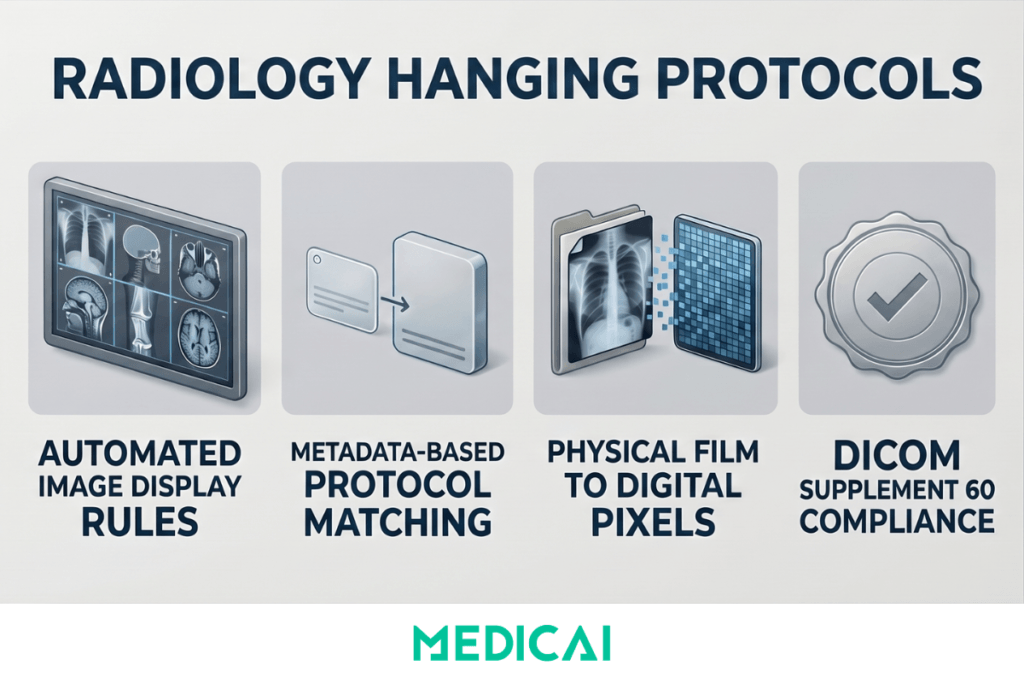
The term derives from the pre-digital era, when radiologists literally hung physical X-ray films on illuminated light boxes in specific arrangements before reading a study. Different study types required different physical arrangements — chest PA and lateral films hung side by side, while spine films were arranged in a separate orientation. When digital PACS replaced film, the concept of the predetermined display arrangement was preserved and formalized as the hanging protocol. The digital version does what the film arrangement did — gives the radiologist a consistently organized display that supports their established reading pattern — but applies it automatically, consistently, and instantly across thousands of studies per day.
The formal technical definition of hanging protocols as a DICOM standard is contained in DICOM Supplement 60, incorporated into the main DICOM standard as Part 3 and Part 4. The DICOM Hanging Protocol Information Object Definition (IOD) specifies the structured data model for storing and applying protocols, in principle allowing protocols designed in one PACS to transfer to another compliant system. In practice, most PACS vendors implement proprietary hanging protocol configuration interfaces that generate DICOM-compliant objects internally — so the standard ensures interoperability at the data level while the configuration workflow remains vendor-specific.
Why Hanging Protocols Matter for Radiology Workflow
The operational case for hanging protocols is grounded in straightforward time mathematics. In a PACS environment without configured protocols, the radiologist performing manual viewport arrangement on each study opening spends between 30 and 90 seconds per study on setup tasks — locating the relevant series from the study list, arranging them in viewing panels, adjusting window and level for the study type, and manually retrieving prior comparison studies from the archive. At 60 studies per shift and 60 seconds of setup per study, that is 60 minutes of non-interpretive time per shift — 10 to 15% of an 8-hour shift consumed by tasks that a correctly configured hanging protocol reduces to near zero.
The burnout connection
Radiologist burnout — documented at approximately 49% in North American radiology in RSNA Radiology Graphics surveys — is driven in significant part by the mismatch between cognitive resources and task demands. Interpretation requires focused clinical judgment. Setup tasks are repetitive, mechanical, and cognitively dissatisfying without being cognitively trivial. They consume attention without advancing the interpretive task. Well-configured hanging protocols reduce this mechanical overhead and allow the radiologist’s cognitive resources to focus on interpretation—the work that creates clinical value and professional satisfaction.
The turnaround time connection
Report turnaround time is the primary operational metric linking imaging workflow to billing performance. Setup time per study directly adds to turnaround time. A hanging protocol that reduces per-study setup time by 45 seconds across 100 studies per day reduces total daily setup time by 75 minutes — time that can be redirected to interpretation, increasing throughput without changing headcount or extending shift length.
The consistency connection
Manual viewport arrangement varies by radiologist, fatigue level, and familiarity with study type. A radiologist who reads chest CTs at high volume may have an efficient manual arrangement pattern for that study type, but an inconsistent one for hepatic MRI cases, which are encountered less frequently. A hanging protocol enforces the optimal display arrangement for every study type, regardless of the radiologist’s familiarity with that specific study type or their fatigue level at hour seven of a shift. The display is always correct, always consistent, and always ready before the first image is evaluated.
How a Hanging Protocol Works — The Technical Mechanism
Matching criteria — how the PACS selects the right protocol
The hanging protocol matching process begins when a study is selected from the worklist. The PACS evaluates the study’s DICOM metadata against the matching criteria of each available protocol, in priority order, until a match is found. The common matching criteria are:
- Modality — CT, MRI, X-ray, ultrasound, PET-CT, mammography — is the most basic criterion. A CT chest protocol matches CT chest studies; a brain MRI protocol matches brain MRI studies.
- The Body Part Examined tag in the DICOM standard allows distinction between chest CT and abdominal CT within the same modality. The reliability of body part matching depends on whether the technologist correctly populated the Body Part Examined tag at acquisition — an inconsistent entry is one of the most common sources of matching failure in practice.
- Study Description from the DICOM Study Description tag enables more specific matching when body part tags are inconsistently populated. Many PACS configurations use study description as the primary matching criterion because institutions control their own study description vocabulary and can enforce consistency more reliably than they can enforce modality tag completion.
- Laterality — essential for musculoskeletal and breast imaging protocols, where the affected side determines the display orientation and prior study retrieval logic.
- Contrast status — from the DICOM Contrast/Bolus tag or study description — allows distinct protocols for pre-contrast, arterial phase, portal venous phase, and delayed phase series within the same body part and modality. A liver MRI protocol that does not distinguish contrast phases will display the wrong series in the primary viewport for a significant proportion of studies.
Viewport layout — how the display is structured
Once a protocol is matched, the viewport layout specifies the number of display panels, their arrangement on screen, and which series from the current study appears in each panel. Each viewport receives a series assignment rule: the T2 axial series in the upper left viewport, the DWI in the upper right, the ADC map in the lower right, the FLAIR in the lower left — for a standard brain MRI protocol. Series assignment can be rule-based on DICOM series attributes (TE value, inversion time, pulse sequence type) for robust matching regardless of series naming inconsistency, or text-based on Series Description for simpler implementations where naming is controlled.
Prior study loading — the highest-value component
The most clinically valuable element of a well-configured hanging protocol is automatic prior study loading. The protocol specifies that when the current study is opened, the PACS automatically retrieves the most recent prior study of the matching type from the archive — the chest CT from 18 months ago, the brain MRI from the prior year — and places it in linked comparison viewports that synchronize scroll position with the current study. The radiologist can view current and prior images simultaneously at the same anatomical level, without any manual retrieval.
For longitudinal conditions — lung nodule surveillance, oncology staging, multiple sclerosis monitoring — automatic prior loading is not a convenience feature. It is the mechanism that ensures every comparison is made, and that no potentially significant interval change is missed because the prior was not loaded. A hanging protocol that loads the current study correctly but does not retrieve a relevant prior that was available in the archive has delivered only half its clinical value.
Window and level presets — modality-specific contrast optimization
Each series viewport in the hanging protocol carries a default window width and window center. Standard presets include the lung window for pulmonary parenchyma (W:1500 L:−600), the mediastinal window for chest soft tissue assessment (W:350 L:50), the liver window for abdominal organ assessment (W:150 L:75), and the bone window for osseous structures (W:1500 L:300). The hanging protocol applies these presets automatically on series load so the correct tissue contrast is immediately available for the body part and clinical question. The radiologist does not adjust the window and level before beginning interpretation — the protocol has already done it.
Designing Hanging Protocols by Specialty and Study Type
Hanging protocol design is not a generic task — the protocol for a subspecialty chest radiologist reading high-resolution CT for interstitial lung disease differs from that for a general radiologist reading chest CT for pulmonary embolism. Protocols must be designed by the radiologists who read the studies, starting from the clinical question that each study type is meant to answer and working back to the display arrangement that serves that question most efficiently.
General design principles that apply across all specialties
Every protocol must have an unambiguous name that distinguishes it from similar protocols covering adjacent study types. “CT Chest” is inadequate when the department has distinct protocols for contrast-enhanced CT chest, CT pulmonary angiography, CT chest lung cancer screening, CT chest post-operative follow-up, and CT chest with PET correlation. The naming convention must be specific enough that the PACS matching engine applies the correct protocol and that the radiologist immediately identifies the active protocol when a study opens.
Every protocol must have a fallback. When no specific protocol matches a study’s metadata — because a technologist entered a non-standard body part tag, or because the study is an unusual combination the library does not cover — the PACS must apply a generic default that provides a usable display rather than opening the study in an unformatted blank screen. The default protocol should be audited regularly to identify what study types are falling through to it, so specific protocols can be designed to cover them.
Protocols must be designed collaboratively with the radiologists who read the studies, not by PACS administrators working from vendor templates. The radiologist expert on that study type knows which series is most important to view first, which prior loading configuration best addresses the clinical question, and which window presets best match how they habitually read that study type.
Neuroradiology — the highest-complexity protocol requirement
Brain MRI has the highest number of sequences of any common study type — typically 8 to 14 series in a standard brain MRI with contrast — and requires the most carefully designed hanging protocol. A standard brain MRI with contrast protocol places the T2 axial in the primary reading viewport, the FLAIR axial in the secondary viewport, the DWI in the third, the ADC map in the fourth, and the post-contrast T1 in the fifth. The pre-contrast T1 loads in a linked viewport adjacent to the post-contrast T1 so the radiologist can compare pre- and post-enhancement patterns without manually switching series. Prior brain MRI loads automatically in a second row of linked panels with synchronized scroll position, with the same sequence-to-viewport assignment applied to the prior study, so corresponding series are always in the same position.
In CT head stroke imaging, the hanging protocol must recognize a CT perfusion study — CBF, CBV, MTT, and Tmax parameter maps — and arrange the perfusion maps in a standardized display alongside the non-contrast CT and CT angiography source images. A protocol that cannot distinguish CT perfusion from standard CT head will display the maps as a disordered series list, requiring manual arrangement that consumes exactly the time the protocol was supposed to save.
Oncology — longitudinal series display and measurement support
For CT staging studies in oncology, the hanging protocol automatically loads the three most recent prior staging CTs of the same body region in sequentially linked panels — the current study on the far left, the most recent prior adjacent, the prior before that next, and the earliest relevant prior on the far right. The scroll positions of all four panels are synchronized so the radiologist can step through the same axial level across all four time points simultaneously. This arrangement supports RECIST measurement comparison without manual retrieval or panel alignment — the radiologist sees the same lesion at four time points in a single scroll.
For PET-CT, the hanging protocol arranges the fused PET-CT, the CT-only series, and the PET-only series in three linked panels with synchronized scroll, plus a maximum intensity projection (MIP) reconstruction of the PET data in a fourth viewport for whole-body metabolic activity overview. A generic CT protocol applied to a PET-CT study will display the CT series correctly, but will leave the PET data unlinked and the MIP in an unassigned position.
Orthopedic imaging — calibrated display and implant planning workflows
As covered in the orthopedic PACS and templating guide, orthopedic hanging protocols must recognize weight-bearing X-ray studies and apply a display label that explicitly identifies them as weight-bearing, preventing surgeons from using non-weight-bearing images for load-bearing joint replacement planning. Full-limb AP studies — stitched panoramic X-rays spanning from hip to ankle — must be displayed as single composite images with the calibration tool active for leg-length discrepancy measurement. Bilateral symmetry comparison protocols place left- and right-extremity images in linked side-by-side viewports with synchronized zoom, so the surgeon can assess asymmetry at the same magnification level across both sides.
Breast imaging — the most standardized protocol requirement in radiology
Mammography hanging protocols are the most internationally consistent of any modality because the ACR and international equivalents specify the standard display arrangement: bilateral CC views displayed with medial aspects facing the center, bilateral MLO views flanking, prior mammograms loaded automatically in a flanking position for direct comparison. Digital breast tomosynthesis (DBT) protocols display reconstructed slices in a cine loop rather than as a static series. These protocols are standard enough that deviating from them without a specific institutional reason introduces unnecessary variability into a breast imaging program.
PACS Integration Requirements That Determine Whether Protocols Work
Hanging protocol functionality depends entirely on the PACS viewer’s architecture. The most carefully designed protocol library is useless if the viewer cannot apply it correctly.
DICOM metadata quality is the foundation
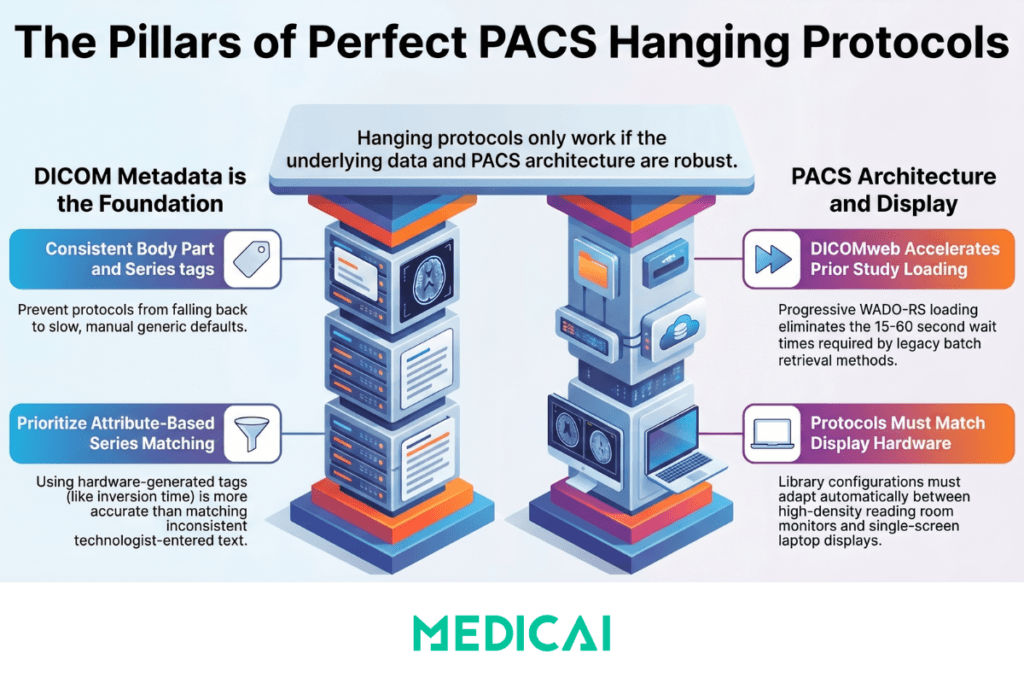
A hanging protocol can only match as specifically as the DICOM metadata of the incoming study allows. If the Body Part Examined tag is blank, the study description is non-standard, or the series descriptions are inconsistently populated across studies of the same type, the matching engine falls back to less specific criteria and may apply the wrong protocol — or the generic default — to a significant percentage of studies. Hanging protocol implementation, therefore, requires parallel investment in DICOM tag governance to ensure that technologists and modality operators consistently populate the Body Part Examined, Study Description, and Series Description fields according to a department-defined standard. A protocol library that is technically well-designed but is poorly matched due to metadata inconsistency does not reduce setup time — it increases it, because radiologists must manually verify and correct the displayed arrangement for every mismatched study.
Series detection quality — attribute-based versus text-based matching
Advanced hanging protocols use image-level DICOM attribute analysis for series assignment rather than Series Description text matching. A brain MRI protocol that assigns the FLAIR series to its viewport based on the DICOM inversion time value — which is always present in the DICOM header regardless of how the series was named — is more robust than one that matches on the Series Description “FLAIR” because the inversion time value is generated by the scanner hardware rather than entered by the technologist. Image-level attribute matching requires a PACS viewer with more sophisticated protocol-processing capabilities but yields significantly higher match accuracy for complex multi-sequence MRI studies.
DICOMweb-native prior retrieval — why it matters for protocol performance
Automatic prior loading requires the PACS to retrieve prior studies from the archive in real time when a new study is opened. In legacy PACS environments, prior retrieval uses DICOM C-MOVE, a traditional batch retrieval mechanism that must complete before images are displayed. In DICOMweb-native PACS environments, prior retrieval uses WADO-RS — a standard HTTPS request that retrieves series as individual tile requests, allowing the viewer to display available series progressively as they arrive while the remaining series load in the background. For hanging protocols that specify multiple prior studies — such as the four-study oncology staging comparison — DICOMweb progressive loading reduces the time to first display from the C-MOVE wait time (which can be 15 to 60 seconds for large CT series from cold storage) to near-immediate for the most recently accessed studies.
Multi-monitor and viewport density compatibility
A hanging protocol designed for a dual-monitor high-density reading room workstation cannot be applied on a single-monitor laptop. The physical display environment constrains which protocols can be deployed. Cloud PACS viewers that run on standard browser hardware — laptop screens, tablet displays, single-monitor clinic workstations — require protocols designed for the available viewport density. Practices that use both high-density reading room workstations and browser-based access from secondary locations need distinct protocol libraries for each display environment, with a mapping rule that selects the appropriate version based on the display configuration in use.
Medicai’s cloud PACS viewer supports configurable hanging protocols with modality- and study-description-based matching criteria, per-specialty viewport layout configuration, automatic prior-study loading via DICOMweb WADO-RS retrieval, and window and level presets per series type. The zero-footprint browser architecture means protocols are applied consistently across every device where the viewer is accessed — the protocol configured for a brain MRI reading workflow applies whether the radiologist is at a reading room workstation or accessing the same study from a browser on a different device.
Common Hanging Protocol Failures and How to Fix Them
The high default-protocol rate
The most common operational failure is a high rate of studies opening under the generic default protocol rather than a specific study-type protocol. This manifests as radiologists reporting that studies frequently open in the wrong arrangement, requiring manual correction. The diagnostic step is to audit the protocol match rate by study type and modality — identifying the percentage of each study type that matches correctly versus falls through to the default. Match rates below 85% for any specific study type indicate either overly specific matching criteria that exclude legitimate variations in incoming metadata or an underlying metadata quality issue at the acquisition source. Resolution is either broadening the matching criteria to tolerate metadata variations or improving DICOM tag governance at the modality.
Window and level preset miscalibration
A protocol applies the correct series layout, but the window and level presets display the images with a contrast that requires immediate manual adjustment — everything appears too bright, vessel detail is washed out, or the bone window shows artifacts. This happens when protocols are copied from a generic template without calibrating the presets to the specific scanner’s output characteristics, which vary by manufacturer, model, software version, and reconstruction kernel. Resolution requires checking the displayed image against the raw pixel histogram for representative studies of that type and adjusting the window width and center iteratively until the displayed contrast matches the radiologist’s expected diagnostic appearance.
Prior study loading failures
The prior study does not load when expected, despite being available in the archive. This is almost always a patient identity problem rather than a hanging protocol problem — the patient identifier in the archive for the prior study does not match the patient identifier in the current study. Causes include MRN format changes after a system migration, name changes (maiden vs married), duplicate patient records in the master patient index, or studies acquired at a different facility with a different MRN system. The hanging protocol is working correctly — it is requesting prior retrieval — but the PACS cannot find the prior because the identity link is broken. Resolution requires MPI reconciliation, which is covered in the enterprise imaging architecture guide.
Protocol applied to incompatible display hardware
A four-viewport protocol designed for a dual high-resolution monitor setup is applied to a single-monitor workstation, resulting in a cramped, clinically inadequate display. The PACS cannot know which display hardware is connected to a specific session unless it is configured to detect or record display environment characteristics. Resolution requires creating environment-specific protocol variants — a full-density version for reading room workstations and a reduced-density version for single-monitor or browser-based access — and applying the correct variant based on session context.
Protocol library staleness
A hanging protocol library designed for PACS implementation in 2019 and not revised since 2019 does not cover new study types introduced since then — new MRI sequences added to brain protocols, new CT perfusion parameters, new fusion imaging workflows. Radiologists who manage around missing protocols add manual setup steps that reintroduce the overhead the protocol library was designed to eliminate. Resolution requires a scheduled annual review of the protocol library against the current study mix, with radiologist input on any display preferences that have changed since the last revision.
Frequently Asked Questions
What are hanging protocols in radiology?
A hanging protocol in radiology is a predefined rule set that tells the PACS or radiology viewer how to automatically display a study when the radiologist opens it — which series appear in which viewport positions, at what window and level settings, with what orientation, and whether prior studies should be loaded automatically in linked comparison panels. The protocol is applied based on the study’s DICOM metadata (modality, body part, study description, contrast status) without any manual action from the radiologist. The purpose is to present each study in the optimal display arrangement for its specific clinical context immediately on opening, eliminating the manual setup time that accumulates across hundreds of studies per shift.
How do hanging protocols improve radiology workflow?
Hanging protocols improve radiology workflow in three ways. First, they eliminate per-study setup time — the manual viewport arrangement, window and level adjustment, and prior retrieval that can consume 30 to 90 seconds per study in environments without protocols. Across a 60-study shift, that reduction represents 30 to 90 minutes of recovered interpretive time per radiologist per day. Second, they enforce consistency — every study of a given type is displayed in the same arrangement regardless of which radiologist opens it, eliminating the variability in prior loading and series display that can contribute to missed findings. Third, they reduce cognitive overhead — the radiologist begins interpreting immediately rather than after a formatting sequence, allowing full cognitive resources to be applied to the clinical question from the first image viewed.
What is the DICOM hanging protocol standard?
The DICOM hanging protocol standard is defined in DICOM Supplement 60, published in 2003 and incorporated into the main DICOM standard as Part 3 (Storage) and Part 4 (Service Classes). It specifies an Information Object Definition (IOD) for storing hanging protocol specifications as DICOM objects — defining the data model for matching criteria, viewport layout, series assignment, and display settings in a structured, interoperable format. The standard enables hanging protocol definitions to be stored and potentially exchanged between DICOM-compliant systems. In practice, most PACS vendors implement proprietary configuration interfaces that generate DICOM Supplement 60-compliant protocol objects internally, so the practical configuration workflow is vendor-specific even though the underlying data format conforms to the standard.
How do I configure hanging protocols in a PACS?
Hanging protocol configuration involves four steps. First, define the matching criteria for each study type — modality, body part, study description, contrast status, and laterality — in order from most specific to least specific, with a generic default at the bottom of the priority stack. Second, define the viewport layout for each protocol — the number of panels, their screen positions, and which series from the current study each panel displays. Third, configure the prior study retrieval rules — how many prior studies to load, the matching logic, and which comparison viewports. Fourth, set the window and level presets for each series type within each protocol. The most common configuration failure is defining matching criteria that are too narrow, resulting in a high fallback-to-default rate. Audit the match rate after initial configuration and broaden the fallback criteria before deploying to production.
Why are my hanging protocols not working correctly?
The four most common causes of hanging protocol failures are: DICOM metadata inconsistency at the acquisition source (the study’s body part tag, study description, or series description does not match the protocol’s criteria, causing fallback to the generic default); window and level presets calibrated to a different scanner’s output characteristics, producing displays requiring immediate manual adjustment; prior study loading failures caused by patient identity mismatches between the current study and the archived prior (an MRN format change, a duplicate patient record, or a name change); and protocol library staleness, where protocols designed at implementation have not been updated to cover new study types or changed workflow requirements. Audit the match rate by study type to diagnose the first cause, compare displayed images to raw pixel histograms for the second, check the patient identity linking logic for the third, and review the study type coverage of the library against the current study mix for the fourth.
Do cloud PACS systems support hanging protocols?
Yes — modern cloud PACS platforms support hanging protocol configuration, though the sophistication of the matching engine and the flexibility of the viewport layout configuration vary between platforms. The key capability to evaluate is prior study loading via DICOMweb WADO-RS retrieval rather than traditional DICOM C-MOVE, since progressive WADO-RS loading significantly reduces the time-to-display for multi-prior protocols — particularly for large CT series retrieved from tiered storage. Also, evaluate whether the protocol is applied consistently across all access contexts — reading room workstation, laptop browser, tablet — or whether the cloud viewer applies the protocol only to specific configurations. A hanging protocol that applies to the reading workstation but not to the tablet used for off-hours or mobile reading results in only partial workflow improvement.
Conclusion
Hanging protocols are not a one-time configuration task that happens at PACS implementation and is then forgotten. They are a living component of the radiology reading workflow that requires ongoing refinement as study types evolve, subspecialty volumes change, display hardware is updated, and the radiologist team’s reading patterns develop. A protocol library that was well-designed in 2020 may be partially obsolete by 2026 if new sequences have been added to the MRI protocol mix, new CT perfusion parameters have been introduced, or display hardware has been upgraded from single-monitor to dual-monitor configurations.
The practices that sustain the efficiency and quality benefits of hanging protocols over time are those that audit match rates regularly, involve radiologists in protocol design and revision rather than delegating it entirely to PACS administrators, maintain DICOM metadata quality at the acquisition source, and use a PACS platform whose matching engine complexity is adequate for their study mix. The protocol is only as good as the metadata it matches against, the display environment it runs on, and the radiologist discipline that keeps it up to date.
For the broader PACS reading workflow context in which hanging protocols operate — including how PACS architecture, RIS integration, and structured reporting connect to the viewing layer — see the PACS architecture guide and the structured radiology reporting guide.


Related Articles


Lets get in touch!
Learn more about how Medicai can help you strengthen your practice and improve your patients’ experience. Ready to start your Journey?
Book A Free Demo