HIPAA-Compliant Medical Image Sharing: Rules, Safeguards, and Common Failures

Medical images move all day: from an imaging center to the referring doctor, from a hospital to a specialist for a second opinion, and from a provider to the patient who asked for a copy. Each transfer carries protected health information, so HIPAA governs how it happens.
HIPAA does not ban any specific tool, nor does it certify vendors. It sets rules for who may receive images and requires safeguards for how electronic images are stored and sent. A sharing method is compliant when the organization using it has met those rules, not because a product page says “HIPAA compliant.”
This guide covers what the law requires, which Security Rule safeguards are required or addressable, where Dropbox and email fit, what to do after a breach, and the penalty amounts in force for 2026.

Key takeaways
- Medical images and their DICOM headers are PHI when they can be linked to a patient.
- Providers may share images with other providers for treatment without the patient’s written authorization. Most other disclosures need authorization or a specific Privacy Rule exception.
- Any vendor that stores or transmits images on your behalf is a business associate and must sign a business associate agreement (BAA) before it handles PHI.
- Encryption is “addressable,” which does not mean optional. Properly encrypted images that are lost or stolen are not a reportable breach, as long as the keys were not exposed.
- For 2026, civil penalties range from $145 to $2,190,294 per violation.
Is medical imaging protected under HIPAA?
Yes. Protected health information (PHI) is individually identifiable health information that a covered entity or business associate creates, receives, maintains, or transmits. A CT series, an MRI study, an X-ray, or an ultrasound clip is health information. Once it can be tied to a person, it is PHI.
Covered entities are health plans, health care clearinghouses, and providers who bill electronically using standard transactions. That includes most hospitals, imaging centers, and radiology groups. Business associates are vendors that handle PHI on their behalf, such as cloud PACS providers, image exchange services, and IT contractors.
Where identifiers hide in an imaging study
A DICOM file contains pixel data and a header with dozens of attributes. The identifying ones include:
- Patient name, patient ID, birth date, and sex
- Accession number, study date, and study time
- Institution name and the names of the referring and performing physicians
- Unique identifiers (UIDs) and device serial numbers that can be linked back to a record
Identifiers also sit outside the header. Ultrasound frames and secondary captures often have the patient’s name burned into the pixels. Scanned requisition forms travel inside studies. 3D reconstructions of a head CT or MRI can render a recognizable face. File names, folder names, email subject lines, and CD labels can also identify the patient. Stripping header tags alone fixes none of these.
The three HIPAA rules that govern image sharing
HIPAA’s Administrative Simplification provisions (Title II of the 1996 law) produced three rules that shape every image transfer: the Privacy Rule, the Security Rule, and the Breach Notification Rule.
Privacy Rule: who may receive images
- Treatment, payment, and health care operations need no patient authorization. A radiology group sending a study to the referring physician, or a hospital sending images to an outside specialist for a second opinion, is a treatment disclosure.
- The minimum necessary standard does not apply to disclosures to a provider for treatment. It applies to most payment and operations disclosures, so send only the studies required for the purpose.
- Patients have a right of access to their images. You must provide a copy within 30 days (one 30-day extension is allowed), in the electronic format they request if you can readily produce it, for a reasonable, cost-based fee. Patients can also direct you to send a copy to someone else.
- Most other disclosures need the patient’s written authorization unless a specific exception applies, such as a court order or a subpoena that meets the rule’s conditions. Requests from attorneys, employers, and life insurers usually fall here.
- Separately, the 21st Century Cures Act treats unreasonable refusals or delays in sharing electronic health information, including images, as possible information blocking. Security is not a reason to refuse a lawful request; it is a reason to share it safely.
Security Rule: how electronic images are protected
The Security Rule applies to electronic PHI (ePHI), which includes all digital images and DICOM files. It sets three groups of safeguards:
- Administrative: a documented risk analysis (required), risk management, workforce training, and access management.
- Physical: facility access, workstation security, and device and media controls, including how CDs and USB drives are handled and disposed of.
- Technical: access control, audit controls, integrity, authentication, and transmission security. The next section breaks these down.
Breach Notification Rule: what happens when images leak
If unsecured images reach someone who should not have them, you may have to notify patients, HHS, and, in larger cases, the media. The breach section below covers the deadlines and the encryption safe harbor.
Addressable does not mean optional
Each Security Rule standard comes with implementation specifications labeled “required” or “addressable.” Required specifications must be implemented. For an addressable one, you must assess whether it is reasonable and appropriate for your organization. If it is, implement it. If it is not, document why and implement an equivalent alternative when one is reasonable.
In practice, encryption is cheap and built into every modern sharing platform, so few organizations can document a credible reason not to encrypt images. HHS proposed in January 2025 to make nearly all specifications required, including encryption. As of mid-2026 that rule had not been finalized, so the addressable standard still applies.
| Standard (45 CFR 164.312) | Standard status | Implementation specification | Spec status | What it means for image sharing |
|---|---|---|---|---|
| Access control | Required | Unique user identification | Required | Everyone who opens a study logs in as themselves. No shared accounts. |
| Access control | Required | Emergency access procedure | Required | A documented way to reach images during an outage. |
| Access control | Required | Automatic logoff | Addressable | Viewer sessions time out when idle. |
| Access control | Required | Encryption and decryption | Addressable | Stored images are encrypted at rest. |
| Audit controls | Required | None (the standard itself) | Required | The system records who viewed, downloaded, or shared each study. |
| Integrity | Required | Mechanism to authenticate ePHI | Addressable | You can detect altered or corrupted images. |
| Person or entity authentication | Required | None (the standard itself) | Required | Recipients prove who they are before viewing, usually with MFA. |
| Transmission security | Required | Integrity controls | Addressable | Tampering in transit can be detected. |
| Transmission security | Required | Encryption | Addressable | Links, uploads, and DICOMweb traffic run over TLS. |
What makes a sharing method HIPAA-compliant?
A compliant method is a combination of the right recipient, the right safeguards, and the right contract. Check all five of these.
1. Encryption in transit and at rest
Images should travel only over encrypted connections, such as TLS 1.2 or later for web links, uploads, and DICOMweb traffic. Stored copies should be encrypted at rest; AES-256 is the common choice. HHS guidance on securing PHI points to NIST standards for both, and encryption that meets them is what earns the breach safe harbor. Keep the keys separate from the data.
2. Access controls and authentication
Give every user a unique account and the narrowest role that fits the job. Use links that expire, can be revoked, and allow view-only access when the recipient does not need a download. Strong, unique credentials matter as much as the platform: enterprise Password Managers help staff avoid reused or shared passwords. Multi-factor authentication is the usual way to meet the person or entity authentication standard; this overview of MFA compliance requirements in the US explains where it is expected.
3. A business associate agreement with every vendor that holds images
Any vendor that creates, receives, maintains, or transmits PHI on your behalf is a business associate and must sign a BAA before it handles patient data. The BAA commits the vendor to safeguard the data, report breaches and security incidents, bind its own subcontractors to the same terms, and return or destroy PHI when the contract ends.
HHS guidance says a cloud provider that stores ePHI is a business associate even if the data is encrypted and the provider has no key. The narrow “conduit” exception covers services that only pass data through, such as an internet service provider, not services that keep copies.
4. Audit trails
The platform should log every view, download, share, and deletion, with the user, the study, and the time. Review the logs on a schedule, not only after an incident. HIPAA requires you to keep its required documentation, such as policies and risk analyses, for 6 years; many organizations keep audit logs for that long.
5. Patient authorization, when the purpose requires it
For treatment, payment, and operations, no authorization is needed. For anything else, keep a signed authorization that names what will be shared, with whom, for what purpose, and until when.
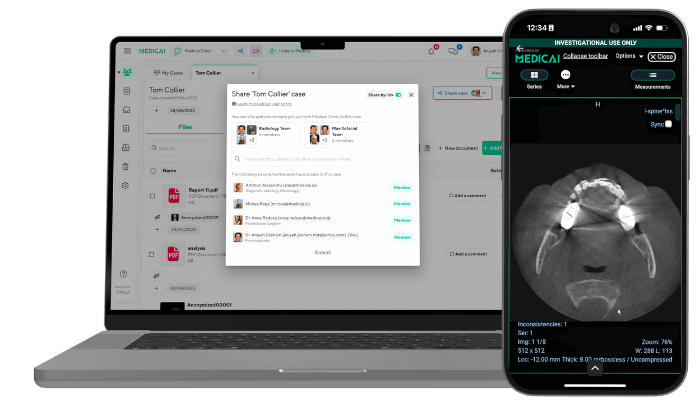
A platform cannot make you compliant on its own. It can supply the safeguards above and sign a BAA, so that your own policies have tools that work. Medicai’s medical imaging exchange is built for this kind of provider-to-provider sharing. For a complete vendor checklist, see our guide to medical image sharing.
Is Dropbox HIPAA compliant?
Dropbox can be used in a HIPAA-compliant way, but only on the right plan, with a signed BAA, and with settings you configure yourself. A free or personal account is never suitable for patient images.
| Requirement | What it involves |
|---|---|
| Eligible plan | Dropbox Business or Enterprise team plans. Personal, Family, and free accounts are not eligible for a BAA. |
| Signed BAA | A team admin signs it in the admin console, from the Account page. It is offered to US customers. Sign it before any PHI is uploaded. |
| Sharing settings | Restrict sharing outside the team. Require passwords and expiration dates on shared links. |
| Sign-in security | Enforce two-step verification or single sign-on for every member. |
| Logging | Turn on activity logging and review who accessed shared files. |
| Third-party apps | Review connected apps. Apps linked to Dropbox are not covered by the Dropbox BAA. |
Even when configured correctly, Dropbox is a general file store, not an imaging tool. It does not open DICOM studies in a medical viewer, so recipients usually download whole studies to their own devices, which moves PHI outside your controls. It does not de-identify headers or burned-in text. Large multi-series studies also upload and download slowly.
The same logic applies to Google Workspace and Microsoft 365. Both offer a BAA on business plans, and both leave configuration to you. For routine provider-to-provider sharing, a purpose-built image exchange avoids the download problem: the recipient views the study in a browser, and the audit log stays with you.
Sharing methods that put you out of compliance
| Method | The problem | Safer alternative |
|---|---|---|
| Personal email (Gmail, Yahoo, and similar) | No BAA, no audit trail, and copies persist in inboxes you do not control | A business email service under a BAA with encryption, or a link from an image exchange |
| Unencrypted email from a work account | Not banned, but provider-to-provider email needs reasonable safeguards, which in practice means encryption. Most studies are too large to attach anyway. | Send an expiring, access-controlled link instead of the files |
| SMS and consumer messaging apps | No BAA, and images land on personal phones and in their backups | A messaging or exchange tool covered by a BAA |
| Unencrypted CDs and USB drives | Not banned, but a lost unencrypted disc is presumed to be a reportable breach | Encrypted media, or a viewer link; CDs remain fine when a patient asks for one |
| Personal cloud folders | No BAA on consumer plans | A business plan with a signed BAA, configured as described above |
| “Anyone with the link” shares with no expiry | No way to know or limit who opened the study | Links that require sign-in or a passcode and expire |
| Phone photos or screenshots of a monitor | Uncontrolled copies on personal devices, and the DICOM data needed for diagnosis is lost | Share the original study through the platform |
| Posting cases to forums or social media | Burned-in names, dates, and faces are easy to miss | De-identify first (see below) and get consent where your policy requires it |
One exception is the patient’s own choice. Under the right of access, a patient may request images via unencrypted email after you warn them of the risk, and you may honor that request.
Breach notification and the encryption safe harbor
An impermissible use or disclosure of PHI is presumed to be a breach unless a documented risk assessment shows a low probability that the data was compromised. The assessment weighs four factors: what PHI was involved, who received it, whether it was actually viewed or acquired, and how far the risk was mitigated.
The safe harbor applies only to unsecured PHI. Images encrypted to HHS standards, with the key not compromised, are “secured,” so losing them does not trigger notification. A stolen laptop with an encrypted disk is a security incident to log, not a breach to announce.
| Who must be notified | When | Threshold |
|---|---|---|
| Affected individuals | Without unreasonable delay, no later than 60 calendar days after discovery | Every breach of unsecured PHI |
| HHS | Within 60 days of discovery | 500 or more individuals |
| HHS | Within 60 days after the end of the calendar year | Fewer than 500 individuals (an annual log) |
| Prominent media outlets | Within 60 days of discovery | More than 500 residents of one state or jurisdiction |
| The covered entity (notified by its business associate) | Without unreasonable delay, no later than 60 days after discovery | Every breach the vendor discovers |
HIPAA penalties in 2026
HHS’s Office for Civil Rights (OCR) sets civil penalties by culpability tier. These are the inflation-adjusted amounts effective January 28, 2026.
| Tier | Minimum per violation | Maximum per violation | Calendar-year cap (statutory) | Calendar-year cap (2019 enforcement discretion) |
|---|---|---|---|---|
| Did not know | $145 | $73,011 | $2,190,294 | $36,505.50 |
| Reasonable cause | $1,461 | $73,011 | $2,190,294 | $146,053 |
| Willful neglect, corrected within 30 days | $14,602 | $73,011 | $2,190,294 | $365,052 |
| Willful neglect, not corrected | $73,011 | $2,190,294 | $2,190,294 | $2,190,294 |
The lower annual caps come from a 2019 Notice of Enforcement Discretion. OCR still follows it, but it can withdraw it at any time, which would restore the statutory caps.
Criminal penalties are separate and enforced by the Department of Justice. Knowingly obtaining or disclosing PHI can result in up to $50,000 and one year in prison; up to $100,000 and five years in prison under false pretenses; and up to $250,000 and ten years in prison when done for commercial advantage, personal gain, or malicious harm. State attorneys general can also bring civil actions under HIPAA.
The safeguards in this guideline align with failures OCR cites again and again in its settlements: no risk analysis, no BAA with a vendor, and unencrypted devices or media.
De-identification for research and teaching
De-identified images are no longer PHI, so they can be used for teaching files, research, and AI training sets without authorization. HIPAA allows two methods.
- Safe Harbor: remove all 18 identifiers listed in the rule for the patient and for their relatives, employers, and household members. The list includes names, geographic units smaller than a state, all date elements except the year, ages over 89, contact details, record and account numbers, device identifiers and serial numbers, biometric identifiers, full-face photographs and comparable images, and any other unique code. You must also have no actual knowledge that what remains could identify the person.
- Expert Determination: a qualified statistical expert analyzes the dataset, concludes that the risk of re-identification is very low, and documents the methods used.
If you need dates or zip codes for research, a limited data set shared under a data use agreement is a third option, but it is still PHI.
De-identifying DICOM studies in practice
- Apply the Basic Application Level Confidentiality Profile in DICOM PS3.15, Annex E, which lists the header attributes to remove or replace.
- Replace UIDs consistently, so series from the same study still link together.
- Remove or shift dates and check private tags that vendors use for their own data.
- Inspect the pixel data for burned-in text, especially ultrasound, secondary captures, and scanned documents.
- Remove or blur facial features in head CT and MRI before sharing 3D-capable data sets.
- Store any key that links codes back to patients separately, under access control.
Sharing images with attorneys and insurers
A request from an attorney or a life insurer is not a treatment disclosure. You need the patient’s signed HIPAA authorization, or a court order or subpoena that meets the Privacy Rule’s conditions. Often the simplest route is for the patient to request their own images under the right of access and direct them to their attorney.
For imaging workflows in personal injury and medical malpractice cases, see our guide to medical image sharing for lawyers.
How to choose a HIPAA-ready image sharing platform
No product is “HIPAA certified,” so judge vendors by what they will commit to in writing. Ask these questions before you upload a single study.
| Ask the vendor | Why it matters |
|---|---|
| Will you sign a BAA before we upload any images? | Without one, using the service for PHI is a violation on day one. |
| Is data encrypted in transit (TLS 1.2 or later) and at rest? | Encryption is what qualifies you for the breach safe harbor. |
| Can recipients view studies in a browser, without downloading? | A DICOM web viewer keeps copies off personal devices. |
| Do share links expire, and can we revoke them? | Access should end when the clinical need ends. |
| Do you support MFA, SSO, and role-based permissions? | These meet the authentication and access control standards. |
| Does the audit log record views, downloads, and shares, and can we export it? | You need the log for audits and breach investigations. |
| Do you support DICOM and DICOMweb, and connect to our PACS and RIS systems? | Studies should arrive complete and usable, not as screenshots. |
| Can you de-identify studies on export? | Research and teaching requests are easier to handle safely. |
| Where is data hosted, how is it backed up, and how do we reach it during an outage? | The emergency access procedure is a required specification. |
| What happens to our data when the contract ends? | The BAA must cover return or destruction of PHI. |
Standalone DICOM viewers can open studies, but they do not handle sharing, access control, or audit logs on their own. For how sharing fits with standards such as DICOMweb and IHE XDS-I, see our medical image sharing guide.
To see how a purpose-built exchange handles these requirements, explore Medicai’s medical imaging exchange.
Frequently asked questions
Is medical image sharing HIPAA compliant?
Yes, when it is for a permitted purpose, uses the required safeguards, and every vendor involved has signed a BAA. HIPAA regulates how images are shared, not whether they can be. Sharing for treatment needs no patient authorization.
Is email HIPAA compliant for sending medical images?
HIPAA does not prohibit email. Provider-to-provider email needs safeguards, which in practice means encryption and a BAA with the email provider. A patient may ask to receive images by unencrypted email after being warned of the risk. Most studies are too large to attach, so a secure link is usually the better choice.
Does HIPAA require encryption for medical images?
Encryption is an addressable specification: you must implement it, or document why it is not reasonable and use an equivalent measure. Few organizations can justify skipping it. Encryption that meets HHS guidance also means a lost device or file is not a reportable breach.
What is a BAA and when is one needed?
A business associate agreement is a contract in which a vendor agrees to protect PHI, report breaches, and ensure its subcontractors are bound by the same rules. You need one with any vendor that stores, processes, or transmits images for you, signed before it handles any PHI.
Is Dropbox HIPAA compliant?
Dropbox can be used for PHI only on a Business or Enterprise team plan, with a BAA signed by a team admin before any PHI is uploaded. You must also restrict sharing, enforce two-step verification or SSO, and review connected apps, none of which the BAA covers. Personal and free accounts are not eligible.
Can I share medical images with a doctor at another hospital?
Yes. Sharing with another provider for treatment, including for a second opinion, does not require patient authorization. Use an encrypted, access-controlled method and keep a record of what was sent.
How do I de-identify DICOM images?
Use HIPAA’s Safe Harbor or Expert Determination method. In practice, apply the DICOM PS3.15 Annex E confidentiality profile to the header, replace UIDs consistently, and check the pixel data for burned-in names and dates, plus recognizable faces in head CT and MRI.
What happens if medical images are shared improperly?
You must assess whether a breach occurred. If it did, notify affected patients within 60 days of discovery, and notify HHS (and, above 500 residents of a state, the media) on the schedule the rule sets. Civil penalties in 2026 range from $145 to $2,190,294 per violation.
Are cloud platforms HIPAA compliant?
No platform is “HIPAA certified.” A cloud provider that stores ePHI is a business associate, even if the data is encrypted and it holds no key. A cloud service is suitable when it signs a BAA, provides the required safeguards, and you configure and use it correctly.
Sources
- HHS applies inflation increases to penalties for HIPAA violations, The HIPAA Journal
- 45 CFR 164.312, Technical safeguards, eCFR
- Breach Notification Rule, HHS
- Guidance on de-identification of PHI, HHS
- Individuals’ right of access under HIPAA, HHS
- Guidance on HIPAA and cloud computing, HHS
- HIPAA Security Rule notice of proposed rulemaking fact sheet, HHS
- DICOM PS3.15 Annex E, Attribute Confidentiality Profiles, NEMA
- Dropbox and HIPAA/HITECH, Dropbox Help Center


Related Articles


Lets get in touch!
Learn more about how Medicai can help you strengthen your practice and improve your patients’ experience. Ready to start your Journey?
Book A Free Demo