Open Source DICOM Viewers: Features & How to Use Them
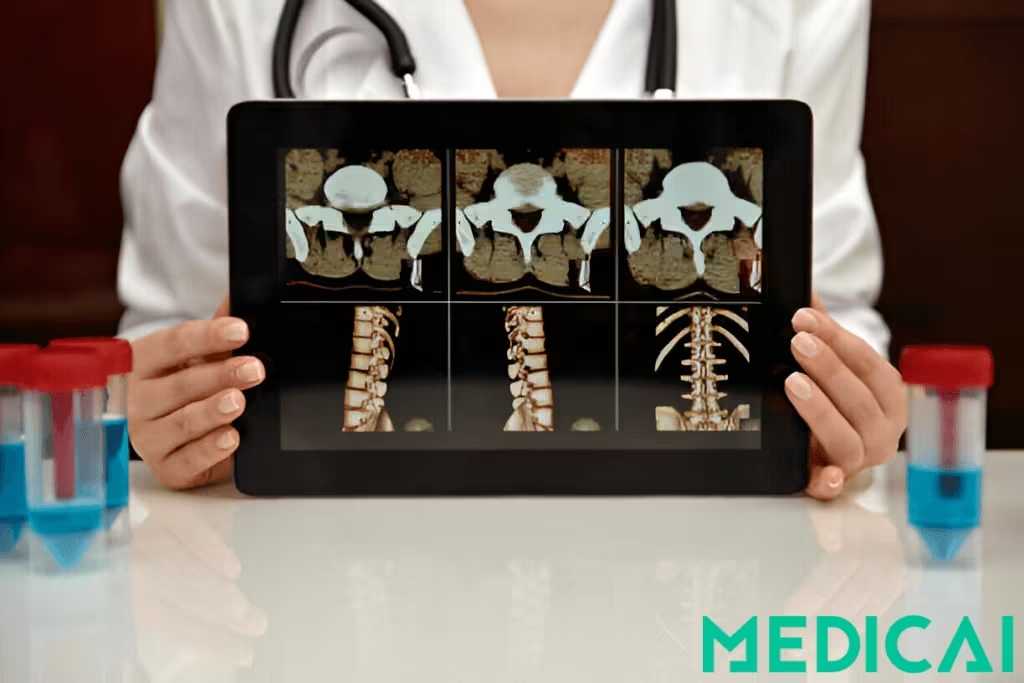
Have you ever tried opening a medical image and felt locked out by complicated software or paywalls?
For years, DICOM viewers—the essential tools for reading medical scans—were either costly, complex, or locked behind proprietary systems.
But times are changing, and open-source DICOM viewers are making medical imaging more accessible. These free, flexible tools empower healthcare professionals, researchers, and educators to explore, analyze, and share imaging data without barriers.
Discover more about open source DICOM viewers, their features, how to use them, and what to consider before making a choice.

What is a DICOM Viewer & Why It Matters in Healthcare
DICOM files are the backbone of medical imaging. DICOM stands for Digital Imaging and Communications in Medicine, a global standard for the handling, storage, transmission, and viewing of medical images. You can use an open source or free online DICOM viewer to view the images.
These files aren’t just pictures. They bundle the image (like a CT scan slice) and critical metadata, such as patient ID, scan type, modality used, and timestamp.
The built-in data layer ensures consistency across imaging systems such as MRI machines and PACS servers. Without the DICOM format, sharing and interpreting medical scans between departments or institutions would be a logistical nightmare.
So, it’s essential to know the differences between DICOM and PACS.
What Does a DICOM Viewer Do?
A DICOM viewer is the software interface that allows users to open and interact with these specialized files. You can scroll through image slices, adjust contrast and brightness (window/level), zoom in, annotate, measure, and compare multiple studies.
It’s how radiologists interpret and report findings. It helps surgeons plan procedures. It supports researchers’ analysis and data collection.
Advanced viewers also offer tools like multiplanar reconstruction (MPR), 3D visualization, and integration with PACS systems for real-time data retrieval and storage.
What is an Open-Source DICOM Viewer?
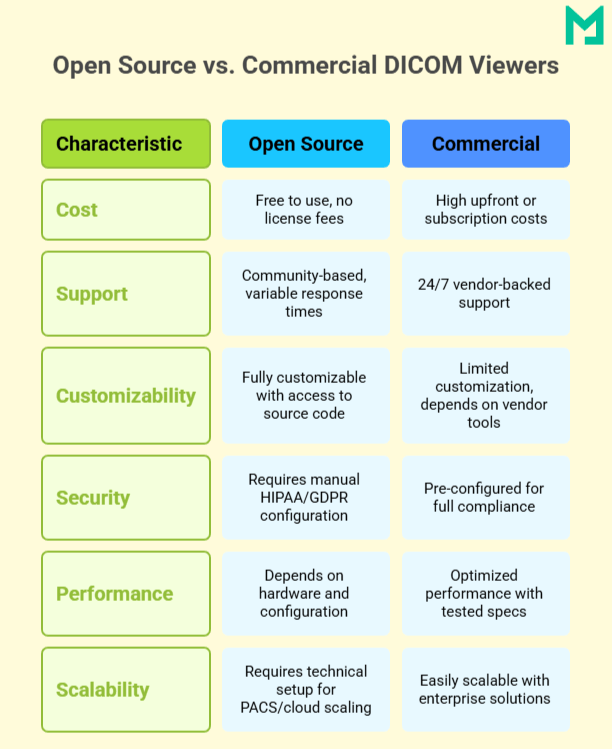
An open-source DICOM viewer is a free-to-use imaging tool developed under a license that allows anyone to view, modify, and distribute the source code. Developer communities, research institutions, or nonprofit organizations build and maintain these viewers.
Unlike commercial software, open-source DICOM viewers allow users to customize functionality, integrate with existing hospital systems, or adapt the viewer for research and telemedicine use cases.
For hospitals, medical schools, and startups, open-source tools offer an affordable, flexible entry point to professional-grade medical imaging without vendor lock-in or expensive licensing restrictions.
Benefits of Using Open Source DICOM Viewers
Let’s explore the advantages of Open Source DICOM viewers.
Cost-Free and Accessible
Open-source DICOM viewers are free, making them perfect for hospitals, clinics, NGOs, and schools with limited budgets. There are no licensing fees or restrictions, helping more people worldwide access high-quality imaging tools.
Customizable and Developer-Friendly
Open-source DICOM viewers provide access to source code, allowing healthcare organizations to customize tools for their workflows. This flexibility enables the development of custom plugins, PACS integration, and user interface modifications.
Developers can enhance DICOM functionality, automate tasks, and contribute to the project, fostering community collaboration and continuous improvement.
Perfect for Research, Teaching, and Global Health
These viewers are widely used for image analysis, annotation, and training in academic and research settings. They’re also crucial in global health projects, enabling diagnostic imaging in low-resource areas without vendor lock-in or legal hurdles.

Key Features to Look For in an Open Source DICOM Viewer
Choosing the right open-source DICOM viewer depends on more than just budget. The core features will determine how well a viewer supports your daily work.
Advanced Image Viewing Tools
A good DICOM viewer should go beyond just displaying an image; it should give you full control over how you interact with it.
Look for tools like zoom, pan, rotate, and scroll, which help you inspect details at different levels. Cine-loop playback is essential for reviewing motion-based modalities such as ultrasound or cardiac MRI. Viewers that support multi-slice navigation and stack browsing let you scroll through a series of images smoothly.
Advanced viewers also offer multiplanar reconstruction (MPR) and 3D rendering. These features are key for analyzing anatomy across multiple planes and for visualizing complex structures such as tumors or bone fractures.
Annotation & Measurement Tools
Precise measurement and documentation tools are non-negotiable in clinical and research imaging.
Look for viewers that support region of interest (ROI) selection, linear and angular measurements, and area calculations. These tools are vital for tracking lesion size, measuring organ dimensions, and evaluating surgical outcomes.
Annotations allow radiologists and researchers to highlight findings, compare time-based studies, and collaborate more effectively in team-based environments.
Modality & Format Support
Your viewer should be able to handle a wide range of imaging types and export options.
Ensure compatibility with common modalities like CT, MRI, PET, and ultrasound, as well as less frequent ones such as mammography or nuclear medicine. Some open-source viewers even support hybrid imaging like PET/CT fusion.
File format support is equally important. Exporting images as JPEG, PNG, TIFF, or even video formats (MP4, AVI) helps with documentation, reporting, and presentations. Some viewers also allow the conversion of standard images back into the DICOM format for archiving.
Web vs Desktop Interfaces
The viewer’s platform can impact performance, accessibility, and deployment.
Web-based DICOM viewers (zero-footprint viewers) run entirely in modern browsers. No installations are required. They’re ideal for remote access, telemedicine, and fast deployment across departments or institutions.
Desktop-based viewers typically offer more power, offline access, and deeper system-level control. However, they’re tied to specific operating systems and require manual updates or configurations.
Security & Privacy Features
Since DICOM files often contain sensitive patient information, security is critical, especially for clinical use or telemedicine.
Prioritize viewers with built-in anonymization tools that strip patient identifiers for safe sharing or research. Audit trails and logging features are also crucial for compliance and traceability.
Most importantly, the viewer should support HIPAA-compliant workflows, especially if used in a U.S. healthcare setting or storing data in the cloud.
Open-source tools provide flexibility, but combining them with Medicai’s HIPAA-compliant cloud framework ensures patient privacy and scalable performance.
Top Open Source DICOM Viewers
Below are the top open-source viewers that provide excellent performance, flexibility, and adoption.
OHIF Viewer
Platform: Web-based (React, Node.js)
Ideal for: Teleradiology, remote diagnostics, healthcare systems with distributed teams
Key Features:
- Zero-footprint viewer—runs entirely in the browser with no software installation.
- Built using modern web technologies (React, Node, CornerstoneJS)
- Modular and extensible architecture for easy customization
- Supports multi-view layout, annotation tools, and DICOM metadata browsing
- Seamlessly integrates with DICOMWeb services and PACS systems
Weasis
Platform: Desktop (Java-based; runs on Windows, macOS, Linux)
Ideal for: Hospitals, radiology departments, and clinical PACS integration
Key Features:
- Robust desktop viewer with native DICOM network integration (C-FIND, C-MOVE, C-STORE)
- Multiplanar reconstruction (MPR), 3D navigation, and plugin support
- Compatible with multiple imaging modalities (CT, MRI, PET, etc.)
- Can be deployed as part of enterprise PACS workflows
MicroDicom
Platform: Windows Desktop
Ideal for: Beginners, small clinics, educators, and offline access
Key Features:
- Lightweight and portable
- User-friendly interface for quick viewing and exporting
- Supports exporting to JPEG, PNG, BMP, TIFF, GIF, and MP4 video
- Includes basic measurement, annotation, and metadata viewing tools
Papaya DICOM Viewer
Platform: Web-based (JavaScript, runs in browser)
Ideal for: Educational use, NIfTI/DICOM review, and quick image inspection
Key Features:
- Built with pure JavaScript, this tool needs no plugins.
- It supports DICOM and NIfTI formats, ideal for neuroscience and radiology.
- Key features include slice navigation, color map support, and a grid layout for series comparison.
- Operates directly in the browser via local file uploads or embedded scripts.
Med3Web Viewer
Platform: Web-based (WebGL-compatible browsers)
Ideal for: 2D/3D visualization, online diagnostics, and mobile-friendly imaging
Key Features:
- Offers both 2D and 3D rendering of DICOM images using WebGL, ideal for cross-platform compatibility.
- Reads data from local folders or web-based sources.
- Works on most modern desktop browsers and offers limited functionality on mobile devices.
- Supports zoom, scroll, pan, and view manipulation with responsive controls.
Oviyam Viewer
Platform: Java Web Application
Ideal for: PACS integrations, hospitals using DICOM WADO services, and IT departments needing server-side deployment
Key Features:
- Allows querying and retrieving patient studies via DICOM protocols (C-FIND, C-GET, WADO).
- Displays image series in JPEG format, making it lighter to transmit across networks.
- Pre-packaged with JBoss for simplified server deployment in clinical environments.
- Supports integration with existing PACS servers and DICOM archives.
How to Use an Open Source DICOM Viewer
Once installed, a DICOM viewer is fairly intuitive, especially with modern interfaces. Below is a step-by-step walkthrough of how to use these tools effectively for clinical or research purposes.
Step 1: Upload or Connect to PACS
- For local files, you can drag and drop DICOM files into the viewer or select them manually via the file browser.
- Use the DICOM Query/Retrieve feature for PACS integration to search for studies by patient name, study date, or accession number.
OHIF connects with DICOMWeb via HTTP, while Weasis supports traditional DICOM C-FIND and C-MOVE protocols.
Step 2: Navigate & Manipulate Images
- Use your mouse or trackpad to scroll through image slices, zoom, and pan across the scan.
- Adjust window/level settings to enhance tissue contrast or highlight specific anatomical regions.
- Enable overlays for patient info, image dimensions, and orientation markers.
Step 3: Annotate & Measure
- Activate the measurement toolset to mark regions of interest (ROI), measure distances, angles, and areas.
- Add text notes or highlight abnormalities, which are mainly useful during case reviews or research documentation.
Most viewers let you toggle annotations on/off for clean image exporting.
Step 4: Export or Share
- Export images in formats like JPEG, PNG, or TIFF for inclusion in reports or presentations.
- Save entire image series or screenshots with overlays for case studies.
Some viewers support exporting reports in PDF format with embedded measurements and notes.
Step 5: Anonymize Data
Before sharing images externally, use the built-in DICOM anonymization tools to remove protected health information (PHI). You can strip metadata fields like patient name, ID, date of birth, and referring physician details.
Open Source DICOM Viewer: Challenges to Consider
While open-source DICOM viewers offer flexibility and cost savings, they have a few trade-offs that are important to consider.
Limited Support Compared to Paid Tools
Open-source DICOM viewers are revolutionizing access to medical imaging, providing powerful and cost-free alternatives to commercial software. These tools enhance diagnostics for radiologists, educators, developers, and researchers.
Platforms like Medicai offer professional support and infrastructure for organizations needing dependable uptime that can complement open-source viewers without sacrificing flexibility.
Technical Expertise May Be Required
Installing and configuring open-source DICOM viewers, particularly those with PACS or DICOMweb integrations, often requires technical expertise. Advanced deployments and customization typically involve IT staff or developers, unlike commercial tools that offer easier plug-and-play setups.
Medicai helps bridge this gap by offering managed DICOM workflows and viewer-ready deployments that reduce the setup burden.
Performance Limitations on Low-End Devices
Browser-based viewers like OHIF or Papaya are convenient, but complex datasets, such as large CT or MRI series, can push the limits of low-spec machines or outdated browsers.
Likewise, 3D rendering or MPR may require a dedicated GPU or higher RAM. It can be a bottleneck in resource-constrained environments.
Conclusion
Open-source DICOM viewers are transforming how we access and interact with medical imaging. They offer powerful, flexible, and cost-free alternatives to commercial software. Whether you’re a radiologist, educator, developer, or researcher, these tools open doors to smarter, more accessible diagnostics.
With the right setup and some know-how, you can create a secure, customizable imaging workflow tailored to your needs.


Related Articles


Lets get in touch!
Learn more about how Medicai can help you strengthen your practice and improve your patients’ experience. Ready to start your Journey?
Book A Free Demo