Why Does Every Urgent Care Center Need a Modern PACS System?

Need faster diagnoses and smoother patient flow in your urgent care clinic? The answer might be simpler than you think.
PACS is a digital solution that allows urgent care providers to store, access, and share medical images in real time. It replaces outdated processes like printed films and CDs, making diagnostic imaging faster, more secure, and more efficient. PACS improves patient care and clinic operations.
Let’s discover how PACS fits seamlessly into the urgent care workflow, its benefits, and why clinics are making the switch now.

The Need in Urgent Care
Urgent care clinics offer quick, walk-in treatment for non-life-threatening conditions such as sprains and minor injuries. However, some facilities provide MRIs in urgent care. These clinics operate in a fast-paced environment to minimize delays and reduce patient frustration.
However, many urgent care centers still use outdated or fragmented imaging systems, which slow everything down. Thus, urgent care providers often face several challenges, including:
- Delays in Image Access: Images may need to be physically transferred or emailed to off-site radiologists.
- Limited On-Site Capabilities: Not all clinics have radiologists in-house or reliable image viewers.
- Manual Processes: CDs, USB drives, or paper-based workflows are still common in some locations.
- Poor Integration: Imaging systems often don’t sync smoothly with EHRs or reporting tools.
Imagine a patient walks in with a swollen wrist. An X-ray is performed quickly on-site.
However, the image must be sent to a radiologist elsewhere for interpretation.
The clinic waits — sometimes for hours.
Meanwhile, the patient waits too long or is discharged without a definitive diagnosis. This is not only inefficient, but it can also lead to incomplete care, medical errors, and patient dissatisfaction.

However, in urgent care, every delay adds pressure:
- Patients expect fast service, and long waits damage your reputation.
- Providers need quick reads to make treatment decisions.
- Clinics rely on high daily volumes — bottlenecks in imaging hurt throughput and revenue.
You don’t have time for slow systems or IT troubleshooting. You need instant access, accurate readings, and seamless sharing, all in real time.
That’s why more and more clinics are turning to cloud-based PACS. It’s fast, secure, accessible from anywhere, and built to handle urgent care workflows without delay.
What Is PACS, And Why Does Urgent Care Need It
PACS stands for Picture Archiving and Communication System. It’s a digital platform that stores, retrieves, and shares medical images, such as X-rays, CT scans, and ultrasounds.
Instead of printing films or burning CDs, PACS allows providers to:
- View images instantly from any device
- Share them securely with radiologists or specialists
- Archive studies without taking up physical space
- Integrate images directly into a patient’s health record
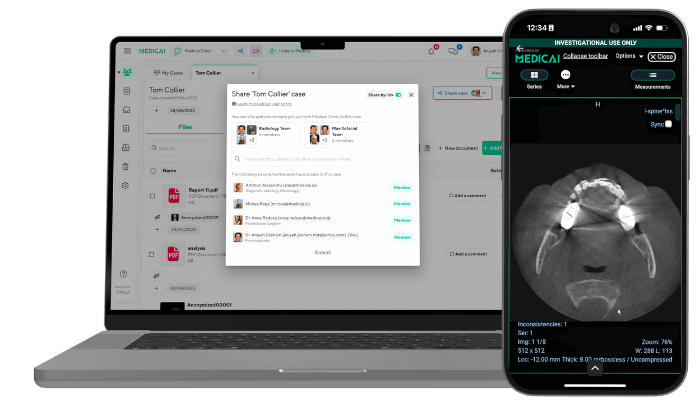
Today’s modern systems, such as the cloud-based PACS offered by Medicai, are even more powerful. They run online without bulky servers, providing access to imaging data anytime, anywhere.
How Does PACS Support Urgent Care?
Urgent care centers thrive on speed, efficiency, and flexibility. A well-integrated PACS supports all three.
Instant Image Access and Real-Time Collaboration
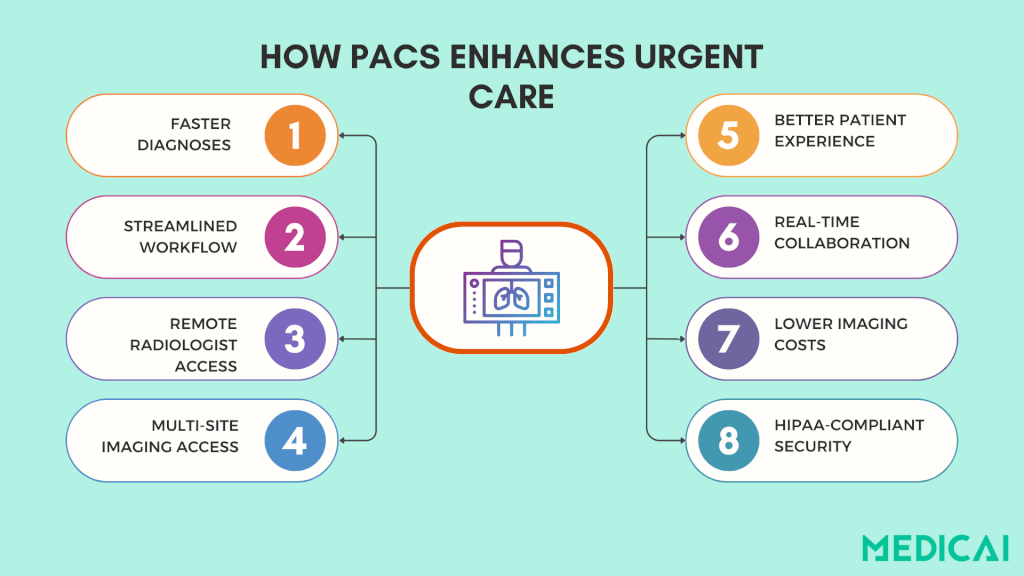
Time is critical in urgent care. With PACS, images are available immediately after a scan, allowing physicians to review X-rays in seconds. Radiologists can also access and interpret images remotely, eliminating the need for physical transfers.
This real-time access ensures quick answers for patients and allows providers to proceed efficiently to the next case.
Secure, Cloud-Based Image Storage
Traditional film takes up space, CDs get lost, and USB drives are outdated. PACS solves all of that by securely storing imaging data in the cloud.
Providers can quickly access a patient’s past scans from anywhere, whether in the clinic or working remotely. There’s no physical archive or manual handoffs—just centralized access to all imaging records when needed.
And because reputable PACS systems follow strict HIPAA-compliant protocols, patient data stays protected.
Built for Multi-Site and High-Volume Clinics
Urgent care can involve multiple walk-in clinics, and PACS streamlines imaging across them. A scan from one clinic can be easily reviewed by a provider at another, eliminating the need to resend files or repeat tests. This efficiency makes PACS particularly valuable for urgent care networks and growing practices.
The benefits are clear even for single-location clinics: faster workflows, fewer errors, and more patients seen per day.
How PACS Fits into the Urgent Care Workflow
PACS enhances every step of the urgent care workflow. Let’s see how.
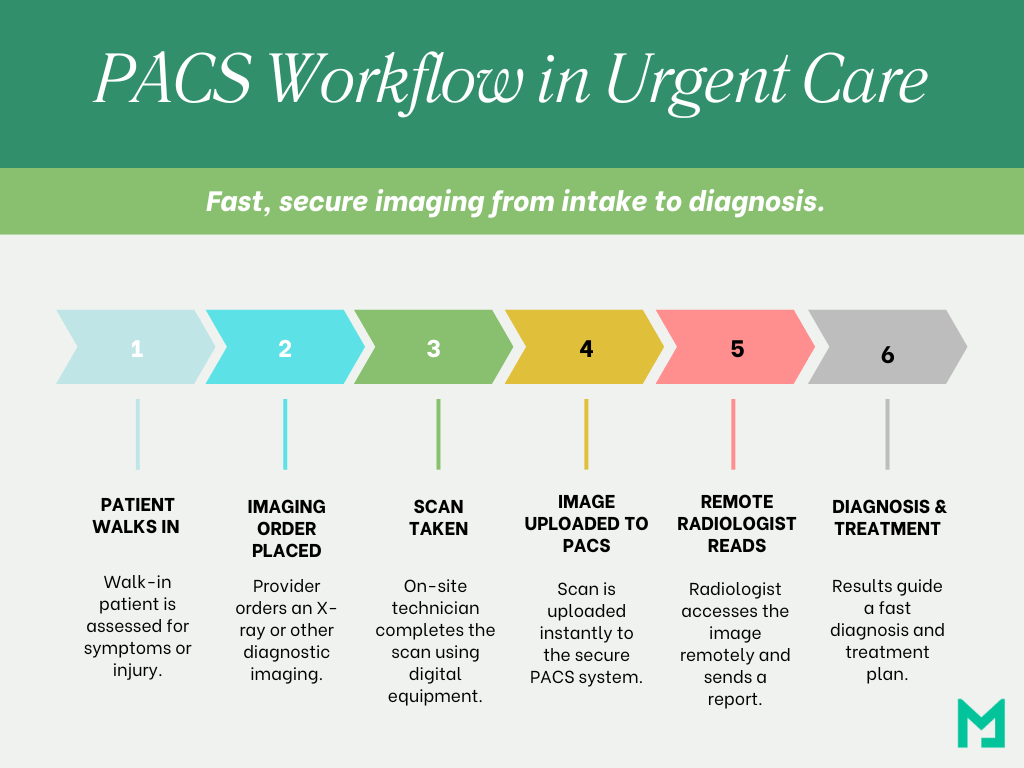
- Patient Visit and Imaging Order: A patient arrives with a complaint, such as a swollen ankle or chest pain. The provider assesses the situation and orders tests, such as an X-ray.
- Image Acquisition: Digital equipment is used on-site for imaging. The image is automatically uploaded to the PACS as soon as the scan is complete.
- Instant Image Access: Once uploaded, the image is instantly available for the provider and can be sent to a remote radiologist for a second opinion.
- Radiologist Read and Report: The radiologist reviews the image, writes a report, and sends it back via PACS, often within minutes, even after hours, depending on your coverage.
- Diagnosis and Treatment: The urgent care provider uses imaging results to make quick clinical decisions, whether applying a splint, prescribing medication, or referring for further care.
- Archiving and Future Access: Imaging and reports are stored automatically, making them accessible if the patient returns or visits another clinic in the network. No repeated tests or record tracking are needed.
Adding MRI to Your Urgent Care Center
A modern PACS handles the imaging you already produce, but a growing number of centers are also weighing whether to offer MRI on-site. That used to be a hospital-only capability. Lower-cost, low-field MRI has changed the math, and the same cloud PACS workflow that routes your X-rays is what makes an on-site MRI service readable and shareable across your care network. Here is what adding MRI actually takes, and how it connects to the PACS workflow above. For the patient-facing view of MRI at urgent care, see our guide to MRI at urgent care.
How low-field MRI becomes feasible in urgent care
Low-field MRI makes urgent care MRI feasible by reducing the build-out and operating costs that keep 1.5T and 3T scanners locked inside hospital-grade MRI suites. A 0.55T system is commonly cited as costing about 40–50% of a standard 1.5T scanner, with further savings from simpler siting and lower ongoing maintenance costs.
The practical feasibility levers look like this:
Lower acquisition cost, with predictable ownership economics
Low-field MRI shifts the economics because the scanner cost drops first, and the “hidden” costs follow. Recent estimates in a 2025 review put 0.55T hardware at roughly 40–50% of the cost of a standard 1.5T system.
Reduced installation requirements, so clinics do not need a hospital-grade MRI build-out
Low-field systems are often described as needing less electromagnetic shielding and less structural work, which can reduce installation and transport costs by up to 70%. The same review notes that some deployments avoid reinforced flooring, copper shielding, and dedicated HVAC upgrades, and that maintenance costs can be up to 45% lower in designs that avoid a quench pipe or heavy cryogenic requirements.
Smaller footprint and simpler cryogen handling, which fits outpatient space constraints
The MAGNETOM Free. Max’s example illustrates the trend: a compact footprint (under 25 m²), an 80 cm bore, and a sealed cryogenic subsystem that uses 0.7 L of liquid helium, compared with ~1,500 L cited for traditional systems.
Outpatient-operational fit, with one real constraint: throughput
Low-field MRI is explicitly discussed as being adopted in outpatient and ambulatory settings because infrastructure demands are lower.
Throughput still matters: certain exams can take longer at 0.55T (one abdominal comparison reported ~54 ± 10 minutes at 0.55T vs ~36 ± 11 minutes at higher field strength). That pushes urgent care toward tight protocols for high-yield indications, and away from “everything for everyone” MRI menus.
Compact feasibility checklist (for procurement and build planning)
| Feasibility lever | What to verify before you buy |
|---|---|
| Siting and shielding | Room size, shielding scope, fringe-field footprint, permitted adjacent spaces |
| Construction | Floor load requirements, HVAC upgrade scope, power requirements, quench pipe needs |
| Staffing model | On-site technologist coverage, after-hours plan, safety screening workflow |
| Reading workflow | How studies route to radiologists, how priors are pulled, how results return to your EHR/PACS |
Low-field MRI solves the “can we physically and financially host MRI here?” problem. A cloud PACS workflow then solves the “can we read it safely and route it correctly?” problem, which is where systems like Medicai typically enter the architecture as the imaging backbone rather than as a standalone add-on.
Low-field MRI solves the siting problem; the next question is operational: how does an urgent care clinic run MRI end-to-end without creating a new bottleneck?
How MRI at urgent care works end-to-end
MRI at urgent care works when the clinic can complete six workflow steps without delays in safety screening, scheduling, interpretation, or result delivery. This workflow spine shows what happens from the order to the follow-up.
1) Clinical intake and MRI ordering
Urgent care MRI starts with a focused exam and a clear clinical question, because MRI is ordered to answer one specific uncertainty, not to “scan broadly.” The ordering note should state the suspected diagnosis, symptom duration, and the affected body part and laterality, as these details drive protocol selection and radiological interpretation.
2) Safety screening and contraindication handling
MRI at urgent care requires a formal safety screen for implants, metal exposure, and MRI-unsafe devices. The safety step must also account for renal function needs when contrast is considered, because contrast decisions affect both scheduling and protocol.
3) Scheduling and availability routing
Urgent care MRI succeeds when scheduling is treated as a routing problem rather than a clerical task. Same-day access usually depends on a narrow menu of protocols, predictable scan slots, and a defined escalation path when no slots are available. If the clinic uses a partner imaging site, the handoff must be managed so the patient does not repeat intake and the clinical question is not lost.
4) Scan execution and protocoling
MRI at urgent care depends on standard protocols that match common urgent presentations, for example, knee internal derangement, acute back pain without red flags, or suspected occult fracture. Protocoling should be explicit about sequences, contrast rules, and the criteria for a “critical finding” that triggers immediate communication.
5) Interpretation pathway (onsite radiologist vs teleradiology)
MRI at urgent care is often interpreted by teleradiology coverage, especially after hours, so the clinic needs a defined turnaround-time target and a policy for critical results. The interpretation step should specify who receives the preliminary read, who communicates urgent findings, and how discrepancies are handled.
6) Results delivery and image access for next-step care
MRI at urgent care is complete only when the report and images are accessible to the next clinician, not just to the urgent care site. The workflow should enable the patient’s primary care physician or specialist to receive the report, images, and relevant priors without delay while providing patients with informative booklets and summary guides, because follow-up care is where the MRI’s value is realized.
Where an imaging platform like Medicai fits without adding a separate workflow
A cloud imaging workflow can reduce delays between acquisition, radiology interpretation, and sharing results by keeping studies and priors accessible across sites and care teams. Medicai is one example of a cloud PACS workflow layer that centralizes imaging access and supports cross-site collaboration, helping urgent care MRI workflows avoid “portal sprawl” and reduce time lost to manual transfers.
Quick operational checks that prevent common failures
- MRI at urgent care fails when images cannot travel, so define how reports and DICOM studies reach downstream care.
- MRI at urgent care fails when safety screening is informal, so keep the MRI safety checklist mandatory and auditable.
- MRI at urgent care fails when the clinical question is vague, so a brief indication line is required to drive protocoling.
- MRI at urgent care fails when interpretation is undefined; establish a clear read pathway and critical results policy.
Urgent care MRI works only if the end-to-end workflow is in place, so the benefits show up in specific access and throughput outcomes rather than in generic claims of convenience.
Benefits of offering MRI at urgent care centers
MRI at urgent care improves access to advanced diagnostic imaging when speed and convenience matter, but the clinical scenario is not an emergency. Urgent care MRI delivers value when the center can schedule the scan quickly, obtain a timely read, and share images and reports with downstream clinicians without extra friction.

Improved access to diagnostic imaging
MRI at urgent care expands access for conditions where MRI changes next steps, such as suspected soft-tissue injury, persistent joint pain, or selected neurologic complaints that are not red-flag emergencies. Urgent care MRI can reduce delays by keeping the ordering decision and the imaging pathway within a single visit or a coordinated referral.
Reduced wait times and faster clinical decisions
MRI at urgent care can shorten time-to-diagnosis by moving appropriate patients out of emergency department imaging queues and into a scheduled, protocol-driven MRI pathway. Urgent care MRI works best when the center sets a turnaround-time expectation for interpretation and has a clear escalation rule for critical findings.
Convenience without sacrificing escalation safety
MRI at urgent care can reduce the number of separate appointments by combining evaluation, ordering, and coordination at a single location. Urgent care MRI still requires a strict escalation pathway, because patients with red-flag symptoms should be directed to emergency care where stabilization and immediate imaging triage are available.
Better continuity for follow-up care
MRI at urgent care becomes more useful when images and reports can be accessed by primary care and specialists without delays. Urgent care MRI workflows benefit from a sharing model that supports report delivery and image access for next-step care, because follow-up decisions depend on both the interpretation and the underlying study.
Operational upside for centers, if throughput stays controlled
MRI at urgent care can improve service mix and revenue only when scan time, staffing coverage, and interpretation capacity are planned around a limited, high-yield menu of protocols. Urgent care MRI loses value when scheduling delays, interpretation delays, or workflow handoffs create bottlenecks that offset the access benefit.
Benefits of Cloud PACS in Urgent Care
Upgrading to cloud-based PACS enhances the experience for both your clinic and patients. Unlike traditional systems that rely on physical servers and manual processes, cloud PACS allows providers to access images instantly from any device, securely and remotely.
- Speed Without the IT Burden: Cloud PACS enables instant image uploads and access from any device, eliminating delays caused by CDs or emails. This enables real-time reviews for faster diagnoses and treatment.
- Fewer Costs, More Control: Cloud PACS operates on a subscription model, eliminating the need for costly on-site servers and IT support. This approach allows urgent care clinics to lower capital expenses and benefit from a more predictable, scalable solution.
- Happier Patients, Smoother Workflows: Cloud PACS reduces imaging delays, allowing urgent care staff to quickly share results and consult radiologists. Patients get faster answers, and clinics maintain smooth operations.
- Designed to Grow With You: As urgent care networks grow, cloud PACS simplifies scaling by eliminating the need for new servers or duplicate systems. Providers can access all images and data across locations, ensuring a single source of truth regardless of where they work.
At Medicai, we’ve designed our cloud-native PACS specifically for urgent care. Clinics can instantly access images, remote reading capabilities, and HIPAA-compliant storage without needing in-house IT.
PACS Urgent Care: Common Challenges & Solutions
For urgent care providers, adopting a PACS can raise some common concerns.
- Cost: Traditional PACS systems were known for high upfront costs. That’s changed. Today’s options, including cloud and hybrid models, offer affordable, scalable pricing that fits urgent care budgets without sacrificing performance.
- IT Support: Many urgent care clinics don’t have in-house IT teams. However, most PACS vendors now offer remote maintenance, updates, and support, so clinics can run smoothly without an added technical burden.
- Workflow Disruption: Urgent care moves fast, and any disruption can cause backlogs. The right PACS should integrate easily with your EHR and feel intuitive, improving, not slowing down your daily workflow.
Choosing the Right PACS for Your Urgent Care
Not all PACS platforms are the same, especially for urgent care. Choose a cloud PACS system that meets your unique needs.
Prioritize Speed and Simplicity
Urgent care clinics need imaging systems that move as fast as they do. Look for a PACS that offers instant image access from any device without complicated logins or clunky interfaces.
You’re already losing time if your staff waits for images to load or switch platforms to share them.
Ensure Seamless Integration
Your PACS shouldn’t exist in a silo. It should work hand-in-hand with your:
- Electronic Health Record (EHR) system
- Radiology Information System (RIS)
- Billing or practice management software
Look for platforms with built-in integration tools or vendor support to help ensure smooth onboarding.
Security Isn’t Optional
Urgent care clinics are just as responsible for patient privacy as hospitals. Ensure your PACS solution is fully HIPAA-compliant, uses end-to-end encryption, and offers secure user access control.
Cloud PACS platforms should also provide reliable data backups and business continuity features in case of downtime or outages.
Pick a System That Can Grow With You
Whether you plan to open more clinics or expand your services, your PACS should be flexible enough to support future growth. Look for:
- Unlimited user access
- Centralized archives
- Multi-site image sharing
You don’t want to outgrow your system in a year and have to start over. So choose the right PACS vendor.
Implementation checklist: adding MRI to urgent care without breaking workflow
MRI at urgent care is successful when the clinic can control safety screening, scheduling, interpretation, and image sharing without creating new delays. Use this checklist to validate readiness before launch and to audit performance after go-live.
Workflow readiness
- MRI ordering uses a short, defined indication list and laterality rules.
- MRI safety screening is mandatory, documented, and repeatable.
- MRI protocols are standardized for the top urgent presentations the center will accept.
- MRI scheduling has defined scan slots and a fallback path when no slot exists.
- MRI interpretation has a named coverage model, onsite or teleradiology, with a turnaround-time target.
Clinical governance
- MRI escalation rules are explicit for red-flag symptoms and critical imaging findings.
- MRI critical results communication has an owner and a documented response path.
- MRI contrast use rules are defined, including when renal function checks are required.
Imaging operations and sharing
- MRI studies and priors can be accessed by downstream clinicians without manual transfers.
- MRI reports are delivered to the ordering clinician and the patient channel used by the clinic.
- MRI image sharing supports continuity of care, primary care, orthopedics, neurology, and emergency handoffs when needed.
Measurement (what to track in the first 30 days)
- Referral completion rate to the next clinician
- Order-to-scan time
- Scan-to-report time
- Critical result callback time
- Re-scan rate and incomplete exam rate
PACS is essential for urgent care centers seeking fast, efficient, and quality care. It streamlines imaging, speeds up diagnoses, and enhances decision-making, reducing delays and costs while improving the patient experience.
Medicai’s PACS is built to keep pace with urgent care. It is simple to use, easy to scale, and ready to perform.
So, are you ready to upgrade your workflow without the hassle?


Related Articles

Lets get in touch!
Learn more about how Medicai can help you strengthen your practice and improve your patients’ experience. Ready to start your Journey?
Book A Free Demo