Medical image sharing: how it works, standards, and HIPAA and GDPR rules

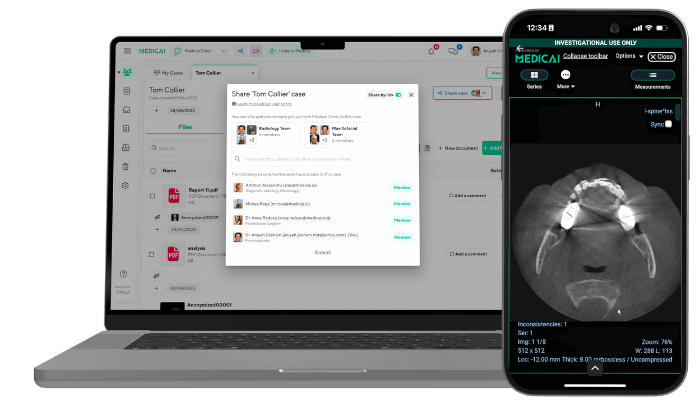
Medical image sharing is the secure transfer of imaging studies, such as CT, MRI, X-ray, and ultrasound, between providers, patients, and other authorized parties, while preserving the study’s metadata and diagnostic quality. Today, most sharing runs over the web using the DICOM and DICOMweb standards rather than on CDs, and it is governed by HIPAA in the US and the GDPR in the EU.
A referral, a second opinion, a transfer between hospitals, a patient requesting their own scans: each depends on a study reaching the right person quickly, without exposing the patient’s identity to anyone else. This guide explains how sharing works, the standards behind it, what HIPAA and the GDPR require, what patients are legally entitled to, the main risks and safeguards for each, and the questions to ask before you choose a sharing tool.

How Medical Image Sharing Works
Every imaging study is stored as a set of DICOM files. Each file holds the image pixels plus a header with the patient’s name, date of birth, medical record number, study date, body part, and scanner details. That header is what lets any viewer display the study correctly and file it against the right patient. It is also why a shared study counts as protected health information (PHI) under HIPAA and as personal health data under the GDPR. For more on the format, see What is DICOM.
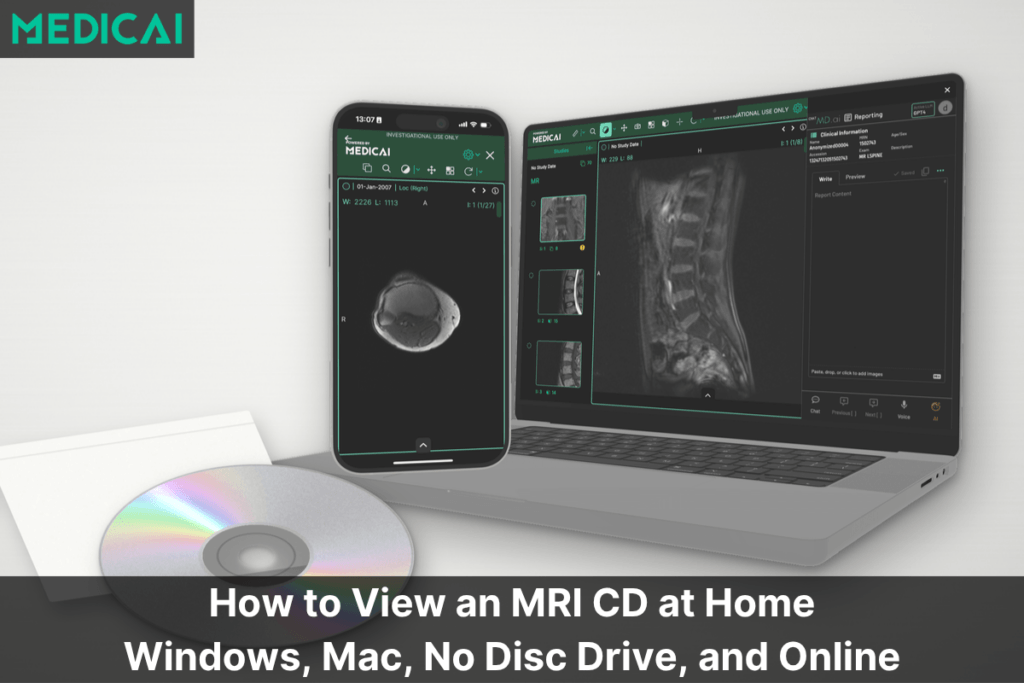
For years, studies were left on burned CDs or DVDs. Discs get lost in the post, arrive scratched, or need a viewer the recipient does not have installed. They also keep no record of who opened them, so a lost disc could be an untraceable breach. Web-based sharing replaces the disc: the sender uploads the study or grants access to it, and the recipient views it in a browser, usually within minutes.
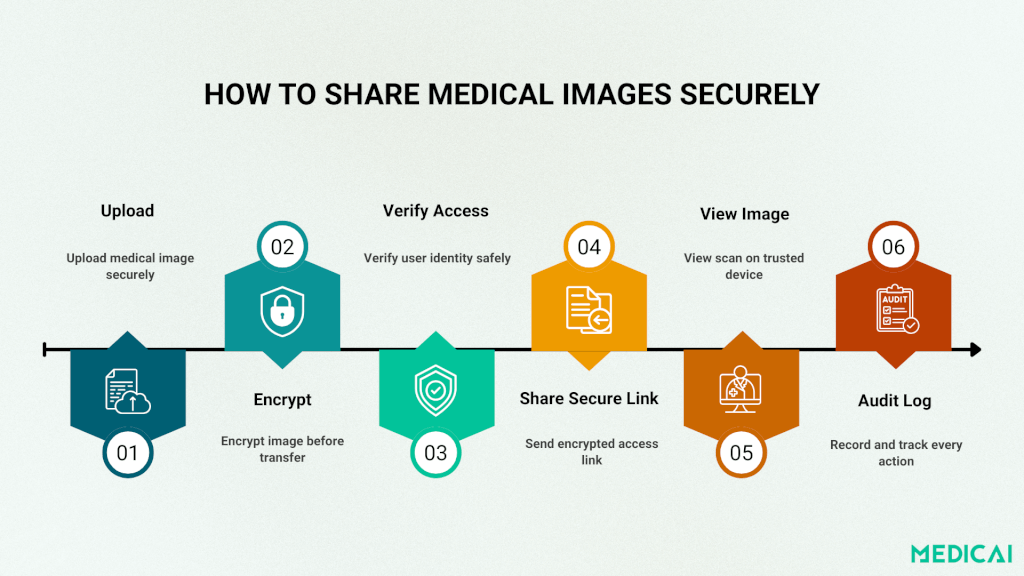
A typical web-based share follows four steps:
- The sender selects the study in the PACS, the archive, or a sharing portal and chooses the recipient.
- The study is delivered over an encrypted connection, either pushed to the recipient’s system or stored in a cloud archive behind an access link.
- The recipient signs in or opens a time-limited link and views the study in a browser, or imports it into their own PACS.
- Every view, download, and onward share is written to an audit log.
The images rarely travel alone. Orders, reports, and patient demographics move as HL7 v2 messages or FHIR resources, so a study arrives linked to the order and report it belongs to. Without that context, a radiologist or referring physician receives images with no history attached. See What is HL7 for how those messages work.
Standards that make sharing work
A shared study is only useful if both ends speak the same standards. Four standards do most of the work, and each solves a different part of the problem.
| Standard | What it does in sharing | Where you meet it |
|---|---|---|
| DICOM | Defines the image file and its header, so any compliant viewer can open the study | Every imaging study |
| DICOMweb | Moves DICOM over HTTPS: STOW-RS stores studies, QIDO-RS searches for them, WADO-RS retrieves them | Cloud PACS, web viewers, sharing platforms |
| IHE XDS-I.b | Lets affiliated sites publish imaging manifests and reports to a shared registry, so another site can find and retrieve the study | Health information exchanges and regional networks |
| HL7 v2 and FHIR | Carry orders, reports, and demographics; FHIR’s ImagingStudy resource describes a study for apps and patient portals | EHR integration, patient access apps |
DICOM and DICOMweb. DICOMweb is defined in part 18 of the DICOM standard (DICOM Standards Committee). Because it runs over standard web connections, a browser-based viewer can display a study without installing any software, and two cloud systems can exchange studies without a VPN or a dedicated DICOM network connection.
IHE XDS-I.b. Integrating the Healthcare Enterprise (IHE) publishes profiles that describe how standards fit together for a task. In XDS-I.b, an imaging document source publishes a study manifest to a document repository, and an imaging document consumer at another site queries the registry and retrieves the images from the source (IHE). This is how many regional networks allow a hospital to access a patient’s prior imaging from another organization.
HL7 v2 and FHIR. HL7 v2 messages still carry most orders and results inside hospitals. FHIR, the newer web-based standard, is used by patient-facing apps and many EHR integrations, and its ImagingStudy resource lets an app list a patient’s studies and link to them.
When you evaluate a sharing tool, ask which of these it supports. A tool that only exports JPEG images or proprietary links breaks the chain: the recipient loses the metadata and measurements and cannot load the study into their own PACS.
Medical Image Sharing vs Medical Image Exchange
The two terms are often used interchangeably, but they describe different scales of the same activity.
- Sharing is a single transfer between two parties, such as a radiology group sending a study to a referring surgeon, or a patient sending an MRI to a second-opinion clinic. Most modern PACS, vendor neutral archives, and cloud platforms include it as a feature.
- Exchange is the infrastructure that makes routine sharing across many organizations possible. It adds a provider directory, routing rules, inbound and outbound worklists, and the governance that comes with many parties, including a business associate agreement with each.
A single clinic sending a few studies a week needs sharing. A health system or imaging network that sends and receives studies from dozens of sites every day needs exchange, because manual sharing at that volume leads to misrouted studies and missing reports. Medicai’s Medical Imaging Exchange is one example of an exchange platform.
HIPAA and GDPR: what each requires
HIPAA and the GDPR aim at the same outcome: health data that stays confidential, accurate, and available to the people who need it. They differ in who they cover, how far they reach, and what patients can demand.
HIPAA (United States)
HIPAA applies to covered entities, meaning providers, health plans, and clearinghouses, and to the business associates that handle protected health information for them. Cloud PACS vendors, image sharing platforms, and teleradiology services that store or transmit studies for a provider are business associates.
The HIPAA Security Rule requires administrative, physical, and technical safeguards for electronic PHI: a documented risk analysis, access controls, audit controls, integrity controls, and transmission security. Encryption is currently an “addressable” implementation specification. That does not make it optional: an organization must either encrypt or document why an equivalent measure is reasonable for its situation. For images sent outside the healthcare provider organization, it is hard to justify any alternative to encryption.
A proposed update to the Security Rule, published in January 2025, would make encryption and multi-factor authentication required safeguards. As of mid-2026 it had not been finalized (Medcurity, June 2026). Organizations that already encrypt in transit and at rest and use multi-factor authentication will need few changes if it is adopted.
GDPR (European Union and EEA)
The GDPR applies to any organization that processes personal data of people in the EU or EEA, wherever the organization is based. A US teleradiology group reading for a German hospital, or a US platform storing studies for EU patients, falls under it.
Health data is a special category under Article 9, so processing needs both a lawful basis and an Article 9 condition, such as the provision of health care or a patient’s explicit consent (GDPR Article 9). A vendor that stores or transmits images on a provider’s behalf is a processor and must work under a data processing agreement as required by Article 28. control their healthcare data by deciding who can access it and for what purpose. Healthcare organizations must implement interoperable systems to securely share imaging data, avoiding breaches and compliance issues.
HIPAA vs. GDPR: Similar Goals, Different Scopes
While HIPAA and GDPR share the common goal of protecting sensitive health data, their scopes and applications differ.
| HIPAA | GDPR | |
|---|---|---|
| Who it covers | Covered entities and their business associates | Any organization processing data of people in the EU or EEA |
| Data | Protected health information (PHI and ePHI) | Personal data; health data is a special category |
| Legal basis for sharing | Treatment, payment, operations, or patient authorization | A lawful basis plus an Article 9 condition |
| Vendor contract | Business associate agreement (BAA) | Data processing agreement (DPA) |
| Patient rights | Access, amendment, accounting of disclosures | Access, rectification, erasure, restriction, portability |
| Maximum penalties | $145 to $2,190,294 per violation depending on culpability, capped at $2,190,294 per calendar year for identical violations (2026 inflation-adjusted figures) | Up to €20 million or 4% of worldwide annual turnover, whichever is higher |
| Geographic reach | US entities and their vendors, including vendors abroad | Extraterritorial for data of people in the EU or EEA |
Penalty sources: HIPAA amounts from the HHS inflation adjustment published January 28, 2026 (Federal Register document 2026-01688, summarized by The HIPAA Journal); GDPR amounts from Article 83. For a longer comparison, see HIPAA vs GDPR. For the HIPAA side in more depth, see HIPAA-compliant medical image sharing.
Patients’ rights to their own images
Patients in both the US and the EU have a legal right to their imaging. Providers that make that right hard to use, by charging excessive fees, insisting on a CD, or delaying, can face enforcement.
United States
HIPAA right of access. Patients can get a copy of their PHI, including images, in the form and format they request if it is readily producible, which includes an electronic copy. Providers must act on the request within 30 days, with one 30-day extension allowed, and may charge only a reasonable, cost-based fee (HHS guidance).
Information blocking. Under the 21st Century Cures Act, providers and health IT developers must not unreasonably interfere with access to, or exchange of, electronic health information (ONC). A process that makes patients wait for a CD when an electronic copy is readily available can raise information blocking questions.
European Union and EEA
Right of access (Article 15). Patients can obtain a copy of their personal data, including imaging, normally within one month of the request.
Right to data portability (Article 20). Where processing is based on consent or a contract and carried out by automated means, patients can receive their data in a structured, commonly used, machine-readable format, such as DICOM, and have it sent directly to another provider where technically feasible (GDPR Article 20). Because much care-related processing rests on other bases, the Article 15 access right is often the one that applies in practice.
In practice, these rights are why patient portals and “send my scan” tools have replaced the CD request form. A patient who can log in, view, download, and forward their own studies does not need to visit the records desk. Medicai offers a patient imaging portal for ongoing access and a free tool to send medical images for one-off transfers.
Sharing images across borders
A patient in Germany who wants a US subspecialist to review an MRI is a common case, and it touches both frameworks at once.
GDPR. Personal data can leave the EU or EEA only under Chapter V of the GDPR: an adequacy decision covering the destination country (Article 45), appropriate safeguards such as standard contractual clauses (Article 46), or, for occasional transfers, a derogation such as the patient’s explicit consent after being told the risks (Article 49).
HIPAA. HIPAA does not ban storing or viewing PHI outside the US. The covered entity stays responsible, so the business associate agreement must bind any offshore vendor or subcontractor, and the risk analysis must cover where the data is stored and who can reach it.
A good clinical purpose, such as a second opinion, does not remove these requirements. Before sending studies abroad, confirm the transfer mechanism, record the patient’s consent where consent is the basis, and use a platform that logs who accessed the study and from where. No platform can make a transfer risk-free; the aim is a transfer that is lawful, documented, and limited to what the recipient needs.
Risks in medical image sharing and the safeguard for each
Most incidents in image sharing trace back to a short list of gaps. Each one has a matching control, and most controls are standard features of modern sharing platforms rather than custom work.
| Risk | Safeguard |
|---|---|
| Identifiers in the study | De-identify headers and check pixels before non-clinical use |
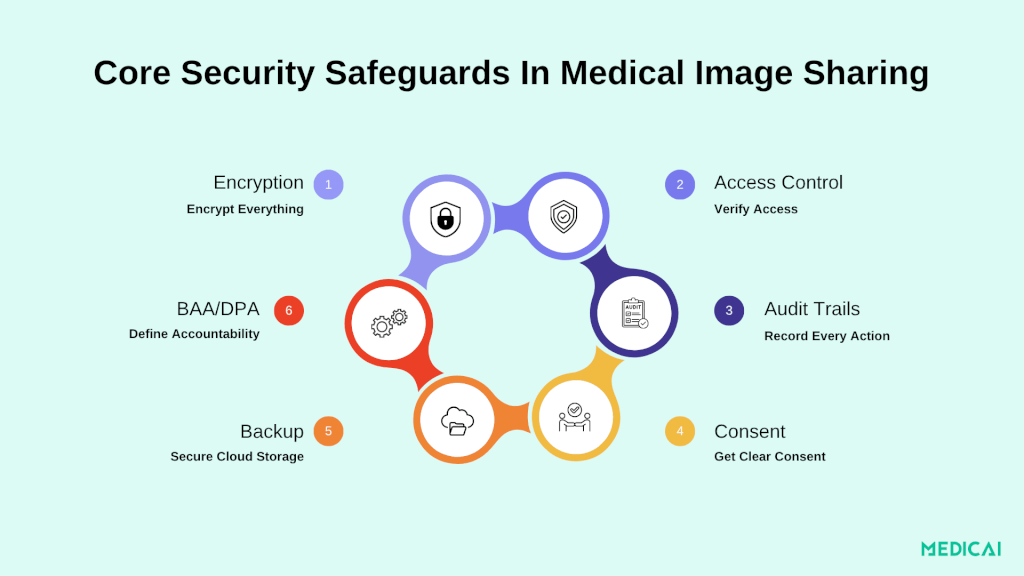
| Unencrypted transfer or storage | Encrypt in transit and at rest |
| Weak access control | Roles, multi-factor authentication, expiring links |
| No audit trail | Tamper-evident logs of every view, download, and share |
| Legacy systems and workarounds | Make the secure route the easiest route |
| Human error | Recipient checks, expiring links, revocation |
| Vendor gaps | A BAA or DPA before any data moves |
| Retention and recovery | Encrypted backups, retention schedule, training |
Identifiers in the study
DICOM headers carry the patient’s name, date of birth, and record numbers, and some images, such as ultrasound frames and scanned documents, have identifiers burned into the pixels. For treatment, the identifiers must stay. For research, teaching, conference talks, and many legal reviews, they should be removed. De-identify the header fields and check the pixel data for burned-in text before any study leaves for a non-clinical purpose.
Unencrypted transfer or storage
A study that crosses networks without encryption can be read or altered in transit, and a study stored unencrypted is exposed if a server or device is compromised. Encrypt in transit (TLS 1.2 or higher) and at rest (AES-256 is common practice), and ask who manages the encryption keys.
Weak access control
Stolen or shared passwords can open an entire archive, and phishing remains a common way in. Use role-based access so a referring physician sees only their patients’ studies, require multi-factor authentication, and send external recipients time-limited or single-use links rather than accounts. Healthcare teams can protect credentials and system access by using an offline password manager, ensuring sensitive login data remains secure even without internet connectivity.
No audit trail
If a study is viewed by the wrong person, the organization must be able to say who opened it, when, and what they did with it. Many older systems log poorly, which leaves both an investigation and a breach assessment without facts. Keep tamper-evident logs of every view, download, and share, and set alerts for unusual activity, such as bulk downloads.
Legacy systems and workarounds
Older PACS often cannot share outside the organization, so staff fall back on burned CDs, USB drives, personal email, or consumer file-sharing services. The fix is to make the secure route the easiest one: browser-based sharing straight from the PACS or archive, with consumer file-sharing tools blocked on clinical workstations.
Human error
Studies go to the wrong recipient, or leave with identifiers that should have been removed, most often when staff are rushed. Recipient verification, expiring links, and the ability to revoke access after sending limit the damage of a mistake.
Vendor gaps
A sharing, storage, or viewing vendor that handles PHI without a contract exposes the provider to liability. Sign a business associate agreement (HIPAA) or a data processing agreement (GDPR) before any data moves, and confirm that the vendor’s own subcontractors are covered.
Retention and recovery
Data kept longer than needed adds risk; data lost in an outage or ransomware attack stops care. Keep encrypted backups, follow a written retention schedule, and train staff regularly on phishing and safe sharing.
Security that slows urgent care tends to get bypassed. The aim is a workflow where the secure path is also the fastest one for a clinician who needs a study in minutes.
Common use cases
Specialty referrals. When a specialist can review prior imaging before the first appointment, the visit starts with a plan instead of a repeat scan. Orthopedic surgeons, oncologists, and neurologists rely on prior studies to decide whether a new scan is needed at all. Patients can also send their prior studies to a specialist before booking, so the specialist can say whether the referral is the right one.
Second opinions. Subspecialist review can change diagnosis or management, particularly in oncology, neurology, and complex musculoskeletal cases. Remote access means a patient does not need to travel or wait for discs to be copied and posted. See radiology second opinions.
Cross-facility transfers. A patient moving between hospitals, or from an emergency department to a specialist center, arrives with their studies already available. That avoids repeating a CT, which saves cost and time and spares the patient an extra radiation dose.
Access for rural and underserved patients. A clinician in a small or rural facility can send a study to a remote specialist instead of sending the patient on a long trip, which narrows the gap in access to subspecialty review.
Patient access. Patients view, download, and forward their own studies through a portal instead of collecting a CD from the records desk, which also helps providers meet the access deadlines described above.
Legal and insurance cases. Attorneys and insurers need complete studies, and they need access logs that show chain of custody, which is a different requirement from clinical sharing. See medical image sharing for lawyers.
Teleradiology. Remote reading depends on fast, reliable transfer from the acquiring site to the radiologist, often overnight and across time zones. See teleradiology.
Questions to ask any image sharing vendor
Use these questions to compare tools on facts rather than feature lists. A vendor that cannot answer them in writing is a risk regardless of price.
- Which standards does it support: DICOM, DICOMweb (STOW-RS, QIDO-RS, WADO-RS), HL7 v2, FHIR, IHE XDS-I.b?
- Will it sign a BAA, a DPA, or both, and can you review the template before signing?
- Where is the data hosted, and can you choose the region to meet EU or other data-residency rules?
- How is data encrypted in transit and at rest, and who manages the keys?
- What do the audit logs record, how long are they kept, and can you export them?
- Does it support roles, multi-factor authentication, expiring links, and revoking access after a study is sent?
- Does it include de-identification for research or teaching shares?
- Can recipients open studies in a browser at diagnostic quality without installing software?
- Does it connect to your PACS, VNA, and EHR, or does staff have to upload studies by hand?
- Which security certifications or audit reports, for example ISO 27001 or SOC 2, can it share, and which parts of the service do they cover?
For a side-by-side look at the tools on the market, see medical image sharing platforms. Organizations that also need referring-physician access or system integration can review Medicai’s doctor imaging portal and imaging API.
Frequently asked questions
Is it HIPAA compliant to email medical images?
Standard email rarely meets the Security Rule on its own: attachments are often unencrypted, there is no control over forwarding, and there is no log of who opened the study. DICOM studies are also often too large for email. A sharing platform with encryption, access control, and audit logs is the safer route between providers.
Do I need a BAA with an image sharing vendor?
Yes. If the vendor creates, receives, stores, or transmits PHI on your behalf, HIPAA requires a business associate agreement before any data moves. Under the GDPR, the equivalent is a data processing agreement under Article 28.
How long does a provider have to give a patient their images?
In the US, HIPAA allows 30 days from the request, with one 30-day extension. Under the GDPR, the answer is due within one month, which can be extended by two further months for complex requests.
Should images be de-identified before sharing?
Not for treatment, because the receiving clinician needs to know whose study it is. For research, teaching, conference talks, and many legal reviews, remove identifiers from the DICOM header and check the images for burned-in names or IDs first.
Is cloud sharing safer than sending a CD?
A CD has no encryption, no access control, and no record of who viewed it, and it can be lost in the post. A well-configured cloud platform adds all three and lets the recipient open the study in minutes, so it is both faster and easier to audit.
Choosing how to share
The right setup depends on where your studies need to go. A clinic that sends a few studies a week to known specialists needs secure links with expiry and logs. An imaging network that sends and receives from dozens of sites every day needs exchange: directories, routing, and integration with the PACS and the EHR. In both cases the requirements underneath are the same: standards-based transfer over DICOM and DICOMweb, encryption, access control, audit logs, and a signed BAA or DPA with every vendor that touches the data.
Let’s get in touch. See how Medicai’s Medical Imaging Exchange handles sharing across sites. Book a free demo.
Sources
- DICOMweb, DICOM Standards Committee
- Cross-enterprise Document Sharing for Imaging (XDS-I.b), IHE
- Individuals’ right of access, HHS
- Information blocking, ONC
- HHS inflation adjustment of HIPAA penalties, effective January 28, 2026, The HIPAA Journal
- HIPAA Security Rule update status, Medcurity, June 2026
- GDPR Article 9, Article 20, Article 83


Related Articles

Lets get in touch!
Learn more about how Medicai can help you strengthen your practice and improve your patients’ experience. Ready to start your Journey?
Book A Free Demo