The Lawyer’s Guide to Interpreting DICOM Images for Presenting Medical Evidence

What if the strongest witness in your case isn’t a person, but a medical image?
This is where DICOM becomes significant!
DICOM is a medical imaging standard that goes deeper than just images. It includes important details, high-quality visuals, and advanced presentation methods for information. DICOM files give lawyers a strong and reliable way to support their cases.
Discover how lawyers can harness the full power of DICOM images, from authentication to expert presentation and courtroom strategy.

DICOM Fundamentals
DICOM, short for Digital Imaging and Communications in Medicine, is the global standard for capturing, storing, transmitting, and viewing medical imaging data. It’s likely saved in DICOM format, whether it’s an X-ray, MRI, CT scan, or ultrasound.
What makes DICOM unique isn’t just the image—the combination of visual data and metadata turns it into a complete digital medical record.
A DICOM file comprises two parts:
- The image
- The metadata.
The image is what you see: a chest X-ray, a spinal MRI, a brain CT scan.
The metadata is what you don’t see, but what often matters more in court. It contains:
- Patient Identification (name, ID, DOB)
- Scan Details (modality type, study description)
- Acquisition Date/Time (to place events on a legal timeline)
- Device and Facility Info (to authenticate where and how it was produced)
- Technical Parameters (exposure levels, imaging sequences, positioning)
Together, this makes DICOM a digital witness that can back up expert testimony and add objective proof to a legal narrative. It gives context, clarity, and credibility in ways traditional formats simply can’t.
Legal Considerations for Using DICOM as Evidence
Not all files are equal or admissible when introducing medical imaging as evidence. DICOM images offer legal teams a powerful asset, but only when handled with care, authenticity, and privacy.

Authentication Requirements
Before a DICOM image can be used in court, it must be authenticated to prove it’s real and linked to the case. This starts with a clear chain of custody, tracking everyone who handles the file, from radiologist to legal team.
Courts depend on medical professionals’ testimony to verify that images are authentic, correctly identify the patient, and are of good integrity. Without this verification, even strong images may be ruled inadmissible.
It can’t be used if you can’t prove it’s real.
Relevance and Materiality
Once authenticated, the next hurdle is proving the image is relevant to the case.
The legal standard here is clear: the image must relate directly to the disputed facts. Whether it shows a herniated disc from a car accident or documents the timeline of a missed cancer diagnosis, the DICOM image must help establish or refute a claim.
Besides, images must be of high quality to impact the case outcome. A blurry JPEG is insufficient, while a detailed DICOM file with clear visuals and metadata can effectively demonstrate the severity, causation, or progression of an injury.
HIPAA and Privacy Compliance
Using DICOM files involves handling protected health information (PHI), subject to privacy laws.
In the U.S., HIPAA regulates the storage, access, and sharing of medical records, including DICOM images. They ensure that only necessary and authorized information is used in legal proceedings.
That often means:
- Redacting personal identifiers (name, ID number, address) before showing images publicly
- Using HIPAA-compliant software tools for storing and reviewing files
- Ensuring encrypted storage and secure sharing, especially if cloud-based tools are involved
- Keeping access logs so that you can show who opened or modified a file, and when
Failing to follow HIPAA rules can result in serious legal consequences, including exclusion of evidence or liability for data breaches.
Digital Chain of Custody and File Integrity
Unlike a printed X-ray, DICOM files can be vulnerable to digital manipulation. That’s why establishing a secure digital chain of custody is critical.
Look for tools that offer:
- Tamper-evident audit logs, which show if and when a file was accessed, copied, or changed
- Built-in DICOM security features, such as digital signatures and hash verification
- File origin verification, confirming where the image came from and which device captured it.

Best Practices for Presenting DICOM Images in Court
Transforming complex medical data into courtroom evidence can be challenging. However, effectively presenting DICOM images makes them a powerful tool in legal cases. The goal is to make the invisible visible to judges, juries, and opposing counsel.
Effective Display Methods
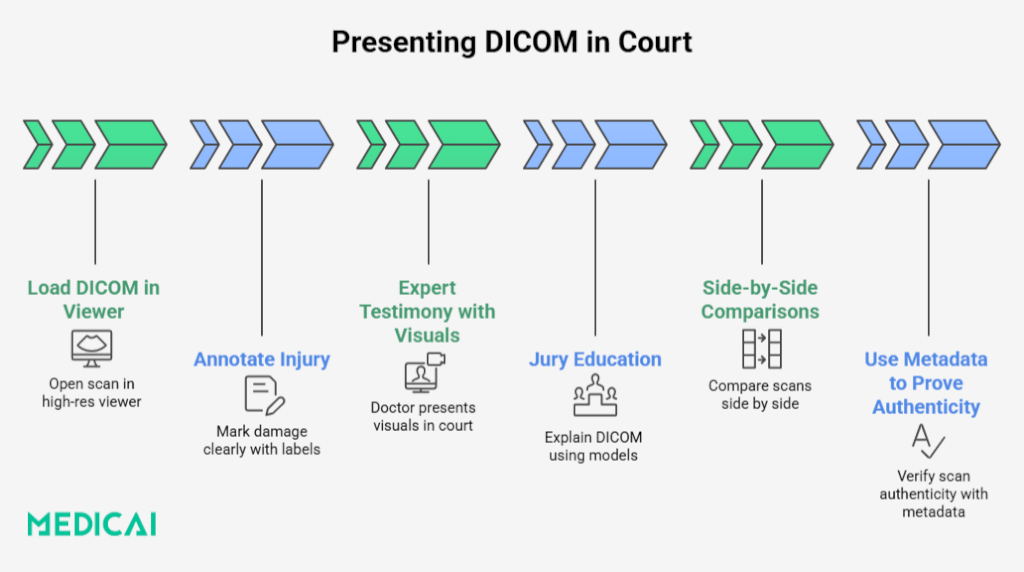
Use dedicated DICOM viewers to get the most out of DICOM images in court. Platforms like Medicai let you manipulate the image in real-time, adjusting zoom, contrast, and brightness, and applying overlays to spotlight injury sites.
3D reconstructions can be game changers for complex injuries or anatomical questions. They help jurors understand how a bone fracture or disc herniation compresses a nerve without needing a medical degree.
To highlight the contrast, you can show side-by-side comparisons—a normal knee vs. your client’s injured one, or pre- and post-surgical scans. Even better, annotate the images.
Labels, arrows, and color coding draw the jury’s eye exactly where it needs to go, making it easier for them to follow along.
In short, make the medical story clear, visual, and undeniable.
Collaborating with Medical Experts
DICOM files are packed with information, but it takes the right expert to explain what it all means.
When preparing for trial, collaborate with modality-specific experts to interpret scans (MRI, CT, X-ray, etc.). Their insights are crucial for making the images understandable. Work together to highlight key legal features with annotated graphics and demonstration slides.
Consider using DICOM Structured Reports (SRs). These integrate image data with expert commentary in a standardized, machine-readable format. It saves time in court and ensures the expert’s interpretation is documented, consistent, and defensible.
Educating the Jury
Even the clearest scan won’t help if the jury doesn’t understand what they’re looking at.
Start with a quick primer. A short explanation of what an MRI, CT, or X-ray does can go a long way. Avoid jargon. Just stick to the basics.
Introduce the Hounsfield Unit (HU) scale for CT scans. It’s a simple concept: numbers that measure tissue density. Water is 0. Air is -1000. Bone is +1000. These numbers make it easier to explain the differences between healthy and damaged tissues.
Use anatomical diagrams or models to help orient the jury. This will help them match what they see on screen to what they know about the human body.
Finally, break down complex findings into plain English. If your expert says “multilevel degenerative disc disease with central canal stenosis,” translate that into “worn-down spinal discs pressing on the nerves.”
The more jurors understand, the more they’ll believe and remember what you’re showing them.
Using DICOM Viewer Features Effectively in Case Presentations
A DICOM file is only as powerful as your ability to present it.
Zoom and Pan: Highlight the Details
Zoom functions let you focus on critical injury sites, such as small fractures, compressed nerves, or abnormal growths. Panning helps guide viewers to specific areas without overwhelming them with the entire scan.
In court, it can make subtle injuries far more visible and easier to explain to non-medical audiences.
Measurement Tools: Prove the Extent of Injury
Many DICOM viewers offer built-in measurement tools that let you calculate lengths, diameters, or distances within the scan. You can use these to quantify the size of a herniation, the gap in a fracture, or the degree of spinal narrowing.
When your expert witness references these measurements, you can visually demonstrate them, backing verbal testimony with visual, measurable facts.
Annotations and Overlays: Tell the Story Visually
Annotations let you add arrows, labels, text boxes, and color-coded highlights directly onto the image. Use overlays to:
- Identify specific anatomical structures
- Highlight abnormalities
- Show before-and-after comparisons
- Label scans with the date, modality, or patient ID (if appropriate)
This transforms a static scan into a narrated visual aid, making the evidence accessible and memorable.

Strategic Advantages of Using Native DICOM Format
Let’s see why sticking with the DICOM format gives your case a serious edge.
Preserves Image Fidelity and Metadata
The main advantage of native DICOM files is that they maintain full resolution and grayscale depth from imaging devices. It is crucial for identifying subtle differences in tissues and structures.
Besides, DICOM files preserve essential metadata, such as acquisition time, patient information, imaging parameters, and device details, that can be vital for verifying the scan’s integrity.
Leverages Metadata for Legal Verification
DICOM metadata is your digital paper trail. It reveals when the scan was taken, who it belongs to, where it was performed, and the machine settings used.
This information is invaluable when you need to:
- Establish a timeline of injury or care
- Confirm the image belongs to your client
- Prove that proper procedures were followed
This metadata authenticates the image as evidence. Without it, your opponent may claim the file was altered. With it, you can verify from the moment of capture.
Enables Advanced Visualization Techniques
DICOM is more than storage; it enhances the use of images with interactive tools to create visually persuasive cases.
- Windowing and Leveling: Adjust contrast and brightness to highlight damage.
- Multi-Planar Reformatting (MPR): View structures from multiple angles.
- Volume Rendering: Create 3D reconstructions for clearer anatomical views.
- Series Playback: Display images illustrating injury progression over time.
Adds Credibility and Defensibility
Presenting an image in its original form is powerful, demonstrating that you’re not cherry-picking visuals but showing medical facts as captured. If challenged, you can refer to embedded metadata, secure file handling practices, and expert interpretation, making your evidence more defendable.
DICOM and the Common Use Cases in Litigation
DICOM images play a decisive role in various legal cases by offering objective, timestamped medical evidence.
- Personal Injury: DICOM scans (such as MRIs or CT scans) help prove the severity and timing of an injury. Side-by-side comparisons or series of images can show how an injury has developed over time, which is critical for establishing causation and damages.
- Medical Malpractice: Original DICOM files allow lawyers to scrutinize missed diagnoses or improper imaging practices. Metadata confirms when a scan was taken and under what conditions, making proving negligence or delayed treatment easier.
- Workers’ Compensation: DICOM imaging supports claims involving soft tissue damage or degenerative conditions that evolve gradually. Timestamps and scan progression help link workplace conditions to ongoing medical issues.
- Criminal Cases: Forensic imaging in DICOM format can show internal injuries from assaults or abuse. Its metadata helps build a timeline and supports expert testimony on injury patterns.
Overcoming Technical and Practical Challenges
DICOM files offer rich evidentiary power but bring a few challenges.
Access and Usability
DICOM files aren’t easily opened with standard image viewers. That’s why platforms like Medicai offer browser-based viewers designed with legal workflows in mind. No complex setup, no medical degree required.
These tools let you access, share, and annotate scans in minutes.
Medical Terminology
Imaging reports can be loaded with technical terms. Collaborating with medical experts and using features like Medicai’s integrated report viewer can help turn complex findings into courtroom-ready explanations.
Structured Reports (SRs) also provide consistent interpretations that pair neatly with the images.
File Integrity and Security
Maintaining a secure digital chain of custody is critical. Medicai’s HIPAA-compliant infrastructure includes access logs, encrypted sharing, and audit-ready controls to ensure privacy and evidentiary integrity. It also helps you scan and preview DICOM files safely, minimizing the risk of embedded malware.
Conclusion
DICOM images are visual proof that can elevate your legal strategy. They add clarity, credibility, and undeniable weight to medical claims when presented effectively. From metadata to 3D visuals, they bring hard facts to the forefront.
With tools like Medicai, legal teams can securely access, analyze, and present this evidence confidently. Mastering DICOM can turn technical data into compelling, case-winning narratives in a courtroom where every detail matters.


Related Articles



Lets get in touch!
Learn more about how Medicai can help you strengthen your practice and improve your patients’ experience. Ready to start your Journey?
Book A Free Demo