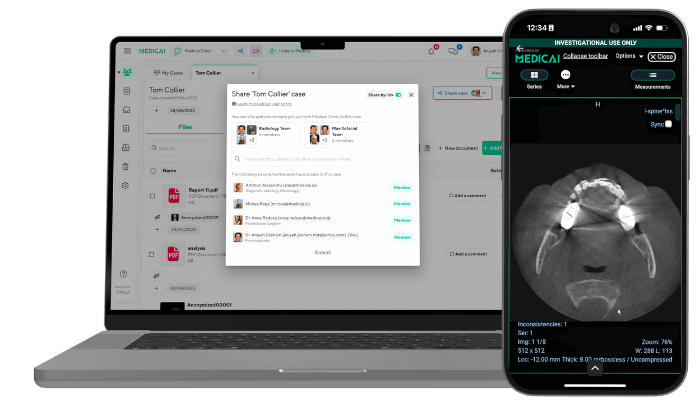
PACS in Healthcare: How Picture Archiving and Communication Systems Work in Radiology

A picture archiving and communication system (PACS) is the software that stores, retrieves, and distributes medical images across a hospital or imaging center. For the full definition and what the acronym stands for, see our guide to PACS meaning and the picture archiving and communication system.
This article looks at PACS from the inside of a working department: the role it plays in healthcare, the components it is built from, how an image moves from the order to the radiologist’s report, and how PACS connects to the RIS, the EHR, and a vendor-neutral archive.
This guide defines PACS in healthcare, outlines its components, and explains why a hospital PACS system is essential. PACS architecture, security, and buying criteria are covered in our enterprise PACS guide.
Note on terminology: PACS in medical imaging is unrelated to PACs (premature atrial contractions) in cardiology. The two share the same acronym but refer to entirely different concepts. This guide covers Picture Archiving and Communication Systems used in radiology and healthcare IT. For cardiac PACS, remote consultation cardiology references.

What does PACS stand for in medical terms?
PACS stands for Picture Archiving and Communication System. The acronym refers to a digital platform used in hospitals and radiology departments to store, retrieve, and share medical imaging studies — replacing the physical film archives of pre-digital radiology. FDA regulation 21 CFR 892.2050 now uses the name MIMPS (medical image management and processing system) for the device type that includes PACS.
The four words in the acronym each describe one of the platform’s core functions:
- Picture — the diagnostic image (X-ray, CT scan, MRI, ultrasound, mammogram, nuclear medicine study, or PET) acquired from an imaging modality
- Archiving — long-term digital storage of these images, replacing physical film libraries
- Communication — the network protocols (primarily DICOM) that move images between scanners, storage, and viewers
- System — the integrated software, hardware, and network infrastructure that supports the above
PACS is most commonly used in radiology, but the same platform increasingly supports cardiology, ophthalmology, dermatology, pathology, and dental imaging — any clinical specialty that generates diagnostic images.
In healthcare, PACS is the imaging IT platform that handles the complete workflow of diagnostic medical images — from acquisition at the imaging modality (CT scanner, MRI machine, X-ray unit, ultrasound), through long-term storage, to retrieval on a radiologist’s reading workstation, and finally to distribution to referring clinicians through the electronic health record.
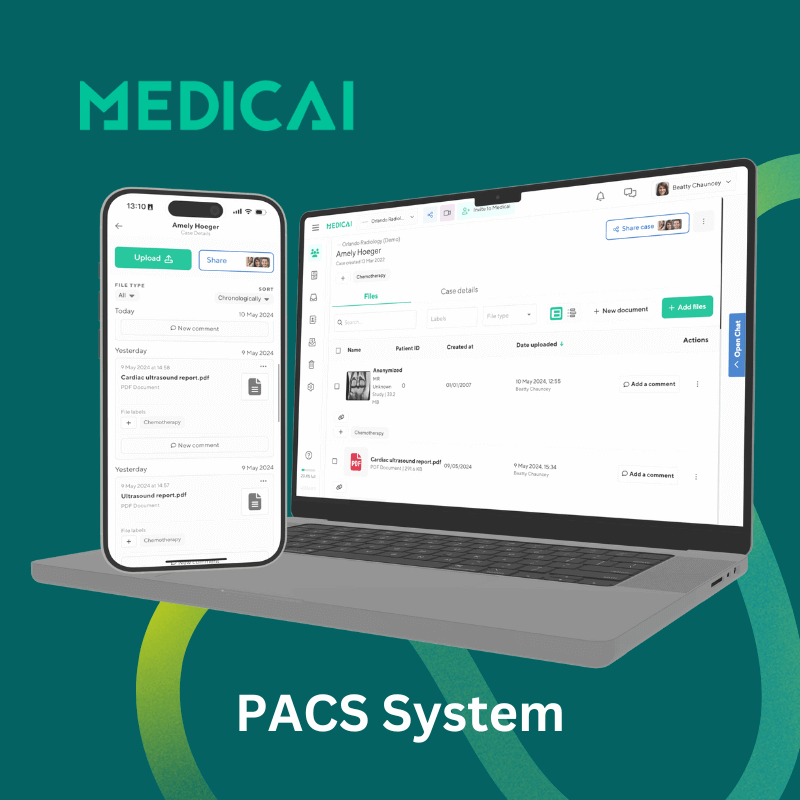
What is PACS in healthcare?
PACS plays three operational roles in modern healthcare delivery.
Clinical workflow backbone
PACS connects every imaging modality in a hospital — the CT scanner in the ED, the MRI machine in the outpatient imaging center, the X-ray unit on the orthopedic floor, the ultrasound in obstetrics — into a single accessible archive. A radiologist sitting at any authorized workstation can pull up any patient’s imaging study within seconds, regardless of the modality used to acquire it or where the patient was scanned.
EHR integration layer
PACS integrates with the EHR (Electronic Health Record) so that when a referring physician opens a patient’s chart, the imaging studies appear in context with the rest of the clinical record. This integration eliminates the older workflow in which physicians had to log in to separate radiology systems to view images.
Compliance and audit infrastructure
PACS handles the long-term storage and audit-logging requirements imposed by HIPAA, GDPR, and equivalent regulations for imaging data. Modern PACS deployments encrypt data in transit and at rest, log every study access for audit, and support the multi-year retention periods (how long images must be kept is set mainly by state law and differs for adults and minors. HIPAA itself does not set a retention period for medical records) required by regulatory frameworks.
Components of a PACS system
A PACS system consists of four interconnected components: imaging modalities that acquire the studies, network infrastructure that moves data between systems, viewing workstations where radiologists interpret studies, and archival storage that retains the imaging data long-term.
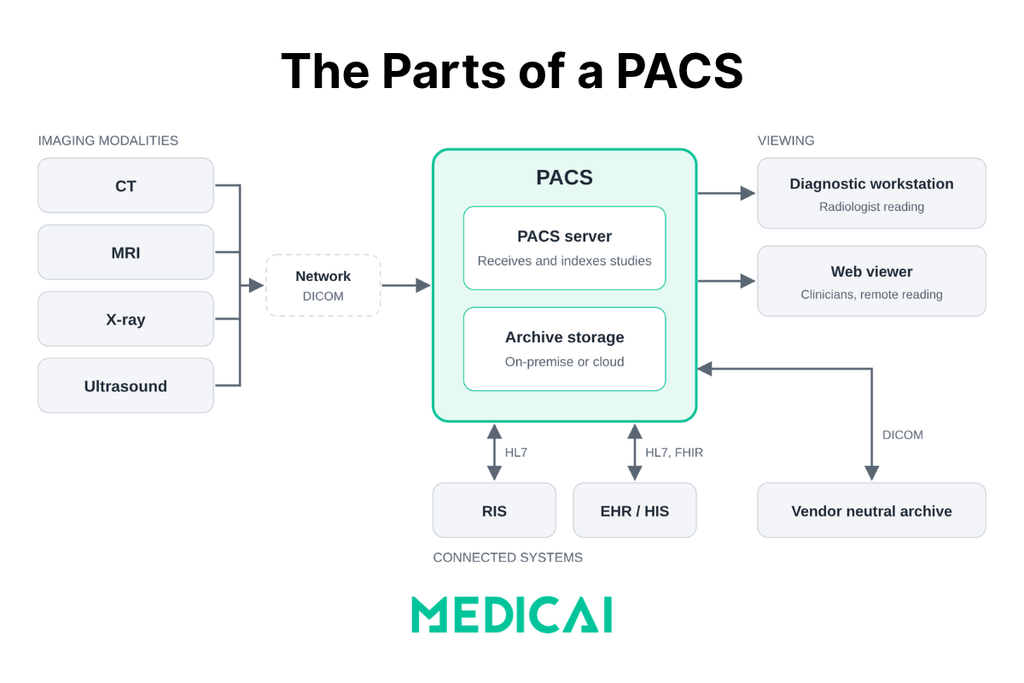
The PACS server
At the center of every PACS sits the server: the software that receives images from the modalities, indexes them in a database, stores them in the archive, and responds to viewer requests. When a CT scanner sends a study, it uses the DICOM store service. When a radiologist opens a prior exam, the viewer uses DICOM Query/Retrieve or web-based DICOMweb services to find and fetch it.
In an on-premise PACS, the server is physical hardware in the hospital’s data center. In a cloud PACS, the same functions run on cloud infrastructure, and the facility keeps only a small gateway on site to forward images. For setup details, see our guide to PACS server configuration.
Imaging modalities
The devices that generate diagnostic images — CT scanners, MRI machines, X-ray units, ultrasound systems, mammography units, nuclear medicine cameras, and PET scanners. Each modality outputs images in DICOM (Digital Imaging and Communications in Medicine) format, the universal standard that ensures images can be read by any DICOM-compliant viewer regardless of manufacturer.
Network infrastructure
High-speed network connections that move imaging studies between modalities, the PACS archive, and viewing workstations. Modern PACS deployments use either classic DIMSE network protocols (running over dedicated TCP ports on hospital networks) or DICOMweb (the modern RESTful HTTP equivalent that enables browser-based viewing and cloud-native deployment).
Viewing workstations
The diagnostic workstations radiologists use to read studies. Workstations include the DICOM viewer software, calibrated diagnostic-grade monitors (typically 3MP or 5MP for radiology reading), and integration with reporting tools and worklists. Modern PACS increasingly supports zero-footprint web-based viewers that run in a browser without local software installation, enabling reading from any authorized location.
Archival storage
Long-term storage of imaging studies. Three architectures dominate: on-premise storage (dedicated servers within the hospital), cloud storage (imaging archived in HIPAA-compliant cloud infrastructure), and hybrid (recent studies on local storage for fast access; older studies on cloud for cost-effective long-term retention). The choice of architecture has high cost and operational implications across a 7-to-10-year contract horizon.
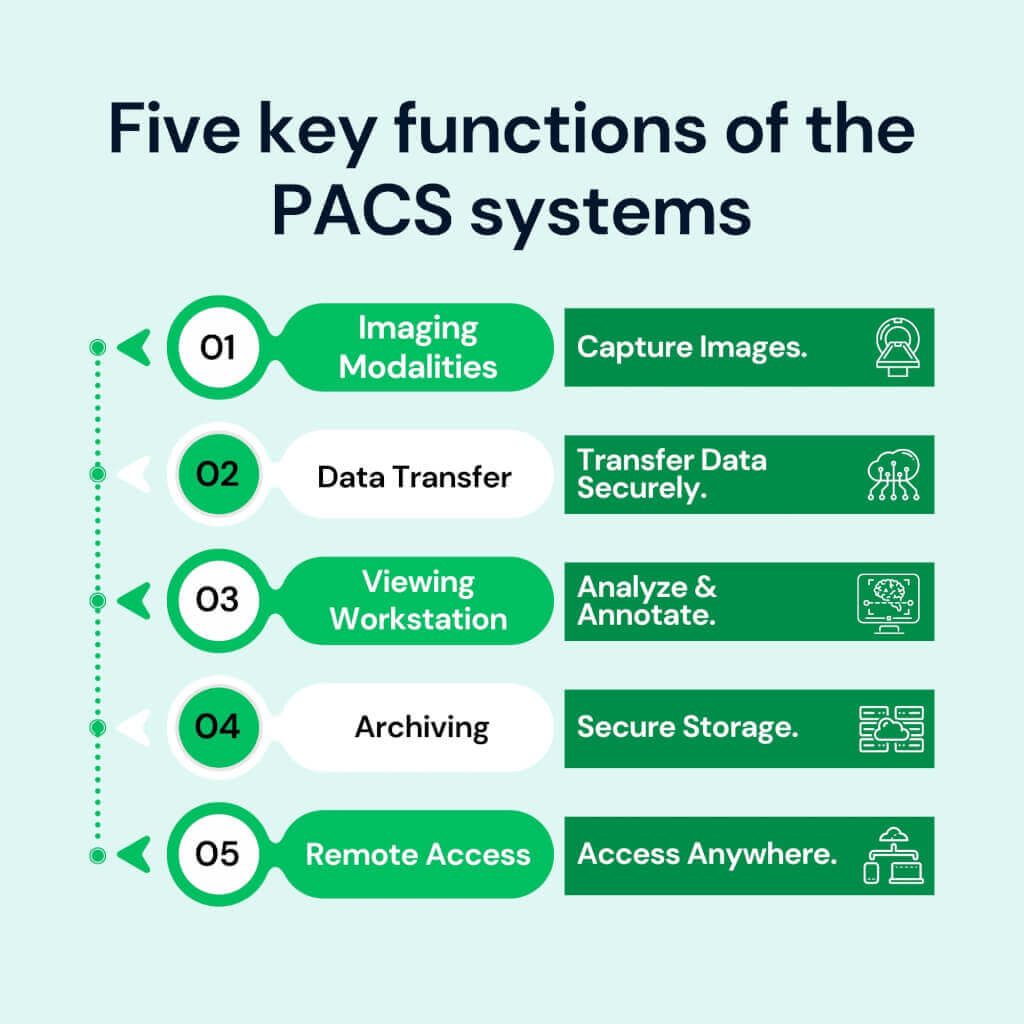
How a PACS system works: the lifecycle of a medical image
A medical image flows through a PACS system in four stages: an imaging order is placed in the RIS or EHR, the modality acquires the image using DICOM Modality Worklist to match it to the order, the modality sends the image to the PACS using DICOM Store, and the radiologist retrieves the image at the viewing workstation using DICOM Query/Retrieve.
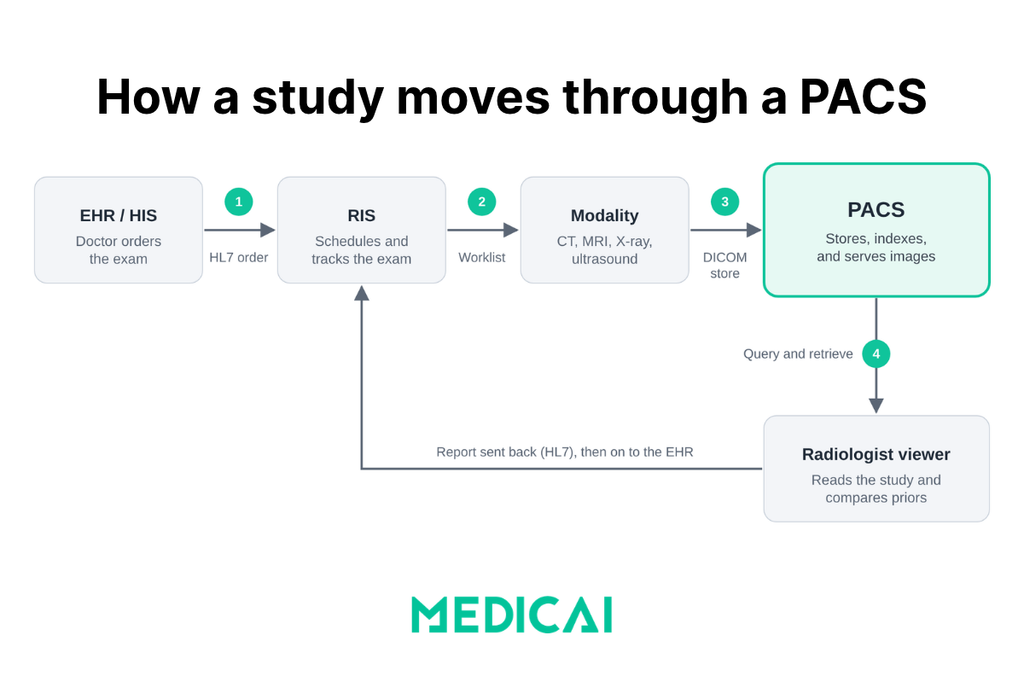
Stage 1 — The order (HL7)
The workflow begins in the RIS (Radiology Information System) or EHR. A physician orders an imaging study — a chest CT, a knee MRI, and a screening mammogram. The order generates an HL7 ORM message containing patient demographics, the requested study, and a unique Accession Number that will follow the study across all downstream systems.
Stage 2 — The worklist (DICOM Modality Worklist)
The CT scanner, MRI machine, or X-ray unit queries the DICOM Modality Worklist (MWL) server before each scan. The technologist reviews the day’s scheduled patients in a worklist and selects the correct patient — ensuring the resulting images are tagged with the correct Accession Number and patient demographics, preventing the identity mismatches that plagued pre-MWL imaging workflows.
Stage 3 — The capture and send (DICOM Store)
The modality acquires the diagnostic images. As each image is generated, the modality sends it to the PACS server using the DICOM Store service class (C-STORE). The PACS server validates the incoming study, indexes it by patient and accession number, and writes it to archival storage. In modern cloud-native PACS deployments, this transmission may use DICOMweb STOW-RS over HTTPS rather than classic DIMSE C-STORE.
Stage 4 — The fetch (DICOM Query/Retrieve)
When the radiologist opens the study at a viewing workstation, the workstation sends DICOM C-FIND and C-MOVE commands (or DICOMweb QIDO-RS and WADO-RS equivalents) to the PACS server. The PACS retrieves the relevant pixel data and transmits it to the workstation, where the radiologist reviews the images, makes measurements, compares them with prior studies, and dictates the diagnostic report.
Types of PACS systems: on-premise, cloud, and hybrid
PACS systems are deployed in three models: on-premise, cloud-based, and hybrid. Each model has different cost structures, scalability profiles, and operational implications, and the choice constrains the imaging architecture for the next 7 to 10 years.
| Dimension | On-premise PACS | Cloud PACS | Hybrid PACS |
|---|---|---|---|
| Infrastructure | Servers and storage in-house | Vendor-managed cloud | Local servers + cloud backup |
| Upfront cost | High | Low | Medium |
| Ongoing cost | IT staff + hardware refresh | Predictable monthly subscription | Both models combined |
| Scalability | Manual capacity planning | Elastic, on-demand | Cloud bursts when local fills |
| Remote access | VPN-dependent | Native, browser-based | Cloud layer enables remote |
| Data residency | Full on-site control | Vendor-controlled (contractual) | Mixed |
| Best fit | Large hospitals, strict residency | Imaging centers, specialty clinics | Hospitals transitioning to cloud |
On-premise PACS
Traditional PACS deployment with all servers, storage, and IT infrastructure inside the hospital. Provides full control over data residency and operates on the hospital’s internal network. The trade-offs are high upfront capital cost (hardware, software, setup), ongoing IT staffing for maintenance, and physical hardware refresh cycles every 5–7 years.
Cloud PACS
PACS infrastructure hosted by a cloud vendor (AWS, Azure, or vendor-managed cloud), accessed through the browser without on-premise servers. Cloud PACS shifts capital expenditure to operating expenditure (via a monthly subscription), eliminates hardware refresh cycles, and enables remote access from any authorized location. The most common deployment model for imaging centers, specialty clinics, and growing radiology practices in 2026.
Cloud PACS shifts the cost model from a large upfront capital purchase to a predictable operating subscription, which is often the deciding factor between deployment types. For a full breakdown of what drives PACS cost and how to compare cloud against on-premise over a five-year total cost of ownership, see the guide to cloud PACS cost.
Hybrid PACS
Combines on-premise primary storage with cloud-based backup or burst capacity. Recent imaging studies remain on local servers for fast access; older studies and overflow capacity are moved to cloud storage. Hybrid PACS models suit hospitals transitioning from full on-premise to cloud-native architectures without a forklift migration.
For a deeper comparison of cloud and on-premise PACS, see cloud vs on-premise PACS. For vendor evaluation across architectures, see cloud PACS vendors.
PACS for X-ray and digital radiography
X-ray is where many clinics first need a PACS. Urgent care centers, orthopedic and chiropractic practices, and outpatient imaging sites often start with one or two X-ray rooms, then add other modalities later. A PACS for X-ray performs the same core functions as any PACS, storing and distributing DICOM images, but its workflow has its own priorities.
CR and DR: two ways X-rays become digital
| Dimension | Computed radiography (CR) | Digital radiography (DR) |
|---|---|---|
| How the image is captured | A reusable imaging plate is exposed, then scanned in a separate reader | A flat-panel detector converts the exposure into a digital image directly |
| DICOM modality code | CR | DX |
| Typical setting | Older rooms and lower-volume sites | Most new rooms and portable units |
Either way, the result is a DICOM image that the CR reader or DR console sends to the PACS, and the PACS treats both the same once they arrive.
What an X-ray workflow needs from a PACS
- Modality worklist on the X-ray console, so technologists select the patient from a list instead of typing details by hand, reducing mismatched studies.
- Fast routing of a high volume of small studies to the right reader, including outside radiologists for after-hours reads.
- Prior comparison, since follow-up X-rays of the same joint or chest are only useful when compared with the earlier image.
- Measurement and annotation tools for orthopedic and spine work.
- Easy sharing with referring providers, so a fracture image reaches the orthopedist without a burned disc.
- For small clinics without IT staff, a cloud PACS avoids the need to run a local server, while a local cache or edge device can keep images opening quickly on-site.
If you only need to open a few X-ray files you already have, use Medicai’s free online X-ray viewer. For connected storage, worklists, and sharing across sites, see Medicai Cloud PACS.
PACS integration with RIS, HIS, EHR, and VNA
PACS doesn’t operate in isolation. It integrates with four other systems in the healthcare IT stack — the Radiology Information System (RIS), the Hospital Information System (HIS), the Electronic Health Record (EHR), and the Vendor-Neutral Archive (VNA) — to deliver the complete imaging workflow.
PACS and RIS
The RIS handles radiology-specific administration: scheduling, technologist worklist management, radiologist worklist, and report generation. PACS handles the imaging itself. The two integrate so closely that many vendors offer combined PACS/RIS suites, yet architecturally they remain separate systems. For a more detailed comparison, see RIS vs. PACS.
PACS and HIS
The HIS manages hospital-wide administrative workflows — patient registration, billing, bed management, and master patient index. PACS integrates with the HIS to ensure imaging data is associated with the correct patient record and that imaging billing flows correctly through the hospital’s revenue cycle.
PACS and EHR
EHR integration is what makes imaging visible to non-radiologist clinicians. When a primary care physician, surgeon, or emergency physician opens a patient’s chart in Epic, Cerner, or another EHR, the imaging studies appear in context — typically through a launch-in-context link that opens the PACS viewer pre-populated to the relevant patient. This integration is the difference between PACS as a radiology-only tool and PACS as a hospital-wide imaging platform.
PACS and VNA
The Vendor-Neutral Archive sits beneath the PACS as the long-term storage layer. PACS handles active reading workflow; VNA handles vendor-independent long-term archive. Most modern hospitals operate both, with PACS as the active diagnostic tool and VNA as the durable archive that outlives any single PACS contract. For more, see VNA vs PACS.
Benefits and limitations of PACS
Benefits
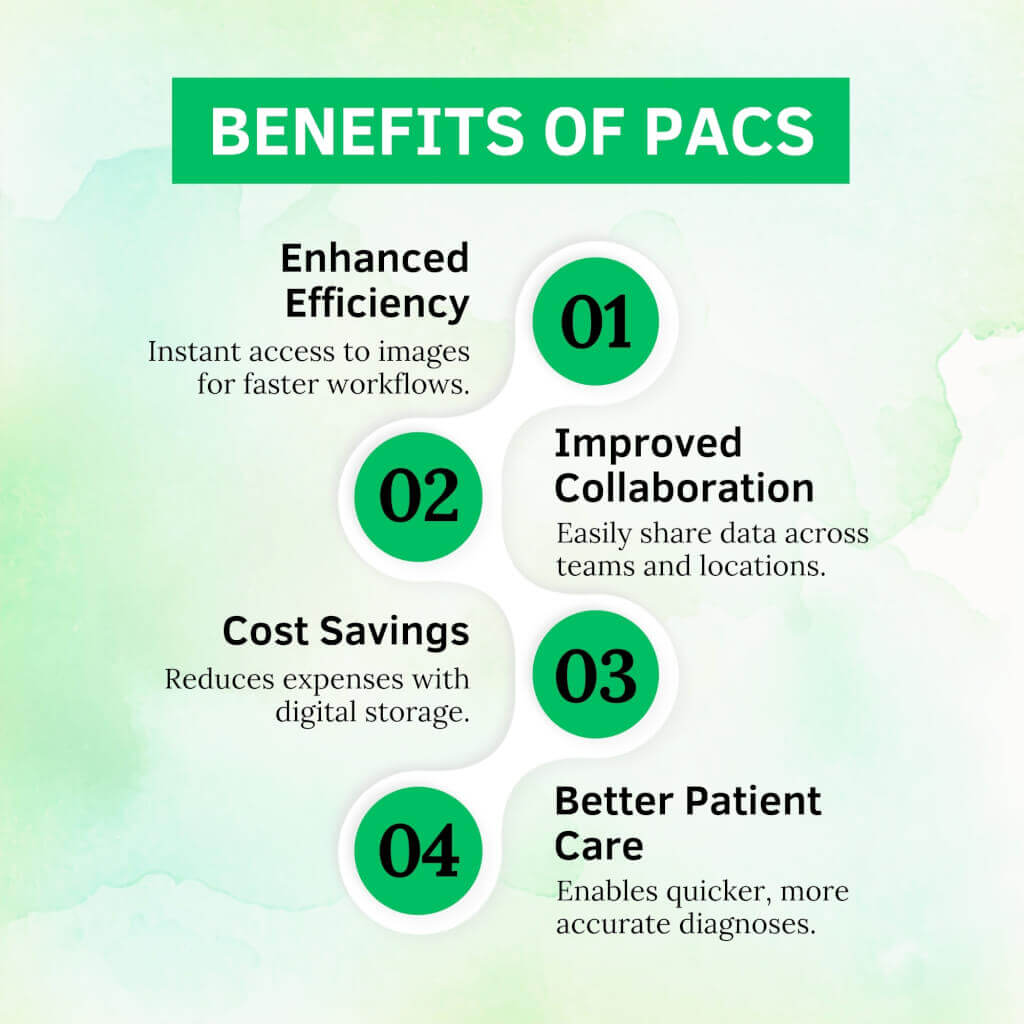
- Film and physical storage disappear. Images are captured, stored, and read digitally.
- Images are available in seconds, at any workstation the user is authorized to use, inside or outside the hospital.
- Radiologists can compare a new study with every prior exam of the same patient, which supports more accurate reads.
- Remote reading and teleradiology become possible, so a study can be read by a specialist in another city.
- Integration with the RIS and EHR brings the report and images together in front of the referring clinician.
Limitations
- An on-premise PACS needs servers, storage, backups, and staff to run them, and the hardware must be replaced on a regular cycle.
- Image volumes grow every year, especially with CT, MRI, and digital breast tomosynthesis, so storage costs continue to rise.
- Some systems store data in proprietary ways, which makes switching vendors slow and expensive. A vendor neutral archive reduces this risk.
- Downtime stops the department, so the PACS needs a tested continuity plan.
- A PACS stores protected health information, making it a target for ransomware and requiring strict access controls and audit logging.
- Sharing images with outside organizations still often falls back to CDs unless an image exchange is in place.
The standards that make PACS work: DICOM, HL7, and IHE
A PACS rarely works alone. Three sets of standards let it exchange data with scanners, information systems, and other hospitals.
- DICOM defines the image file format and the network services for sending, finding, and retrieving images. Every modality and every PACS speaks it, which is why a study from one vendor’s scanner can open in another vendor’s viewer. Read more in our guide to the DICOM format and to DICOMweb.
- HL7 carries the text side of the workflow: orders, patient demographics, and finished reports moving between the EHR, the RIS, and the PACS. Newer systems also use HL7 FHIR, which includes an ImagingStudy resource that references images stored in a PACS.
- IHE profiles describe how DICOM and HL7 should be combined for a specific job. The Scheduled Workflow profile covers the path from order to report described above. The XDS-I profile covers sharing images between organizations, explained in our guide to how medical image sharing works.
What a PACS costs
PACS cost depends mostly on the deployment model. An on-premise system has a large up-front cost for licenses, servers, and storage, followed by maintenance and hardware refreshes. A cloud PACS is usually priced as a subscription, often based on study volume or storage, with little to no on-site hardware. Our guides to cloud PACS cost and cloud vs on-premise PACS compare the two in detail.
Frequently Asked Questions about PACS
What does PACS stand for?
PACS stands for Picture Archiving and Communication System. It’s the medical imaging IT platform that hospitals and radiology departments use to store, retrieve, and share diagnostic images like X-rays, CT scans, MRIs, and ultrasounds — replacing the physical film archives of pre-digital radiology.
What is PACS in healthcare?
In healthcare, PACS is the imaging IT platform that manages the complete workflow of diagnostic medical images — from acquisition at the imaging modality, through long-term storage, to retrieval on a radiologist’s workstation, and finally to distribution through the electronic health record.
What is a PACS system used for?
A PACS system captures diagnostic medical images from imaging modalities (CT, MRI, X-ray, ultrasound), stores them in long-term digital archives, retrieves them at radiologist workstations for interpretation, and distributes them to referring clinicians through the electronic health record.
Do you need a PACS for X-ray?
If a clinic produces digital X-rays from a CR reader or DR system, it needs somewhere to store, view, and share them. A PACS does that and keeps images available for comparison and referral. Small clinics often use a cloud PACS so they don’t have to run their own server.
What is the difference between PACS and a medical record?
A medical record (EHR) is the complete clinical record — diagnoses, medications, lab results, notes, and imaging references. PACS is a specialized imaging platform that stores imaging studies. EHR holds the textual record; PACS holds the pixel data. The two integrate so that imaging appears in context within the patient’s full record.
What’s the difference between PACS and RIS?
PACS handles imaging data — storage, retrieval, and viewing of diagnostic images. RIS (Radiology Information System) handles radiology administration — scheduling, worklists, reporting, and billing. PACS is the radiologist’s diagnostic tool; RIS is the department’s workflow system. The two integrate but serve different functions.
What’s the difference between PACS and a VNA?
PACS is the active reading platform that radiologists use day-to-day. A VNA (Vendor-Neutral Archive) is the long-term archive layer beneath the PACS, storing imaging in a vendor-independent format so the data outlives any single PACS contract. Most hospitals operate both a PACS for active workflows and a VNA for long-term archiving.
What’s the difference between PACS and DICOM?
DICOM is the international standard defining how medical images are formatted, transmitted, and stored. PACS is the software platform that uses DICOM to deliver clinical functionality. Every PACS speaks DICOM, but a PACS adds workflow, storage management, security, and integration that the DICOM standard alone doesn’t provide.
Is PACS the same as PAC (premature atrial contraction)?
No. PACS in medical imaging is unrelated to PACs (premature atrial contractions) in cardiology — the two share the same acronym but refer to entirely different concepts. PACS is the Picture Archiving and Communication System (an imaging IT system). PACs are abnormal heartbeats originating in the atria.
Where PACS is heading
Three trends are reshaping PACS through 2027 and beyond. Cloud-native architecture is moving from a differentiator to a baseline expectation — even legacy on-premise PACS leaders are migrating toward cloud-extension architectures, and new deployments increasingly start cloud-first. AI integration is becoming a native PACS capability rather than a partnership extension, with platforms shipping native AI orchestration for triage, detection, reporting, and workflow optimization. And the boundary between PACS and Vendor-Neutral Archive is dissolving as cloud-native platforms deliver both active reading and long-term archive through a single architecture.
For organizations evaluating PACS in 2026 and 2027, the practical implication is that today’s PACS selection constrains the next 7-to-10 years of imaging architecture. The questions worth asking are not just ‘which PACS has the highest KLAS ranking’ — they’re ‘which PACS fits where this radiology department will be three contract cycles from now.’
For deeper context, see the PACS architecture guide and the PACS workflow guide — the architecture and workflow companion hubs in this PACS cluster.


Related Articles


Lets get in touch!
Learn more about how Medicai can help you strengthen your practice and improve your patients’ experience. Ready to start your Journey?
Book A Free Demo