Why DICOM Archiving is Better in Cloud
What is DICOM
DICOM, or Digital Imaging and Communications in Medicine, is an internationally recognized standard for medical images. DICOM images are used for various medical imaging modalities, such as X-rays, MRI scans, and ultrasounds. The Cloud Healthcare API provides operations for reading DICOM instances, studies, and series that are consistent with the DICOM web standard.
Scaling DICOM files in Cloud
There are many benefits to using the Cloud for DICOM files, and it’s often less expensive than using traditional methods. As data sets become larger and more complex, storing them on-premises becomes increasingly difficult and costly. This is especially true for businesses that are looking to attain scale.
To avoid this problem, many organizations are turning to cloud storage solutions. These services are relatively affordable, allowing companies to store their data without investing in expensive hardware and software. Scalability is an essential factor in any cloud system. This is because cloud-based can handle a high number of transactions.
Additionally, on-premise solutions are vulnerable to attacks and may need help to handle significant demand increases. For your storage needs to keep up with the ever-growing technological advances and your own needs as your healthcare organization grows, you’ll need a storage solution that can grow with you.
When scaling up, budget concerns often arise, and cloud technology has an advantage over on-premises solutions. Cloud storage is usually flexible in terms of pricing and configuration options, which can help to keep costs down. With medical image archiving growing in popularity, it is easy to increase the size of your archive.
Cloud Native PACS- a game-changer for DICOM viewers
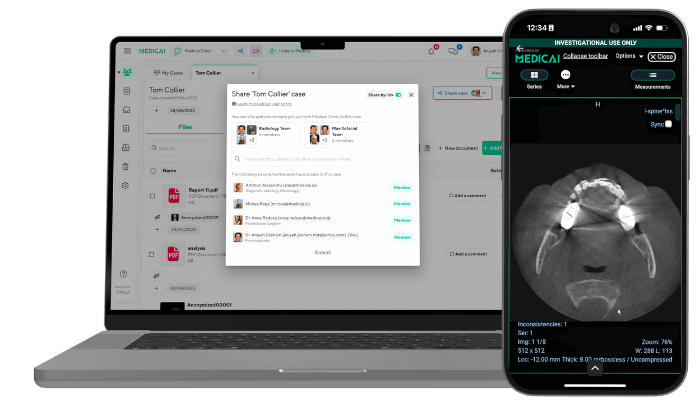
Cloud-based PACS offers many benefits over traditional PACS, including storing and using data on remote servers. This makes it an ideal choice for patients who need access to health information from anywhere in the world. A third party, such as a cloud PACS vendor, handles the hosting and maintenance of your data. It manages the DICOM cloud storage and its security, and anyone with an internet connection and permission access can see medical imaging data from anywhere.
Cloud-based DICOM viewers are available from PACS vendors, as well as web-based viewers. This way, anyone wishing to view images remotely can do so without installing special DICOM/ PACS software.
With a regular DICOM viewer, you need to install it on a computer or download an app for smartphones and tablets. Since before the development of cloud-based PACS and DICOM viewers, DICOM files have been less accessible. This is due in large part to their proprietary format. However, recent technological advances have allowed for the widespread adoption of cloud-based PACS and DICOM viewers, making these files much more accessible to clinicians and patients. Nowadays, remote access to files is possible.
It means people can access files far away from them without traveling to the file’s location. Cloud-based DICOM viewers are accessed through a web-based platform, providing easy access to medical images. Images can be manipulated, shared, and compared in various ways depending on the viewer’s features. This makes them a powerful way to communicate and interact with others.
How to Implement the Change
Kurt Lewin (1890-1947), a founding pioneer in change management, has developed a 3-stage Model: Unfreeze, Change, Refreeze. The Model’s name is an analogy for changing a block of ice:
- You have to melt the ice (unfreeze).
- You have to reshape it in a desirable form (change).
- You must create a new block of ice (refreeze).
Medicai is facilitating the change in clinics/ hospitals by just simply installing one or more Medicai Nodes. These nodes enable access to the data already existing in the current infrastructure (PACS, VNA). If there is no PACS, Medicai takes over the role of PACS.
It means the “Change” stage of the Model is easy to execute and achieve due to the easiness with which Medicai Nodes connect with the existing infrastructure.
The plug-and-play install of Medicai Nodes sustains the “Refreeze” stage, where access to the existing data becomes granular and fast. Therefore, implementation becomes brief and takes a few hours up to a few days, depending on the current infrastructure’s complexity.

Related Articles


Lets get in touch!
Learn more about how Medicai can help you strengthen your practice and improve your patients’ experience. Ready to start your Journey?
Book A Free Demo