DICOM Viewer: The Secret Weapon for Personal Injury Cases

In personal injury law, medical evidence can make or break a case. However, relying on slow hospital processes, outdated CDs, or unclear medical reports can hinder progress and weaken legal arguments.
That’s where a DICOM viewer for personal injury lawyers comes in—a game-changing tool.
A DICOM viewer offers lawyers quick access to high-quality medical images, allowing them to analyze injuries, collaborate with experts, and craft compelling courtroom visuals. With the right DICOM viewer, attorneys can strengthen their cases, speed up settlements, and enhance client compensation.
Let me help you discover how valuable a DICOM viewer can be for personal injury lawyers.

Why Personal Injury Lawyers Need a DICOM Viewer?
Personal injury lawyers need quick, direct access to medical records, and a DICOM viewer makes that possible. It allows lawyers to access, analyze, and present medical scans to strengthen their legal arguments and maximize case outcomes.
A DICOM viewer is software designed to open and analyze medical imaging files, such as MRIs, CT scans, and X-rays. These files can be crucial evidence in personal injury cases.
Let’s see why every personal injury attorney should use a DICOm viewer.
- Medical Images as Key Evidence: Courts and insurance companies require solid, objective proof of injuries. MRIs, X-rays, and CT scans offer undeniable evidence crucial for a claim’s success or failure.
- Instant Access to Medical Records: No more waiting on hospitals or struggling with CDs. With a DICOM viewer, lawyers can pull up medical scans instantly, reducing delays and keeping cases moving.
- Stronger Case Preparation: Zooming in on fractures, measuring soft tissue damage, and annotating images allows lawyers to pinpoint injuries and build more compelling arguments.
- Higher Settlements & Court Wins: Clear visual evidence of injuries prompts insurance companies and opposing lawyers to take cases more seriously. It leads to better settlement offers and stronger courtroom presentations.
- Seamless Collaboration with Medical Experts: Lawyers can use built-in annotation tools to highlight important details and share scans with radiologists or expert witnesses. It helps them get insights that strengthen their legal strategies.
In short, a DICOM viewer transforms how personal injury lawyers handle medical evidence—making their job faster, easier, and more effective.
The result? Stronger cases, bigger settlements, and happier clients.
Key Features of a DICOM Viewer for Personal Injury Lawyers
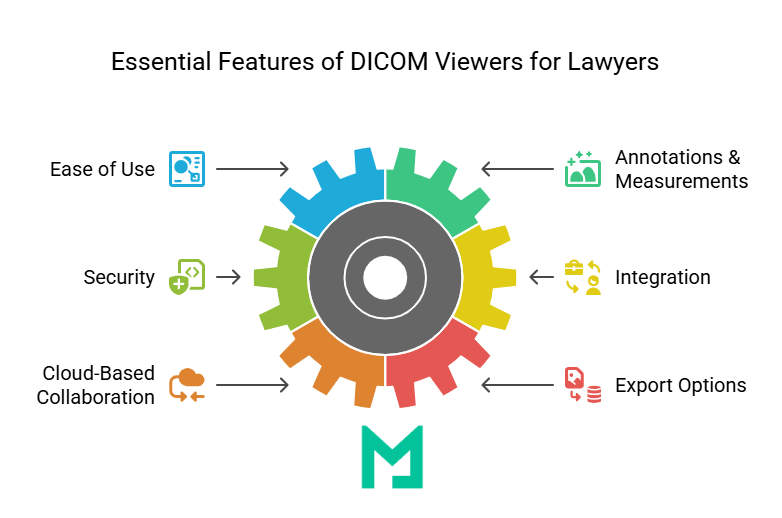
Not all DICOM viewers are created equal. For personal injury lawyers, the right tool must be simple, secure, and effective in handling medical evidence. Here are the essential features of a DICOM Viewer for Personal Injury Lawyers.
Ease of Use – No Medical Training Required
Lawyers aren’t radiologists, so a DICOM viewer must be intuitive. A simple, user-friendly interface ensures that attorneys can handle medical images, zoom in on injuries, and adjust contrast or brightness without specialized training.
The goal? Quickly identify key injury details without getting lost in complex medical software.
Annotations & Measurements – Turning Images into Stronger Evidence
Raw medical scans don’t always speak for themselves. That’s why annotation and measurement tools are game-changers. Lawyers can:
- Highlight fractures, muscle tears, or disc injuries with drawing tools.
- Add notes directly onto the image for easy reference.
- Measure injury size or misalignments—critical for proving severity in settlement negotiations.
These features make medical imaging easier to interpret, ensuring clearer explanations for clients, insurance adjusters, and judges.
Secure & HIPAA-Compliant Access – Protecting Sensitive Medical Data
Legal cases deal with confidential medical information, making security a top priority. A good DICOM viewer ensures:
- HIPAA-compliant encryption, so patient data is protected.
- Secure logins and restricted access, preventing unauthorized use.
- Audit trails, tracking who accessed the files for legal compliance.
Lawsuits can involve millions of dollars in settlements. Because of this, it is very important to keep medical data secure and usable in court.
Integration with Case Management Software – Streamlining Legal Workflows
Time is money in law firms. A DICOM viewer integrates seamlessly with existing legal case management systems like:
- SmartAdvocate
- Clio
- Filevine
Attorneys can attach medical images directly to case files. This reduces back-and-forth communication between different software platforms, improving organization and saving time.
Cloud-Based Collaboration – Work Anytime, Anywhere
Legal teams don’t work in isolation. Whether reviewing medical records with expert witnesses or preparing for court, a cloud-based DICOM viewer makes collaboration effortless:
- Access files from any device, anytime.
- Share medical images instantly with colleagues and doctors—no CDs, no downloads.
- Eliminate IT headaches, as cloud solutions don’t require software installations or updates.
The flexibility speeds up decision-making and strengthens case preparation for law firms juggling multiple injury cases.
Export Options – Converting Images for Legal Use
DICOM files are not standard image formats, which can be problematic when presenting evidence in court or negotiations. A top-tier DICOM viewer allows lawyers to export medical scans into commonly used formats, including:
- PDF – Ideal for filing evidence in court or attaching scans to legal documents.
- JPEG/PNG – Easy sharing via email or case management systems.
These options help lawyers present medical evidence clearly to judges, insurance companies, and clients, removing technical barriers.
How Lawyers Use a DICOM Viewer Independently — Without Waiting on Third Parties
One of the most overlooked advantages of cloud-based DICOM viewers in legal practice is the ability for the attorney to engage directly with imaging evidence without routing every question through a medical expert. This independence changes the pace and quality of case preparation in three specific ways.
Independent review of medical evidence
With a DICOM viewer, a personal injury lawyer can open the same high-resolution scan the radiologist interpreted and explore it directly — zooming in on the disc herniation, adjusting contrast to make soft tissue damage visible, stepping through CT slices to understand the three-dimensional extent of a spinal injury, or comparing the imaging from the day of the accident against follow-up scans taken three months later.
This is not about replacing the medical expert. It is about arriving at expert consultations already informed. A lawyer who has reviewed the imaging before the call asks better questions, identifies inconsistencies between the radiology report and the visual evidence more reliably, and builds a case strategy rooted in what the images actually show rather than in the report summary. For cases involving soft tissue injuries — which are difficult to visualize and routinely challenged by defense counsel — this direct familiarity with the imaging is the difference between a confident expert examination and one that can be shaken on cross.
Stronger case preparation through imaging familiarity
Direct image access changes deposition and cross-examination preparation in practical ways. An attorney who has personally reviewed the spinal MRI can ask the treating physician specific questions about the imaging findings — “can you walk us through what we are seeing at L4-L5 in this slice” — rather than relying on the physician to volunteer details. It changes the preparation of expert witness testimony: instead of briefing the expert from a written report, the attorney can share the annotated imaging study directly and discuss the specific frames relevant to the case narrative.
Identifying the imaging timeline is also more reliable with direct access. A lawyer reviewing serial imaging studies can flag the frames that show the injury at its worst, the frames that show inadequate healing, and the frames that document new complications — building the visual timeline that demonstrates injury progression or failure to improve, which directly supports calculations of future medical costs and ongoing disability claims.
Real-time collaboration with medical experts
When both the attorney and the treating physician or independent medical expert use the same DICOM viewer to view the same study simultaneously, the consultation changes character. The physician can place an annotation directly on the image — circling the nerve compression, drawing the measurement line across the disc space, highlighting the area of oedema — while the attorney watches in real time from a different location. Both parties mark up the same study.
This real-time shared viewing reduces the most common source of error in medical-legal collaboration: the translation gap between what the physician sees in the imaging and what the attorney understands from the written report. When the expert can point directly at the finding on the image and say, “This is the structure, this is the damage, and this is why it is consistent with the mechanism of injury described,” the attorney arrives at trial with a clear, consistent visual narrative that matches the expert’s testimony precisely.

How DICOM Viewers Elevate Personal Injury Case Strategies?
A DICOM viewer improves legal strategies by aiding personal injury lawyers during negotiations and in court proceedings in various ways.
Eliminating Delays in Medical Evidence Review
One of the biggest hurdles in personal injury cases is waiting for hospitals or imaging centers to release medical records. Traditional methods—requesting CDs or printed scans—can take days or weeks, slowing settlements or trial preparations.
With a DICOM viewer, lawyers can:
- Instantly retrieve, view, and analyze digital medical images without relying on third-party access.
- Avoid compatibility issues, as DICOM files can be opened directly without special hospital software.
- Speed up case timelines by reviewing injuries as soon as scans become available.
Strengthening Medical Evidence Through Expert Collaboration
Medical testimony can be pivotal in personal injury cases, but delays in expert analysis may weaken a claim. A DICOM viewer facilitates real-time collaboration between lawyers and medical professionals.
DICOM viewers eliminate physical copies and unsecured emails by allowing secure file sharing between radiologists and expert witnesses. This gives lawyers quicker access to expert insights, enhancing the credibility of medical evidence in court.
Making Injury Evidence More Persuasive in Court
Medical reports are often complex and full of technical terms, making them difficult for judges, juries, and insurance adjusters to grasp fully. A DICOM viewer helps simplify medical evidence into compelling visual proof.
DICOM viewers improve courtroom presentations in several ways. They:
- Enhance X-rays, MRIs, and CT scans for clarity.
- Show pre- and post-accident comparisons to demonstrate the extent of trauma.
- Overlay annotations and labels, making injury details easier to understand.
A strong visual presentation can make injuries undeniable, increasing the chances of favorable settlements or court verdicts.
Strengthening Negotiation Power for Higher Settlements
Insurance companies often try to minimize payouts by disputing the severity of injuries. A DICOM viewer provides undeniable proof, making it harder for insurers to challenge claims.
A DICOM viewer greatly influences settlement discussions by providing high-resolution images of injuries that enhance the credibility of claims. These visuals justify higher compensation by clearly showing the severity of injuries and serve as objective proof against insurance disputes.
How to Choose the Right DICOM Viewer for Your Law Firm
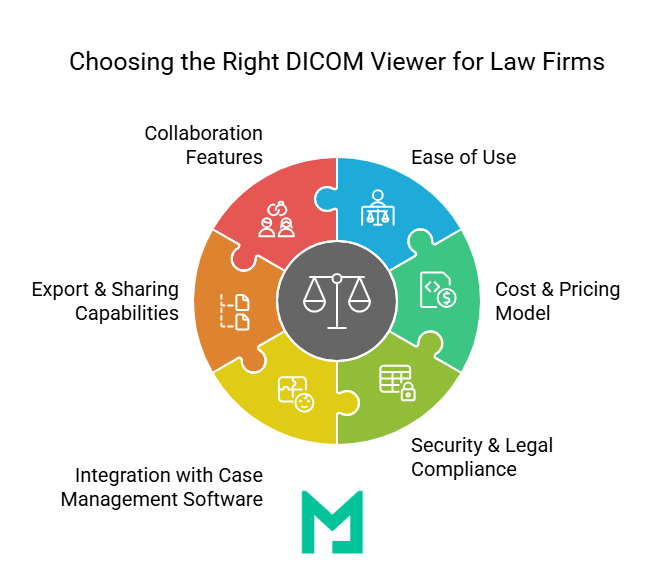
Not all DICOM viewers and PACS platforms are built for legal use. Hospital-grade PACS systems are designed for high-volume radiology departments — they are expensive, require IT infrastructure to maintain, and are not accessible to outside parties without complex credentialing. A personal injury legal team needs a different set of capabilities: simplicity, secure external sharing, HIPAA compliance, and courtroom-ready export tools. Four criteria separate platforms that serve legal workflows from those that do not.
Security and HIPAA compliance first
Any platform used to access, store, or share patient medical imaging in connection with a legal matter is handling Protected Health Information under HIPAA. The platform must carry a signed Business Associate Agreement (BAA) with every legal team that accesses patient data. Beyond the BAA, the platform must use AES-256 encryption at rest and TLS 1.2+ in transit, role-based access controls that restrict viewing to authorised parties only, and a full audit trail that logs every image access event with user identity and timestamp. That audit trail is not just a compliance requirement — it is the chain of custody documentation that establishes the legal admissibility of the imaging evidence in court.
Lawyer-friendly interface with no medical IT background required
The viewer must be operable by a lawyer or paralegal without training on medical imaging software. The essential tools for legal use are: zoom and pan to inspect specific anatomical areas, window and level adjustment to enhance contrast for soft tissue visibility, side-by-side comparison of studies taken at different dates, annotation tools to mark and label areas of injury, linear measurement tools for documenting injury dimensions, and image export to standard formats (JPEG, PNG, PDF) for court presentations and expert briefings. If any of these require a technical installation process or a manual that a non-clinical professional cannot follow independently, the platform does not meet the operational requirement.
Secure external sharing without a portal login for every recipient
Personal injury legal work involves sharing imaging with multiple parties who are not employees of the law firm or the healthcare provider — independent medical experts, opposing counsel during discovery, insurance adjusters, and the court itself. A platform designed for this workflow generates secure, encrypted, time-limited sharing links for each recipient — the link expires after a set period, access is logged, and the recipient does not need to create an account or install software to view the study. This is the mechanism that replaces the CD in the modern personal injury workflow: one link, one click, one secure view.
Integration with case management and documentation tools
Imaging evidence does not exist in isolation — it sits alongside medical records, police reports, witness statements, and legal filings inside a case management system. A DICOM viewer that integrates via API with case management platforms allows imaging links, annotations, and export files to be attached directly to the relevant case file without manual download and re-upload steps. This integration reduces administrative overhead and eliminates the risk of imaging evidence being stored outside the secure case file, such as in personal downloads or email attachments.
Medicai provides all four capabilities from a single platform: HIPAA-compliant cloud storage with BAA, a zero-footprint browser viewer accessible on any device, time-limited secure sharing links that require no recipient account, and an open API that connects to case management software. For personal injury legal teams evaluating DICOM viewer options, the free 14-day trial includes full access to all sharing and collaboration features — test the complete workflow with a real case study before committing.
Legal and Ethical Considerations in Using DICOM Viewers
Personal injury lawyers must ensure they use DICOM viewers securely, ethically, and legally.
Ensuring HIPAA Compliance When Handling Patient Medical Images
Medical images contain sensitive health information protected under HIPAA. To mitigate legal risks, law firms should use HIPAA-compliant DICOM viewers with secure encryption, store images securely, and limit access to relevant team members to maintain confidentiality.
Misusing non-compliant software or mishandling data can lead to legal penalties and loss of credibility in court.
Avoiding Evidence Tampering Risks with Proper Image Management
Managing DICOM files correctly is essential to maintaining credibility in court and using evidence responsibly. If these files are altered or mishandled, it can harm a case and lead to accusations of tampering.
- Always use original DICOM files and modify them only to highlight specific findings for legal purposes.
- Mark any annotations and maintain a secure, timestamped record of all access and modifications as an audit trail.
Working with Certified Radiologists for Expert Medical Interpretations
Lawyers aren’t medical professionals; misinterpreting an MRI or X-ray can weaken a case. To avoid errors, consult board-certified radiologists for expert opinions. Use a DICOM viewer for secure collaboration and ensure accurate documentation of medical interpretations to prevent court challenges.
Conclusion
Whether negotiating with insurers or presenting in court, medical images can speak louder than words—if you have the right tools to showcase them. A DICOM viewer is a game-changer for personal injury lawyers, transforming how they handle medical evidence.
Medicai offers a cutting-edge, cloud-based DICOM viewer designed to help law firms access, analyze, and share medical imaging effortlessly.
So, why rely on outdated methods when Medicai makes medical imaging effortless?


Related Articles

Lets get in touch!
Learn more about how Medicai can help you strengthen your practice and improve your patients’ experience. Ready to start your Journey?
Book A Free Demo