Teleradiology PACS for Urgent Care Clinics — Cloud Imaging, Remote Reads, and 24/7 Coverage
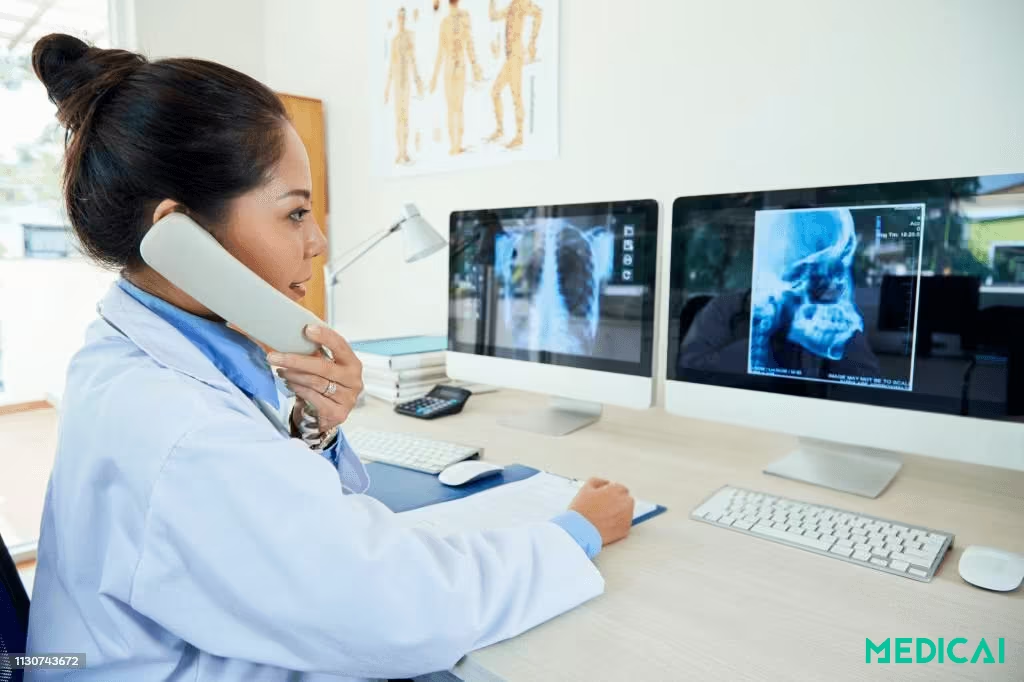
When patients walk into urgent care, they need answers fast. Yet imaging often becomes a bottleneck, especially when radiologists aren’t on site.
That’s where technology changes the game.
A teleradiology PACS system for urgent care enables clinics to capture, store, and transmit images instantly while connecting with remote radiologists for immediate reads. The result is faster diagnoses, smoother workflows, and more confident care decisions.
Discover why teleradiology PACS is a perfect fit for urgent care and how it improves speed, security, and patient outcomes in today’s fast-paced healthcare environment.

Understanding PACS and Teleradiology in Urgent Care
A Picture Archiving and Communication System (PACS) is the digital backbone of modern medical imaging. Instead of relying on bulky film and manual transfers, PACS stores, organizes, and transmits images electronically.
Its components usually include modalities (X-ray, CT, MRI, ultrasound scanners), a secure network for transmitting images, workstations for viewing and reporting, and an archive that serves as a digital library.
With PACS, urgent care providers no longer waste time burning CDs or waiting for images to be couriered. Everything is instantly accessible across the clinic, ensuring that care moves forward without delay (Sectra Medical, TechTarget, ADSC).
Teleradiology takes PACS a step further by enabling remote review of medical images. Through teleradiology, images captured at the clinic are securely shared with radiologists who may be across town—or across the country.
When PACS and teleradiology collaborate, urgent care centers access real-time images and expert opinions, eliminating traditional workflow bottlenecks. This integration fosters seamless collaboration between front-line clinicians and remote radiologists, reducing repeat imaging and delays in reporting.
Cloud-based PACS solutions enhance care coordination by providing secure, HIPAA-compliant access from any location. Platforms like Medicai simplify the adoption of these systems for clinics, enabling advanced imaging to be fast and reliable for urgent care teams.
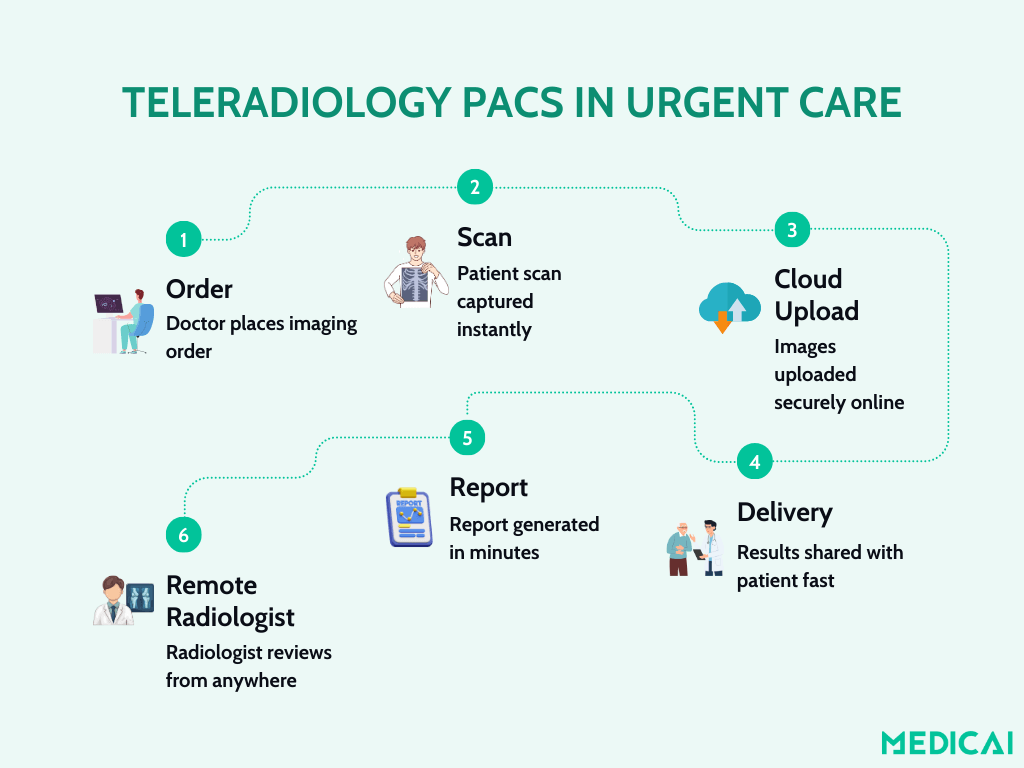
Workflow Teleradiology PACS System for Urgent Care
Urgent care relies on speed, and the workflow of the teleradiology PACS system streamlines the imaging workflow from scan order to radiologist report, avoiding traditional bottlenecks.
Step 1: Imaging Order and Capture
A provider orders a scan, such as an X-ray, for a possible fracture. The patient is imaged using the clinic’s modality (X-ray, CT, or ultrasound). The system automatically sends the study to the PACS without manual transfers.
Step 2: Cloud Transmission via Teleradiology
Instead of being confined to the clinic’s server, the PACS uploads the images to a secure, cloud-based teleradiology network. It helps authorized radiologists, wherever they’re located, access the case instantly.
Step 3: Case Routing to Remote Radiologists
The system generates a worklist and assigns the study to an available radiologist, often based on subspecialty, workload, or time zone. This routing ensures urgent care clinics get access to the right expertise when needed most.
Step 4: Remote Interpretation
Radiologists log in through a web-based DICOM viewer to analyze the images. Using advanced tools like measurements, annotations, and sometimes AI overlays, they interpret the scan. The teleradiology element ensures 24/7 coverage, even outside clinic hours.
Step 5: Report Creation and Delivery
The remote radiologist creates a structured report using templates or voice dictation. Once finalized, the report is sent back through the PACS into the urgent care’s EHR. The provider can access results within minutes and share them directly with the patient.
Step 6: Archival and Follow-Up Access
Both the images and reports remain securely archived in the PACS. Because it’s cloud-based, urgent care staff and radiologists can revisit studies from any location, providing continuity of care across patient visits or multiple clinic sites.

Why Cloud-Based Teleradiology PACS Fits Urgent Care Perfectly
In urgent care, time is crucial. Patients expect quick answers for conditions like fractures or pneumonia. Traditional imaging workflows with CDs and manual processes can’t meet this demand.
Cloud-based teleradiology PACS addresses this issue by offering a secure, digital platform that enhances speed, flexibility, scalability, and collaboration.
Speed and Efficiency
Cloud PACS ensures images are uploaded and shared instantly, eliminating delays tied to physical storage or manual transfers. Radiologists can access scans remotely and deliver reads in minutes. For patients waiting anxiously, that speed translates into faster diagnoses and quicker treatment decisions.
Secure and Scalable Storage
Instead of maintaining on-site servers, clinics can rely on HIPAA-compliant cloud archives. These offer encryption, redundancy, and the ability to scale as imaging volume grows.
Whether an urgent care center handles a handful of studies daily or thousands monthly, cloud PACS adapts without costly infrastructure upgrades.
Multi-Site Coordination
Urgent care networks often operate across multiple locations. With cloud PACS, images from one clinic can be accessed at another in real time. Radiologists and providers collaborate seamlessly, reducing repeat imaging and ensuring patients receive consistent care no matter which location they visit.
Lower Overhead and IT Burden
Cloud PACS replaces heavy capital investment with predictable subscription pricing. Vendors handle updates, backups, and security, reducing IT responsibilities for clinic staff. That means providers can focus on patients, not troubleshooting servers or managing storage.
Key Features to Look for in a Teleradiology PACS for Urgent Care
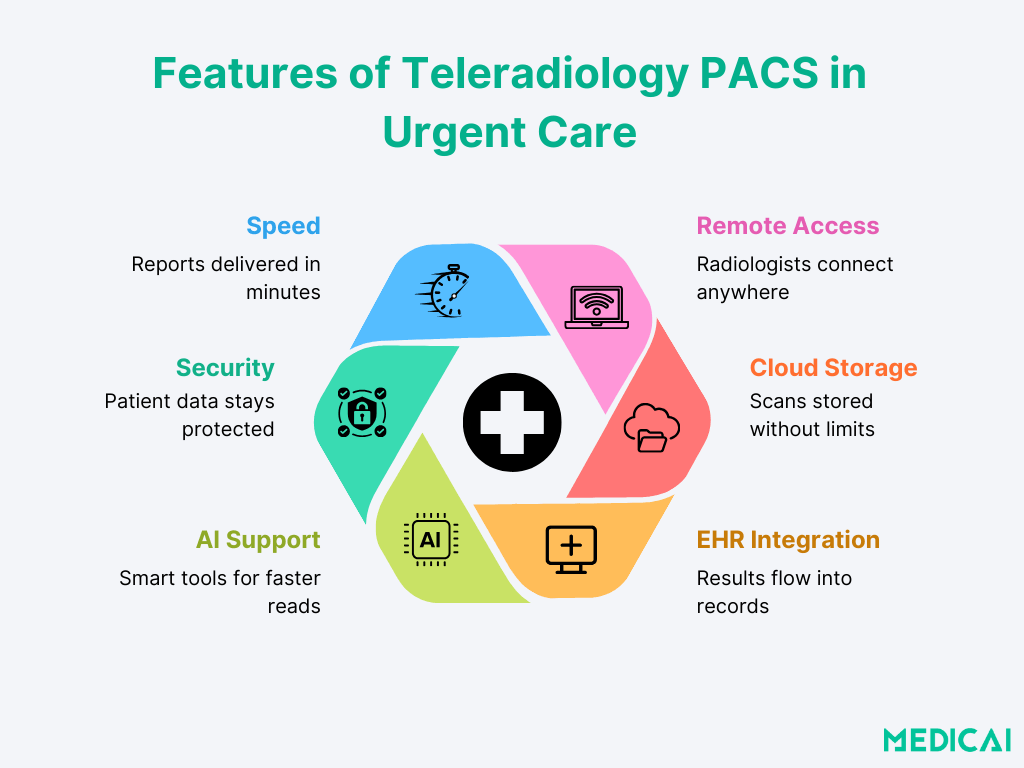
Selecting the right PACS system for urgent care goes beyond image storage; it’s about speed, security, and collaboration. A good teleradiology PACS can be crucial for timely care.
Find out the key features every clinic should consider.
- Speed-First Design: Choose a PACS that allows instant image uploads and near-real-time access for radiologists, ensuring quick report availability for patients.
- Intuitive User Experience: Urgent care staff need intuitive PACS platforms that minimize training time and errors. User-friendly designs enable physicians and technicians to focus on patients rather than struggle with software.
- Cloud Functionality: Cloud-based PACS provides secure, anytime access to images without the cost or hassle of local servers. With encrypted storage and built-in redundancy, clinics can scale effortlessly while maintaining HIPAA compliance.
- Seamless Integration with Existing Systems: An effective PACS should integrate smoothly with EHR, RIS, or EMR systems to prevent data duplication, ensure consistent patient records, and speed up reporting and documentation.
- Remote Viewing and Reporting Tools: Explore platforms like Medicai, which offer web-based DICOM viewers, mobile access, and support for structured reporting or voice recognition. These features help radiologists provide accurate reads quickly, even remotely.
- AI Assistance: Modern PACS solutions feature AI tools that detect abnormalities, flag urgent cases, and suggest templates, enhancing workflows and reducing oversight in high-volume environments. However, they do not replace radiologists.
- Compliance and Security: Choose a PACS that supports HIPAA-compliant encryption, role-based access controls, and detailed audit trails. It protects sensitive information while ensuring compliance with healthcare regulations.
- Reliable Support and Uptime: Partner with vendors who offer 24/7 support, strong uptime guarantees, and easy onboarding. A reliable support structure guarantees smooth operations, even during high patient volumes.
Common Challenges and Mitigation Strategies
Implementing a teleradiology PACS system in urgent care has challenges. While it offers several benefits, clinics often face a few disruptions.
Upfront Cost Concerns
Traditional on-premises PACS involve high server and maintenance costs, which can burden urgent care clinics. Cloud-based PACS models offer subscription pricing, enabling predictable monthly fees that scale with growth, making advanced imaging more accessible and affordable.
Limited IT Support
Most urgent care centers lack full in-house IT teams. So choose a vendor that offers remote maintenance and support.
Cloud providers handle software updates, backups, and troubleshooting, allowing staff to focus on patient care rather than technical issues.
Implementation Disruption
Switching systems can feel intimidating, especially in a fast-paced, urgent care environment. To avoid disruption, clinics should prioritize PACS platforms like Medicai that integrate seamlessly with existing EHR and RIS systems.
For urgent care groups managing teleradiology billing — including prior authorization, professional component claims for remote reads, and PACS-to-billing data feed reliability — the radiology revenue cycle management guide covers the full billing workflow.
Quality and Communication Risks
When relying on remote radiologists, ensuring accurate communication becomes vital. Misreads or incomplete reporting can impact patient outcomes.
To mitigate this, clinics should work with teleradiology networks that verify radiologist credentials, provide clear audit trails, and allow access to patient history alongside images. These safeguards strengthen collaboration and reduce the risk of errors.
Choosing the Right PACS for Your Urgent Care
Not all PACS platforms are the same, especially for urgent care. Choose a cloud PACS system that meets your unique needs.
Prioritize Speed and Simplicity
Urgent care clinics need imaging systems that move as fast as they do. Look for a PACS that offers instant image access from any device without complicated logins or clunky interfaces.
You’re already losing time if your staff waits for images to load or switch platforms to share them.
Ensure Seamless Integration
Your PACS shouldn’t exist in a silo. It should work hand-in-hand with your:
- Electronic Health Record (EHR) system
- Radiology Information System (RIS)
- Billing or practice management software
Look for platforms with built-in integration tools or vendor support that can help with smooth onboarding.
Security Isn’t Optional
Urgent care clinics are just as responsible for patient privacy as hospitals. Ensure your PACS solution is fully HIPAA-compliant, uses end-to-end encryption, and offers secure user access control.
Cloud PACS platforms should also provide reliable data backups and business continuity features in case of downtime or outages.
Pick a System That Can Grow With You
Whether you plan to open more clinics or expand your services, your PACS should be flexible enough to support future growth. Look for:
- Unlimited user access
- Centralized archives
- Multi-site image sharing
You don’t want to outgrow your system in a year and have to start over. So choose the right PACS vendor.
How Medicai Delivers Teleradiology PACS for Urgent Care Clinics
Medicai is a cloud-native PACS platform built on Microsoft Azure, designed specifically for the deployment model that urgent care teleradiology requires: multiple clinic sites, remote radiologist access, zero on-premise server infrastructure, and seamless EHR integration. Unlike legacy PACS systems that require a local server at each clinic location, Medicai connects any DICOM-capable imaging device directly to a cloud archive via a lightweight DICOM Gateway — studies are available to remote radiologists within seconds of acquisition, from any browser, without a VPN.
For urgent care clinics operating with lean IT teams and unpredictable study volumes, Medicai’s subscription model eliminates the capital expenditure of on-premise infrastructure and replaces it with per-study or per-user pricing that scales with clinical demand. When a clinic adds a second location, no new server is required — the new site connects to the same cloud archive via another DICOM Gateway, and imaging data from both locations is immediately accessible to the same radiologist pool.
| Capability | Legacy on-premise PACS | Medicai Cloud PACS for Urgent Care |
|---|---|---|
| Deployment | Local server required at each clinic site — hardware procurement, installation, and ongoing maintenance | Cloud-native on Microsoft Azure — lightweight DICOM Gateway at each site, no local server, no hardware to manage |
| Remote radiologist access | VPN required — complex IT setup, performance degradation on large imaging files, fails outside office hours | Zero-footprint browser viewer — any device, any location, no VPN, no software installation required |
| 24/7 coverage | Dependent on local network uptime — server outages, power failures, and maintenance windows interrupt access | Cloud-hosted with geo-redundant failover across Azure availability zones — always available, no single point of failure |
| Study availability | Images stored locally — manual transfer or CD required to share with remote radiologists; delays of hours or days | Images available to remote readers within seconds of acquisition via automatic cloud upload — no manual transfer step |
| Multi-site coordination | Each site runs a separate server — complex synchronisation required to share studies across locations | All clinic sites share a single cloud archive — studies from any location instantly accessible to any authorised reader |
| EHR integration | HL7 v2 interface engine required — expensive middleware, manual retesting after every software upgrade, silent failure risk | HL7 FHIR APIs — native connection to Epic, athenahealth, and AdvancedMD with no interface engine or middleware |
| Disaster recovery | Manual off-site backup required — tape or secondary server, high failure risk, recovery measured in days | Automatic geo-redundant replication — no secondary hardware, recovery measured in minutes, included in subscription |
| Scaling | Hardware forklift upgrade when storage runs out — capital expenditure, procurement lead time, planned downtime | Elastic cloud scaling — storage expands automatically with imaging volume, no downtime, no hardware procurement |
Medicai’s structured reporting module supports voice dictation and template-based reporting directly within the platform, so remote radiologists can deliver finalized reports to the urgent care EHR within minutes of completing their read — without switching between systems. The patient imaging portal extends this workflow to patients directly: after the radiologist signs off, patients receive a secure link to view their own imaging study and report from any device, reducing follow-up calls and improving the post-visit experience.
For urgent care networks evaluating teleradiology PACS, Medicai offers a 14-day free trial with full platform access — connect your existing modalities, run a live study through the workflow, and verify that report turnaround meets your clinical requirements before committing to a contract.
FAQ: Teleradiology PACS for Urgent Care
What is teleradiology, and how does it work for urgent care?
Teleradiology is the electronic transmission of medical imaging studies — X-rays, CT scans, MRIs, and ultrasounds — from the clinic where the images were acquired to a radiologist reading remotely. For urgent care, the workflow is: a technologist acquires the imaging study at the clinic, the PACS automatically uploads it to a cloud archive, and a remote radiologist accesses the study through a web-based DICOM viewer within minutes. The radiologist interprets the images, generates a structured report, and delivers it to the urgent care provider’s EHR — all without the patient waiting for an on-site radiologist. Cloud-native PACS platforms like Medicai complete this entire cycle in under 30 minutes for routine studies.
Does an urgent care clinic need its own PACS system?
Yes — any urgent care clinic performing diagnostic imaging (X-ray, CT, or ultrasound) needs a PACS system to store, retrieve, and transmit the DICOM image files that imaging equipment produces. Without a PACS, images can only be stored on the modality itself or burned to CD — neither of which supports remote radiologist access or long-term archiving. Cloud PACS solutions designed for urgent care eliminate the need for on-site server infrastructure: a lightweight DICOM Gateway at the clinic connects existing imaging equipment to a cloud archive, making images immediately available to remote radiologists and accessible from the clinic’s EHR without a local server investment.
How quickly can a remote radiologist deliver a report for an urgent care patient?
With a properly configured teleradiology PACS workflow, report turnaround for routine urgent care studies — fracture X-rays, chest X-rays, abdominal ultrasounds — typically runs 15–30 minutes from image acquisition to signed report in the EHR. CT studies requiring subspecialist reads (head CT for stroke, abdominal CT for appendicitis) may take 30–60 minutes, depending on radiologist availability and time of day. Cloud PACS platforms that integrate with on-call teleradiology reading services can guarantee turnaround-time SLAs and provide 24/7 coverage, including nights, weekends, and holidays — eliminating the coverage gaps that on-site radiology arrangements often leave.
Is cloud PACS HIPAA compliant for urgent care imaging data?
Enterprise cloud PACS platforms operating on Azure or AWS implement HIPAA-compliant data handling by default: patient imaging data is encrypted at rest using AES-256 and in transit using TLS 1.2+, access is controlled through role-based permissions with multi-factor authentication, and every image access event is logged in an audit trail. Cloud providers sign HIPAA Business Associate Agreements (BAAs) with healthcare customers, formally establishing the compliance relationship required by federal law. Medicai is HIPAA-compliant and provides BAAs to all healthcare customers as a standard part of the onboarding process.
How does teleradiology PACS integrate with an urgent care clinic’s EHR?
Teleradiology PACS connects to EHR systems through two interface layers. The first is HL7 messaging: imaging orders created in the EHR generate HL7 ORM messages that flow to the PACS worklist, pre-populating patient demographics on the imaging modality before acquisition. When the radiologist signs the report, an HL7 ORU message delivers it automatically to the ordering provider’s EHR record. The second layer is image access: FHIR-native PACS platforms like Medicai embed a DICOM viewer link directly in the EHR patient record, allowing the urgent care provider to open the imaging study with a single click without a separate PACS login. Legacy PACS systems using HL7 v2 interface engines require middleware, which adds maintenance overhead and creates a silent failure risk — a consideration when evaluating teleradiology PACS platforms for urgent care.
Conclusion
Urgent care clinnicsics evaluating teleradiology PACS have a straightforward decision framework: if your clinic is already imaging patients and relying on CD transfers or delayed radiologist reads, a cloud-native PACS with integrated teleradiology workflow eliminates both problems simultaneously. Medicai deploys in hours — connect your existing DICOM modalities to the cloud archive, configure the EHR integration, and run your first remote read without purchasing a server or hiring an interface engine consultant. The free 14-day trial includes full platform access, live technical support, and the ability to run actual patient studies through the complete workflow.
A teleradiology PACS system enables urgent care clinics to swiftly manage fast-moving cases. By combining cloud storage with remote radiologist access, imaging becomes a seamless workflow rather than a bottleneck.
Platforms like Medicai make this transformation simple and scalable. We help make the future of urgent care imaging smarter, more connected, and already within your reach.


Related Articles


Lets get in touch!
Learn more about how Medicai can help you strengthen your practice and improve your patients’ experience. Ready to start your Journey?
Book A Free Demo