EHR vs EMR: Key Differences, Definitions, and Which to Choose
Electronic Medical Records (EMR) and Electronic Health Records (EHR) store patient data electronically; however, they serve distinct purposes that affect how providers manage and share medical information.
As healthcare transitions to a digital future, it’s essential to understand its differences.
EMRs are digital records used for internal documentation within a single provider’s practice. EHRs, on the other hand, allow data sharing across multiple providers, enhancing patient care coordination. EMRs prioritize efficiency within one facility, whereas EHRs support interoperability, making them ideal for integrated healthcare systems.
Curious to know which system is best for your practice? Keep reading to find out!

Difference between EMR and EHR
EMRs are digital medical records used within a single healthcare provider, while EHRs allow seamless data sharing across multiple providers. EMRs focus on internal record-keeping, whereas EHRs enhance interoperability, patient care coordination, and accessibility, making them the preferred choice for integrated healthcare systems.
Understanding the difference between Electronic Medical Records (EMR) and Electronic Health Records (EHR) is crucial for healthcare providers, IT professionals, and patients.
Let’s explore the key differences between EMRs and EHRs.
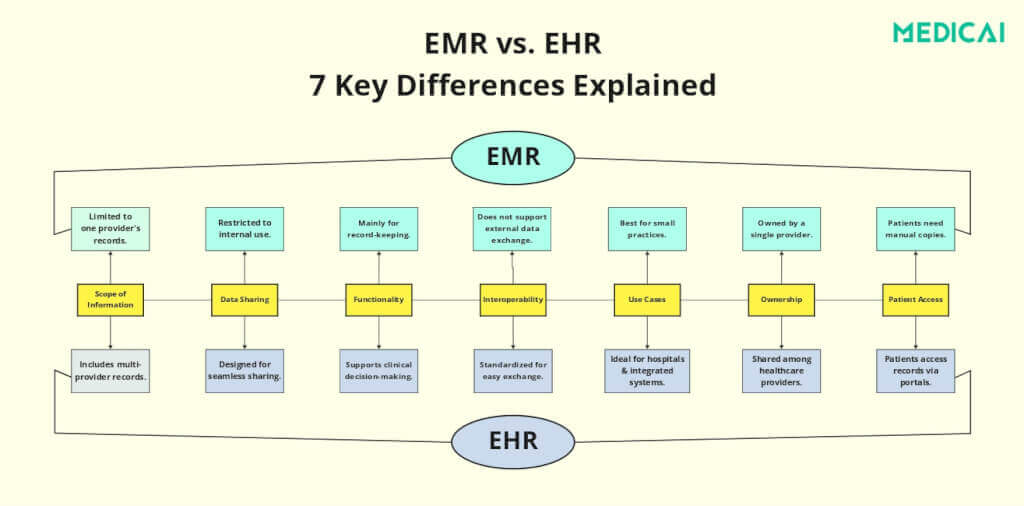
| Comparison point | EMR (Electronic Medical Record) | EHR (Electronic Health Record) |
|---|---|---|
| Definition | Digital patient chart used within one provider or practice | Comprehensive digital record shared across multiple providers and care settings |
| Data scope | Data from one practice only | Data from multiple providers, labs, specialists, and pharmacies |
| Data sharing | Limited — internal use only; manual transfer to other providers | Extensive — real-time sharing across authorised providers and systems |
| Interoperability | Not designed for interoperability; creates data silos | Built for interoperability using HL7, FHIR, and CDA standards |
| Functionality | Record-keeping, scheduling, and e-prescribing within one practice | Clinical decision support, patient portals, population health analytics |
| Use cases | Solo practitioners, small clinics, single-specialty practices | Hospital networks, multi-specialty systems, government health programmes |
| Cost and implementation | Lower upfront cost; simpler to implement | Higher cost and complexity; requires interfaces with multiple systems |
| Data ownership | Owned by the provider; patient access via manual request | Shared among providers; patients often have direct portal access |
What Are EMR and EHR?
What is an EMR?
An Electronic Medical Record (EMR) is a digital version of a paper chart used within a single healthcare provider or organization. It contains patient history, prescriptions, diagnoses, lab results, and treatment plans. However, they remain only within that particular practice or hospital.
EMRs help streamline workflows, making it easier for doctors and nurses to access past visits, update records, and prescribe treatments. However, EMRs are designed for internal use, meaning they do not readily share data with other healthcare providers.
EMR systems store structured clinical data in a relational database accessible only within the deploying organisation’s network. When a patient transfers to a different provider, their EMR data does not transfer automatically — the originating practice must export records as a printed document, a PDF, or a manually initiated data extract, which the receiving provider then imports or re-keys into their own system. This is the defining limitation of the EMR model and the primary reason the term gave way to EHR as healthcare organisations sought interoperability.
What are the four types of EMR systems?
EMR systems are typically categorised by deployment model and clinical scope:
(1) Standalone EMR — a single-specialty system used by individual physician practices, focused on encounter documentation, e-prescribing, and appointment scheduling;
(2) Integrated EMR — a multi-module system that connects clinical documentation with practice management, billing, and lab results within one organisation;
(3) Web-based EMR — a cloud-hosted system accessed through a browser, eliminating on-premise server infrastructure;
(4) Specialty-specific EMR — systems built for a particular clinical workflow, such as dental, chiropractic, or ophthalmology EMRs, that include specialty-specific templates and tools not present in general-purpose systems. Most modern EMR deployments are web-based and integrated, with standalone desktop systems now primarily found in legacy environments.
What is an EHR?
An Electronic Health Record (EHR) is a comprehensive, interconnected system that integrates patient information from multiple healthcare providers. It includes everything in an EMR and external records, such as lab reports, specialist notes, imaging results, and prescriptions from different pharmacies.
EHRs are built for interoperability, ensuring patient data is accessible across hospitals, clinics, and specialists and creating a complete, up-to-date health history.

Scope: How Far Do EMRs and EHRs Reach?
EMRs are limited to a single healthcare provider or organization. They are commonly used by individual clinics, specialty practices, or small hospitals to store patient records. Because they operate within a single system, EMRs are excellent for documenting patient visits, but they do not extend beyond that practice.
On the other hand, EHRs have a broader reach. They span multiple healthcare providers and organizations, making them essential for large hospital networks, government health programs, and multi-specialty healthcare systems.
Data Sharing: Can Other Providers Access the Records?
Data sharing is where the most significant difference between EMRs and EHRs becomes evident.
EMRs are restricted to the original provider’s system. If a patient visits a different doctor, the new provider will not have access to the patient’s medical history unless the records are printed or manually transferred. This limitation can lead to fragmented care, duplicated tests, and potential medical errors.
EHRs, however, are designed for seamless data sharing. They allow hospitals, labs, pharmacies, and specialists to access the same patient records in real time. It ensures that every healthcare provider involved in a patient’s care has the most up-to-date information, reducing medical errors and improving treatment outcomes.
Functionality: How Do They Work in Practice?
EMRs primarily focus on improving efficiency within a single healthcare setting. They help automate appointment scheduling, documentation, and prescriptions. They make it easier for providers to manage patient visits.
However, they lack built-in tools for collaboration with external providers.
EHRs offer much more than just record-keeping. They support clinical decision-making and care coordination across providers, making healthcare more patient-centered. Features like e-prescriptions, medical alerts, patient portals, and AI-driven diagnostics make EHRs more powerful and adaptable.
Many EHR systems also integrate with remote patient monitoring devices. These devices help doctors monitor vital signs and chronic conditions remotely.
Interoperability: Can Systems Communicate With Each Other?
EMRs are not designed for interoperability. Each healthcare provider typically uses a different EMR system. It creates isolated data silos that do not communicate with one another.
If patients switch doctors or visit a specialist, their medical history does not automatically transfer. Thus, the systems increase administrative burden and delay treatment.
EHRs, however, are built for interoperability using standardized formats such as HL7, FHIR, and CDA. These standards ensure that health records can be shared across different systems and that patients can follow them wherever they go.
With an EHR, authorized providers can access a patient’s complete medical history, including lab results, prescriptions, imaging scans, and doctor notes.
Use Cases: Where Are EMRs and EHRs Used?
EMRs are best suited for individual clinics, small hospitals, and specialty providers that do not need to exchange data with external healthcare organizations. They are convenient for solo practitioners who want an efficient way to store and access patient records.
EHRs are ideal for healthcare networks that require shared access to patient records across multiple locations. Large hospitals, multi-specialty clinics, and government health agencies benefit from EHRs because they allow seamless provider communication.
Ownership: Who Controls the Data?
EMRs are owned and controlled by the healthcare provider or facility that creates them. Patients cannot access their EMRs directly and must request copies to transfer their records to another doctor. Since the data is stored within a single system, ownership remains strictly with the provider, not the patient.
EHRs operate differently. Instead of being owned by one provider, they are shared among multiple healthcare organizations. Patients often have direct access to their health records through online patient portals, which gives them more control over their health information.
Benefits of EMR and EHR
Electronic Medical Records (EMR) and Electronic Health Records (EHR) offer significant advantages, but their benefits differ based on their use.
Benefits of EMRs
- Improved Practice Efficiency: EMRs streamline workflows by automating documentation, appointment scheduling, and prescription management. They reduce paperwork, minimize manual errors, and allow healthcare providers to focus more on patient care than on administrative tasks.
- Better Record Keeping: An EMR system stores all patient data—including medical history, lab results, medications, and treatment plans—in a structured and easily accessible format. It helps providers quickly retrieve records, track patient progress, and make informed treatment decisions.
- Lower Implementation Cost: EMRs are cost-effective for small clinics and individual practices. Compared to EHRs, they require less infrastructure and simpler implementation, making them a more affordable option for healthcare providers who do not need multi-provider connectivity.
- Faster Workflow: Since EMRs eliminate paper-based records, providers can access patient data instantly, reducing wait times and improving patient experience.
Benefits of EHRs
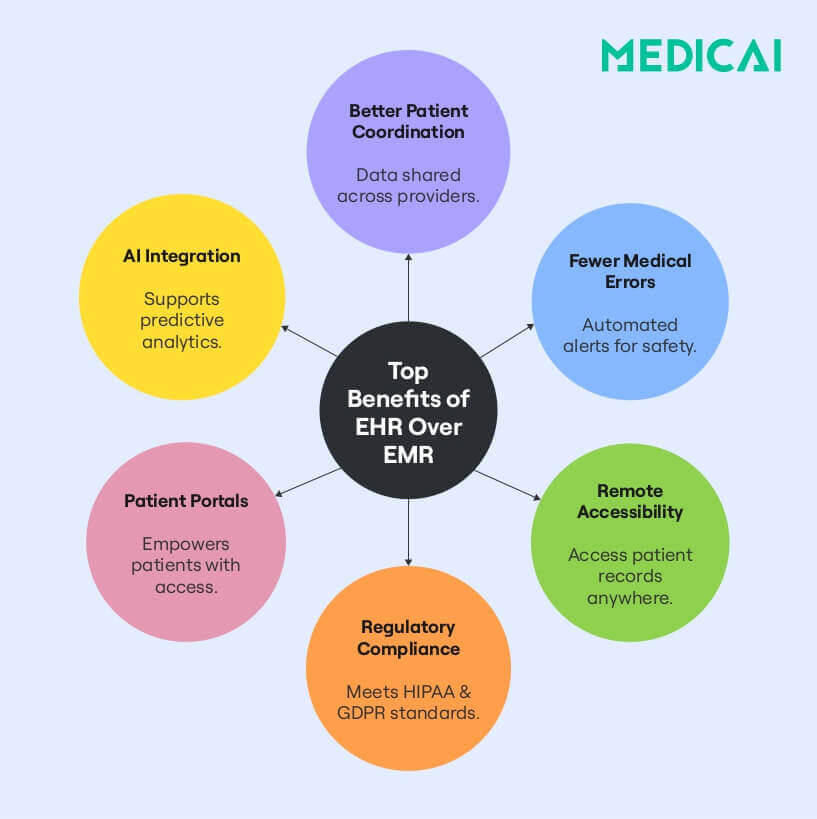
- Comprehensive Patient Overview: EHRs integrate patient records from multiple healthcare providers to provide a complete, unified medical history. This ensures that all aspects of a patient’s health—diagnoses, treatments, lab results, imaging scans, and prescriptions—are easily accessible in one centralized system.
- Improved Coordination: By sharing data in real time, EHRs enhance communication between primary care doctors, specialists, hospitals, and pharmacies. This enables better collaboration, faster referrals, and coordinated treatment plans.
- Better Patient Safety: EHRs reduce duplicate tests, medication errors, and allergic reactions by flagging potential risks and keeping all providers up to date on a patient’s history. Built-in clinical alerts and decision support tools help doctors make safer, data-driven medical decisions.
- Regulatory Compliance: Most EHR systems comply with healthcare data security regulations, including HIPAA (U.S.), GDPR (Europe), and ONC requirements. They are designed to meet interoperability standards, ensuring patient information can be securely exchanged across different healthcare networks.
- Remote Access: Unlike EMRs, EHRs allow healthcare providers to access patient records anywhere. It benefits telemedicine, multi-location hospitals, and emergency care, where quick access to a patient’s complete medical history can be critical.
EHR vs. EMR vs. PHR: What’s the Difference?
EMRs store patient records within a single provider, EHRs connect data across multiple healthcare providers for seamless sharing, and PHRs are patient-managed records for personal health tracking. While EMRs focus on internal use, EHRs improve interoperability, and PHRs give patients control over their medical history and data access.
A Personal Health Record (PHR) is a digital health record managed and maintained by the patient rather than healthcare providers. Unlike EMRs and EHRs, which are controlled by hospitals, clinics, and medical professionals, PHRs allow individuals to collect, store, and manage their health data independently.
PHRs can be standalone systems—meaning they exist separately from a hospital’s medical records—or linked to an EHR system to provide a more connected healthcare experience. These records typically include-
- A patient’s medical history
- Medications
- Allergies
- test results
- immunization records
- lifestyle data – fitness tracking, nutrition logs, and mental health notes.
With the rise of wearable devices and health-tracking apps, PHRs are becoming more popular. They help individuals to actively monitor their health and share specific data with their doctors when necessary.
Conclusion
Choosing between EMR and EHR depends on your healthcare practice’s needs. While EMRs streamline internal record-keeping, EHRs offer seamless data sharing, better coordination, and improved patient outcomes.
However, as healthcare shifts toward interoperability and digital transformation, EHRs are becoming the standard for modern practices.
Medicai’s AI-powered EHR ensures effortless integration, compliance, and secure access to patient data. Ready to future-proof your healthcare system? Upgrade to an advanced EHR with Medicai and transform patient care today!

FAQ: EHR vs EMR
Is Epic an EHR or EMR?
Epic is an EHR — it is designed for data sharing across multiple providers, departments, and care settings, which is the defining characteristic of an EHR rather than an EMR. Epic is the most widely deployed EHR system in US hospitals, used by approximately 38% of US hospitals according to KLAS Research. It supports interoperability through Epic’s FHIR APIs, allowing data exchange with external systems, including imaging platforms, lab systems, and patient portals. The terms EHR and EMR are sometimes used interchangeably in practice, but by definition, any system built for cross-organisation data sharing — like Epic — is an EHR.
Is EMR outdated?
The term EMR is increasingly outdated — ONC, CMS, and most healthcare IT industry bodies now use EHR as the standard terminology, and federal incentive programmes (Meaningful Use / Promoting Interoperability) were built around EHR adoption rather than EMR. However, EMR, as a system category, remains relevant for single-specialty practices that do not need cross-organisational data sharing: a solo practitioner in a closed practice environment derives full value from an EMR without the additional complexity and cost of EHR interoperability infrastructure. The distinction matters most when evaluating whether a system’s capabilities match the practice’s actual data exchange requirements.
What is the main difference between EHR and EMR in one sentence?
An EMR is a digital patient chart used within one provider’s practice; an EHR is a comprehensive patient record designed to be shared across multiple providers, organisations, and care settings.
Which is better for a small practice — EMR or EHR?
For a truly independent small practice with no referral network and no need to share patient data with external providers, an EMR is sufficient and less expensive to implement. For any practice that refers patients to specialists, receives patients from hospitals, orders external labs, or participates in a care network, an EHR is the right choice — its data-sharing and interoperability capabilities directly reduce the administrative overhead of managing referrals and the risk of care errors from incomplete patient histories. The practical trend is toward EHR even for small practices: the declining cost of cloud-based EHR systems has largely closed the cost advantage EMRs once held.
How does EHR connect to medical imaging and PACS?
EHR systems connect to PACS (Picture Archiving and Communication Systems) and medical imaging platforms through two primary interfaces: HL7 v2 messages carry imaging orders from the EHR to the RIS and completed radiology reports back to the EHR; FHIR APIs enable more modern, bidirectional data exchange that can surface DICOM images directly within the EHR interface. When this integration is working correctly, the referring clinician can view both the radiology report and the underlying images without leaving the EHR. When the integration is incomplete — a common scenario in legacy deployments — clinicians access the EHR for the report and must log into a separate PACS viewer for the images. Medicai’s cloud imaging platform connects to EHR systems, including Epic, athenahealth, and AdvancedMD, via FHIR, embedding imaging access directly within the EHR interface.


Related Articles



Lets get in touch!
Learn more about how Medicai can help you strengthen your practice and improve your patients’ experience. Ready to start your Journey?
Book A Free Demo