HIPAA-Compliant Medical Imaging Sharing: Essential Knowledge for Personal Injury Attorneys

Medical images can make or break a personal injury case. However, handling them the wrong way can land your firm in serious legal trouble.
Attorneys must manage HIPAA regulations while crafting evidence-based arguments. They must also understand Protected Health Information (PHI) and select secure imaging platforms, balancing compliance with legal strategy.
Learn the essentials of HIPAA-compliant medical imaging for personal injury attorneys to safeguard their practice, clients, and case strength.

Why Medical Imaging Matters in Personal Injury Litigation
Radiology scans provide objective insights into a client’s condition and often serve as stronger evidence than verbal testimony. For attorneys, understanding the role of imaging in evidence gathering while ensuring HIPAA compliance is essential.
Injury claims rely on evidence, and diagnostic images effectively convey an injury’s existence, location, and severity. They confirm injuries like broken bones or herniated discs and help establish causation by linking the injury to the incident, whether it’s a car crash, workplace accident, or fall.
Diagnostic Imaging Types Commonly Used
Personal injury attorneys regularly work with several types of diagnostic imaging, each offering unique advantages depending on the nature of the injury:
- MRI (Magnetic Resonance Imaging) – MRIs are used for soft tissue injuries and provide high-resolution views of muscles and nerves.
- CT (Computed Tomography) Scans – CT scans detect internal bleeding and fractures, providing detailed images for trauma cases.
- X-rays – Useful for identifying bone fractures, dislocations, or foreign objects.
- Ultrasound and PET Scans – They are less common in litigation, but can be critical in cases involving vascular damage or internal organ dysfunction.
Understanding image types helps attorneys craft solid medical arguments and choose appropriate expert witnesses.
How Imaging Strengthens Claims for Damages
Beyond proving the injury occurred, medical imaging is essential for calculating the extent of physical and financial harm. Judges and juries are more likely to award fair compensation when presented with clear, undeniable visual evidence of:
- The severity of injury
- The need for surgical intervention or long-term care
- Permanent disability or loss of function
- Future medical costs
Combined with expert testimony, radiology images can transform subjective claims into strong, scientifically backed cases, increasing clients’ chances of justice and fair compensation.
Is Medical Imaging Protected Under HIPAA?
Yes, medical imaging files containing identifiable patient data are Protected Health Information (PHI) under HIPAA and must be handled with strict privacy safeguards.
Personal injury attorneys may see medical records as printed reports or physician notes, but radiology images are equally protected due to the sensitive data they contain. Understanding HIPAA’s treatment of these digital assets is essential for legal professionals handling medical evidence.
What Is PHI and Why Does It Apply to Images
Under HIPAA’s Privacy Rule, Protected Health Information (PHI) is any identifiable information in a medical record created, used, or disclosed during health care. It includes written records, digital images, audio, and video files.
Medical images like MRIs, CT scans, and X-rays are considered PHI if they contain identifiable patient details, such as a name or medical record number. Even seemingly anonymous images may be linked to identifiable data, necessitating HIPAA compliance.
Identifiable Metadata in DICOM Files
Most medical imaging is stored in DICOM (Digital Imaging and Communications in Medicine) format—a specialized standard supporting the image and associated metadata. That metadata often includes:
- Patient name
- Date of birth
- Medical record number
- Scan date and time
- Referring physician
- Facility location
Even if an image looks neutral, its embedded metadata can link it to a specific person. Attorneys often receive this metadata automatically when digital files come from healthcare providers via CD, USB, or shared drives.
Not reviewing, sanitizing, or encrypting these files before sharing can result in unintentional HIPAA violations.
Legal Risks of Mishandling Medical Images
Personal injury attorneys must secure Protected Health Information (PHI) to comply with HIPAA. If they fail to safeguard PHI, they can be classified as business associates and face civil penalties for unauthorized access or disclosure.
Thus, HIPAA compliance applies not only to healthcare providers but also to legal professionals handling PHI.
Some common attorney missteps include:
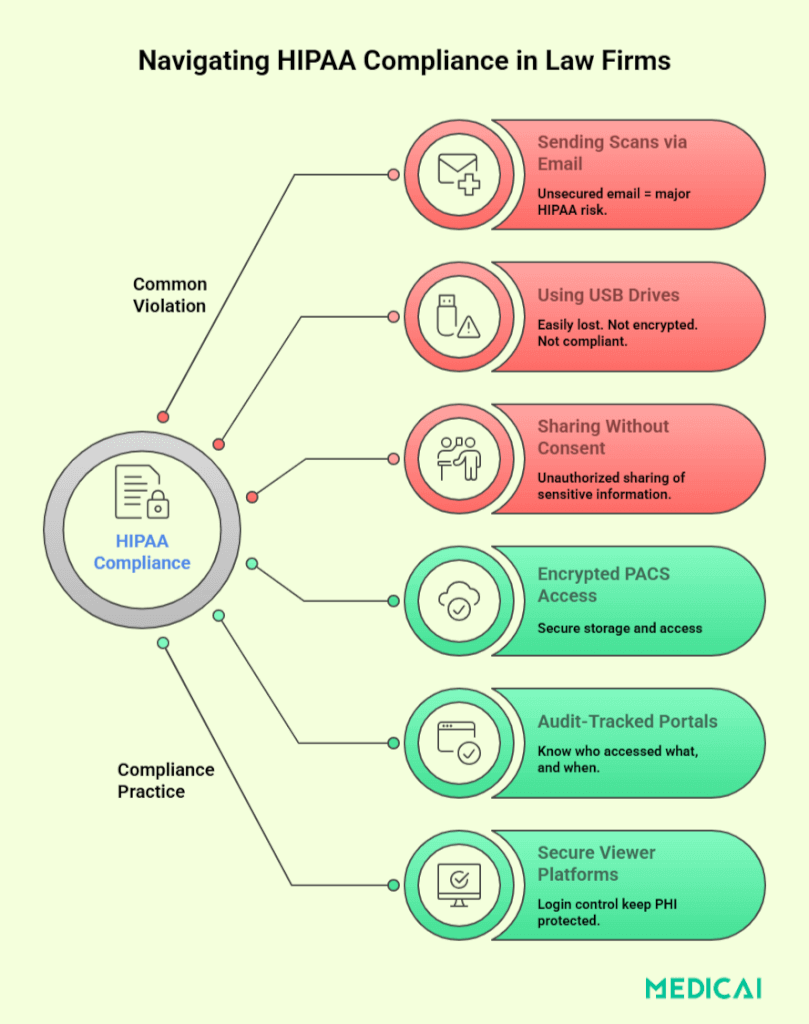
- Sharing image files via unsecured email
- Failing to de-identify files when sharing with opposing counsel
- Losing physical media like CDs or flash drives
- Using unencrypted storage or cloud platforms
Improperly handled PHI in legal proceedings can result in fines, reputational harm, and the jeopardization of crucial medical evidence. It can also lead to client litigation for privacy breaches.
Attorneys must handle medical imaging with the same care as any confidential case file and ensure their image-sharing workflows comply with HIPAA’s safeguards.
HIPAA Overview: What Personal Injury Attorneys Need to Know
Understanding HIPAA, especially Title II and its privacy requirements, is crucial for ensuring that the handling of health information remains legal.
Title II of HIPAA
The Health Insurance Portability and Accountability Act (HIPAA), enacted in 1996, enhances healthcare portability and promotes electronic health records. Title II: Administrative Simplification is crucial for attorneys working with Protected Health Information (PHI).
It sets Privacy and Security Rules, creating national standards for handling sensitive health data, including DICOM images. It also requires unique patient identifiers and standardized electronic healthcare transactions, affecting how attorneys manage imaging records.
Disregarding Title II regulations can lead to HIPAA violations for personal injury lawyers, even when gathering evidence.
The Privacy and Security Rules
The Privacy Rule regulates access to PHI, requiring entities, including attorneys, to obtain patient authorization for access. It also limits data disclosure to what is “reasonably necessary” for its intended purpose.
The Security Rule applies to electronic PHI (ePHI) and sets standards for:
- Access control – Only authorized users can access data
- Encryption – PHI must be protected during transmission and storage
- Audit controls – Systems must log access and activities
- Risk assessments – Entities must regularly evaluate their data security systems
When attorneys handle imaging files stored on CDs, flash drives, or cloud platforms, these rules are highly relevant. Even reviewing an unencrypted MRI on a shared office computer could constitute a breach if security protocols aren’t followed.
What Makes a Medical Image Sharing Method HIPAA-Compliant?
HIPAA outlines specific technical, administrative, and procedural safeguards when Protected Health Information (PHI), including imaging, is transmitted or stored digitally.
Encryption Standards and Access Controls
Encryption is crucial for HIPAA compliance regarding electronic PHI (ePHI). Image-sharing platforms must implement strong end-to-end encryption for both stored data (at rest) and data being transmitted (in transit) to protect against unauthorized access.
But encryption alone isn’t enough. Systems must also implement access controls that limit who can view or download imaging files. That means:
- Password-protected logins (enforced by Password Managers)
- Role-based access
- Session timeouts and lockouts for idle users
These safeguards prevent unauthorized parties from gaining access and help maintain a verifiable chain of custody for sensitive medical images.
Business Associate Agreements (BAAs)
When personal injury attorneys use third-party services like cloud PACS or document retrieval companies for medical imaging, HIPAA requires a Business Associate Agreement (BAA). It ensures the vendor protects PHI according to HIPAA standards.
A BAA must:
- Define how PHI will be used, stored, or shared
- Establish responsibility in the event of a breach
- Require that the vendor implement appropriate security measures
Not securing a BAA with vendors handling medical images risks non-compliance and penalties for attorneys. A secure platform alone doesn’t ensure HIPAA compliance; it must be contractually outlined.
Audit Trails and Logging Requirements
A core principle of HIPAA is accountability. Any system used to share or store medical images must have audit capabilities—digital logs that record:
- Who accessed which file and when
- What actions did they take (viewed, downloaded, deleted)
- IP addresses or device identifiers
Audit trails are vital during breach investigations or when questioning an image’s chain of custody in court. Without verifiable logs, proving proper handling of PHI and preventing unauthorized access becomes challenging for attorneys.
Platforms lacking detailed activity logs or allowing untracked file downloads do not meet HIPAA expectations.
Secure Authorization and Consent Management
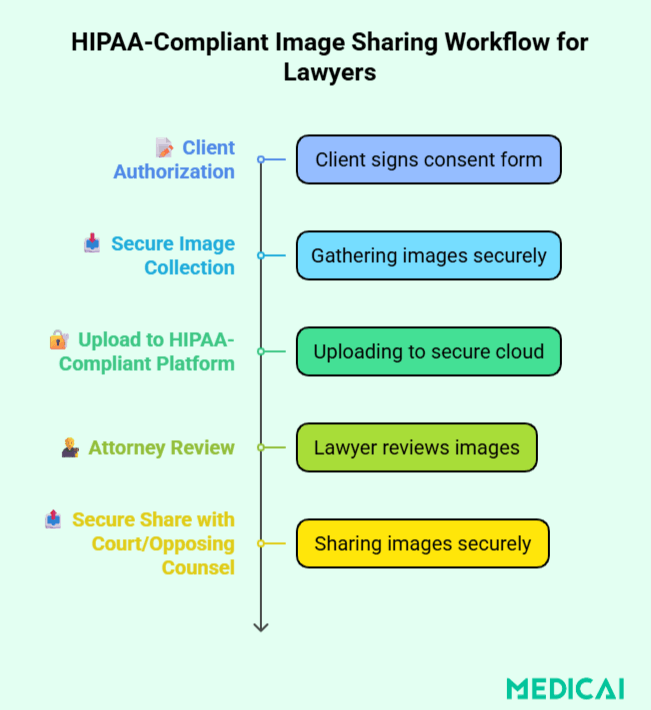
Before medical images are obtained or shared, HIPAA requires proper patient authorization, especially when use is for legal purposes rather than direct care. A compliant image-sharing process must include:
- Tools to collect signed HIPAA authorization forms
- Verification steps to confirm the identity of the requestor
- Restrictions on how long and how widely the data can be accessed
Attorneys must ensure that any PHI they receive is legally authorized and that image-sharing platforms respect the consent’s scope and duration. Sharing without consent, even if well-intentioned, may be deemed a breach.
Platforms should ideally have features for uploading, storing, or verifying consent documents to simplify compliance.
Legal Consequences of HIPAA Violations
Mishandling medical images or other Protected Health Information (PHI) can result in steep fines, reputational harm, and lost client trust. Attorneys must understand the risks to build safer, more compliant practices.
Four-Tier Penalty Structure
The U.S. Department of Health and Human Services (HHS) enforces HIPAA through a tiered system based on culpability and corrective action:
| Tier | Level of Culpability | Minimum Penalty per Violation | Maximum Penalty per Violation | Annual Penalty Limit |
| Tier 1 | Lack of Knowledge (Reasonable Efforts) | $141 | $35,581 | $35,581 |
| Tier 2 | Reasonable Cause (Lack of Oversight) | $1,424 | $71,162 | $142,355 |
| Tier 3 | Willful Neglect – Corrected within 30 days | $14,232 | $71,162 | $355,808 |
| Tier 4 | Willful Neglect – Not Corrected within 30 days | $71,162 | $2,134,831 | $2,134,831 |
Best Practices for Attorneys Handling Medical Images
Handling medical imaging in litigation involves a secure, compliant workflow. From record requests to court presentations, best practices help attorneys protect PHI and improve case outcomes.
Requesting Records the Right Way (HIPAA Forms, Timeline)
- Start with a valid HIPAA authorization form signed by the client.
- Specify the imaging type (e.g., MRI, CT), date range, and request both image files and reports.
- Opt for secure digital delivery, and avoid vague requests that cause delays or incomplete disclosures.
Maintaining a Chain of Custody
- Track who accessed each image, when, and how.
- Log transfers, store files securely, and avoid altering filenames or file contents.
This protects the image’s evidentiary integrity and supports admissibility in court.
Partnering with Medical Experts and Vendors
Trusted partners help attorneys manage files efficiently and legally.
- Work with radiologists who can interpret scans and testify when needed.
- Use HIPAA-compliant vendors for secure image storage, expert collaboration, and formatting.
Staff Training and Internal Policy Setup
Practical training reduces risk and ensures consistent, secure workflows across the firm.
- Train legal staff on HIPAA protocols annually.
- Set internal guidelines for image handling, appoint a compliance lead, and audit regularly.
HIPAA-Compliant Technologies for Imaging Sharing
Outdated CDs and unsecured emails no longer cut it. Today’s personal injury attorneys need modern, HIPAA-compliant tools to access, share, and store medical images securely
Secure Cloud PACS (Picture Archiving and Communication Systems)
Cloud-based PACS platforms like Medicai allow legal teams to securely store, access, and share imaging, without physical media. Key features include:
- Encrypted storage and remote access
- Role-based permissions for controlled access
- Audit logging for full traceability
These systems streamline collaboration with off-site experts and reduce the risk of data breaches.
DICOM Viewers with HIPAA Features
DICOM viewers allow attorneys and experts to view scans securely, without downloading or compromising patient data. Their design for legal use offers:
- Authentication and access controls
- Data encryption
- De-identification tools
- Built-in activity logs
Encrypted File Sharing Portals
Secure portals are safer than email for sending images to courts or opposing counsel and help maintain compliance during discovery. They offer:
- End-to-end encryption
- Password-protected, time-limited links
- Detailed access logs
Integration with Legal Case Management Tools
Integrated systems save time and reduce compliance risks across the firm. HIPAA-compliant imaging tools can integrate with legal case systems to:
- Simplify access to imaging within case files
- Enable secure internal communication
- Reduce data handling errors
Conclusion
Medical imaging is a powerful asset in personal injury cases, but only when handled securely and responsibly. By understanding HIPAA’s requirements and using compliant technologies, attorneys can protect client privacy while strengthening their legal strategy.
Platforms like Medicai help legal teams streamline access to imaging, maintain compliance, and collaborate with experts in a secure environment.


Related Articles



Lets get in touch!
Learn more about how Medicai can help you strengthen your practice and improve your patients’ experience. Ready to start your Journey?
Book A Free Demo