The Teleradiology Tech Stack: Building a High-Performance Remote Reading Workflow

For decades, the word “Teleradiology” meant one specific thing: outsourcing your night shifts to a third-party “Nighthawk” group to cover the 2:00 AM trauma cases. It was a service you bought, not a technology you owned.
In 2026, the definition of PACS teleradiology will be obsolete.
With the rapid expansion of hospital-at-home models, decentralized imaging centers, and the post-pandemic shift in workforce expectations, every hospital is now a teleradiology site. Whether your radiologist is a sub-specialist reading from a home office in another state, or a neurologist viewing a stroke study from their iPad in the hospital cafeteria, the technical challenge is identical.

How do we move heavy, pixel-dense medical data securely and instantly across the open internet?
For too long, IT directors have tried to solve this modern problem with legacy tools—specifically, the clunky, slow, and insecure Virtual Private Network (VPN). This approach is failing. It creates bottlenecks, frustrates doctors, and ultimately delays patient care.
This guide explores the modern Teleradiology Tech Stack, moving beyond the limitations of VPN tunneling to a cloud-native architecture that creates a single, unified, and lightning-fast reading environment.
The 3 “Villains” of Remote Reading
Before we fix the architecture, we must diagnose the pathology. If your radiologists are complaining about “sluggish systems” or “missing images,” they are likely battling one of these three technical villains.
Villain A: The “Spinning Wheel” (Latency & Throughput)
In a legacy setup, when a radiologist clicks “Open” on a study, the system attempts to download the entire DICOM file to their local workstation.
For a standard Chest X-ray (10MB), this is negligible. But for a 3D Breast Tomosynthesis study or a Coronary CTA, the dataset can exceed 3 to 5 Gigabytes. Even with a decent fiber internet connection, moving that much data takes time. This introduces a metric called Time-to-First-Image (TTFI).
If a doctor has to wait 5–10 minutes for a case to “buffer” before they can start reading, your Turnaround Time (TAT) metrics are destroyed. In acute stroke care (code stroke), those minutes are brain tissue.
Villain B: The “Split Worklist” (Orchestration Chaos)
The modern radiologist often serves multiple masters. A private practice group might cover five different rural hospitals.
In a traditional environment, this creates the “Swivel-Chair” workflow:
- Log into Hospital A’s PACS (VPN #1). Check for cases.
- Log out.
- Log into Hospital B’s PACS (VPN #2). Check for cases.
- Repeat.
This lack of a Unified Global Worklist is a massive productivity killer. It creates “cherry-picking” (doctors picking easy cases) and leaves difficult cases sitting in hidden queues, unread.
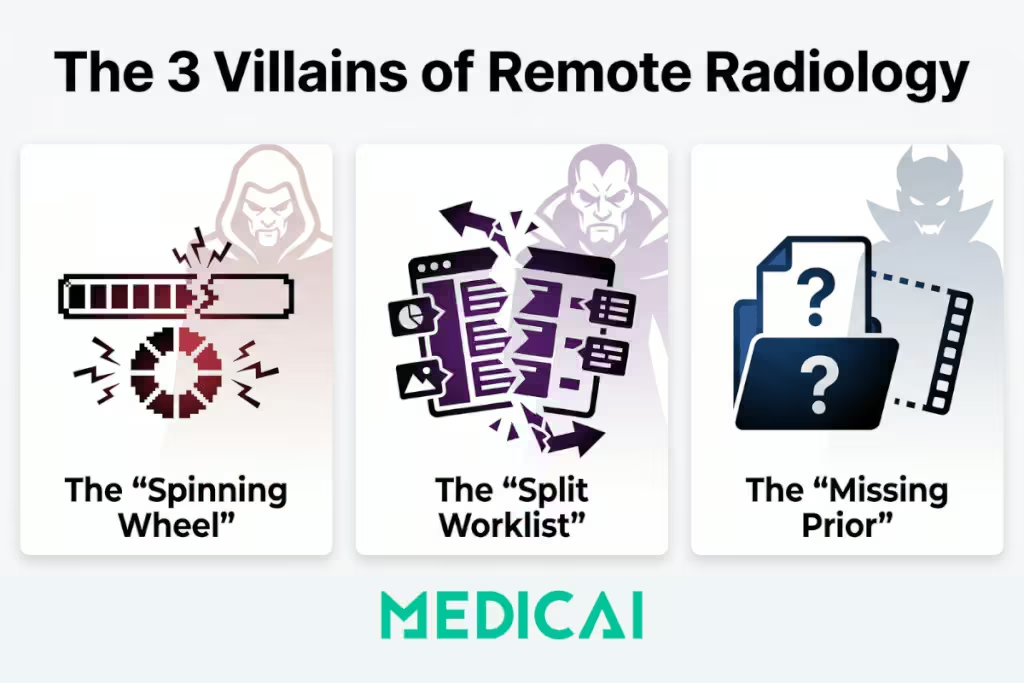
Villain C: The “Missing Prior” (Data Silos)
Diagnostic accuracy relies on comparison. Seeing a lung nodule is important; knowing that it hasn’t changed size in two years is critical.
In a disjointed teleradiology setup, the radiologist might receive the current exam, but the prior exams are trapped on a local server inside the hospital’s basement. Without Relevant Prior Fetching, the teleradiologist is flying blind, often forced to hedge their report with phrases like “Comparison not available,” which degrades the diagnostic value.
Architecture Wars: VPN Tunneling vs. Cloud-Native Streaming
To defeat these villains, we must look at the infrastructure “pipes.” A fundamental war is being fought between the old way (VPNs) and the new way (HTTPS/TLS).
The Legacy Model: Site-to-Site VPN
Historically, to connect a remote radiologist, IT teams would set up a Site-to-Site VPN. This creates a rigid, encrypted tunnel between the hospital firewall and the doctor’s house.
- The Flaw: It extends your secure network into an insecure environment (the doctor’s home).
- The Heavy Lift: It requires “Store-and-Forward” logic. The full DICOM file must travel through the tunnel to be processed by the local computer.
- The Security Risk: If the doctor’s laptop is stolen, it may contain cached Patient Health Information (PHI) on its hard drive. This is a HIPAA breach waiting to happen.
The Modern Model: Cloud-Native Streaming (Zero Footprint)
Modern platforms like Medicai utilize a Server-Side Rendering architecture.
Instead of moving the file, the cloud server processes the image using powerful GPUs. It then streams a high-definition, interactive “video” of the medical image to the doctor’s web browser.
- The Speed: Because you are streaming pixels, not downloading gigabytes, a 5GB cardiac study opens as instantly as a 10MB X-Ray. The bandwidth requirement drops drastically.
- The Security: This is a Zero-Footprint Viewer. No data is ever downloaded to the doctor’s device. When they close the browser tab, the cache evaporates. There is nothing to steal.
- The Protocol: It uses HTTPS / TLS 1.3—the same encryption standard used by online banking. It does not require a VPN tunnel, meaning you don’t need to punch risky holes in your hospital firewall.
The Decision Matrix: Which PACS Teleradiology Persona Are You?
“Teleradiology” is not a one-size-fits-all term. The technology you need depends entirely on your operational model.
| Setup Type | The “Entity Persona” | The Operational Challenge | The Tech Stack Solution |
| Internal Remote Reading | The Hybrid Hospital | Staff radiologists want to read from home on weekends or evenings using their same hospital credentials. | Enterprise PACS with Web Viewer. You don’t need a separate teleradiology system; you need your primary PACS to have a cloud-native web interface. |
| External Nighthawk | The Outsourcer | You need to send images to a 3rd party group (e.g., vRad) without giving them full access to your internal network. | DICOM Gateway + Cloud Router. You need a “Push” workflow that automatically routes specific studies (e.g., “After 5 PM CT Scans”) to the external partner. |
| Distributed Group | The Virtual Practice | A private radiology group servicing 10+ disparate clinics and hospitals. | Unified Worklist (VNA). A layer that sits on top of the 10 hospital connections, aggregating them into a single list so the doctor logs in once and sees everything. |
The Solution: The “Gateway” Architecture
So, how do you implement this modern stack without ripping out your existing legacy PACS? You cannot simply replace a massive GE or Sectra installation overnight.
The answer lies in the DICOM Gateway rather than PACS.
This is the approach Medicai champions. Instead of a “Rip and Replace,” we use a “Wrap and Extend” strategy.
Step 1: The Local Ingest (The Gateway)
We install a lightweight software agent (The Gateway) inside the hospital’s firewall. To the local PACS, this Gateway looks just like another printer or workstation.
- Action: The PACS auto-routes studies to the Gateway.
- Intelligence: The Gateway can be configured with logic rules (e.g., “Only send Neuro cases,” or “Anonymize these fields”).
Step 2: The Secure Transport
The Gateway compresses the data and pushes it outbound via HTTPS (Port 443) to the Medicai Cloud.
- Why this matters: Because it is an outbound connection, your IT security team does not need to open dangerous inbound ports or manage complex VPN keys. It is firewall-friendly by design.
Step 3: The Cloud Orchestration
Once the data hits the cloud, it is indexed and made available immediately.
- Prefetching: The cloud logic creates a query back to the hospital: “Do you have any prior Chest CTs for this Patient ID?” If yes, the Gateway pulls them up automatically.
- AI Integration: The cloud can run AI triage algorithms (e.g., detecting an intracranial hemorrhage) before the doctor even opens the case.
Step 4: The Diagnostic Stream
The remote radiologist logs into the secure web portal. They see a Unified Worklist containing studies from Hospital A, Clinic B, and Imaging Center C. They click “Open,” and the cloud GPU streams the images instantly.
Frequently Asked Questions (FAQ)
What is the difference between PACS and Teleradiology software?
Traditionally, PACS was for on-premise storage, and Teleradiology was strictly for transmission. However, modern Cloud PACS vendors like Medicai have merged these categories. A Cloud PACS is a Teleradiology platform because it stores data in a location accessible from anywhere.
How do you handle “Priors” in a Teleradiology workflow?
The biggest risk in remote reading is missing the patient’s history. Smart platforms use “Prefetching Rules.” When a new order arrives, the system automatically queries the hospital’s local archive (via the Gateway) for previous exams and pulls them to the cloud before the radiologist opens the case.
Is Cloud Teleradiology HIPAA compliant?
Yes, and arguably more so than VPNs. By using a Zero-Footprint Viewer, you ensure that no Protected Health Information (PHI) is ever stored on the radiologist’s personal device. The data is encrypted at rest in the cloud and encrypted in transit via TLS.
Can I use this for Mammography?
Yes, but only if the platform supports Server-Side Rendering. Mammography files (especially Tomosynthesis) are massive. Downloading them is impossible. Streaming them allows for diagnostic-quality viewing over standard residential internet connections.
Conclusion: Stop Moving Files, Start Streaming Pixels
Teleradiology should not feel like a compromise. A remote radiologist should not have to “make do” with a slow, clunky viewer just because they aren’t on site.
The technology exists today to make remote reading as fast, precise, and secure as reading in the hospital basement. By shifting from a VPN-based architecture to a Cloud-Native Gateway model, you can reduce IT tickets, improve radiologist satisfaction, and—most importantly—cut your Turnaround Times (TAT) significantly.
Your patients are waiting for their results. Don’t let your infrastructure slow them down.


Related Articles


Lets get in touch!
Learn more about how Medicai can help you strengthen your practice and improve your patients’ experience. Ready to start your Journey?
Book A Free Demo