How PACS Integration, DICOM, and HL7 Impact Radiology Workflow from Order to Report

PACS integration is the technical layer that connects PACS with RIS, EHR, HIS, and imaging modalities so that patient identity, orders, images, and reports remain synchronized throughout the radiology workflow, using standardized protocols like DICOM and HL7. A radiology workflow is the end-to-end clinical and technical process that moves a medical imaging study from order to report, covering patient registration, order routing, modality scheduling, image acquisition, PACS archive routing, radiologist reading, structured reporting, and EHR distribution.
The two concepts are inseparable in practice: the radiology workflow is what the radiology department does; PACS integration is what enables it to run without delays, lost files, or manual data entry. Want to know how PACS integration transforms medical imaging workflows?
Dive into the write-up to fully understand how PACS integration transforms medical imaging, its workflow, benefits, and challenges.
What is PACS Integration?
PACS integration is the seamless connectivity between PACS and other healthcare systems to efficiently manage medical images and patient data. PACS is designed to store, retrieve, and distribute medical images from various imaging modalities such as X-rays, MRIs, CT scans, and ultrasounds.
However, PACS becomes a centralized hub for imaging workflows when integrated with RIS, EMR, and cloud-based systems. It eliminates the need for physical film storage and manual data transfer.
PACS Integration Quick Map
- DICOM moves images and imaging metadata between modalities, PACS, and viewers.
- HL7 v2 moves patient ADT, orders, and results between RIS, HIS, EHR, and PACS.
- FHIR provides API-based patient context and modern app integration.
- RIS creates the order and accession number that anchors the imaging exam.
- EHR provides the chart launch point and the longitudinal patient record.
- PACS stores, indexes, retrieves, and distributes studies and priors.
- DICOM modality worklist reduces manual demographics at the modality and lowers mismatch rates.
Before PACS, hospitals used physical X-ray films, which took up significant storage space and were easily lost or damaged. Their limited sharing capabilities also delayed collaboration among medical professionals, impacting patient care.
Using PACS integration makes medical imaging workflows more manageable and organized. It dramatically boosts efficiency in radiology and beyond. In a well-integrated healthcare ecosystem, PACS can:
- Retrieve imaging orders from a Radiology Information System (RIS).
- Embed imaging reports into a patient’s Electronic Medical Record (EMR) for easy access.
- Share medical images remotely via cloud PACS solutions for teleradiology.
- Enhance interoperability by following standardized protocols such as DICOM and HL7.
PACS integration lets radiologists and healthcare providers access imaging data quickly, speeding up diagnoses and decision-making.
Core Components of PACS Integration
Effective PACS integration in healthcare must connect seamlessly with various technologies and standards that enable data exchange, interoperability, and workflow optimization.
Core functional layers in PACS integration
- Imaging modalities, generate DICOM studies.
- Secure network, transports studies and messages across sites.
- Archive and servers, store and index studies for retrieval.
- Viewers and workstations, deliver clinical access in and out of the EHR.
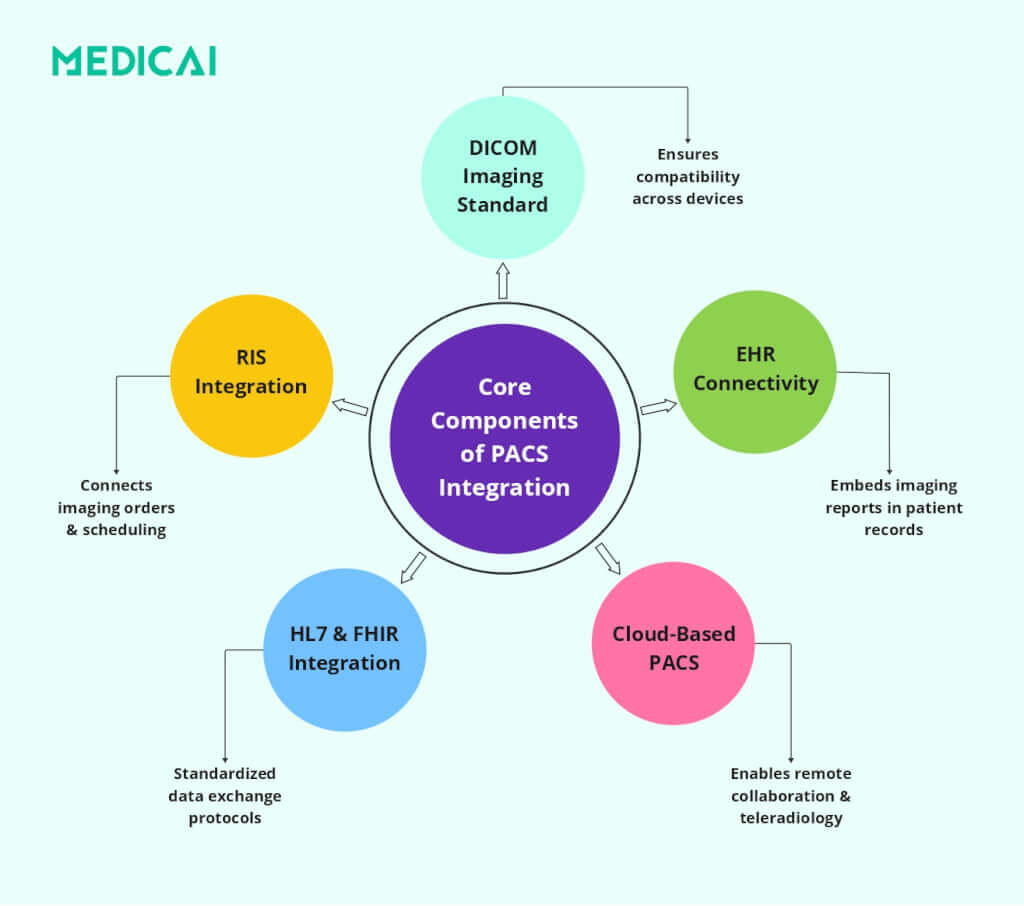
DICOM Standard (Digital Imaging and Communications in Medicine)
DICOM is the global standard for handling, storing, and transmitting medical imaging data. It ensures that different imaging devices and software platforms can exchange and interpret images without compatibility issues.
DICOM is crucial for PACS integration for several reasons.
- Universal Format for Medical Imaging: DICOM ensures that MRI, CT, ultrasound, and X-ray images can be shared and interpreted consistently across different systems.
- Interoperability Across Vendors: Allows seamless communication between imaging equipment from multiple manufacturers.
- Efficient Image Sharing: The feature supports real-time image transfers between PACS, RIS, and EMR systems, eliminating workflow bottlenecks.
- Structured Reporting: DICOM files include metadata that helps categorize and structure imaging reports, making diagnosis more efficient.
RIS (Radiology Information System)
A Radiology Information System (RIS) is specifically designed to manage radiology workflows, patient scheduling, reporting, and order tracking. When integrated with PACS, RIS ensures that imaging data is efficiently organized and easily accessible.
Here’s how RIS-PACS integration improves efficiency:
- Automated Image Order Management: Physicians can request imaging studies directly in the RIS, and PACS processes them.
- Streamlined Patient Scheduling: Radiology appointments are automatically linked to PACS, reducing the risk of errors and duplicate imaging requests.
- Faster Report Generation: PACS integration with RIS automatically links imaging studies to reports, enabling radiologists to dictate and finalize findings more quickly.
- Billing & Administrative Efficiency: RIS ensures accurate billing by linking imaging procedures to hospital billing systems, improving revenue cycle management.
EHR/EMR (Electronic Health Records / Electronic Medical Records)
EHR (Electronic Health Records) and EMR (Electronic Medical Records) store comprehensive patient health records digitally. PACS integration with EHR/EMR allows radiologists and physicians to access imaging studies directly from patient records, eliminating workflow disruptions.
Benefits of PACS-EHR/EMR Integration include-
- One-Click Image Access: Physicians can open imaging reports directly from the patient’s EHR, eliminating the need to maintain separate systems.
- Comprehensive Patient History: Combining imaging data with medical history, lab reports, and prescriptions enables more informed diagnoses.
- Reduces Redundant Imaging: PACS integration ensures that prior imaging studies are easily accessible, preventing unnecessary duplicate scans.
- Supports Team-Based Care: Surgeons, oncologists, and specialists can access imaging within multi-disciplinary EHR platforms, improving patient collaboration.
HL7 & FHIR Standards (Health Level Seven & Fast Healthcare Interoperability Resources)
HL7 and FHIR are healthcare data exchange standards that enable structured, secure communication between systems (e.g., PACS, RIS, EHR, and hospital information systems).
Hospital Information System (HIS) workflows push patient registration and encounter updates through HL7 v2 messages, such as ADT, and those updates keep PACS demographics aligned with the enterprise record.
HL7 & FHIR facilitate PACS integration in several ways, including-
- Standardized Data Exchange: Ensures that PACS and other hospital systems can share imaging reports, patient demographics, and clinical notes.
- Faster Interoperability with EHRs: HL7 allows PACS reports to be embedded within patient records, making diagnostic imaging instantly available to physicians.
- FHIR for Cloud-Based Access: FHIR supports cloud-based PACS solutions, improving teleradiology and mobile access.
- Regulatory Compliance: Both standards enhance data security and patient privacy, ensuring compliance with HIPAA, GDPR, and other healthcare regulations.
How PACS Integration Works: 7 Stages of End-to-End Radiology Workflow
PACS integration follows a structured radiology workflow that ensures seamless data exchange among imaging systems, healthcare records, and hospital networks. A radiology workflow consists of seven sequential stages that move a study from clinical order to final report. Each stage involves specific systems (RIS, modality, PACS, EHR) and standardized messages (HL7 ADT/ORM/ORU, DICOM Modality Worklist, DICOM Store). The integration patterns described in the rest of this guide map directly to these stages — they describe how PACS connects to each system at each stage, ensuring patient identity, orders, images, and reports stay synchronized end to end.
- Stage 1 — Patient identity (HL7 ADT). A patient is registered in the HIS or EHR. HL7 ADT messages create, update, or merge patient demographics and sync them across the connected systems (RIS, PACS, modalities). This is the identity foundation on which everything downstream depends.
- Stage 2 — Order creation (HL7 ORM). A physician orders an imaging study in the RIS or EHR. HL7 ORM messages create the order, assign an accession number (the unique identifier that follows the study through every downstream system), and route the order to the radiology department’s worklist.
- Stage 3 — Modality worklist (DICOM MWL). The CT scanner, MRI machine, or X-ray unit queries the DICOM Modality Worklist server before each scan. The technologist reviews the day’s scheduled patients in a worklist and selects the correct patient, ensuring the resulting images are tagged with the correct accession number and demographics, eliminating manual typing at the scanner.
- Stage 4 — Image acquisition and transmission (DICOM Store). The modality acquires the diagnostic images. As each image is generated, the modality sends it to the PACS server using the DICOM Store service class (C-STORE). The PACS validates the incoming study, indexes it by patient and accession number, and writes it to archival storage.
- Stage 5 — Indexing and reconciliation. The PACS server validates the incoming study and reconciles it against the ADT and ORM records. Studies that don’t match an order or patient land in a reconciliation queue for manual resolution. This is where most workflow failures happen — and where the “What breaks PACS integration most often” section below documents the recurring failure patterns.
- Stage 6 — Reading and reporting (DICOM Query/Retrieve). The radiologist opens the study at a viewing workstation. The workstation sends DICOM C-FIND and C-MOVE commands (or DICOMweb QIDO-RS and WADO-RS equivalents) to the PACS server. The radiologist reviews the images, compares them with prior studies, measures them, and dictates the diagnostic report.
- Stage 7 — Report distribution (HL7 ORU). The signed report flows back through HL7 ORU messages to the RIS and EHR. The referring physician sees the structured report in the patient’s chart. Billing systems pick up the completed study. The radiology workflow loop closes.
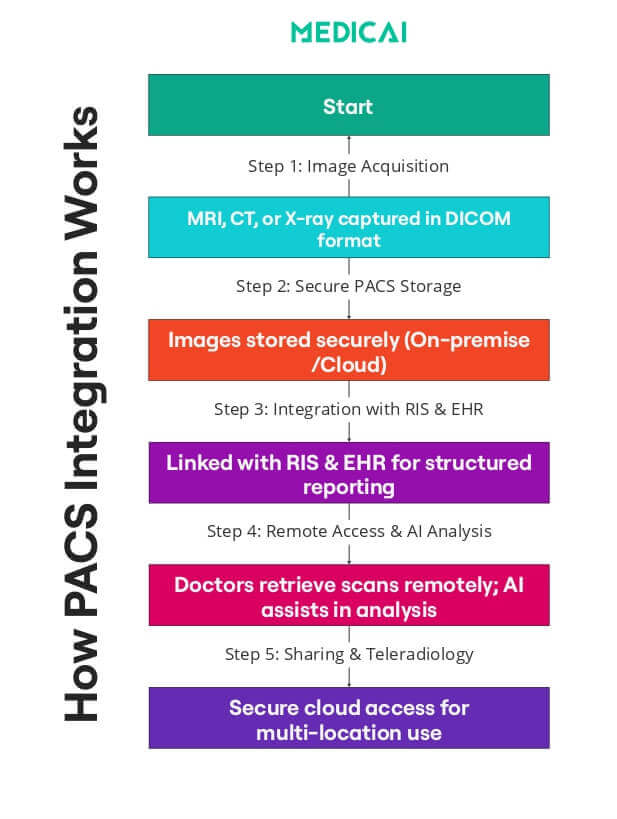
DICOM Connectivity: Transmitting Medical Images to PACS
The PACS workflow begins with DICOM connectivity.
The imaging device generates a DICOM file when a patient undergoes an imaging procedure, such as an MRI or X-ray. This file contains the medical image and metadata, including patient information, imaging parameters, and timestamps.
DICOM ensures that imaging devices like CT scanners, ultrasound machines, and digital X-ray systems can transmit images directly to the PACS server. The images are then stored and categorized, allowing radiologists to retrieve them instantly.
HL7 Interface: Connecting PACS with EHR and RIS
PACS integrates with Electronic Health Records (EHR) and Radiology Information Systems (RIS) using HL7 protocols to ensure imaging data aligns with a patient’s medical history. This synchronization includes imaging orders, patient demographics, and radiology reports.
When a physician orders an MRI via the EHR, HL7 sends the request to the RIS and PACS. After the MRI, the radiologist’s report is linked to the patient’s EHR, enabling referring physicians to access the imaging study and diagnosis in one location.
This automated exchange prevents manual data-entry errors, reduces administrative work, and speeds up clinical decision-making. Similar workflow gains apply in emergency medical services, where electronic patient care reporting helps crews document incidents, manage patient details, and keep records accessible after transport.
HL7 integration succeeds when the order and the image share the same identifiers. HL7 ORM messages typically carry the scheduled exam context, patient demographics, and the accession number that serves as the study anchor across RIS, modality worklists, and PACS. HL7 ORU messages typically carry the finalized report status and results back to upstream systems, so the referring team can see the report in the chart, and billing can proceed. HL7 failures cause predictable symptoms, missing ORM results in studies that never reconcile to an order, and failed ORU leaves reports stuck outside the enterprise record.
Vendor-Neutral Archive (VNA): Ensuring Interoperability
A key challenge in PACS integration is vendor lock-in, which limits healthcare facilities to a single provider. Vendor-Neutral Archive (VNA) solutions tackle this by storing imaging data in a standardized format, enabling access from multiple PACS systems.
VNAs allow hospitals to change PACS providers without losing access to medical imaging archives, enhancing long-term data storage and retrieval. They serve as a central repository for sharing imaging data across various locations and healthcare networks.
Cloud PACS: Enabling Remote Access and Teleradiology
Traditional PACS systems rely on local servers, which can limit accessibility and require significant IT maintenance. With the rise of cloud technology, Cloud PACS allows imaging data to be stored securely online, enabling remote access for radiologists and clinicians.
Cloud PACS provides several advantages.
- Radiologists can review imaging studies remotely, making it perfect for teleradiology and multi-site healthcare systems.
- Physicians can access reports instantly, reducing duplicate scans and enhancing patient care.
- Cloud storage ensures data security, automatic backups, and cost-effective scalability, eliminating the need for costly on-site hardware.
Middleware Solutions: Bridging Legacy PACS with Modern Systems
Many hospitals still use older PACS systems that may not be fully compatible with modern EHR, RIS, or cloud storage solutions. Instead of replacing entire infrastructures, middleware solutions bridge legacy PACS and new healthcare technologies.
Middleware translates data formats, allowing different systems to communicate without conflicts. It also enhances security by encrypting image transfers and ensuring compliance with regulations such as HIPAA and GDPR.
Middleware is crucial in hybrid PACS environments, where hospitals use both on-premise servers and cloud storage.
What breaks PACS integration most often
- Patient merges or demographic edits do not propagate; fix ADT update and merge handling, plus a named reconciliation queue owner.
- Orders never arrive, or the accession map is wrong, fix HL7 ORM monitoring, interface transforms, and modality test cases per site.
- Patient ID or accession mismatches create orphan studies; fix hold bucket rules and patient information reconciliation to relink studies.
- Modality worklist outage or drift forces manual entry, fixes DICOM Modality Worklist monitoring, and pauses manual demographics during outages.
- Report delivery fails back to the chart, fix HL7 ORU acknowledgment monitoring, retries, and interface queue alerts.
- Priors open slowly across sites; fix prefetch rules and the caching strategy for remote locations.
Types of PACS-EHR Integration: Pop-up vs. Embedded
PACS integration UX usually falls into embedded viewing inside the EHR or launch-in-context to a separate PACS viewer, and the choice changes clicks, context switching, and audit control.
Not all integrations are created equal. Depending on your architecture, the user experience varies significantly:
- Level 2: Embedded Zero-Footprint (The “Single Pane”): Using modern iFrame or API technology, the PACS viewer loads inside the EHR window. The doctor never leaves the patient’s chart. This is the gold standard for “Flow,” keeping the clinician focused.
- Level 1: Launch-in-Context (The “Pop-up”): The doctor clicks a button in the EHR. The browser opens a new tab, logs them into the PACS automatically (Single Sign-On), and finds the patient. Effective, but creates “tab clutter.”
Legacy vs Modern Radiology Workflow: How Cloud-Native architecture Changes the 7 Stages
The 7-stage radiology workflow looks similar across PACS architecture models — orders flow through, images get acquired, radiologists read, reports return to the EHR — but the operational realities differ substantially between legacy on-premise deployments and modern cloud-native platforms. The table below maps each workflow stage to the technical implementation in each architecture, highlighting where the operational consequences diverge.
| Workflow stage | Legacy on-premise radiology workflow | Modern cloud-native radiology workflow |
|---|---|---|
| Order routing (HL7 ORM) | HL7 ORM messages flow through an on-premise interface engine (Cloverleaf, Rhapsody) with custom transforms per integration — interface engineering becomes ongoing maintenance overhead | FHIR API delivers orders directly to the cloud archive with standards-based payload — no per-integration custom transforms, faster onboarding for new sending systems |
| Modality worklist (DICOM MWL) | DICOM C-FIND queries a local MWL server on the hospital LAN — modality must be on-network, MWL outage forces manual data entry at the scanner | DICOMweb QIDO-RS queries the cloud worklist over HTTPS — modality reaches the worklist from any networked location, no LAN dependency |
| Image transmission (DICOM Store) | DICOM C-STORE pushes images over LAN to the on-premise PACS server — remote sites need VPN tunnels, transmission failures require manual retransmit | DICOMweb STOW-RS pushes images over HTTPS to the cloud archive — any networked modality uploads without VPN, automatic retry on transmission failure |
| Archive routing (PACS storage) | Local PACS server with tape backup performs the archive role — manual lifecycle management and hardware refresh every 5–7 years drive total cost | Cloud object storage with automated lifecycle policies performs the archive role — hot/warm/cold tiering by access pattern, no hardware refresh cycles |
| Prefetch and priors | Rule-based local cache pull triggers from worklist data — static rules per modality and specialty, priors miss the radiologist’s reading session if cache rules don’t fire | AI-augmented prediction reads order context plus cloud cache — priors arrive at the viewer before the radiologist opens the study, prefetch adapts to reading patterns |
| Reading and reporting | Thick-client diagnostic workstation runs reading software — per-workstation software installation, reading limited to deployed locations | Zero-footprint browser viewer with FDA diagnostic clearance runs reading software — reading from any authorized location, any device |
| Report distribution (HL7 ORU) | HL7 ORU messages flow through an on-premise interface engine to RIS and EHR — acknowledgement monitoring required to catch failed deliveries, manual retries common | FHIR API delivers reports directly to the EHR with embedded viewer launch — structured findings flow into EHR fields automatically, no acknowledgement gap |
The operational consequences compound across stages. A legacy workflow may handle each individual stage adequately, but the cumulative effect of seven on-premise integrations — each with its own interface engine transforms, VPN dependencies, and hardware refresh cycles — is a workflow that costs more to maintain and degrades more predictably than its cloud-native equivalent. For health systems evaluating workflow modernization, the question is not which individual stage is better in cloud-native architecture — it is whether the seven-stage cumulative complexity is worth carrying through another 7-to-10-year contract cycle.
Check the cloud vs on-premise PACS guide for more information on architectural differences.
Benefits of PACS Integration
PACS integration benefits the healthcare systems immensely.
Optimized Clinical Workflow
A fully integrated PACS system provides instant access to diagnostic images, streamlining radiology workflows and reducing delays. With RIS and EHR integration, imaging requests, reports, and patient data are synchronized for quicker diagnoses.
In emergencies, PACS integration is vital for rapid decision-making. It allows clinicians to access images in real time and initiate treatment more quickly.
Improved Interoperability & Data Exchange
PACS integration facilitates seamless data sharing across departments like radiology and cardiology. Standard protocols such as DICOM, HL7, and FHIR ensure connectivity between PACS and EHR systems, allowing physicians to access imaging studies directly within patient records.
This enhances collaboration and helps specialists make informed decisions based on comprehensive data.
Cost Reduction & Operational Efficiency
Digitizing imaging eliminates film storage and manual handling, resulting in cost savings. PACS integration reduces redundant imaging by making previous scans accessible, preventing unnecessary repeats.
Plus, cloud-based PACS reduces IT costs by eliminating on-site servers, while automated workflows reduce administrative workload.
Better Patient Outcomes
Faster access to imaging reports leads to earlier diagnoses and timely treatments. PACS integration enables physicians to compare historical and current scans, making it easier to track disease progression or treatment effectiveness.
Patients with chronic conditions benefit from long-term imaging storage, allowing for continuity of care and precise medical decision-making.
Enhanced Security & Regulatory Compliance
PACS integration ensures that patient data is securely stored and transmitted, in compliance with HIPAA, GDPR, and other healthcare privacy regulations. Built-in encryption, audit trails, and access controls prevent unauthorized data breaches.
Cloud PACS provides automated backups and disaster recovery, safeguarding imaging records from hardware failures or cyber threats.
The Debate: Dedicated PACS vs. EHR-Native Viewers
Many modern EHRs come with a built-in “lightweight” image viewer. While convenient for a quick look, these often lack the FDA Diagnostic Clearance and advanced tools (MPR, MIP, Cobb Angle) required for a specialist workflow.
- The EHR Viewer: Good for a quick reference (e.g., “Is the bone broken?”).
- The Integrated PACS (Medicai): Essential for diagnosis and planning. It provides the full toolset (3D reconstruction, fusion, templating) within the EHR context, ensuring specialists don’t have to compromise on tools to achieve integration.
Challenges in PACS Integration
While PACS integration improves imaging workflows, it still faces technical, security, and performance challenges that must be addressed to ensure seamless operation.
- Interoperability Issues: Variability in DICOM and HL7 standards across vendors can create compatibility issues, making data exchange between PACS, EHRs, and RISs difficult. Using Vendor-Neutral Archives (VNA) helps improve cross-system interoperability.
- Data Migration & Storage Limitations: Migrating large imaging datasets without downtime or data loss is complex, especially when shifting from legacy PACS to cloud storage. Efficient data compression and tiered storage help manage vast imaging archives.
- Cybersecurity & Data Protection: PACS systems store sensitive medical images, making them targets for ransomware attacks and data breaches. Strong encryption, multi-factor authentication, and real-time monitoring are essential to protect patient data.
- Bandwidth & Network Performance: PACS integration requires high-speed networks to enable real-time image retrieval, especially for remote radiologists and multi-site hospitals. Optimized bandwidth allocation and caching improve performance.
Best Practices for Successful PACS Integration
Efficient PACS integration requires standardization, security, scalability, and user training. Best practices ensure interoperability, enhanced security, and optimized workflows.
- Adopt Standardized Protocols: Ensuring compliance with DICOM, HL7, and FHIR is essential for seamless data exchange among PACS, EHR, and RIS. Standardized protocols prevent compatibility issues and enable efficient cross-system communication.
- Choose the Right Vendor: Selecting a scalable and interoperable PACS solution is crucial for future growth and flexibility. Vendor-neutral solutions enable long-term accessibility of imaging data and prevent vendor lock-in.
- Prioritize Cybersecurity: Implementing data encryption, access controls, and multi-factor authentication safeguards for imaging records. Regular security audits and real-time monitoring help prevent breaches.
- Provide Adequate Training & Support: Effective PACS integration requires user training for radiologists, IT staff, and clinicians. Educating teams on system navigation, security protocols, and troubleshooting ensures optimal use and efficiency.
Take Away
PACS integration transforms healthcare by streamlining workflows, enhancing collaboration, and improving patient outcomes. With secure data management and cloud accessibility, providers can deliver faster diagnoses and better care.
Medicai provides scalable, secure, and AI-powered PACS integration, ensuring efficiency, compliance, and innovation in medical imaging. Upgrade your imaging workflows today—because better integration means better healthcare.
Frequently Asked Questions about PACS-EHR Integration
Is a VPN required for EHR-PACS integration?
With legacy systems, yes. With cloud-native platforms like Medicai, integration is handled via secure HTTPS/TLS encryption, eliminating the need for slow and complex VPN tunnels.
Can any PACS integrate with Epic/Cerner?
Yes, provided the PACS supports HL7 and standard DICOM web protocols. Medicai uses a “wrapper” approach to integrate with major EHRs without expensive custom coding.
What happens if the Patient ID in the EHR doesn’t match the PACS?
This creates a “broken link.” Modern systems use a Master Patient Index (MPI) or VNA logic to fuzzy-match records (e.g., matching “Jon Smith” with “John Smith” based on DOB) to prevent data silos.
What is the difference between PACS integration and RIS PACS integration?
PACS integration covers the full connectivity layer across modalities, PACS, EHR, HIS, and identity workflows. RIS PACS integration focuses on orders, scheduling context, accession numbers, modality worklists, and results delivery.
What is a radiology workflow?
A radiology workflow is the end-to-end clinical and technical process that moves a medical imaging study from order to final report. The workflow includes patient registration, order routing through RIS, modality scheduling via DICOM Modality Worklist, image acquisition and transmission to PACS, radiologist reading, structured reporting, and report distribution back to the EHR. The radiology workflow is what the radiology department does; PACS integration is the technical layer that makes it work without manual data entry.
What are the 7 steps of a PACS workflow?
The 7 steps of a PACS workflow are: (1) patient identity creation via HL7 ADT, (2) order creation via HL7 ORM with accession assignment, (3) modality worklist query so the scanner has scheduled context, (4) DICOM Store transmission from modality to PACS, (5) indexing and reconciliation in the archive, (6) clinician viewer launch from the EHR with priors, and (7) HL7 ORU report delivery back to RIS and EHR. Each step depends on standardized messages flowing correctly between systems.
What is DICOM Modality Worklist (MWL)?
DICOM Modality Worklist (MWL) is a query service that lets imaging modalities (CT, MRI, ultrasound) pull the day’s scheduled patients from the RIS before scanning, ensuring images get tagged with the correct accession number and patient demographics. MWL outage forces manual data entry at the scanner, which is the leading cause of patient ID mismatches in legacy workflows. Modern cloud-native PACS implementations use DICOMweb QIDO-RS instead of classic DIMSE C-FIND for the same functionality.
How does AI integrate into a radiology workflow?
AI integrates into radiology workflows at three points: at the worklist layer (prioritizing studies by suspected pathology severity for STAT triage), at the reading layer (segmentation, detection, quantitative measurement tools that augment the radiologist’s interpretation), and at the reporting layer (structured reporting templates pre-populated with AI-computed measurements). FDA regulates these as decision-support tools, not autonomous interpretation — the radiologist verifies and signs each AI-informed report.


Related Articles

Lets get in touch!
Learn more about how Medicai can help you strengthen your practice and improve your patients’ experience. Ready to start your Journey?
Book A Free Demo