Why Does Every Urgent Care Center Need a Modern PACS System?

Need faster diagnoses and smoother patient flow in your urgent care clinic? The answer might be simpler than you think.
PACS is a digital solution that allows urgent care providers to store, access, and share medical images in real time. It replaces outdated processes like printed films and CDs, making diagnostic imaging faster, more secure, and more efficient. PACS improves patient care and clinic operations.
Let’s discover how PACS fits seamlessly into the urgent care workflow, its benefits, and why clinics are making the switch now.

The Need in Urgent Care
Urgent care clinics offer quick, walk-in treatment for non-life-threatening conditions such as sprains and minor injuries. However, some facilities provide MRIs in urgent care. These clinics operate in a fast-paced environment to minimize delays and reduce patient frustration.
However, many urgent care centers still use outdated or fragmented imaging systems, which slow everything down. Thus, urgent care providers often face several challenges, including:
- Delays in Image Access: Images may need to be physically transferred or emailed to off-site radiologists.
- Limited On-Site Capabilities: Not all clinics have radiologists in-house or reliable image viewers.
- Manual Processes: CDs, USB drives, or paper-based workflows are still common in some locations.
- Poor Integration: Imaging systems often don’t sync smoothly with EHRs or reporting tools.
Imagine a patient walks in with a swollen wrist. An X-ray is performed quickly on-site.
However, the image must be sent to a radiologist elsewhere for interpretation.
The clinic waits — sometimes for hours.
Meanwhile, the patient waits too long or is discharged without a definitive diagnosis. This is not only inefficient, but it can also lead to incomplete care, medical errors, and patient dissatisfaction.

However, in urgent care, every delay adds pressure:
- Patients expect fast service, and long waits damage your reputation.
- Providers need quick reads to make treatment decisions.
- Clinics rely on high daily volumes — bottlenecks in imaging hurt throughput and revenue.
You don’t have time for slow systems or IT troubleshooting. You need instant access, accurate readings, and seamless sharing, all in real time.
That’s why more and more clinics are turning to cloud-based PACS. It’s fast, secure, accessible from anywhere, and built to handle urgent care workflows without delay.
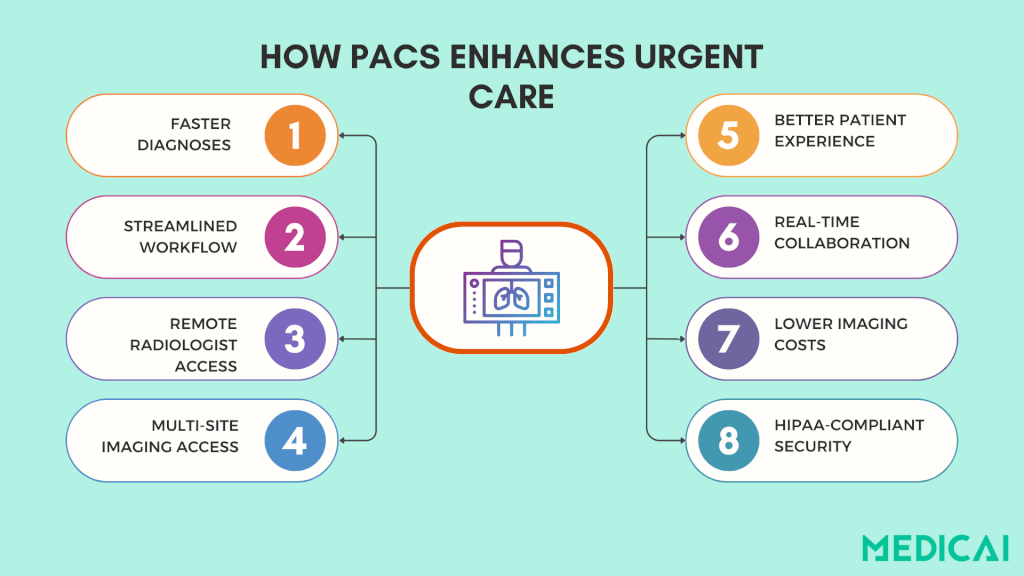
What Is PACS, And Why Does Urgent Care Need It
PACS stands for Picture Archiving and Communication System. It’s a digital platform that electronically stores, retrieves, and shares medical images, like X-rays, CT scans, and ultrasounds.
Instead of printing films or burning CDs, PACS allows providers to:
- View images instantly from any device
- Share them securely with radiologists or specialists
- Archive studies without taking up physical space
- Integrate images directly into a patient’s health record
Today’s modern systems, like the cloud-based PACS offered by the Medicai solution, are even more powerful. They run online without bulky servers, providing access to imaging data anytime, anywhere.
How Does PACS Support Urgent Care?
Urgent care centers thrive on speed, efficiency, and flexibility. A well-integrated PACS supports all three.
Instant Image Access and Real-Time Collaboration
Time is critical in urgent care. With PACS, images are available immediately after a scan, allowing physicians to review X-rays in seconds. Radiologists can also access and interpret images remotely, eliminating the need for physical transfers.
This real-time access ensures quick patient answers and allows providers to proceed efficiently to the following case.
Secure, Cloud-Based Image Storage
Traditional film takes up space, CDs get lost, and USB drives are outdated. PACS solves all of that by securely storing imaging data in the cloud.
Providers can quickly access a patient’s past scans from anywhere, whether in the clinic or working remotely. There’s no physical archive or manual handoffs—just centralized access to all imaging records when needed.
And because reputable PACS systems follow strict HIPAA-compliant protocols, patient data stays protected.
Built for Multi-Site and High-Volume Clinics
Urgent care can involve multiple walk-in clinics, and PACS streamlines imaging across them. A scan from one clinic can be easily reviewed by a provider at another, eliminating the need to resend files or repeat tests. This efficiency makes PACS particularly valuable for urgent care networks and growing practices.
The benefits are clear even for single-location clinics: faster workflows, fewer errors, and more patients seen per day.
How PACS Fits into the Urgent Care Workflow
PACS enhances every step of the urgent care workflow. Let’s see how.
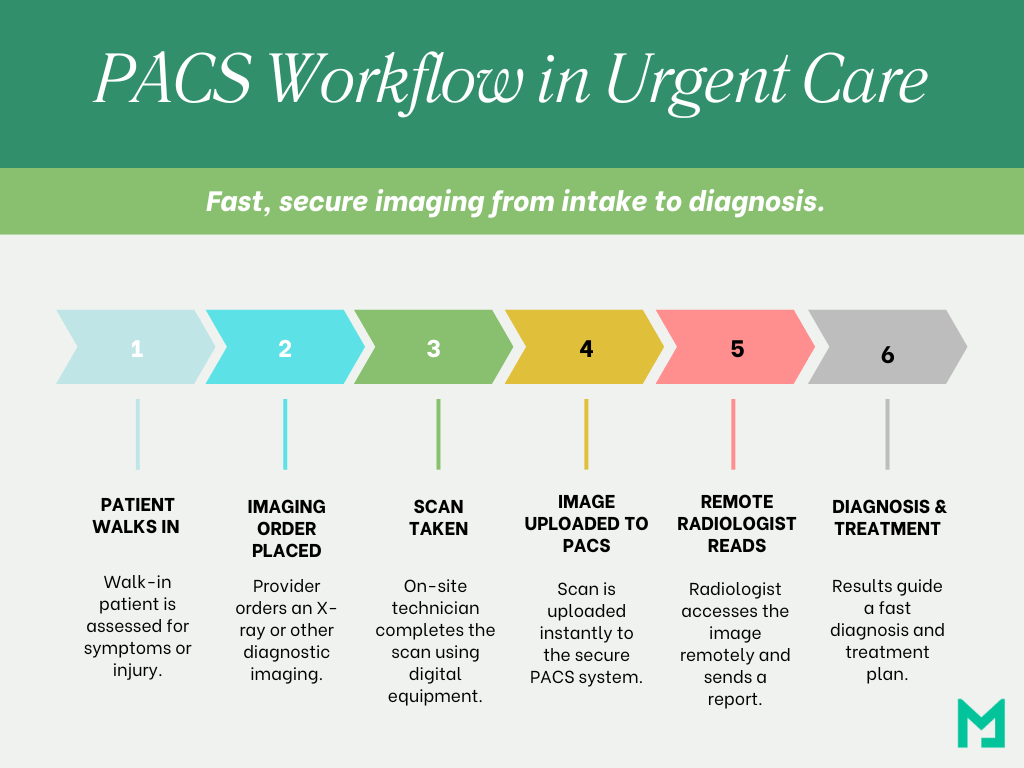
- Patient Visit and Imaging Order: A patient arrives with a complaint, such as a swollen ankle or chest pain. The provider assesses the situation and orders tests, such as an X-ray.
- Image Acquisition: Digital equipment is used on-site for imaging. The image is automatically uploaded to the PACS as soon as the scan is complete.
- Instant Image Access: Once uploaded, the image is instantly available for the provider and can be sent to a remote radiologist for a second opinion.
- Radiologist Read and Report: The radiologist reviews the image, writes a report, and sends it back via PACS, often within minutes, even after hours, depending on your coverage.
- Diagnosis and Treatment: The urgent care provider uses imaging results to make quick clinical decisions, whether applying a splint, prescribing medication, or referring for further care.
- Archiving and Future Access: Imaging and reports are stored automatically, making them accessible if the patient returns or visits another clinic in the network. No repeated tests or record tracking are needed.
Benefits of Cloud PACS in Urgent Care
Upgrading to cloud-based PACS enhances the experience for both your clinic and patients. Unlike traditional systems that rely on physical servers and manual processes, cloud PACS allows providers to access images instantly from any device, securely and remotely.
- Speed Without the IT Burden: Cloud PACS allows instant uploading and access to images from any device, eliminating delays from CDs or emails. This enables real-time reviews for faster diagnoses and treatment.
- Fewer Costs, More Control: Cloud PACS operates on a subscription model, eliminating costly on-site servers and IT support. This approach allows urgent care clinics to lower capital expenses and benefit from a more predictable, scalable solution.
- Happier Patients, Smoother Workflows: Cloud PACS reduces imaging delays, allowing urgent care staff to quickly share results and consult radiologists. Patients get faster answers, and clinics maintain smooth operations.
- Designed to Grow With You: As urgent care networks grow, cloud PACS simplifies scaling by eliminating the need for new servers or duplicate systems. Providers can access all images and data across locations, ensuring a single source of truth regardless of where they work.
At Medicai, we’ve designed our cloud-native PACS specifically for urgent care. Clinics can instantly access images, remote reading capabilities, and HIPAA-compliant storage without needing in-house IT.
PACS Urgent Care: Common Challenges & Solutions
For urgent care providers, adopting a PACS can raise some common concerns.
- Cost: Traditional PACS systems were known for high upfront costs. That’s changed. Today’s options, including cloud and hybrid models, offer affordable, scalable pricing that fits urgent care budgets without sacrificing performance.
- IT Support: Many urgent care clinics don’t have in-house IT teams. However, most PACS vendors now offer remote maintenance, updates, and support so that clinics can run smoothly without an added tech burden.
- Workflow Disruption: Urgent care moves fast, and any disruption can cause backlogs. The right PACS should integrate easily with your EHR and feel intuitive, improving, not slowing down your daily workflow.
Choosing the Right PACS for Your Urgent Care
Not all PACS platforms are the same, especially for urgent care. Choose a cloud PACS system that meets your unique needs.
Prioritize Speed and Simplicity
Urgent care clinics need imaging systems that move as fast as they do. Look for a PACS that offers instant image access from any device without complicated logins or clunky interfaces.
You’re already losing time if your staff waits for images to load or switch platforms to share them.
Ensure Seamless Integration
Your PACS shouldn’t exist in a silo. It should work hand-in-hand with your:
- Electronic Health Record (EHR) system
- Radiology Information System (RIS)
- Billing or practice management software
Look for platforms with built-in integration tools or vendor support that can help with smooth onboarding.
Security Isn’t Optional
Urgent care clinics are just as responsible for patient privacy as hospitals. Ensure your PACS solution is fully HIPAA-compliant, uses end-to-end encryption, and offers secure user access control.
Cloud PACS platforms should also provide reliable data backups and business continuity features in case of downtime or outages.
Pick a System That Can Grow With You
Whether you plan to open more clinics or expand your services, your PACS should be flexible enough to support future growth. Look for:
- Unlimited user access
- Centralized archives
- Multi-site image sharing
You don’t want to outgrow your system in a year and have to start over. So choose the right PACS vendor.
Conclusion
PACS is essential for urgent care centers seeking fast, efficient, and quality care. It streamlines imaging, speeds up diagnoses, and enhances decision-making, reducing delays and costs while improving the patient experience.
Medicai’s PACS is built to meet the pace of urgent care. It is simple to use, easy to scale, and ready to perform.
So, are you ready to upgrade your workflow, without the hassle?


Related Articles



Lets get in touch!
Learn more about how Medicai can help you strengthen your practice and improve your patients’ experience. Ready to start your Journey?
Book A Free Demo