Pediatric PACS: The Future of Radiology in Children’s Hospitals

In pediatric care, delays can be dangerous.
When a child needs a scan, there’s no time to wait for film prints or misplaced records. Fast, reliable access to imaging can mean the difference between uncertainty and immediate action.
That’s where Pediatric PACS comes in.
Pediatric PACS is a digital imaging system built to meet the unique demands of children’s hospitals. The system handles everything from emergency scans to routine follow-ups with speed, accuracy, and safety in mind.
Let’s explore how Pediatric PACS works, the core features that distinguish it, and how your hospital can make the transition.

What Is Pediatric PACS?
pediatric PACS (Picture Archiving and Communication System) is a digital solution designed to store, access, and share medical images, specifically tailored for the needs of pediatric patients and their care teams.
In hospitals with a high patient turnover, Pediatric PACS replaces traditional film-based workflows. It enhances the workflow by digitally capturing, securely storing, and providing instant access to X-rays and CT scans for clinicians.
Pediatric care introduces unique imaging challenges. Children require:
- Faster diagnosis in emergencies
- Lower radiation exposure
- More frequent imaging, often across multiple departments
- And most importantly, seamless collaboration between pediatricians, radiologists, surgeons, and other specialists
That’s where Pediatric PACS excels.
For example, at Astrid Lindgren Children’s Hospital in Stockholm, the radiology department performs over 50,000 pediatric imaging exams annually. Roughly 70% are unscheduled, and half occur after hours, underscoring the need for instant image access and real-time reporting.
With a PACS-driven workflow, radiologists can interpret images almost immediately and deliver results hospital-wide, even during late-night emergencies.

Pediatric Imaging Workflow: Before and After PACS
Imaging plays a central role in pediatric diagnosis and treatment.. Let’s see how Pediatric PACS streamlines the entire workflow, step by step.
Before PACS: Slow, Manual, and Prone to Delays
In a traditional film-based system, processes were slow:
- Imaging exams were recorded on physical film.
- Technologists manually labeled and delivered films.
- Radiologists interpreted images in a central reading room.
- Reports were handwritten or dictated, then typed and delivered separately.
- Clinicians had to wait for film delivery or visit the radiology department to review images..
The system was time-consuming and error-prone, leading to mislabeling, lost films, and illegible reports, which could delay treatment in urgent pediatric emergencies.
After PACS: Fast, Filmless, and Fully Integrated
With Pediatric PACS in place, the entire imaging workflow is streamlined and digitized:
- Patient Registration and Order Entry (RIS): The process begins in the Radiology Information System (RIS). When a child is referred for imaging from the ER, ICU, or outpatient clinic, the exam is scheduled using the patient’s information and order details.
- Image Acquisition: Technologists utilize DICOM-enabled modalities, such as X-ray and CT, which automatically retrieve the correct patient data from the RIS, thereby reducing manual input errors.
- Image Routing to PACS: Once captured, images are instantly sent to the PACS.
- Radiologist Interpretation: Radiologists can access images from high-performance workstations throughout the hospital, including off-hours, with reports generated through the RIS and linked to the imaging exam.
- Report and Image Distribution: Clinicians across the hospital, surgeons, pediatricians, and emergency staff can access images and reports instantly on their PCs or mobile devices. No film, no delay.
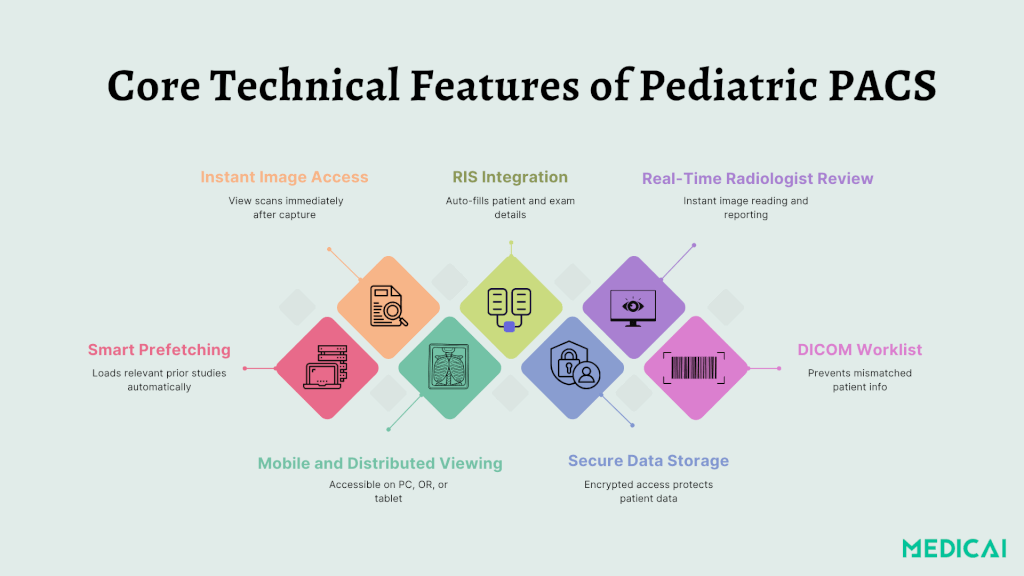
Core Technical Features of Pediatric PACS
Let’s look at the key technical features that make this possible.
RIS/PACS Integration & High Availability
Pediatric PACS is most effective when properly integrated with the Radiology Information System (RIS), which handles patient data, scheduling, and reporting. This connection between PACS and RIS streamlines the entire imaging process, from order to diagnosis.
To prevent downtime, many systems use high-availability (HA) clusters, which include:
- Redundant servers in separate locations
- Automatic failover if one server fails
- 24/7 uptime for uninterrupted access
Zero-Film Workflow & Smart Prefetching
Pediatric PACS replaces film with digital, DICOM-based workflows, capturing, routing, and storing every scan electronically. Smart prefetching enhances efficiency by automatically retrieving previous exams and delivering relevant images in advance.
The system supports quick decision-making and improving diagnostic speed and accuracy.
Mobile and Distributed Viewing
Modern PACS systems offer hospital-wide access to images and reports. Clinicians can review scans from office PCs, operating rooms, and ICUs, as well as from mobile carts or secure tablets. This flexibility enables timely collaboration across departments, especially during emergencies or night shifts.
Redundant Image Archiving
Long-term image storage is critical in pediatrics. PACS systems use multiple backup methods, such as:
- Data mirroring across servers
- Tape or cloud backups
- Automated retention management
DICOM Worklist Integration
Connected imaging devices utilize DICOM worklists to automatically retrieve exam and patient data. This prevents manual entry errors, ensures accurate exam labeling, and speeds up the imaging process.

Implementing Pediatric PACS
Switching to a Pediatric PACS system is a strategic shift in imaging management for pediatric departments, not just a technical upgrade.
Step 1: Assess Clinical and Operational Needs
Start by understanding what your radiology department needs.
Ask:
- How many imaging exams do you perform each year?
- What percentage are urgent, after-hours, or unscheduled?
- How many departments rely on radiology images for their daily decision-making?
- Do you need mobile access or system redundancy?
Pediatric hospitals face unpredictable imaging demands, particularly from emergency departments, NICUs, and surgical teams. Understanding these variables helps determine system specifications and budget priorities.
Step 2: Build a Reliable Infrastructure
High availability should be a foundational goal. Pediatric radiology can’t afford system outages, especially in emergency care.
Key infrastructure considerations:
- Utilize redundant servers and clustered databases for failover.
- Distribute systems across different physical locations.
- Invest in fast networks for efficient image transfers under heavy load.
- Prepare for data backup and disaster recovery with mirrored archives or tape robots.
Many hospitals opt for PACS setups that remain operational during server room or network node failures, ensuring minimal downtime and uninterrupted access to images.
Step 3: Connect All Imaging Modalities
To maximize efficiency and reduce human error, every imaging device should be DICOM-compliant and connected to a Radiology Information System (RIS).
This integration allows:
- Automatic population of patient and exam data
- Error-free scanning and routing of images to PACS
- Real-time association of exams with reports
Whether it’s digital X-ray, ultrasound, CT, or mobile fluoroscopy, seamless integration between modalities and RIS is what makes a filmless workflow possible. Ideally, even mobile units used in ORs or ICUs should be network-connected.
Step 4: Plan for Scalable Access and Viewing
Pediatric PACS systems should offer broad, distributed access. It means images and reports can be viewed:
- On PCs in doctors’ offices
- In operating rooms and intensive care units
- At the bedside via mobile workstations
- During clinical case conferences
Ensure your system supports multiple viewers without performance slowdowns and is optimized for fast image loading, even for high-resolution pediatric scans.
Step 5: Train Staff and Phase the Roll-Out
Even the best system will fail without buy-in from the people who use it. Radiologists, technologists, and referring physicians should all receive tailored training to ensure they can:
- Navigate the PACS interface confidently
- Retrieve and annotate images
- Access reports and prior scans instantly
- Participate in digital case reviews
If you’re implementing PACS across a large hospital, consider a phased rollout. Start with one department, such as emergency or orthopedics, and expand once the system is running smoothly and feedback is positive.
Step 6: Monitor Performance and Optimize Continuously
Post-launch, it’s essential to monitor system performance and user satisfaction. Look at:
- Uptime and response speed
- Image quality and availability
- Radiologist turnaround times
- Staff feedback and workflow issues
Regular audits and updates keep your PACS environment running at peak efficiency.
Key Benefits of Pediatric PACS in Clinical Settings
Pediatric PACS systems deliver real improvements in care quality, efficiency, and safety.
- Faster Diagnoses: Digital image routing enables radiologists to read and report results within minutes, facilitating quicker decisions, especially in emergency or overnight shifts.
- Safer Imaging with Lower Radiation: Access to prior studies helps avoid unnecessary repeat scans. Pediatric PACS also supports low-dose protocols, ensuring children receive the minimum radiation needed for accurate diagnosis.
- Better Collaboration Across Teams: Images and reports are accessible throughout the hospital, allowing real-time case review and discussion among surgeons, pediatricians, and specialists.
- Fewer Errors: Automated worklists and integrated systems minimize manual data entry, reducing risks of mismatched exams or lost information and ensuring clinicians receive the correct image linked to the right patient.
- Improved Efficiency and Cost Savings: PACS reduces costs by eliminating film storage and printing while streamlining workflows, helping radiology teams to manage higher volumes with greater speed and accuracy.
Challenges in Pediatric PACS Implementation
While the benefits of Pediatric PACS are clear, implementing it across a hospital comes with real challenges.
Upfront Costs
Hardware, PACS software, network upgrades, and staff training all require investment. Start small. Prioritize high-impact areas, such as emergency or neonatal units, and then scale.
Downtime and Data Reliability
System crashes or loss of access to imaging during emergencies can disrupt patient care.
High-availability (HA) configurations, real-time failover, and secure backups are critical. Medicai’s architecture supports dual-server redundancy and mirrored storage, ensuring imaging stays online when it’s needed most.
Staff Adoption and Training
Switching to digital workflows may face pushback from clinicians who are used to older systems.
Offer early training and show clear workflow improvements. Medicai offers intuitive interfaces and onboarding support, enabling teams to adapt quickly and feel confident using PACS in their daily workflows.
Integration with Existing Systems
Integrating PACS with RIS, EMRs, and various imaging equipment can be a technically complex task.
Look for platforms like Medicai that follow open standards (like DICOM and HL7) and offer integration services.
Data Privacy and Compliance:
Pediatric imaging data must be protected under regulations like HIPAA or PIPEDA.
:
Secure access controls, encryption, and full audit trails are non-negotiable. Medicai is designed with healthcare-grade security, enabling institutions to meet compliance requirements while maintaining optimal performance.
Conclusion
As pediatric healthcare grows more complex, so do the demands on imaging departments. Pediatric PACS answers that challenge, bringing speed, accuracy, and accessibility to every corner of the hospital.
With solutions like Medicai, hospitals can take that step with confidence, streamlining radiology workflows while prioritizing patient safety and clinical efficiency.


Related Articles



Lets get in touch!
Learn more about how Medicai can help you strengthen your practice and improve your patients’ experience. Ready to start your Journey?
Book A Free Demo